dsh-balance
English | 简体中文
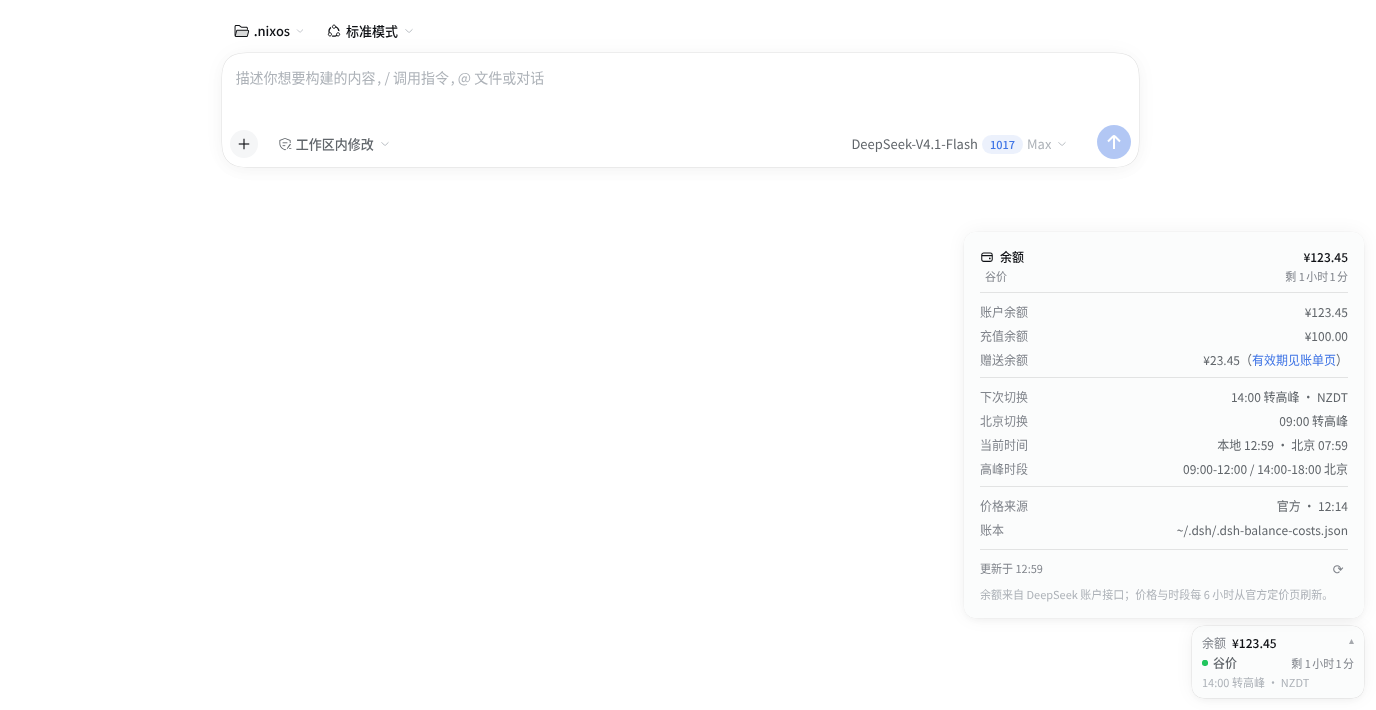
A DeepSeek Harness (DSH) web plugin that shows your real DeepSeek account balance and the current peak/off-peak pricing window in a window-anchored card, and estimates the cost of every conversation and workspace from the session log.
Features
- Balance card — fixed to the bottom-right of the window, independent of the
composer: live account balance, current window (
谷价/高峰), remaining time, and the next switch in your local timezone. It stays at the window bottom even on the no-conversation/hero screen, and moves above the composer or the per-conversation status row when they reach that corner, so it never covers other readings. - Native detail panel — click the card to open a menu-style panel above it:
account balance / topped-up / granted, next switch in local and Beijing time,
current local/Beijing time, peak hours, price-table source and update time,
ledger path, and a refresh button. The granted row is always shown (
0when empty) and links to the Billing page for its expiry while some granted credit remains. Closes on outside click orEsc. - Cost estimates — per-conversation and per-workspace estimates in the sidebar, summed from a persistent ledger that records each usage event once.
- Dynamic pricing — CNY and USD price tables and the peak-hour windows are
fetched from the official DeepSeek pricing pages; the Chinese holiday calendar
comes from
api.apihubs.cn. - Theme and language aware — uses the DSH menu-surface design tokens
(light/dark, radius, type scale), follows the DSH UI language
(
zh-*/ English). - Peak-switch notifications — optional browser notification when the window changes, only if notification permission was already granted for the DSH site.
Requirements
- DSH 0.2.1.x with the web profile. Tested with
0.2.1-rc.3; the package declaresengines.dsh = ">=0.2.1-0 <0.2.2-0"and DSH refuses to mount it on other lines. - Node.js
^22.19.0 || >=24.0.0(the DSH requirement). - A DeepSeek API key configured in DSH's credentials as
DEEPSEEK_API_KEY.
Install
Install this repository directly from GitHub:
dsh plugin --profile web add github:zz0-0/dsh-balance
systemctl --user restart dsh-web
Or with an explicit git URL:
dsh plugin --profile web add git+https://github.com/zz0-0/dsh-balance.git
systemctl --user restart dsh-web
Then hard-refresh the DSH web page (Ctrl/Cmd + Shift + R). The plugin
injects its browser script into the DSH index page, so the refresh is needed the
first time. The systemctl line assumes the Linux user service; if you run
dsh web manually, restart that process instead.
Not the npm package. The npm package named
dsh-balanceis an unrelated project by another author. Install this plugin with the GitHub coordinate above, not withdsh plugin add dsh-balance.
Update
dsh plugin --profile web add github:zz0-0/dsh-balance
systemctl --user restart dsh-web
Remove
dsh plugin --profile web remove dsh-balance
systemctl --user restart dsh-web
Usage
Click the balance card in the bottom-right corner to open the detail panel. The card itself shows the total balance, the current pricing window, the countdown to the next switch, and that switch time in your local zone.
The sidebar shows an ≈¥… estimate on each conversation row and the sum of its
conversations on each workspace row. Hovering a badge shows its tokens and the
recorded estimate.
There is deliberately no cost pill in the composer status row: that row is per-conversation and gets crowded quickly, and the conversation row already carries the estimate.
If notification permission was granted for the DSH site, the browser notifies when the peak/off-peak window changes while the DSH tab is open. A fully closed browser cannot receive notifications.
Pricing and the ledger
Pricing is fetched, not hardcoded
At startup and whenever the cached table is older than six hours, the host fetches both official pricing pages:
| Currency | Page |
|---|---|
| CNY | https://api-docs.deepseek.com/zh-cn/quick_start/pricing |
| USD | https://api-docs.deepseek.com/quick_start/pricing |
The parser reads the model pricing table dynamically, including the model
columns, cache-hit/cache-miss/output prices, and the peak-hour windows from the
Chinese page footnote. If a page changes shape and parsing fails, the previous
cache is kept and the detail panel marks the source as 缓存/默认
(cache/default).
Peak windows
Peak is Beijing weekday 09:00–12:00 and 14:00–18:00. Weekends are always off-peak (from 2026-08-23), and a weekday marked as a public holiday is off-peak. A make-up weekend is still a weekend, so it is off-peak.
The holiday calendar is fetched from:
https://api.apihubs.cn/holiday/get?year=YYYY&size=500
for the current and next year, and cached for 30 days.
The ledger never reprices old spend
The cost ledger is ~/.dsh/.dsh-balance-costs.json. Each session entry stores:
costs.CNYandcosts.USDtokenslastSeq— the last event already recordedpricingVersions— price snapshots used for its recorded eventscalendarVersions— holiday calendars used for its recorded events
When a session is scanned again, only events with seq > lastSeq are priced.
Already-recorded events are never recalculated, so a price change affects only
new events and a restart cannot rewrite what was already spent.
Currency
/user/balance can return multiple balance_infos. The plugin stores costs in
both CNY and USD, then displays the bucket for the primary account currency: the
largest non-zero balance returned by the API (CNY wins a tie). If both
currencies have a positive balance, the card shows both stacked while estimates
use the larger one. A USD-only account uses the USD pricing table and $
badges.
Granted credit expiry. The official balance API reports only the unexpired
granted total, not per-grant expiry dates. The panel therefore keeps the granted
row visible at zero and links it to the DeepSeek Billing page
(https://platform.deepseek.com/transactions) while a granted balance exists.
How it works
The plugin is a DSH bundle: package.json declares
dsh.bundle.patch = ./cordis.patch.yml, and that patch inserts the
dsh-balance entry into the web profile. It has two halves:
| Half | File | Role |
|---|---|---|
| Host | lib/index.js |
Resolves DEEPSEEK_API_KEY through DSH credentials, queries /user/balance, reads session events, keeps the ledger, fetches prices/holidays, serves GET /dsh-balance/data and GET /dsh-balance/client.js. |
| Browser | client.js |
Injected into the DSH index page. Draws the balance card and detail panel, and adds cost badges to conversation/workspace rows. |
The browser only talks to the local DSH server. The API key never reaches the browser.
Cache files, all under ~/.dsh/ (or $DSH_HOME):
.dsh-balance-costs.json— the cost ledger.dsh-balance-pricing.json— current price table and peak hours.dsh-balance-pricing-history.json— one entry per changed price snapshot.dsh-balance-holidays.json— current holiday calendar
Privacy
- Outbound requests:
api.deepseek.com/user/balance(with your API key), the two DeepSeek pricing pages, andapi.apihubs.cn/holiday/get. Nothing else, and no telemetry. - Local-only: the ledger and caches stay in
~/.dsh/. The browser only requests/dsh-balance/datafrom your local DSH server. - Credential handling: the key is resolved host-side through DSH's credentials service and is never serialized into the browser payload.
Troubleshooting
- Card shows
余额?/Balance?—DEEPSEEK_API_KEYis missing or invalid; check DSH's credentials configuration and the host log. - Price source says
缓存/默认— the pricing page could not be fetched or parsed; the last cached table is still used. - No notifications — permission was not granted for the DSH site, or the tab is closed.
- Plugin not visible after install — restart the
dsh webprocess and hard-refresh the browser. Verify the profile lists the plugin. - Install refused with an incompatible-version error — the package declares
engines.dshfor the DSH 0.2.1 line only.
Development
The plugin has no build step: plain ESM on the host and a classic browser script.
git clone https://github.com/zz0-0/dsh-balance.git
cd dsh-balance
dsh plugin --profile web add link:$(pwd)
systemctl --user restart dsh-web
client.jsis served withCache-Control: no-store. With alink:install, edit and hard-refresh the browser.lib/index.jsis host-side: edit and restartdsh-web.- A git install keeps its own copy under the profile's
node_modules; after editing the checkout, reinstall the plugin (or syncclient.jsinto the installed package) and refresh.
Files
| File | Role |
|---|---|
package.json |
DSH bundle metadata and compatibility |
cordis.patch.yml |
Inserts the plugin into the web profile |
lib/index.js |
Host: balance, pricing, holidays, ledger, HTTP routes, client injection |
client.js |
Browser: balance card + detail panel, row badges, notifications |
screenshot.png |
README screenshot |
UI integration
The browser side does not patch React. It uses stable attributes exposed by the workspace sidebar and composer:
[data-row-key="session:<sessionId>"]and[data-row-key="workspace:<workspaceId>"]for cost badges (re-added by aMutationObserverafter React re-renders)[data-composer-card]and[data-slot="conversation.composer.dock"]to keep the window-anchored card clear of the composer and the status row
No comments yet. Be the first to write one.