READMESource: main@de954c09
dsh-mcp-inspector
English | 中文
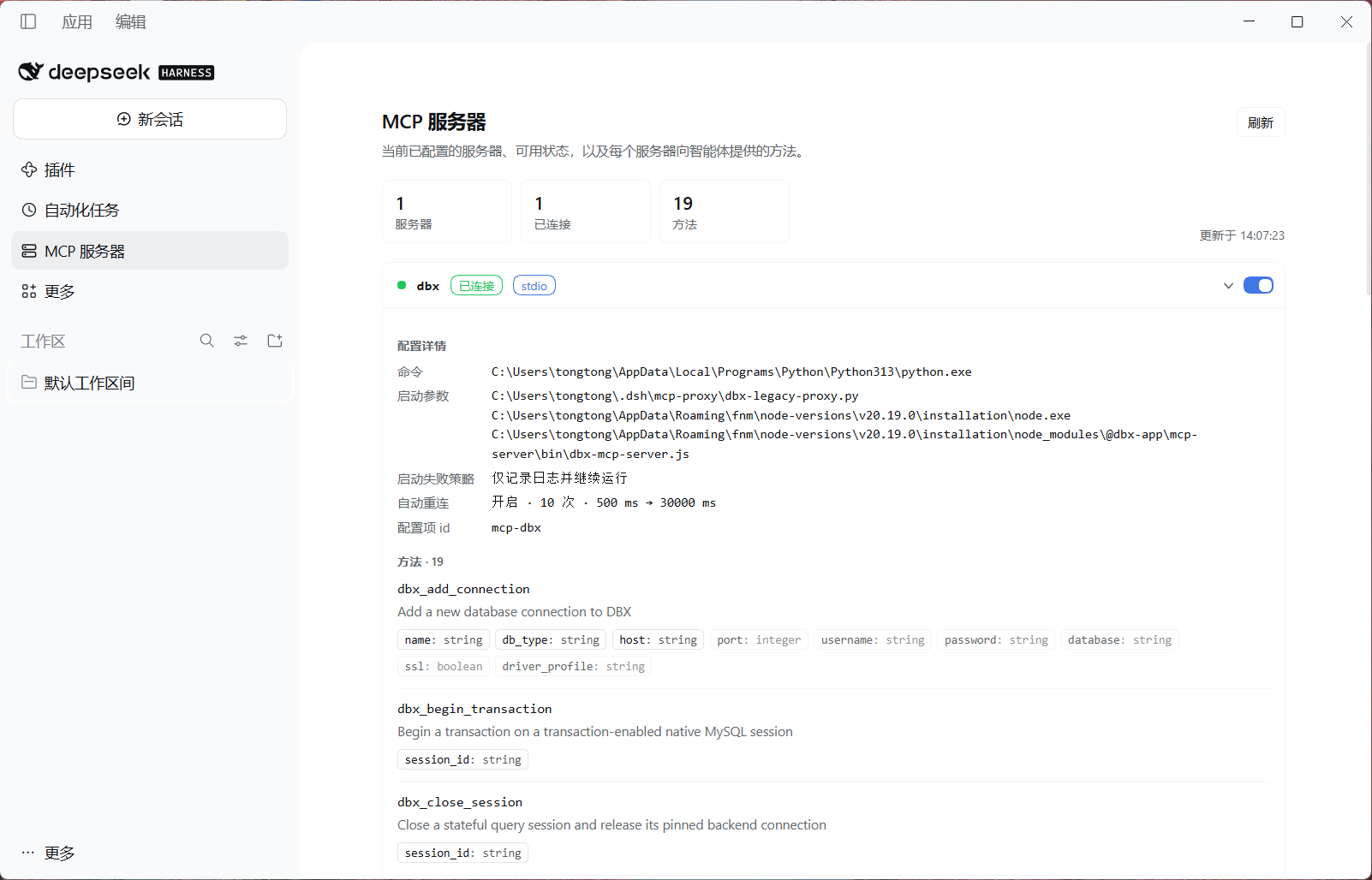
A sidebar panel for the DeepSeek Harness Web UI that lists the MCP servers configured in the current profile, shows their live status, expands into full configuration plus every method they expose, and lets you switch a server on or off without editing configuration files.
Features
- Sidebar entry: an
MCP serversicon in the left sidebar opens the global panel. - Servers and status: one row per server — Connected / No tools yet / Disabled / Failed / Runtime-registered.
- Expand a server:
- Configuration: transport badge (
stdio/streamable-http), command, arguments (one per line), working directory, endpoint URL, header and environment names (values hidden), call timeout, instruction cap, startup-failure policy, reconnect policy, entry id. - Methods: every MCP tool with its name, full description, and parameters (required ones highlighted).
- Configuration: transport badge (
- Live on/off switch: enable or disable one server at runtime. Disabling closes its MCP connection and unregisters its tools; enabling reconnects it. The change goes through the Host's official
pluginManager.setPluginEnabled(), so it is written to the profile'scordis.patch.ymland survives a restart. - Refreshing: reads on open, polls every 15 seconds, and refreshes immediately after a toggle (plus one follow-up read while the server reconnects).
- Theme and locale: built entirely from host theme tokens (light/dark), and the UI text follows the host language (English/Chinese).
Requirements
- DeepSeek Harness 0.2.x (Web GUI or desktop).
- A profile that loads the base and web-app bundles.
- MCP servers declared through
@deepseek-ai/dsh-mcp-clientrows, for example in the profile'scordis.patch.yml:
- insert:
    - id: mcp-github
      name: '@deepseek-ai/dsh-mcp-client'
      config:
        serverName: github
        transport: stdio
        command: npx
        args: ['-y', '@modelcontextprotocol/server-github']
Install
Clone this repository, then install that directory into Harness (either way):
- Web UI: Settings → Plugins → Add → point at the repository's absolute path, then enable it.
- Agent/CLI: have the Harness agent run
plugin_managerinstall_bundlewith the repository path as target, or rundsh plugin --profile <profile> add /absolute/path/to/dsh-mcp-inspector.
After installation the MCP servers entry appears in the left sidebar. Client-side code changes need a plugin reload (disable/enable it in the Plugins page, or restart Harness).
Host routes
The Host half registers two loopback routes and has no user-facing configuration:
| Method and path | Purpose |
|---|---|
GET /mcp-inspector/servers |
Read-only inventory: configured servers, status, configuration, methods |
POST /mcp-inspector/toggle |
Enable/disable one row; body { "entryId": "<Loader entry id>", "enabled": true } |
Security notes:
- It binds to the Harness's own loopback Web server; no extra port is opened.
envand request-headersvalues never leave the Host; the panel only shows their names.- The toggle route accepts POST only, requires the
x-mcp-inspector-action: toggleheader (a cross-site form cannot send it), refuses cross-sitesec-fetch-site, and only toggles rows that the inventory itself reports as MCP servers.
Status semantics
| Status | Meaning |
|---|---|
| Connected | The entry is active and its server currently has registered methods |
| No tools yet | The entry is active but no method is registered (still connecting, or the server exposes no tools) |
| Disabled | The entry is disabled (by this switch or by disabled: true in a patch) |
| Failed | The entry failed to activate (for example a broken startup command) |
| Runtime-registered | A server with registered methods but no configuration row |
Layout
.
├── package.json        # bundle declaration: dsh.bundle.patch + dsh.client (web)
├── cordis.patch.yml    # inserts the Host row mcp-inspector
├── index.js            # Host half: inventory + toggle routes
├── client.js           # Client half: sidebar entry + main panel (React)
├── locale/{en,zh}.json # plugin display title and description
├── icon.svg            # plugin icon
└── docs/screenshot.png # panel screenshot used by this README
Repository metadata
- The package metadata points at
github.com/zwgblue/dsh-mcp-inspector. If you fork the project, update the three URLs inpackage.json(homepage,repository,bugs). - To publish on npm, change the package name to your scope (for example
@you/dsh-mcp-inspector) and update the same name incordis.patch.ymland in the module id at the top ofclient.js. - Adjust the copyright holder/year in
LICENSE(currently2026 zwgblue).
License
MIT
No comments yet. Be the first to write one.