DSH Mobile UI





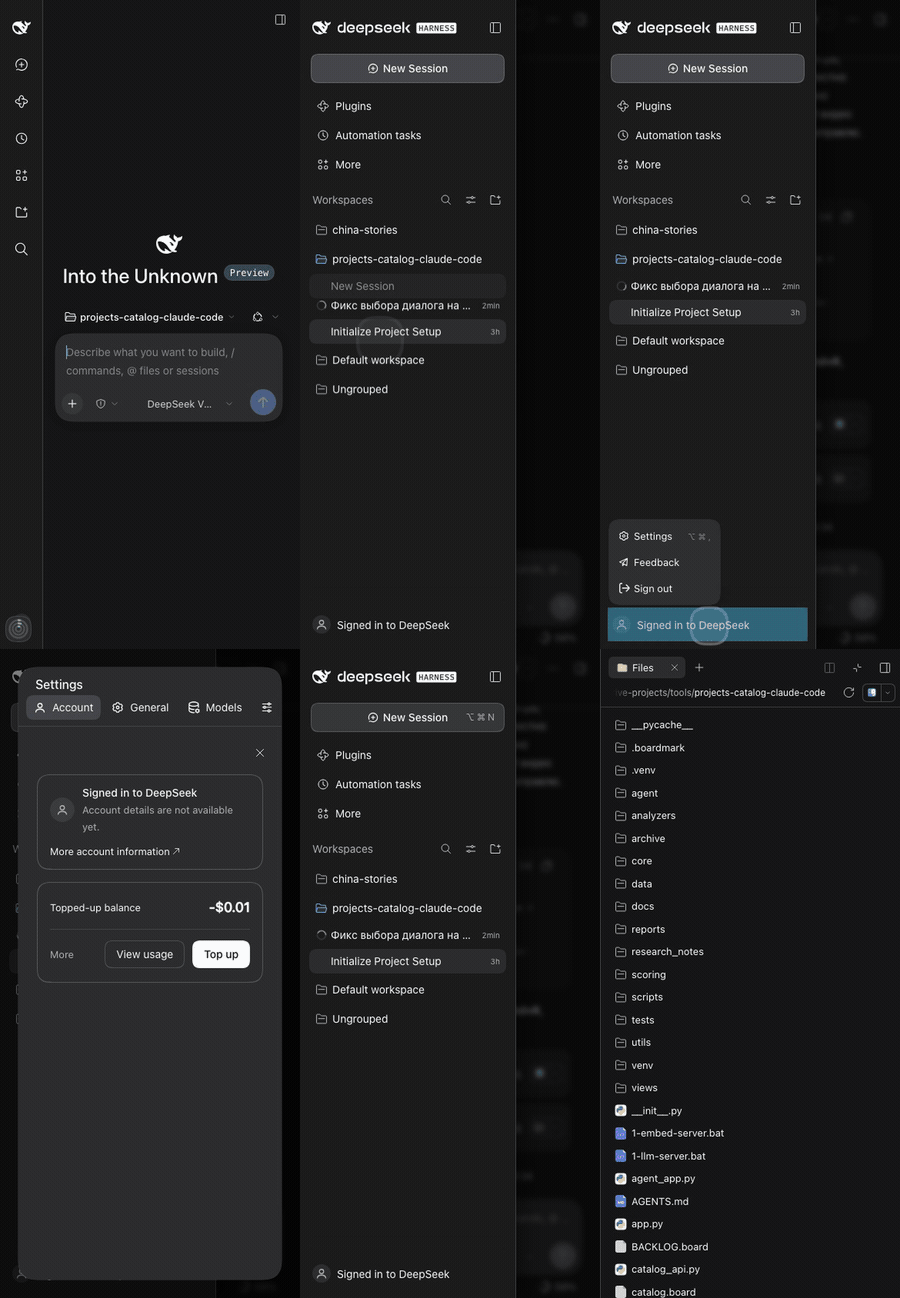

A phone-first fix for the DeepSeek Harness Web UI — a real drawer, edge swipes, readable settings and a working right panel, without touching the core.
DSH 0.2.x is desktop-first: a three-column grid, a 188px settings nav, a 0px right panel and a 14px composer that makes iOS zoom the page. On a phone that leaves a sliver of chat, unreadable settings and no way to reach Files or the code viewer.
- No more iOS auto-zoom — 16px fields on any touch device, even under a wide desktop layout
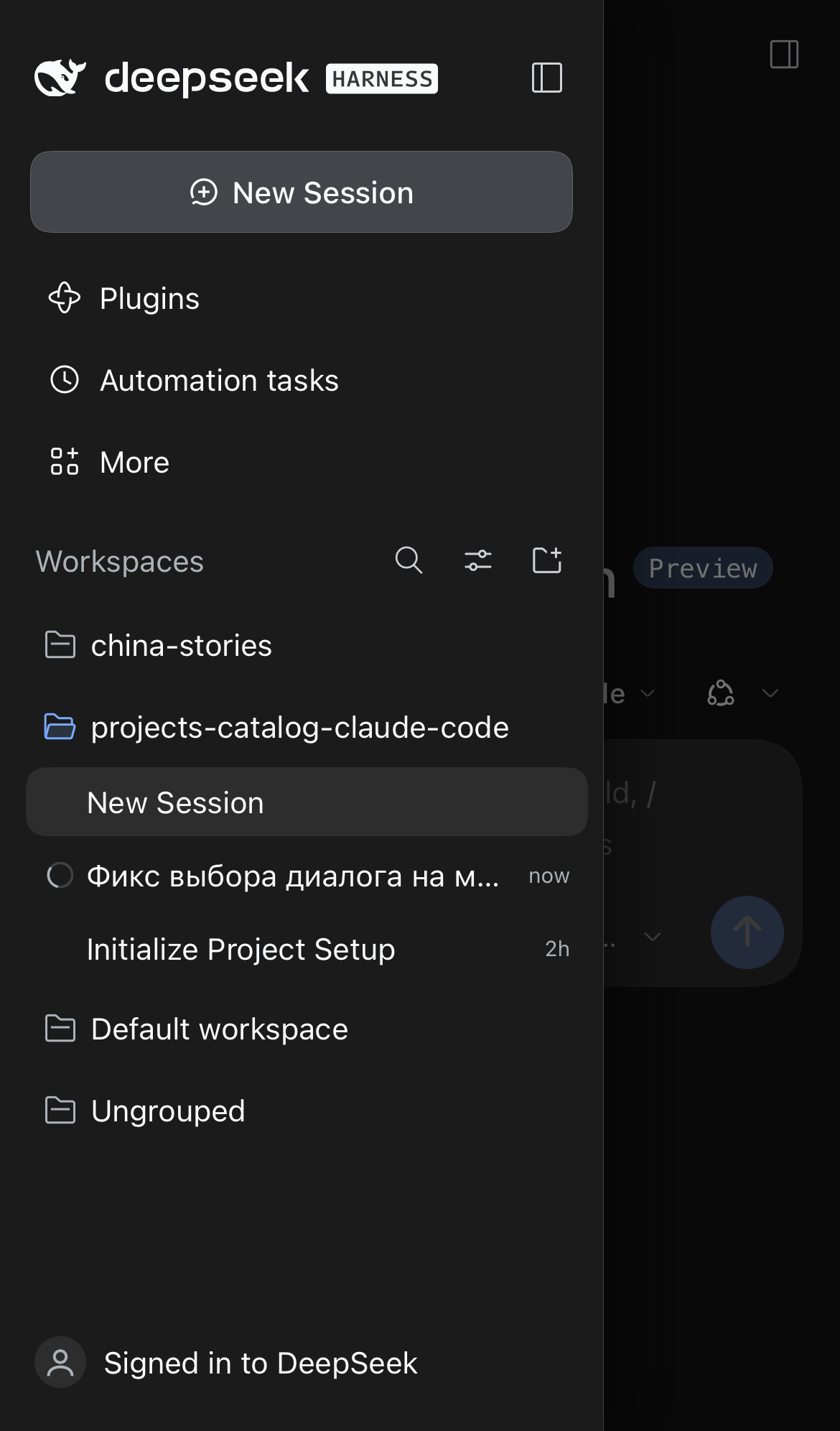
- The chat keeps the width — a 56px rail plus an overlay drawer, with edge swipes
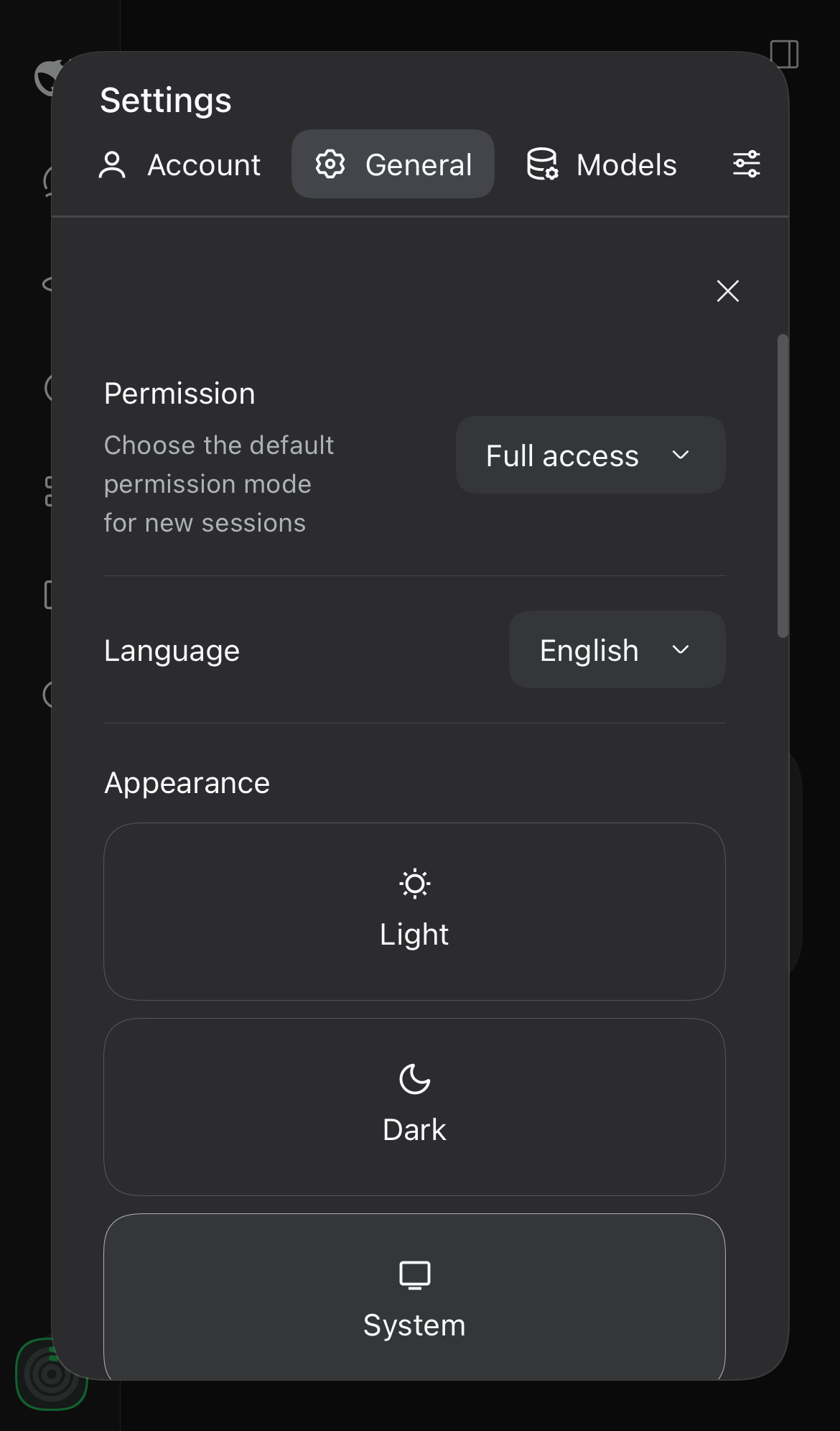
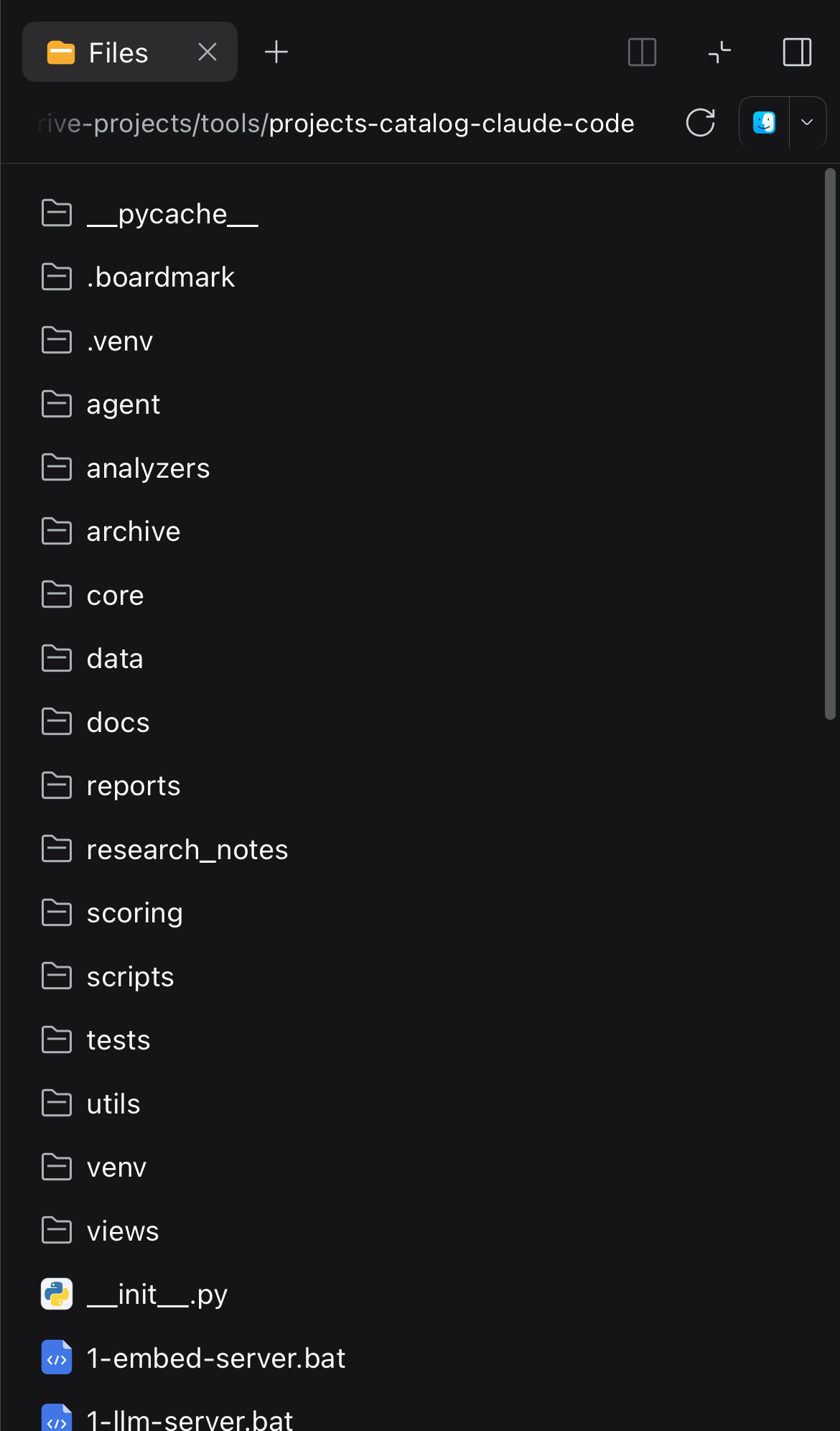
- Everything else fits — settings, Files, terminal and the code viewer
No build step, no host code — one client module, MIT licensed.
What it fixes
| Sidebar drawer | Settings | Files and code |
|---|---|---|
 |
 |
 |
- iOS auto-zoom. Safari zooms a focused field under 16px. All
input/textarea/contenteditablebecome 16px on touch devices; the check is the device (html.dsh-mf-touch), not the viewport width, so a phone showing a stretched desktop layout does not zoom either.touch-action: manipulationkeeps double taps from moving the next tap off its target. - The chat keeps the full width. The sidebar column stays a 56px rail; the open panel becomes a fixed overlay drawer with a dimmed, blurred scrim.
- The drawer closes when you pick a session, when you tap outside it, and by its own close button. The bottom safe area is respected.
- Session rows open on the first tap. iOS treats a plain
<div role="treeitem">with a React handler as "not clickable" and holds its click for the double-tap window (~300ms). Closing the drawer first unmounted the row, so the tap only closed the menu. The row's click is now dispatched synchronously frompointerup, and the late native click of the same tap is swallowed. - Edge swipes. Swipe from the left edge to open, swipe left to close. Vertical drags stay with the scroller (36px threshold, 34px vertical drift, 24px edge zone).
- Settings fit the phone. The desktop dialog keeps a 188px nav column next to the content — on a 390px screen that left ~150px. On narrow screens the section list becomes a horizontal, scrollable strip above the content, and the Account card stacks its identity above the "More account information" link instead of squeezing the name into a narrow column.
- The right panel works. DSH already full-screens it below 768px; between 768 and 1023px the column kept a narrow track, so while the panel is open (
data-sidebar-right-open) the plugin promotes it to a full-screen sheet. - Code and tables stay inside the message and scroll on their own; code in the file viewer is 12px instead of 11px.
- The iOS keyboard accessory bar no longer sticks. In a standalone PWA iOS can leave the previous/next/Done bar pinned at the bottom after the keyboard is dismissed; the plugin drops the field's focus when the keyboard closes.
- File links open inside the app. A raw
/api/fileURL opened from the installed app hands the resource to iOS, which shows it in a native Quick Look sheet with no way back — the only escape was killing the app. The plugin catches those links (andwindow.opencalls) and shows the file in an overlay: image inline, PDF in a frame, audio and video in players, text and JSON as a preview, and a ZIP as its file list — tap an entry to see the picture or text inside. A group of images pages like a story — swipe, tap the left/right edge, or press←/→— with a counter and a save button for the current one. Pictures embedded in an answer open this same sheet (the message's pictures form one gallery); tapping the backdrop beside the picture closes it. Closing an overlay restores the chat scroll position. Close with the button, a tap outside, Escape, or the back gesture. - Host-software actions only where they work. "Open in Finder / VS Code / QuickTime" acts on the machine that runs DSH, so it is hidden for a remote client. Locality is decided in three steps: loopback and the desktop shell are local; a phone is remote; a desktop on a LAN address is assumed local until a WebRTC probe shows its address is not one of the machine's own. Force the answer with
localStorage['dsh-mobile-fix-local'] = '1'(local) or'0'(remote).
Before you install: make DSH reachable
dsh --profile web binds 127.0.0.1 by default — loopback only. A phone on the same Wi-Fi cannot open it until you bind a real interface address and reopen the URL that carries the process token.
Bind your machine's LAN address. Wildcard addresses (
0.0.0.0) are rejected by design; give one concrete literal:# macOS: ipconfig getifaddr en0 Windows: ipconfig Linux: hostname -I dsh --profile web --host 192.168.0.54 --no-openAllow the port. macOS asks once whether
nodemay accept incoming connections — allow it. On Windows add an inbound rule for that port, otherwise the phone times out silently.Open the printed URL on the phone. Startup prints
dsh web: http://192.168.0.54:3080/?token=…. The token is per process: after a restart the old home-screen shortcut stops working, so re-add it (or paste the new link) — the current link is also in~/.dsh/link.txt.HTTPS is optional but changes what works. Over plain HTTP on a LAN address the page is not a secure context, so
navigator.shareis unavailable and the preview's bottom button reads Download file instead of Save to Files; Chrome also refuses "Install app". iOS Safari still adds the page to the home screen over HTTP. For the full experience serve TLS:dsh --profile web --host 192.168.0.54 --tls-cert ./chain.pem --tls-key ./key.pemBehind a prefix-stripping proxy or a tunnel, advertise the public root and trust its authority:
dsh --profile web --public-url https://dsh.example.com/ --trusted-host dsh.example.comOnly the Host machine shows "Open in ". Those actions launch software on the machine running DSH; the plugin hides them for remote clients. Force the answer with
localStorage['dsh-mobile-fix-local'] = '1'(local) or'0'(remote).__dshMobileFixWhere()in the page console prints the decision, the address, the user agent and whether the page is a secure context.
Install
git clone https://github.com/zven73/dsh-mobile-fix.git ~/.dsh/local-plugins/dsh-mobile-fix
dsh plugin --profile web add ~/.dsh/local-plugins/dsh-mobile-fix
dsh plugin needs pnpm on PATH. Restart dsh web (or let the profile re-compose) and reload the page on the phone. Client bundles are served from disk with a content revision, so later updates only need a page reload.
The package id stays
dsh-mobile-fix(the repository was renamed); that is the name you will see in~/.dsh/profiles/web/package.json.
Uninstall
dsh plugin --profile web remove dsh-mobile-fix
How it works
flowchart LR
  A[DSH web client<br/>0.2.x] --> B[client module<br/>lib/client.js]
  B --> C[stylesheet<br/>narrow + touch rules]
  B --> D[DOM hooks<br/>pointer · touch · click]
  C --> E[56px rail + overlay drawer]
  C --> F[settings strip · right sheet]
  D --> E
The package is a plain DSH client plugin: cordis.patch.yml inserts one empty Host row, and lib/client.js is the browser bundle DSH serves through dsh.client. Everything it does is CSS and DOM events:
- selectors use the stable halves of the CSS-module names (
sidebarCol,centerCol,rightbarCol,sessionRow,_root,_collapsed,toggle) and the publicdata-slotnames; - the phone layout is behind
@media (max-width: 1023px), the 16px field rule is behind a touch-device class; - one registered listener set per page — a second
apply(HMR, live composition) replaces the previous one instead of stacking.
Compatibility
| DSH | Profile | Checked on | Status |
|---|---|---|---|
0.2.1-rc.5 |
web |
Chromium fixture at 390×844 in CI, plus a real iPhone PWA by hand | tested |
other 0.2.x |
web |
— | expected to work; a large layout redesign may need selector updates |
| Android | web |
Chromium with a Pixel 7 profile, Chrome 158 | layout works; see the Android note below |
| desktop ≥ 1024px | web |
macOS Chrome / Safari | untouched by design |
Android notes
- The edge belongs to the system, so we start further in. With Android 10+ gesture navigation the outermost strip is reserved for Back. On Android the opening swipe may start anywhere under 84px, and the system Back closes the drawer instead of leaving the conversation. The hamburger works everywhere.
- If the first open lands on
dsh web authentication required, the token was consumed by the navigation (a fresh Chrome profile, a scanner's in-app browser or a first-run screen can swallow it). Reload the page once: the cookie is already set, and the second load goes through. If it does not, open the tokenized URL directly in Chrome and clear the site's cookies for that host. - Add the shortcut without the token. Once a load has succeeded, the auth cookie lives for 30 days,
so a home-screen shortcut to the bare
http://<host>:<port>/opens straight into the app; keep the tokenized link only for the first visit after adsh webrestart (the token is per process). - Installing the app needs HTTPS. Chrome refuses "Install app" outside a secure context, and a LAN address over plain HTTP is not one. With
--tls-cert/--tls-key(or a tunnel) the install prompt appears and the icon behaves like on iOS. - No Share API over HTTP. The preview's bottom button reads "Download file" and saves through a blob download, which Chrome on Android handles normally.
- The keyboard guard is iOS-specific. Android resizes the layout viewport instead of the visual one, so the plugin's blur-on-keyboard-close simply never fires there — nothing to break.
Links open inside DSH
The chat's own setting (Settings → Chat → link opening) decides where an external link goes, and the sandboxed browser tab it needs is disabled in the web profile — the bundle ships it as a desktop-only feature:
# packages/.../cordis.patch.yml
- id: ui-sidebar-browser
  disabled: !!js "ctx.get('profileContext')?.name !== 'desktop'"
Without that tab the chat falls back to window.open, which on an installed app means a trip to Safari (and, with a universal link like GitHub's, a blank in-app Safari left behind). Re-enable the tab in your own profile patch — ~/.dsh/profiles/web/cordis.patch.yml:
- id: ui-sidebar-browser
  name: "@deepseek-ai/dsh-client-ui-sidebar-browser"
  disabled: false
Restart dsh web. Links now open in the right-panel browser, which this plugin already renders full-screen on a phone; the panel's own ↗ hands the page to the system browser when you want that. Some sites (GitHub among them) refuse to be framed and show an empty pane — that is their X-Frame-Options, not the panel.
Troubleshooting
| Symptom | What to do |
|---|---|
| Page still looks desktop on the phone | Reload the page; check the plugin is in the web profile (~/.dsh/profiles/web/package.json → bundles) |
| Settings does not open, or opens off-screen | Reload the page; if the panel is missing entirely, open an issue with the phone model and the DSH version |
| iOS still zooms on a field | Make sure the build is 0.6.1+ — the rule keys off the touch device, not the width |
| Drawer does not close on a tap | Try a real phone: desktop browser emulation fires click differently |
| Right panel is blank | Open it from the session header; the sheet is per session, not global |
| Session tap selects but does not open | Check the console for a JS error; the fix dispatches click from pointerup |
Limitations
- Selectors rely on CSS-module local names; a major redesign will need an update.
- The right panel is presented as a sheet on phones, not resizable.
- No service worker, no Host code: this is a client module only.
- Checked on iOS; Android Chrome should work (the layout rules are width-based) but is not tested.
Development
| Path | What it is |
|---|---|
lib/client.js |
the whole browser bundle: stylesheet, drawer logic, swipes, settings sheet |
lib/index.js |
empty Host half (a valid Loader entry) |
cordis.patch.yml |
inserts the plugin row into the profile |
docs/ |
screenshots and the demo GIF used by the READMEs |
Edit lib/client.js, bump VERSION and package.json, reload the page — the Host recomposes the bundle per request and the URL carries a content revision. There is no build step.
Contributing
Issues and PRs are welcome. Please describe the device, the DSH version and what exactly you saw; a screenshot of the phone helps more than a paragraph. For a fix, keep the desktop layout untouched and test at 390×844 before sending.
Changelog
See CHANGELOG.md.
License
MIT — see LICENSE.
No comments yet. Be the first to write one.