dsh-theme-palette
English · 中文 · Español · Português · हिन्दी
Theme palette for DeepSeek Harness (web & desktop): 4 palettes × light/dark, two independent axes.
Compatibility
| Surface | Status |
|---|---|
| DSH desktop / web client | 0.2.x |
| Node.js | ≥ 20 |
| Changes to host source | none |
The plugin only stacks colour tokens through ctx.theme.overrideTokens; it does not register a theme, patch the host, or touch the appearance preference.
What it does
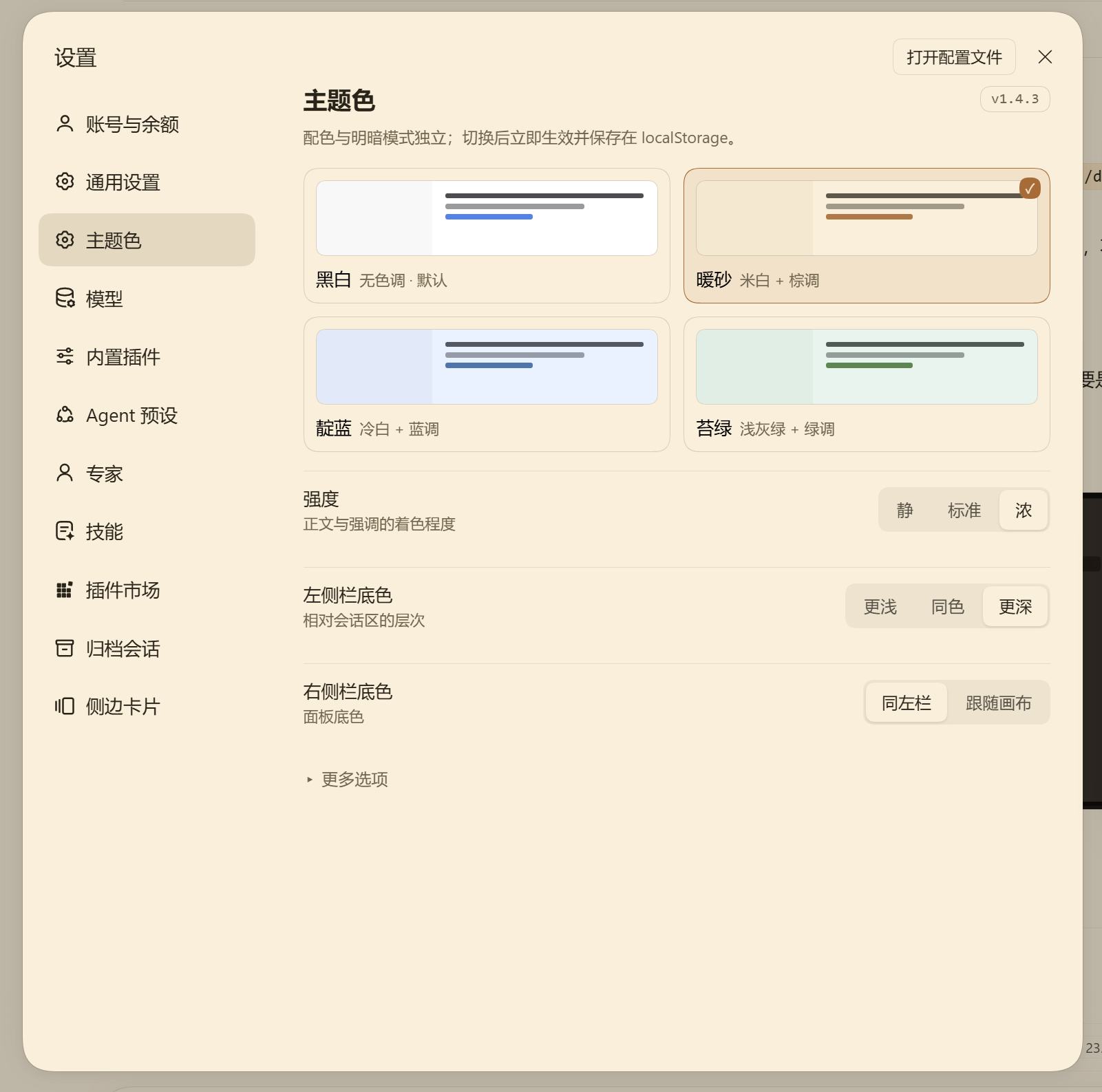
- 4 palettes — Mono, Warm sand, Indigo, Moss — each adapting to light and dark independently;
- the whole ramp is recomputed, not swapped: OKLCH rebuild → role-based chroma → sRGB gamut clamp → contrast solved on real surfaces;
- 27,000+ token references covered: body, secondary, tertiary, captions, links, sidebars, cards, user bubble, primary button, scrollbars, switches, Markdown headings/bold, code blocks;
- adjustable: text tint (3), sidebar depth (3), right panel (2), Markdown emphasis, scrollbars, switch colour;
- custom palette (pick surface / text / accent — the engine keeps its contrast guarantees), config export/import via a
dshs1.code, high-contrast mode, and 4 UI languages; - self-healing: if the host drops the override layer, the palette is re-applied;
- UI in 简体中文 / 繁體中文 / English / 日本語 (follows the host language, can be pinned).
Install
# from npm
cd ~/.dsh/profiles/desktop
pnpm add dsh-theme-palette

# or a specific version
pnpm add dsh-theme-palette@1.4.3
From the GitHub Release tarball:
pnpm add "https://github.com/zuoyunlai/dsh-theme-palette/releases/download/v1.4.3/dsh-theme-palette-1.4.3.tgz"
Then restart the GUI — a running process keeps the old module. Open it from avatar → Settings → Color theme.
Configuration
| Item | Options |
|---|---|
| Palette | Mono · Warm sand · Indigo · Moss (thumbnails follow light/dark) |
| Strength | Quiet / Standard / Strong — how much body text follows the palette |
| Panel surfaces | Sidebar (Lighter / Same / Deeper), right panel (Match sidebar / Follow canvas) |
| More options | Language, Markdown emphasis, scrollbars, switches/checks |
Every choice applies immediately and is stored in localStorage. Light/dark stays under the host’s Appearance control.
Palette engine
OKLCH(L, C, hue) ──► gamut clamp (binary search on C) ──► sRGB hex
        ▲
        └── role chroma × intensity, then contrast solve on {canvas, card, sidebar, overlay}
- semantic aliases keep
var(--dsw-static-neutral-bluish-NN)chains, so anything following a token follows the palette; - light surfaces use steps 00–300, dark surfaces 800–950;
- text floors are enforced at build time: body ≥ 12, secondary ≥ 6.1, tertiary/link ≥ 4.6, sidebar text ≥ 7, bubble text ≥ 7;
- 432 configuration combos are checked by
node palette-dev.mjs.
Design notes, per-component rationale and the contrast tables live in docs/DESIGN.md. Release history: CHANGELOG.md.
Development
node palette-dev.mjs                  # token report for all palettes
node tools/sheet.mjs                  # palette board → tools/sheet.html
node tools/shoot-sheet.mjs            # screenshot the board (headless Chrome)
node tools/compare.mjs --dir tools/out/<run>        # diff against baseline
node tools/preview-settings.mjs --lang en           # render the settings page
node tools/release.mjs --dry          # release preflight
node tools/release.mjs --tag          # publish to npm + tag
Screenshot regression has two layers: the palette board (no auth needed) and the real desktop window via CDP (tools/shoot-desktop.mjs, needs --remote-debugging-port). See tools/README.md.
License
MIT © 2026 Zuoyunlai
No comments yet. Be the first to write one.