潜伏 QIANFU
English | 简体中文
A DeepSeek Harness web theme inspired by the 2009 TV drama Lurk (潜伏): aged paper, ink green, brass and seal red, with paired light and dark palettes.
Unofficial fan work. Not affiliated with or endorsed by the rights holders of Lurk or DeepSeek. No stills, logos or other copyrighted artwork are included.
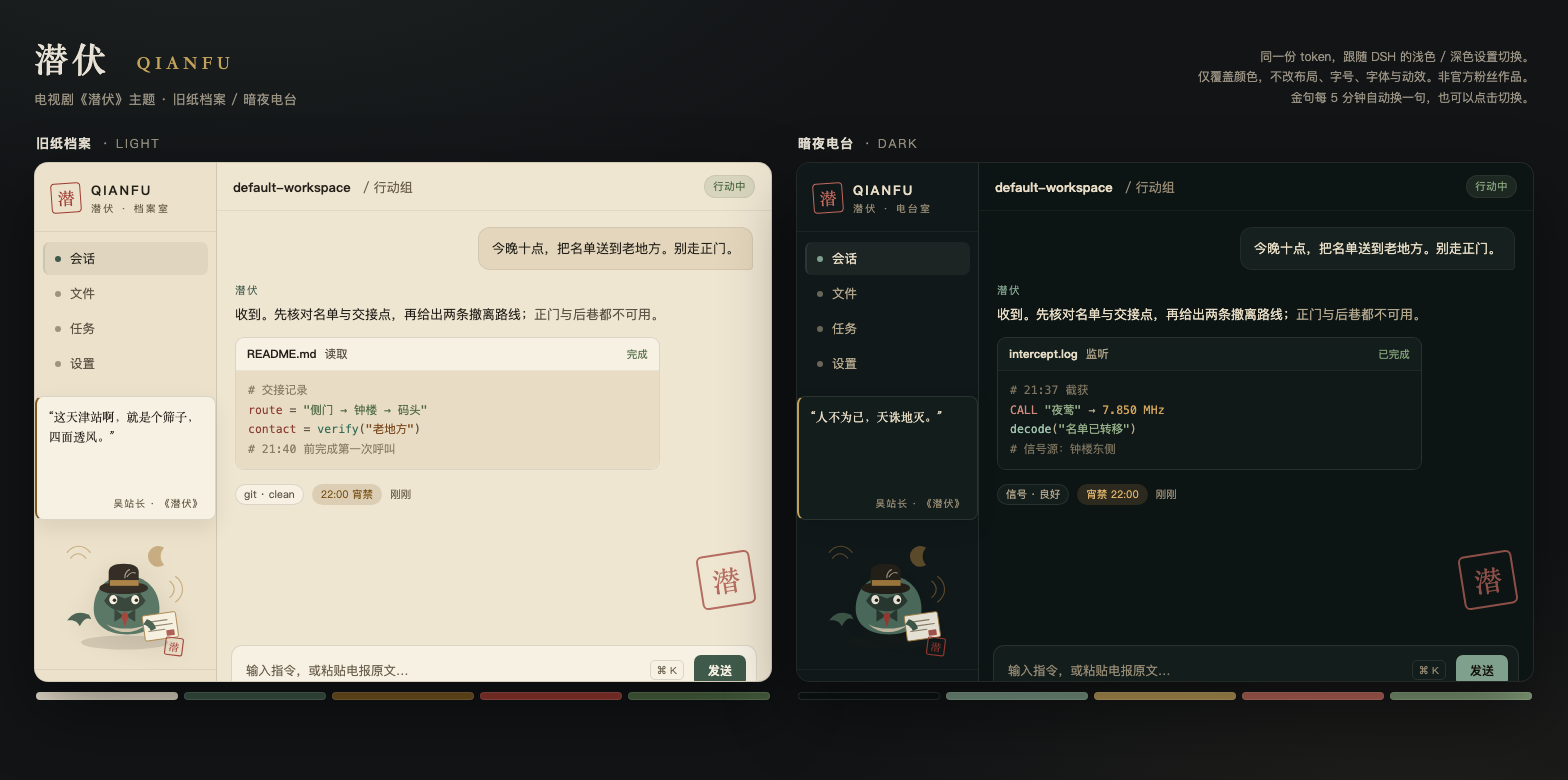
The two palettes
| Mode | Name | Mood |
|---|---|---|
| Light | Old Paper Archive | Yellowed telegram paper, iron-gall ink, ink-green suits, brass corners; seal red for warnings only |
| Dark | Night Radio | A radio room at 3 a.m.: near-black green, smoked-teal surfaces, brass dials, muted crimson |
The plugin does not replace the built-in light/dark themes. It stacks one alias-token layer through the official ctx.theme.overrideTokens() seam:
- Appearance → light / dark / follow system switches between Old Paper Archive and Night Radio;
- font sizes, font families and terminal settings are untouched;
- disabling the plugin disposes the layer — no CSS leftovers, no profile patch to clean up.
Sidebar & mascot
On macOS the native sidebar is transparent (window vibrancy), so it shows the grey window and clashes with the paper content. Since 0.2.0 the theme paints that sidebar with the same paper colour and hangs an original "lurk whale" mascot at the bottom: fedora, trench collar, red tie, telegram and a seal-red stamp.
Above the mascot is a small "station chief quote" card. It auto-advances every five minutes, and a click moves to the next line immediately and resets the timer. The choice is remembered per browser. Nine short lines are included.
The Tianjin station is a sieve — it leaks from all four sides.
Zecheng, you are my man. Understand?
The quote card and mascot now sit in the sidebar's normal flex flow, so the workspace list shrinks and scrolls above them instead of being covered. On short windows the mascot hides and the quote stays.
The dialogue remains the property of the show's rights holders; this is a short fan quotation. To turn it off, set QUOTES to [] in lib/client.js and reinstall.
The mascot is original artwork — no stills, actor likenesses or show logos.
Install
DSH Desktop (recommended)
- Settings → Plugins
- Install plugin
- Enter this directory's absolute path, e.g.:
/Users/apple/Documents/deepseek-harness/default-workspace/dsh-theme-qianfu
- Restart / refresh DSH when prompted
- Switch Appearance between light and dark to see both palettes
Web profile (CLI)
From GitHub:
dsh plugin --profile web add github:zshao56/dsh-theme-qianfu
dsh web
From a local checkout:
dsh plugin --profile web add /absolute/path/to/dsh-theme-qianfu
dsh web
Then hard-refresh the browser (Cmd/Ctrl + Shift + R).
From a tarball
cd dsh-theme-qianfu
npm pack
dsh plugin --profile web add /absolute/path/to/dsh-theme-qianfu-0.5.0.tgz
Compatibility
- DSH 0.2.0-rc.2+ (stable
ctx.theme.overrideTokenssurface) - Tested against DSH
0.2.1-rc.2on Desktop - Pure client plugin:
platform: "web"; registers no model tools, makes no network requests, writes no profile state
Toggle & uninstall
- Temporarily off: Settings → Plugins → 潜伏 QIANFU → disable. The layer is disposed with the plugin.
- Uninstall: remove it from the same card, then restart / refresh.
Development
npm test               # contract test + WCAG contrast checks for key text/background pairs
open preview.html      # light/dark preview rendered from the real tokens
preview.html loads lib/client.js, calls the plugin with a fake ctx.theme, and paints the preview from the actual token table — the preview cannot drift from the implementation.
Design constraints
- Colours are expressed only through
--dsw-alias-*/--dsw-specific-*tokens; no component selectors, no layout overrides - Body, secondary, tertiary, link, state and button text pairs all meet ≥ 4.5:1 in both palettes
- Colour only: no font, size, radius, shadow or motion changes
License
MIT
No comments yet. Be the first to write one.