Super PTC Mode · 超级 PTC 模式
@local/dsh-super-ptc-mode is a configuration-only DSH profile bundle. Installing it adds one agent preset, Super PTC Mode (id super-ptc): the shipped ptc composition — PTC tool presentation — plus a preset-scoped persona suffix that carries the SUPER PTC Agent Teams delegation doctrine.
Repository: https://github.com/zouyuanqing/dsh-super-ptc-mode
本包是纯配置的 DSH Profile Bundle:安装后新增 Agent 预设「超级 PTC 模式」(id super-ptc)。它保留 PTC 呈现——模型只直接调用 run_code,其余工具在程序内以生成 SDK 的形式调用——并在预设作用域内追加「超级委派」系统提示,要求 Lead 先拆分独立工作流、建立共享任务、派生有界队友,验证产物后再收尾。
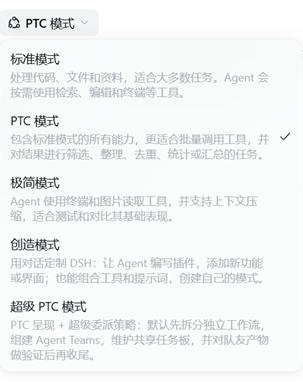
The DSH new-session preset picker lists 超级 PTC 模式 alongside the shipped modes (标准模式 / PTC 模式 / 极简模式 / 创造模式).
Bundle identity
| Field | Value |
|---|---|
| Package | @local/dsh-super-ptc-mode |
| Version | 1.0.0 |
| Repository | https://github.com/zouyuanqing/dsh-super-ptc-mode |
| Preset id | super-ptc |
| Display name | 超级 PTC 模式 (en: Super PTC Mode) |
| Kind | configuration-only: no index.js, no build step, no runtime dependencies |
| Patch | cordis.patch.yml (declared as dsh.bundle.patch) inserts one @deepseek-ai/dsh-agent-preset row, preset-super-ptc |
| License | MIT |
The only behaviour this bundle ships is that preset declaration. There is no host plugin code and no client code. The @local/ scope and private: true are intentional: this is a local profile bundle installed from a checkout, not a package published to npm.
What the preset composes
PTC presentation
The preset mounts @deepseek-ai/dsh-agent-tool-presentation with mode: ptc. For agents joined to this preset the tool catalog collapses to the run_code transport plus a generated SDK: every other tool is reachable only from inside a run_code program as await tools.<name>(args). Independent calls can therefore be batched in one program, which cuts round trips and keeps intermediate output out of the conversation.
The shipped ptc row set
The preset restates the shipped ptc composition so that PTC, delegation, and the doctrine stay one coherent preset:
- identity:
persona(prefix plus the doctrine suffix),agent-instructions,time-context; - shell:
pwshon Windows,bashelsewhere; - filesystem: read/write/edit plus path and content search;
- runtime: background jobs and scheduled reminders;
- knowledge and control: skills, goals, plan mode, compaction (
/compactand tool-result pruning); - delegation: the legacy one-shot
subagent/subagent_fork/list_agentspath stays mounted; the doctrine makes Agent Teams delegation the default strategy; - interaction:
ask_user_question,todo_write, web search/fetch,present.
plugin_manager and plugin-market tools are disabled inside sessions of this preset, so the agent cannot reconfigure its own profile from a delegated session.
The persona suffix: delegation doctrine
The delta against the shipped ptc preset is the persona suffix. It is mounted inside the preset composition, so it shadows the deployment persona suffix for sessions of this preset only; other presets and existing chats are unaffected. It renders after the PTC SDK instructions and tool guidance, so the doctrine has the last word on how work is executed. The text must stay free of {{…}} prompt-variable syntax because persona text is a strict template.
In short, the doctrine tells the Lead to decompose non-trivial work before acting, create shared tasks with acceptance criteria and disjoint write scopes before spawning, keep teammates bounded (typically 1–4) with self-contained briefs, own integration and final verification, and never equate a completion message with verified success.
Host-scoped tools it relies on
Agent Teams tools are not declared by this bundle. They come from the host profile's @deepseek-ai/dsh-experimental-agent-team-profile bundle: spawn_teammate, send_message, list_agents, wait_agent, interrupt_agent, and the shared task board team_task_create / list / get / update.
Requirements
| Requirement | Why |
|---|---|
| DSH desktop or web 0.2.1-rc.5 or newer | Verified on 0.2.1-rc.5; the bundle uses the same composition surface the shipped ptc preset uses. |
Agent Teams experimental bundle enabled (@deepseek-ai/dsh-experimental-agent-team-profile) |
Supplies spawn_teammate, send_message, list_agents, wait_agent, interrupt_agent, and the shared task board. Without it the preset still mounts, but the team tools are absent and the doctrine is unactionable. |
A composed PTC runtime (@deepseek-ai/dsh-ptc-runtime-node; included in the desktop app) |
A ptc presentation without a PTC runtime is refused at mount time, naming the failing row. |
Install and select
Clone the repository and keep the checkout in place (a local-directory install links it;
filesdoes not filter a linked directory):git clone https://github.com/zouyuanqing/dsh-super-ptc-mode.gitIn DSH, install the bundle from the cloned directory with the
plugin_managertool:plugin_manager action: install_bundle target: <absolute path to the cloned dsh-super-ptc-mode directory>Do not hand-edit the profile's dependency list or patch to install it.
If the install result reports
restart-required, restart DSH before using the preset.Select Super PTC Mode (id
super-ptc) as the preset for a new session. Existing chats keep their own preset.Verify in the new session: the roster and bundle details show the title and icon; the system prompt contains the doctrine; only
run_codeis directly callable and the generated SDK exposes the team tools. See docs/VERIFICATION.md for the checked acceptance criteria and a reproduction outline.
The bundle patch is applied before the profile's own cordis.patch.yml, so a profile-level override of the row id preset-super-ptc wins if an operator edits it.
Compatibility
Tested on the DSH desktop app 0.2.1-rc.5 on Windows. The composition is platform-neutral where the shipped ptc preset is: it mounts pwsh on Windows and bash elsewhere, and the rest of the rows are ordinary DSH plugins. UI titles and descriptions follow the DSH locale (en / zh).
Files and display metadata
| File | Role |
|---|---|
package.json |
Manifest; dsh.bundle.patch → ./cordis.patch.yml; exports ./locale/*.json, ./icon, ./cordis.patch.yml |
cordis.patch.yml |
The preset declaration — the composition this bundle exists for |
locale/en.json, locale/zh.json |
meta.title + meta.description, read by Plugin Manager and Settings without activating a plugin |
icon.svg |
Original artwork, square 0 0 64 64: a dark tile, three connected team nodes with the Lead node in the centre, and a lightning bolt for PTC speed. No external references, fonts, or embedded raster; ~1 KB |
screenshots/preset-picker.png |
The DSH preset picker showing 超级 PTC 模式 next to the shipped modes |
docs/VERIFICATION.md |
Public verification summary: acceptance table, evidence statements, reproduce outline |
LICENSE |
MIT |
Verification
The bundle was verified end to end on DSH 0.2.1-rc.5: the preset appears in the roster, a real session mounts it, the persisted system prompt contains the doctrine verbatim, the request header exposes only run_code, the generated SDK declares all nine Agent Teams bindings, and a real teammate plus shared-task flow completed. Details, per-criterion results, and how to reproduce them are in docs/VERIFICATION.md.
Removal
Disable or remove the bundle in DSH plugin management (plugin_manager set_bundle / remove_bundle); the preset row disappears with it. Removing it does not touch the Agent Teams bundle.
License
MIT © 2026 zouyuanqing
中文摘要
- 组成:一个 Agent 预设「超级 PTC 模式」(id
super-ptc)。工具呈现为 PTC:只直接暴露run_code,其余工具由生成的 SDK 在程序内调用;agent 复刻官方ptc预设的工具行,并额外注入预设作用域内的「超级委派」系统提示。 - 依赖:需要宿主 Profile 启用 Agent Teams 包
@deepseek-ai/dsh-experimental-agent-team-profile(提供spawn_teammate、send_message、list_agents、wait_agent、interrupt_agent和共享任务板);还需要 PTC 运行时(桌面版自带)。需 DSH 0.2.1-rc.5 或更新版本。 - 安装:
git clone本仓库后,在 DSH 中用plugin_manager的install_bundle指向克隆目录;按结果刷新或重启,然后在新会话中选择「超级 PTC 模式」预设。本地目录安装会链接该检出目录,请保留它。 - 验证:验收标准、逐项证据与复现步骤见 docs/VERIFICATION.md。
- 许可:MIT,见 LICENSE。
- 文件:
cordis.patch.yml是唯一的组合声明;locale/*.json与icon.svg提供插件管理与设置页的标题、描述和图标;本 README 与docs/VERIFICATION.md仅作文档。
No comments yet. Be the first to write one.