dsh-stand-reminder
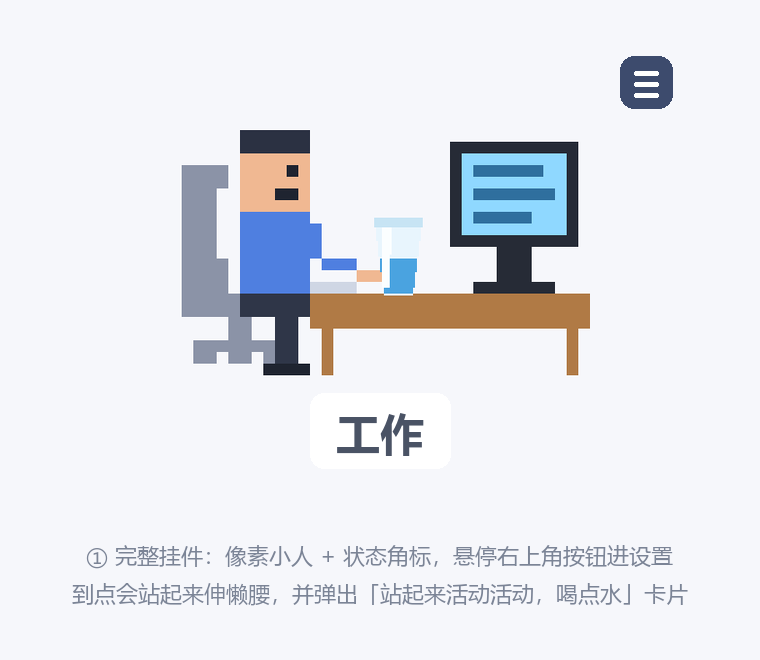
A DSH desktop widget: a pixel-art worker sits at a desk in the bottom-right corner and nudges you to stand up and drink water every 30 minutes.
Repo: https://github.com/zjhWater/BigWater4Workers · npm:
dsh-stand-reminder· 中文说明
When the timer fires, the worker stands up and stretches, a reminder card floats in, and two short chimes play. "I stood up" restarts the timer; "Remind me in 5 minutes" snoozes it.
The glass on the desk is a separate track: it fills slowly at a "cups per day" pace, and when it's full it's time for a sip. Clicking the glass empties it and starts the next cup. It never interferes with the stand-up timer.
Everything is a plain in-page timer: no messages are delivered, no agent is woken, no tokens are spent, and nothing goes over the network.
A day with it
- Open DSH — the worker sits with his legs on the desk, the monitor is dark with a red power button, and the badge reads
收工(off work). - Click the monitor to boot: the timer starts and the worker begins typing. From then on he reminds you to stand up and drink.
- Need to step away? Click the worker — he gets up and walks out of frame, leaving an empty chair. Click the chair when you are back and he walks back to his seat.
- Click the monitor again to shut down for the day: the screen shows the red power button and the worker puts his legs up. Today's counters (worked minutes, cups, glass progress) are kept and reset the next time you boot, so every day starts clean.
Reminder rules
| Setting | Default | Notes |
|---|---|---|
| Interval | 30 min | 5–180 min in the panel |
| Work window | 09:00–18:00 | Outside it the worker shows 休息 (rest) and nothing fires |
| Lunch break | 12:00–13:30 | Can be disabled; a reminder due during lunch is postponed until after it |
| Sound | On | Two short tones; browsers mute it until you interact with the page |
| Volume | 70% | 0–100%, slider in the panel; saved live, plays a sample on release |
| Widget size | 100% | Base = clamp(160px, min(viewport width, height) × 26%, 320px), so it scales with the window (same idea as the whale widget). The slider/wheel multiplies that by 50%–300% and only scales the pixel scene — badge, card and panel keep their font sizes |
| Clock size | 32px | 20–48px, badge only; the panel follows the Harness UI font |
| Water reminder | On | Panel shows "drank X / goal N cups", default 8. The glass fills about every 56 minutes (effective work minutes ÷ goal). It fills whenever you are at the computer, work window or not. Based on the 2022 Chinese Dietary Guidelines (1700 ml/day for men, 1500 ml/day for women) |
| Work log | Shown | Hides the "worked today" row; the duration accumulates from boot time |
Interactions
| Where | What it does |
|---|---|
| Monitor | Boot / shut down. Shutting down means off work: red power button on the screen, legs up. Click again to boot |
| Worker | Leave the desk (walks out of frame, empty chair stays) |
| Chair | Come back (walks in and restarts the timer) |
| Glass on the desk | Counts as one cup: level resets to zero, today's count +1, starts filling again |
| Three-line button (on hover) | Opens the settings panel (same style as the whale widget) |
| Drag the worker | Move it; snaps within 10% of the left/right edge and 15% of the bottom, and mirrors horizontally when snapped left |
| Hover + wheel | Zoom 5% per notch |
Reminder card buttons: 我站起来了 (I stood up — restart the timer), 再过 5 分钟 (in 5 minutes), 不再提醒 (not today). Esc closes the card or the panel.
Edge behaviour:
- The card hides itself after 60 seconds and the worker sits back down; if nobody reacts, it retries once after 10 minutes, then returns to the normal interval.
- Nothing fires in the last 10 minutes of the work window, so you are not told to stand up right before going home.
- If the machine slept or the page was closed long enough to miss more than 5 minutes, it does not replay the reminder — it quietly shifts forward.
不再提醒pauses until the next working day at 09:00.- The first open of a new day always starts at
未开机(not booted), with the glass and work log cleared. - State is synced across tabs through
localStorageevents.
Mini mode
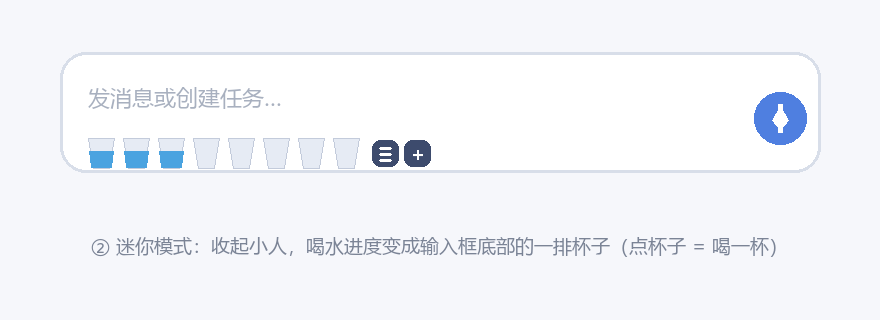
Clicking the — button turns the whole widget into a row of cups at the bottom of the composer:
- One cup per daily goal (8 by default).
- Grey = not reached yet; blue water rising from the bottom = the current cup filling.
- A full cup grows from 1× to 2× over 5 minutes, breathes gently and plays a chime.
- Click a cup to drink: the water clears, the cup shrinks back and fades out, and the next one starts filling.
- Hover the row and two small buttons appear on the right: settings and
+(back to the full widget). - Drag the row anywhere (gaps included) to move it; double-click to snap it back under the composer.
Stand-up reminders are disabled in mini mode — only the water track stays. The row sticks to the composer while the window resizes or the page scrolls. The settings and + buttons only appear on hover, so they don't add clutter.
Data
One localStorage entry (dsh-stand-reminder:v1) plus one JSON file on the host side (~/.dsh/dsh-stand-reminder.json, read and written through the plugin's own /dsh-stand-reminder/state route). The host copy exists because DSH changes its port on every launch and localStorage is per-origin, so localStorage alone would give you an empty profile — and a default position — every time.
Stored: settings, next reminder time, pause deadline, powered/away state, water progress and worked time, widget and cup-row positions. Local only, never uploaded.
Install
From npm (recommended): search for dsh-stand-reminder on the DSH plugin page, or let plugin_manager in a session install it:
plugin_manager install_bundle target = dsh-stand-reminder
Then fully quit the client and reopen it — the worker appears in the bottom-right corner.
For local development, point link: at the source directory:
plugin_manager install_bundle target = link:D:\path\to\dsh-stand-reminder
Uninstall: remove the bundle in the plugin manager.
Development
dsh-stand-reminder/
├─ package.json       dsh.bundle.patch points at cordis.patch.yml
├─ cordis.patch.yml   inserts the dsh-stand-reminder entry
├─ lib/index.js       host side: injects a <script> line + serves the front-end assets
├─ assets/client.js   front end: UI + state machine (refresh the page after editing)
└─ test/              local preview and test tooling
lib/index.jslistens forwebserver/index-injectand pushes one inline script line into the page, then serves the front end at/dsh-stand-reminder/client.jsviawebServer.register(read by mtime,no-store). Editinglib/index.jsneeds a client restart; editingassets/client.jsonly needs a page refresh.- State machine:
boot→sit→stand(reminder) →leaving/away/returning→off(legs up).pausedandrestare two intermediate states that never remind. - The badge shows exactly three words, always matching what the worker is doing on screen:
| On screen | Badge | Modes |
|---|---|---|
| Typing / standing up / sipping | 工作 |
sit / stand / sip / rest |
| Walking away, empty chair, walking back | 离开 |
leaving / away / returning |
| Legs on the desk, dark screen | 收工 |
off / boot / paused |
The badge carries no clock; the next reminder time lives in the panel footer and the widget tooltip.
test/preview.html: open it in a browser and the widget mounts on a plain page, with buttons for boot/shut down, trigger a reminder, leave/come back, drink, open settings and clear state. Supports?mode=boot|away|off|standand?scale=140.test/render_scene.py: no browser needed — rasterises the SVG embedded inassets/client.jsinto PNGs to check the six poses (sit / stand / walk / away / not booted / legs up):
python test/render_scene.py # requires Pillow
- Tests: run
npm installat the repo root first (installs only jsdom, which is never shipped), then:
npm test          # runs the three below in order
node test/dom-smoke.cjs       # full front-end flow: mount, boot, click worker/chair, water, zoom, snap/mirror, mini mode
node test/state-smoke.cjs     # host state route: GET/PUT, bad JSON, 405
node test/hydrate-smoke.cjs   # startup hydration: mini shape, position kept, same-day cups and work time
License
MIT
No comments yet. Be the first to write one.