attention-plugins
DSH 任务分级通知:主线完成即响,其余攒到全部空闲汇总一声。
Task-tiered notifications for DeepSeek Harness: marked sessions ring on completion, the rest pool into one chime.





dsh plugin add attention-plugins@0.2.2
中文(默认) · English · 更新记录 / Changelog
中文
为什么做这个插件
在 DSH 里同时开五个会话,已经是常态。如果每个会话跑完都响一声,你会在等其中一个的时候被打断五次。真正的问题不是那一声提示音,而是响得太多之后你开始不信任它,每次还是要自己切回去看。
attention-plugins 给会话排优先级:标成主线的完成即响,其余攒到这一波全部空闲时汇总响一声「All tasks」。
会话 A  ★ 主线   ──完成──▶  🔔 立即响
会话 B    未标记 ──完成──▶  (攒着)
会话 C    未标记 ──完成──▶  └── 全部空闲 ──▶ 🔔「All tasks」
三档模式各自回答一个问题:
| 模式 | 回答的问题 | 行为 |
|---|---|---|
| 主线模式(默认) | 「我只关心其中几个」 | 标记的主线完成或失败立即响;其余每波汇总一次 |
| 均衡模式 | 「每个都要告诉我」 | 每个会话完成或失败都单独响,从不汇总 |
| 静音模式 | 「现在别烦我」 | 完成时既不响也不弹;提问与权限请求仍然提醒 |
与只按事件类型提醒的插件相比,差别不在音效,而在「什么时候值得打断你」:
| 普通四事件通知插件 | attention-plugins | |
|---|---|---|
| 什么时候响 | 每个会话跑完都响 | 主线立即响,其余每波汇总一次 |
| 模式 | 通常只有一个总开关 | 主线 / 均衡 / 静音三档 |
| 控制粒度 | 按事件类型 | 按事件类型、按会话静音、按主线标记 |
安装
包内已经带好构建产物 lib/,不需要本地编译:
dsh plugin add attention-plugins@0.2.2
dsh web
更新:dsh plugin update attention-plugins@0.2.2。卸载:dsh plugin remove attention-plugins。访问不了 npm 时,可以改装有预构建产物的 Release tarball:dsh plugin add https://github.com/zjbc2000/attention-plugins/releases/download/v0.2.2/attention-plugins-0.2.2.tgz。
从源码安装,改代码或跑未发布的提交时用:
git clone https://github.com/zjbc2000/attention-plugins.git
cd attention-plugins
pnpm install && pnpm run build
dsh plugin add link:/path/to/attention-plugins
dsh web
/path/to/attention-plugins 换成这个 checkout 的绝对路径,在仓库里直接写 link:"$(pwd)" 效果一样。link: 让 DSH 直接引用源码目录,以后 git pull && pnpm run build 就够了;file: 会把包复制进 node_modules,每次改动都得重新 add。
快速上手
- 装好,然后运行
dsh web。 - 打开 Settings → Attention——插件通过
settings.section注册了自己的设置页签。 - 标一个主线:点输入框左侧的 ☆(新会话发出第一条消息之前就能用),或用会话行「…」菜单。想标几个都行。
- 保持默认的主线模式即可;不想标主线、又希望每个任务各自响,就切到均衡模式。
- 点一次事件卡片上的 ▶——浏览器要先看到用户手势,之后才会出声。
提醒规则
| 情况 | 主线模式(默认) | 均衡模式 | 静音模式 |
|---|---|---|---|
| 标记过的会话完成或失败 | 立即响 | 立即响 | 不响 |
| 未标记的会话完成或失败 | 攒着,等所有会话空闲后汇总响一声「All tasks」 | 立即响 | 不响 |
| 被静音的会话,不论状态 | 不响 | 不响 | 不响 |
| 提问或权限请求 | 立即响 | 立即响 | 立即响 |
两条规则:
- 汇总只在「这一波确实攒下了任务」时才响;整波都是主线时不会再补一声。
- 提问与权限请求同样受各自的开关和「当前会话提醒」设置约束。
功能
| 功能 | 说明 |
|---|---|
| 三档任务模式 | 主线 / 均衡 / 静音——一个设置同时管住标记过的、没标记的,以及「别烦我」。 |
| 多主线标记 | 输入框 ☆、会话行「…」菜单、侧栏星标三个入口,可同时标多个;点某颗星只取消那一个。 |
| 四类事件 | 完成、失败、提问、权限请求,每类独立开关、独立音效。 |
| 三种内置音效 | Chime / Success / Subtle,Web Audio 实时合成,不加载音频文件;音量 0–100%。 |
| 每类事件自定义音频 | MP3 / OGG / WAV,≤ 512 KB,只存在当前浏览器,也只对这一类事件生效。 |
| 浏览器通知 | 每类事件、每个会话各一个 tag 并带 renotify,提问不会顶掉未读的完成通知;提问与权限请求要求常驻显示;点击直达对应会话。 |
| 当前会话提醒三档 | 仅后台或最小化 / 切到其他应用时(分屏也算)/ 始终提醒。 |
| 等待子代理结束 | 父会话跑完但子代理还在跑时先不响,整波结束再提醒一次。 |
| 按会话静音 | 在会话行「…」菜单里单独静音,不动全局设置。 |
| 设置页信息栏 | 版本号、GitHub、问题反馈,以及只有点击时才读 npm registry 的检查更新;中英双语界面;遵循 prefers-reduced-motion。 |
设置项
| 设置 | 说明 | 默认 |
|---|---|---|
| 声音通知 | 声音总开关 | 开 |
| 音量 | 播放音量,0–100% | 70% |
| 事件类型 | 逐项开关、音效与自定义音频 | 全开;Chime / Subtle / Success / Success |
| 任务模式 | 主线 / 均衡 / 静音 | 主线 |
| 浏览器通知 | 系统通知,开启时请求授权;点击通知打开会话 | 关 |
| 当前会话提醒 | 仅后台或最小化 / 失焦时 / 始终 | 仅后台或最小化 |
| 等待子代理结束 | 子代理还在跑时先压住父会话的提醒 | 开 |
| 侧栏主线星标 | 在侧栏给已标记会话加星 | 开 |
| 主线标记 | 哪些会话算主线 | 无 |
| 静音会话 | 永不提醒的会话 | 无 |
0.2.2 更新
- 三档任务模式上线,旧的「支线通知方式」设置合并移除。 已有配置在加载时自动迁移:按会话 → 均衡,批量 → 主线。
- 点击通知直达对应会话;通知按事件类型独立 tag,不再互相覆盖。
- 当前会话提醒从布尔开关升级为三档——分屏时不再永远静音。
- 新增等待子代理结束、按会话静音、每类事件自定义音频。
- 设置页信息栏:版本号、GitHub、问题反馈、手动检查更新。
- 修复:同一波「All tasks」汇总会重复响两次;设置页删掉了三处 💡 教学式注释。
完整列表见 CHANGELOG.md。下一步计划:通知历史。
截图
下面的图都不长,每张只对应一个设置区,配一句说明;设置页全貌放在最后,需要时再点开。
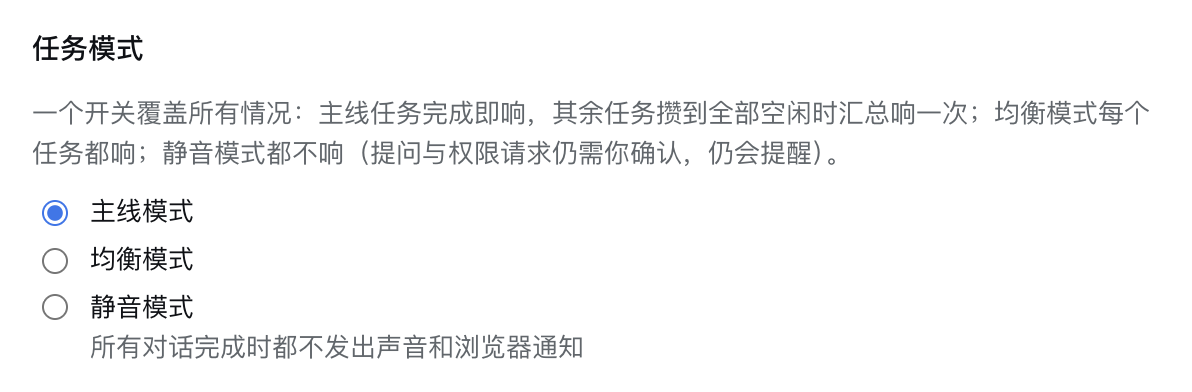
任务模式:三档决定打断频率
主线模式只让标记过的会话打断你,均衡模式每个都响,静音模式在完成时完全安静。三档是单选,切换后立刻生效,不需要重装或重启。
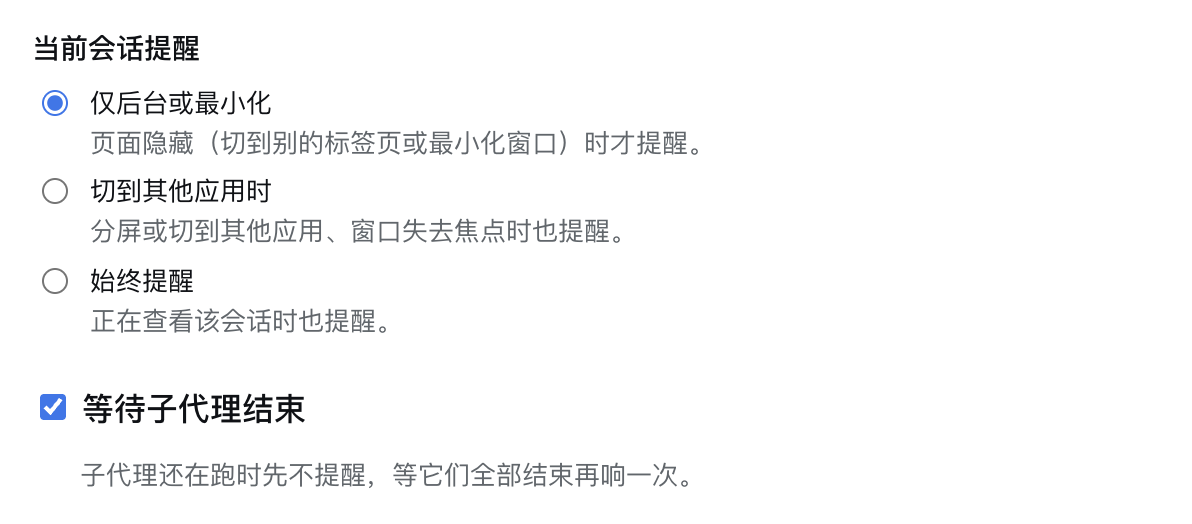
当前会话提醒:分屏时也能响
默认只在标签页隐藏或窗口最小化时提醒;切到「切到其他应用时」后,分屏或开着别的窗口、页面仍然可见时也会提醒——这是浏览器 visibilityState 判断不出来的场景。
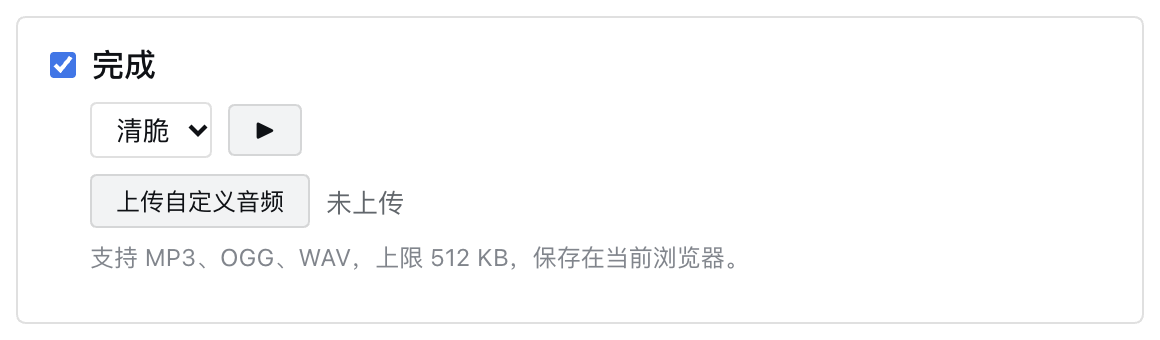
自定义音频:每类事件各用一段
完成、失败、提问、权限四类事件可以各上传一段 MP3 / OGG / WAV(≤ 512 KB)。文件只存在当前浏览器,不会上传到任何地方;把音效设成「无」时自定义音频仍然会播放。
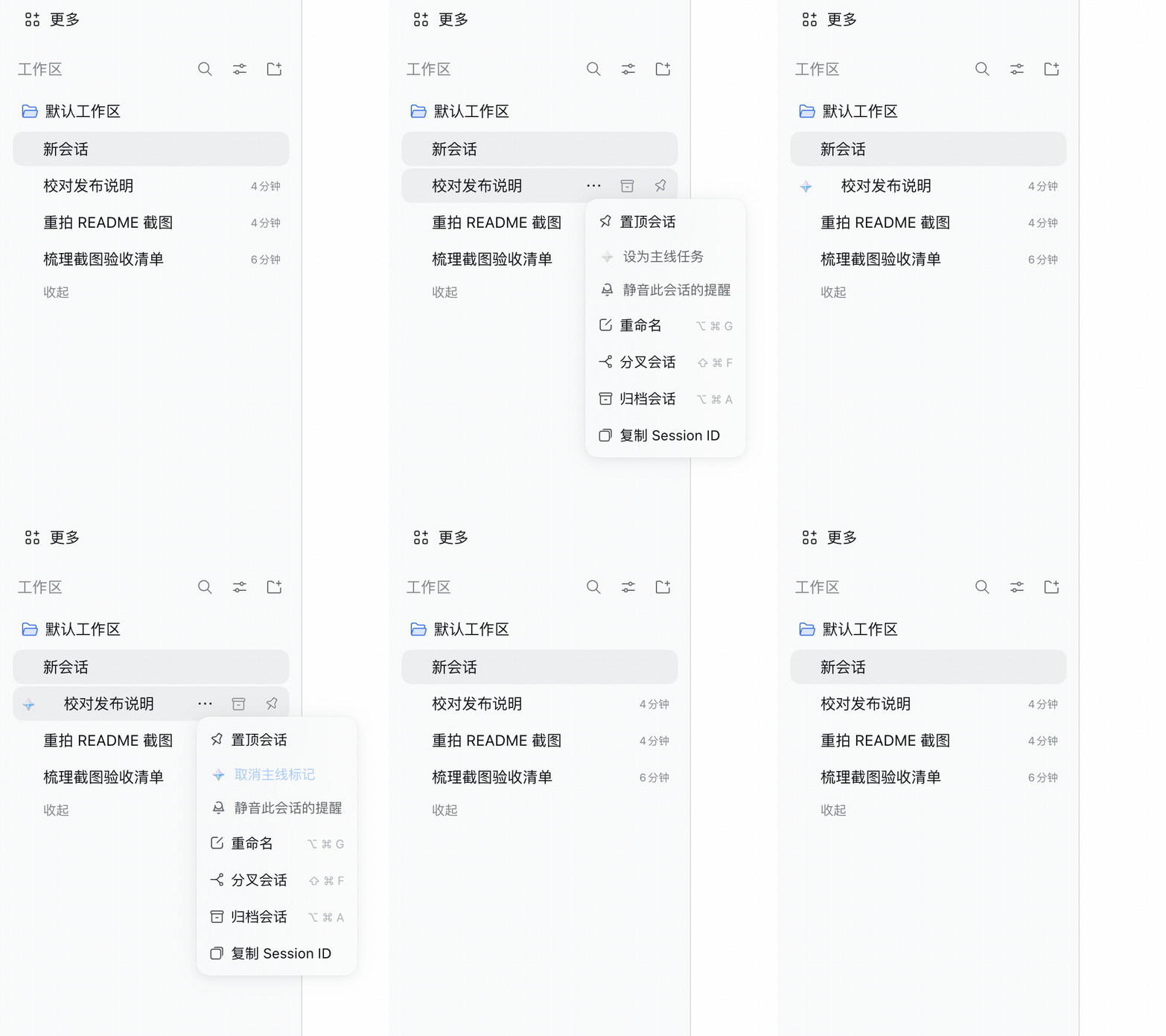
标记主线与按会话静音:都在会话行菜单里
除了输入框左侧的 ☆,会话行的「…」菜单也能把会话设为主线,或只静音这一个会话。GIF 里先标主线、再取消、再静音:
信息栏:版本、仓库、反馈、检查更新
设置页顶部显示插件名和安装的版本;GitHub 与问题反馈直接开新页;「检查更新」只在点击时才请求 npm registry,不会后台联网。

设置页全貌(可展开)
整页从上到下依次是信息栏、声音与四类事件、三档任务模式、主线标记、当前会话提醒、等待子代理、侧栏星标。图很长,所以默认收起。
展开看整页截图(约 3900px 高)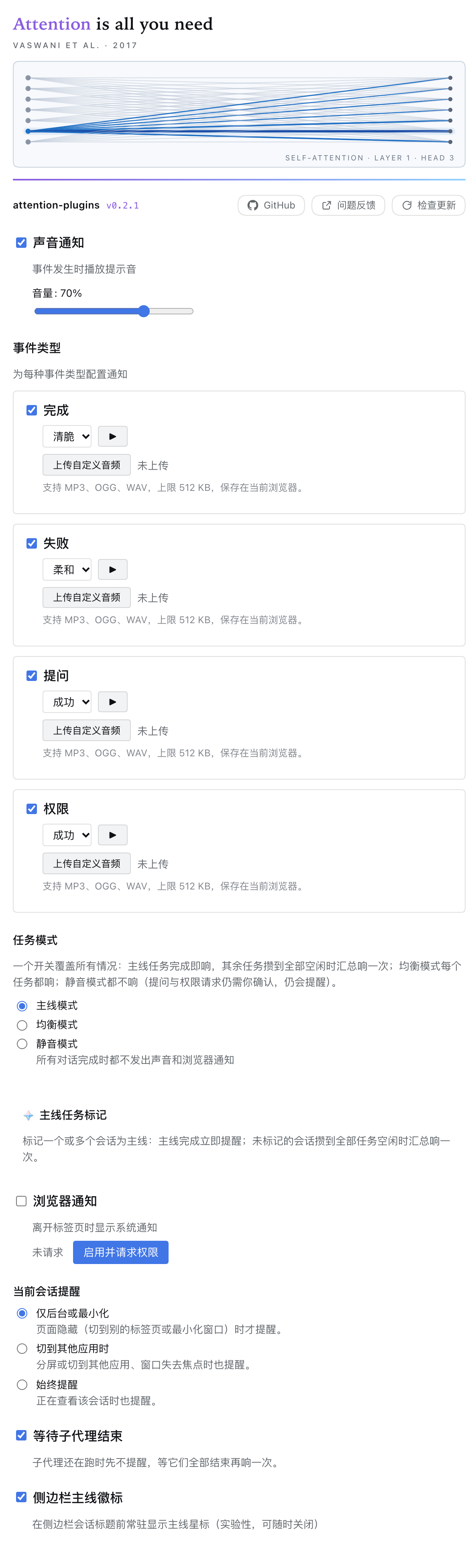
常见问题
一点声音都没有? 浏览器在页面收到用户手势之前不允许播放音频,先点任意事件卡片上的 ▶ 一次。再顺手看一眼系统音量和输出设备;输出设备变化后(比如切到蓝牙)插件会重建 AudioContext,所以第一声不会被吞掉。
浏览器通知不出现? 先在面板里打开并授权。它只在标签页切到后台时弹出,页面在前台是有意不弹的。macOS 上还要在系统设置里允许浏览器发通知。
主线模式下一个主线都没标,还会响吗? 会,响一次:所有会话都算未标记,全部空闲时汇总响一声「All tasks」。想每个都单独响就切均衡模式。
同一个会话会响两次吗(自己一次、汇总再一次)? 不会。标记过的自己响、不进汇总池;均衡模式从不汇总;静音模式两者都不发。
标记和设置存在哪? localStorage 的 attention-plugins:config,只在这一个浏览器里,不跨浏览器、不跨设备同步。
怎么回滚? 钉住版本即可:dsh plugin add attention-plugins@0.2.1,然后重新打开 Settings → Attention,确认一下任务模式和当前会话提醒。配置的 key 没变,但旧版本对其中几个字段的读法不同。
实现要点
- 运行状态来自
api-session/status远程事件;提问与权限来自uiSession.sessionStatus.pendingInteraction。 - 完成判定为
running: true → false;经过 settle 窗口后,按本轮新增的错误区分「完成」与「失败」。 - 提问与权限没有对应的远程事件,首帧只记录基线——打开页面不会补发一堆通知。
- 通知门控顺序:事件开关 → 当前会话 / 页面可见性 → 通知权限。
- 注入点:
conversation.input.left与sidebar.workspaces.session.menu.item;侧栏星标通过 DOM 注入。
环境要求
Node.js 20 及以上,DeepSeek Harness 0.1.7 及以上。端到端验证于 0.2.1-rc.2,安装层验证于 0.2.1-rc.4。更早的 DSH 版本用的是另一套会话 store API,不受支持。
开发
pnpm install
pnpm run build     # tsc + 客户端 bundle
pnpm run watch     # 监听编译
pnpm test          # 单元测试
pnpm run clean
pnpm run shots -- launch   # 隔离实例 + 无头 Chrome(见 docs/SHOTS.md)
测试:12 个文件 / 181 个用例——engine 35、mainline-sideline-advanced 21、custom-audio 18、mainline-mode 16、notification 13、session-lookup 13、version 13、sound-params 15、policy 11、pending 10、settings-normalize 10、meta-bar 6。
构建之后,只改了客户端 bundle 刷新浏览器即可;改了服务端文件则让插件重新加载:printf '\n# reload %s\n' "$(date +%s)" >> ~/.dsh/profiles/web/cordis.patch.yml。
致谢
架构基于 @dingyi222666/dsh-session-notification(上游为 BSD-3-Clause,保留的版权声明见 THIRD-PARTY-NOTICES.md),围绕任务优先级重写:主线标记、三档模式、按会话静音。已收录进 DSH 社区插件目录(awesome-dsh-plugin#8802)。如果它帮你少被打断几次,在 GitHub 上点个 ⭐ 就是最好的支持。
许可证
MIT,详见 LICENSE。
English
Chinese is the default above; this is the same content in English. Back to 中文
Why this exists
Running five DSH sessions at once is normal. A notifier that fires on every completion interrupts you five times, while you are usually waiting for exactly one of them. The real cost is not the sound — it is that after a few false alarms you stop trusting it and check the screen anyway.
attention-plugins gives sessions a priority. Mark what you are waiting for and it rings the moment it lands; everything else is pooled into a single "All tasks" chime when the wave goes idle.
Session A  ★ marked   ──done──▶  🔔 ring now
Session B    unmarked ──done──▶  (pooled)
Session C    unmarked ──done──▶  └── all idle ──▶ 🔔 "All tasks"
The three modes each answer one question:
| Mode | Answers | Behaviour |
|---|---|---|
| Main-line (default) | "I only care about a few" | Marked sessions ring on completion or failure; the rest ring once per wave |
| Balanced | "Tell me about all of them" | Every session rings on its own; nothing is aggregated |
| Silent | "Not now" | No sound, no notification on completion; questions and permission requests still alert |
Compared with an event-only notifier, the difference is not the sound but the question "when is it worth interrupting you":
| A plain four-event notifier | attention-plugins | |
|---|---|---|
| When it rings | Every finished session | Marked sessions now, the rest once per wave |
| Modes | One global switch | Main-line / balanced / silent |
| Granularity | Per event type | Per event type, per session, per marker |
Install
The package ships its built lib/, so there is nothing to compile:
dsh plugin add attention-plugins@0.2.2
dsh web
Update with dsh plugin update attention-plugins@0.2.2; remove with dsh plugin remove attention-plugins. If npm is unreachable, install the prebuilt tarball from Releases instead: dsh plugin add https://github.com/zjbc2000/attention-plugins/releases/download/v0.2.2/attention-plugins-0.2.2.tgz.
From source, for development or an unreleased commit:
git clone https://github.com/zjbc2000/attention-plugins.git
cd attention-plugins
pnpm install && pnpm run build
dsh plugin add link:/path/to/attention-plugins
dsh web
/path/to/attention-plugins is this checkout — inside the repo, link:"$(pwd)" does the same. link: points DSH at the source directory, so a later git pull && pnpm run build is enough; file: copies the package into node_modules and needs a fresh add after every change.
Quick start
- Install and start
dsh web. - Open Settings → Attention — the plugin registers its own settings tab.
- Mark a main line: click ☆ left of a session's composer — it works before a new session sends its first message — or use the session row's "…" menu. Mark as many as you like.
- Keep the default main-line mode. If you would rather not mark anything but still hear every task, switch to balanced.
- Press ▶ on an event card once — browsers need a user gesture before they play audio.
How alerting works
| What happens | Main-line (default) | Balanced | Silent |
|---|---|---|---|
| A marked session completes or fails | Rings immediately | Rings immediately | Silent |
| An unmarked session completes or fails | Pooled: one "All tasks" chime when every session is idle | Rings immediately | Silent |
| A muted session, whatever its state | Silent | Silent | Silent |
| A question or permission request | Rings immediately | Rings immediately | Rings immediately |
Two rules worth knowing:
- The aggregate fires only if that wave actually pooled something. A wave made of main-line sessions alone stays quiet.
- Question and permission alerts still respect their own event switch and the current-session setting.
Features
| Feature | What it does |
|---|---|
| Three task modes | Main-line, balanced, silent — one setting covers marked sessions, unmarked ones, and "do not tell me". |
| Multiple main-line markers | Mark any number of sessions from the composer ☆, the session row "…" menu, or the sidebar star; clearing one star leaves the others alone. |
| Four event types | Completed, failed, question, permission — each with its own switch and built-in sound. |
| Three built-in sounds | Chime / Success / Subtle, synthesized with Web Audio (no audio files shipped); volume 0–100%. |
| Custom audio per event type | MP3 / OGG / WAV up to 512 KB, stored in this browser and played for that event type only. |
| Browser notifications | One tag per event type and session with renotify, so a question never replaces an unread completion; questions and permissions ask to stay on screen; clicking one opens that session. |
| Current-session tiers | Background or minimized only / when the window is unfocused (split screen included) / always. |
| Wait for subagents | A parent that finished while its subagents still run stays quiet; the wave rings once when the last child is idle. |
| Per-session mute | Silence a single session from its "…" menu without touching global settings. |
| Settings meta bar | Version, GitHub, issues, and Check for updates, which reads the npm registry only when pressed; English and Chinese UI; follows prefers-reduced-motion. |
Settings reference
| Setting | What it does | Default |
|---|---|---|
| Sound notifications | Master switch for sounds | On |
| Volume | Playback volume, 0–100% | 70% |
| Event types | Per-type switch, sound, and custom audio | All on; Chime / Subtle / Success / Success |
| Task mode | Main-line / balanced / silent | Main-line |
| Browser notifications | System notifications; asks for permission when enabled; click opens the session | Off |
| Current-session alerts | Background or minimized / unfocused / always | Background or minimized |
| Wait for subagents | Hold a finished parent until its children are idle | On |
| Sidebar main-line star | Show a star for marked sessions in the sidebar | On |
| Main-line markers | Which sessions count as main-line | None |
| Muted sessions | Sessions that never alert | None |
What's new in 0.2.2
- Three task modes replace the old side-line alerting setting. Existing configs migrate on load: per-session → balanced, batch → main-line.
- Click a notification to open its session, and per-event notification tags so alerts no longer overwrite each other.
- Current-session alerts are three tiers instead of a boolean — split screen is no longer permanently muted.
- Wait for subagents, per-session mute, and custom audio for every event type.
- Meta bar with the installed version, GitHub, issues, and a manual update check.
- Fixes: the "All tasks" aggregate could ring twice in one wave; three 💡 teaching notes are gone from the settings panel.
Full list in CHANGELOG.md. Next up: a notification history view.
Screenshots
Each image below is short and covers one settings area, with a sentence explaining what it does; the full panel is collapsed at the end.
Task modes: three tiers decide how often you are interrupted
Main-line only interrupts you for marked sessions, balanced rings for every session, silent is quiet on completion. One radio group, effective immediately — no reinstall or restart.
Current-session alerts: split screen included
By default it alerts only when the tab is hidden or the window minimized. Switch to "when another app is in front" and it also alerts with the page visible but the window unfocused — a case visibilityState cannot detect.
Custom audio: a different clip per event type
Completed, failed, question and permission can each use their own MP3 / OGG / WAV clip (≤ 512 KB). The file stays in this browser and is never uploaded; it still plays when the built-in sound is set to none.
Marking a main line and muting one session: both live in the row menu
Besides the ☆ next to the composer, the session row "…" menu can mark a session as main-line or mute just that session. The GIF marks a line, clears it, then mutes it:
Meta bar: version, repository, issues, update check
The top of the settings page shows the plugin name and installed version; GitHub and issues open in a new tab; Check for updates contacts the npm registry only when pressed, never in the background.
Full settings panel (collapsed)
From top to bottom: meta bar, sounds and four event types, three task modes, main-line markers, current-session alerts, wait for subagents, sidebar star. The screenshot is tall, so it stays folded.
Expand the full panel screenshot (about 3900px tall)
FAQ
No sound at all? Browsers block audio until the page has seen a user gesture — press ▶ on any event card once. Check the system volume and output device too; the plugin rebuilds its AudioContext after the output device changes (switching to Bluetooth, for example), so the first chime is not swallowed.
No browser notifications? Turn them on in the panel and grant permission when asked. They only appear while the tab is in the background — a visible tab is not notified on purpose. On macOS the browser also needs notification permission in System Settings.
In main-line mode with nothing marked, does it ring? Yes, once: every session counts as unmarked, so a single "All tasks" chime fires when all of them are idle. Switch to balanced if you want each one separately.
Can a session ring twice — once for itself and once in the aggregate? No. Marked sessions ring on their own and are excluded from the pool; balanced mode never aggregates; silent mode emits neither.
Where is the state stored? localStorage key attention-plugins:config — this browser only, not synced across browsers or devices.
How do I roll back? Pin a version: dsh plugin add attention-plugins@0.2.1, then reopen Settings → Attention and re-check task mode and current-session alerts. The config key is unchanged, but older builds read a few fields differently.
Under the hood
- Run state comes from the
api-session/statusremote event; pending questions and permissions fromuiSession.sessionStatus.pendingInteraction. - Completion is
running: true → false; after a settle window, errors added during that turn split "completed" from "failed". - Pending state has no remote event, so the first frame records a baseline only — opening the page does not replay a burst of alerts.
- Gating order: event switch → current session / page visibility → notification permission.
- Injection points:
conversation.input.leftandsidebar.workspaces.session.menu.item; the sidebar star is DOM-injected.
Requirements
Node.js 20 or newer, DeepSeek Harness 0.1.7 or newer. Developed and verified end to end on 0.2.1-rc.2, and against the 0.2.1-rc.4 install layer. Older DSH releases used a different session-store API and are not supported.
Development
pnpm install
pnpm run build     # tsc + client bundle
pnpm run watch     # rebuild on change
pnpm test          # unit tests
pnpm run clean
pnpm run shots -- launch   # isolated instance + headless Chrome (docs/SHOTS.md)
Tests: 12 files / 181 cases — engine 35, mainline-sideline-advanced 21, custom-audio 18, mainline-mode 16, notification 13, session-lookup 13, version 13, sound-params 15, policy 11, pending 10, settings-normalize 10, meta-bar 6.
After a build, a client-bundle change only needs a browser refresh; a server-side change needs the plugin reloaded: printf '\n# reload %s\n' "$(date +%s)" >> ~/.dsh/profiles/web/cordis.patch.yml.
Credits
Architecture based on @dingyi222666/dsh-session-notification (BSD-3-Clause; the retained notice is in THIRD-PARTY-NOTICES.md), rewritten around task priority: main-line markers, three modes, per-session mute. Listed in the DSH community plugin directory (awesome-dsh-plugin#8802). If it saves you a few interruptions, a ⭐ on GitHub is the best thanks.
License
MIT — see LICENSE.
No comments yet. Be the first to write one.