DSH HTML Visual Editor
Edit a generated HTML file on the rendered page itself — no source code view.
English · 中文
When an agent writes a report to .html, DeepSeek Harness shows it as source code.
This plugin adds a file viewer for dsh-better-sidebar that renders the document
and lets you edit the text, formatting and layout in place, then writes the result
back to the same file.
Install
This plugin renders inside the DSH Better Sidebar, so install that first:
dsh plugin --profile web add dsh-better-sidebar
dsh plugin --profile web add github:zimo-2233/dsh-html-visual-editor
The install comes straight from this repository; the published bundle
(lib/client.js) is committed, so there is no build step and no build-script
approval to grant.
dsh-better-sidebar 0.28.0 or newer is required. Without it the plugin stays
inert — it never breaks the app. Nothing else is started: no local server, no
browser extension, no API key, no network call at edit time.
Use
- Open a
.html/.htmfile in the right sidebar. The document renders as a page. - Press Edit in the sidebar header. The page becomes directly editable.
- Select text to apply bold, italic, underline, heading level, font size, text colour, highlight, alignment, lists and links. Undo/redo work as usual.
- Press the save button in the header, or
Ctrl/Cmd+Sinside the page. This is the only step that writes to the file — there is no autosave. - Preview shows your unsaved draft again without losing it.
Rollback: turn off “HTML 可视化编辑” in the sidebar settings’ viewer list, or uninstall the plugin. The built-in HTML viewer returns; no other plugin is touched.
What it saves
For a complete document with an explicit <body>, only the body is replaced. The
original doctype, <head> (including CSS, links and scripts), the body attributes
and everything after </body> are preserved byte for byte. Scripts inside the body
are kept, but they never run in the editor.
Safety
- The preview runs in an iframe with
sandbox="allow-scripts"and withoutallow-same-origin, so the document gets an opaque origin. - The page’s own scripts, event handlers, forms, frames and outbound connections are blocked. Only one nonce-bearing bridge script of this plugin may run.
- The parent window talks to the frame over a single
MessageChannelport, checked against the window source, the opaque origin and a per-load random token. - Saving goes through the sidebar’s existing authenticated write endpoint, so its request fence, file policies, encoding handling and mtime conflict check apply. A conflicting change is reported and never overwritten silently.
- Your HTML is not written to
localStorage, not uploaded, and not sent to any AI service. Unsaved drafts live in memory for the current session only (five at most). - The sidebar service is acquired lazily, so installing this plugin without
dsh-better-sidebarleaves it inert instead of breaking the app.
Limits
- Built for generated static reports, articles and assignment HTML — not a page design tool. There is no drag-and-drop layout, no image replacement, no AI rewrite.
- Pages that build their DOM at runtime (React/Vue apps, chart interactions) cannot be edited this way; open the original file in a browser for those.
- The body is re-serialised by the browser, so indentation, quoting style and other normalisation details may change. Byte-identical output is not promised for arbitrary HTML.
- Documents above 5 MiB are read-only. Without a reliable mtime the document can be edited and exported, but not written back.
- Closing a sidebar tab cannot be intercepted reliably; export the draft before you close it.
Development
npm install
node scripts/build.mjs
npm test
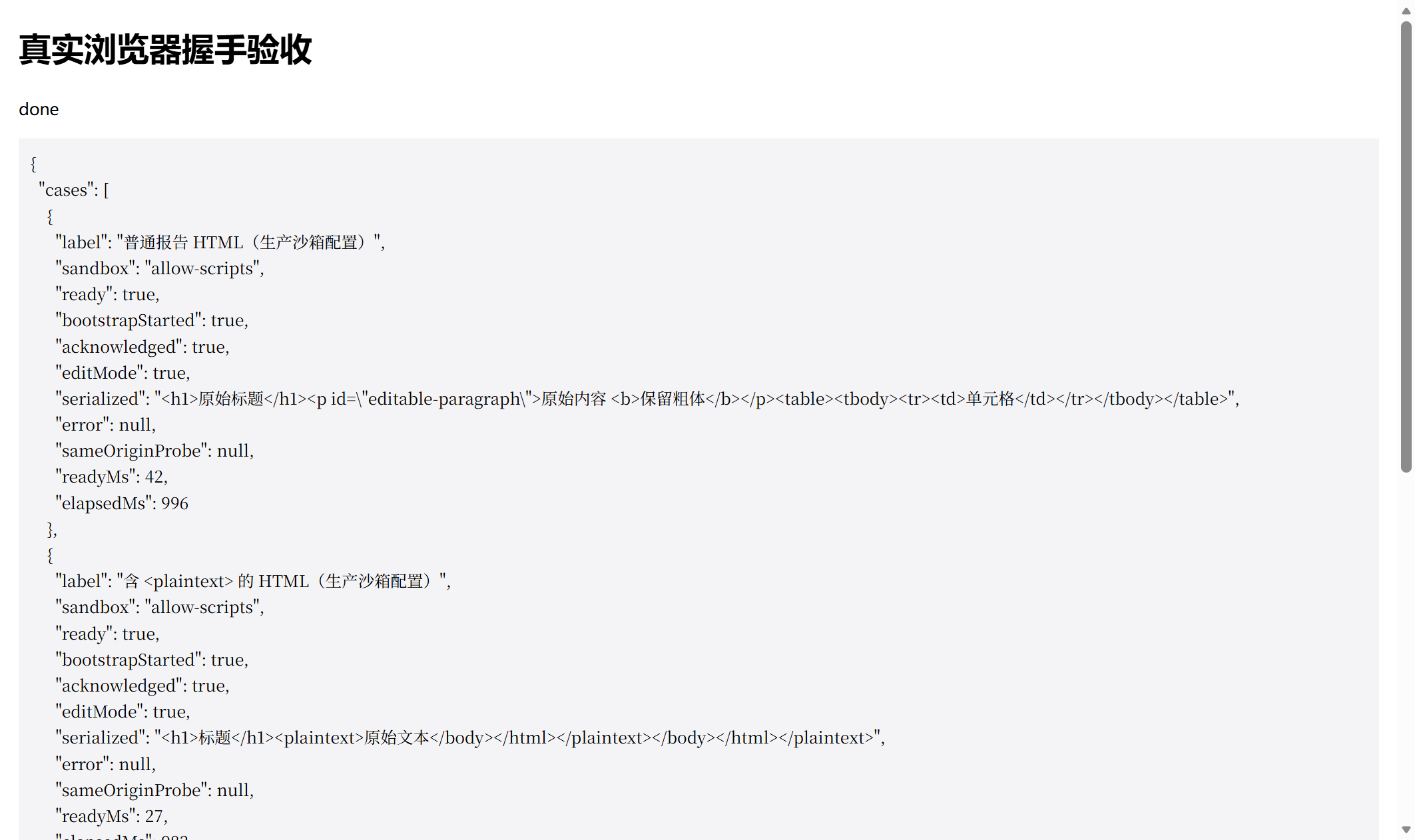
The browser acceptance harness lives in test/browser/:
node scripts/build-browser.mjs
node test/browser/server.mjs <workspace-root> 8977
# open http://127.0.0.1:8977/
It exercises the real handshake in Chromium: 0.1.1 reaches the ready state in under 50 ms, while 0.1.0 times out on every case — the regression that 0.1.1 fixes.
License
MIT — see LICENSE.
中文说明
在 DSH 右侧栏里直接编辑渲染后的 HTML 页面,而不是切换到源码视图。
当智能体生成一份 .html 报告时,DeepSeek Harness 默认按源码显示它。本插件为
dsh-better-sidebar 提供一个文件查看器:先把文档渲染成页面,再让你在页面上直接
改文字、改格式,改完写回同一个文件。
安装
本插件渲染在 DSH Better Sidebar 里,请先安装它:
dsh plugin --profile web add dsh-better-sidebar
dsh plugin --profile web add github:zimo-2233/dsh-html-visual-editor
安装直接来自本仓库;构建产物(lib/client.js)已随仓库提交,因此没有构建步骤,
也不需要批准任何安装期脚本。
需要 dsh-better-sidebar 0.28.0 或更新版本。若未安装,本插件保持静默,不会影响
宿主运行。除此之外不启动任何服务:没有本地服务器、没有浏览器扩展、不需要 API
Key,编辑过程也不联网。
使用
- 在右侧栏打开
.html/.htm文件,文档以页面形式渲染。 - 点侧栏顶部的**“编辑”**,页面即可直接编辑。
- 选中文字可加粗、斜体、下划线、改标题级别、字号、文字颜色、背景色、对齐、 列表与链接,撤销重做照常可用。
- 点顶部的保存图标,或在页面内按
Ctrl/Cmd+S。只有这一步会写回文件, 没有自动保存。 - **“预览”**会显示当前未保存草稿,不会丢失。
**回退方式:**在侧栏设置的文件查看器列表里关掉“HTML 可视化编辑”,或卸载本插件, 即可回到内置 HTML 查看器,不影响其他插件。
保存行为
对带显式 <body> 的完整 HTML,只替换 body 内部:原始 doctype、<head>
(含 CSS、link、script)、body 属性以及 </body> 之后的内容都逐字节保留。body 里的
script 标签会保留,但在编辑器中不执行。
安全
- 预览运行在
sandbox="allow-scripts"且不包含allow-same-origin的 iframe 中, 文档因此是不透明来源(opaque origin)。 - 原页面的脚本、事件处理器、表单、内嵌页面与主动连接全部被阻止,只有本插件带 nonce 的引导脚本可以运行。
- 父子页面通过单条
MessageChannel端口通信,并校验窗口来源、不透明来源与每次 加载随机生成的 token。 - 保存走侧栏已有的鉴权写接口,继承它的请求防护、文件策略、编码处理与 mtime 冲突 检查;文件被外部修改时会提示冲突,绝不静默覆盖。
- 你的 HTML 不写入
localStorage、不上传、也不发给任何 AI 服务。未保存草稿只存在 于当前会话内存中(最多五份)。 - 侧栏服务是延迟获取的:没装
dsh-better-sidebar时本插件保持静默,不会弄坏宿主。
限制
- 面向生成的静态报告、文章、作业 HTML,不是网页设计器:不提供拖拽布局、替换图片 与 AI 改写。
- 运行时生成 DOM 的页面(React/Vue 应用、图表交互)无法这样编辑,请用浏览器打开 原文件。
- body 会经浏览器重新序列化,缩进、引号风格等规范化细节可能变化,不承诺任意 HTML 字节级无损。
- 超过 5 MiB 的文档只读;没有可靠 mtime 时可编辑、可导出,但不能写盘。
- 宿主无法可靠拦截侧栏标签的关闭动作,关闭前请先导出草稿。
开发
npm install
node scripts/build.mjs
npm test
真实浏览器验收在 test/browser/:
node scripts/build-browser.mjs
node test/browser/server.mjs <工作区根目录> 8977
# 打开 http://127.0.0.1:8977/
它在真实 Chromium 里跑完整握手:0.1.1 在 50 ms 内进入就绪态,0.1.0 全部用例超时 ——这正是 0.1.1 修复的回归。
许可
MIT,见 LICENSE。
No comments yet. Be the first to write one.