dsh-ios-simulator-helper
English | 简体中文




A DeepSeek Harness (DSH) native port of the official ZCode ios-simulator@0.1.0 plugin: all 20 original MCP tools preserved as native DSH tools, plus a full settings page (Settings → iOS Simulator) that edits the simulator parameters in-app instead of through environment variables.
- Tool and argument names are identical to the original, so workflows written for the
ios_simulatorMCP server keep working; one tool is added —ios_shutdown_simulator, because the original could boot a simulator but never stop one. - 17 settings fields in 5 groups, all live-editable; an empty field falls back to the original plugin's
IOS_SIM_*variable, then to the built-in default. - The settings page detects the host system and, on a non-macOS host, states that this plugin only supports macOS; every tool that drives Apple tooling then refuses with a clear message instead of failing with
spawn xcrun ENOENT, whileios_preflightreports the failing host check andios_discover_project,ios_create_appandios_ui_statusstill answer. - Published as
@zhz8888/dsh-ios-simulator-helper; the plugin page shows iOS Simulator Helper / iOS 模拟器助手 fromlocale/rather than the raw package name, and both descriptions say the plugin is unofficial and not affiliated with Apple.
Quick start
On a Mac with full Xcode, at least one iOS runtime and DSH installed:
Install the plugin
dsh plugin --profile <profile> add @zhz8888/dsh-ios-simulator-helperIn DSH Desktop, open Plugins and add the same package name there. Reload or restart DSH afterwards.
Check the machine — open Settings → iOS Simulator and press Run diagnostic. It runs exactly the checks
ios_preflightruns (full Xcode, a simulator runtime,idb), and prints a fix for anything missing.Use it — ask for what you want ("build and run this project on the iPhone 16 simulator", "screenshot the running app"), or call the 21
ios_*tools directly. Everything the tools need is editable on that settings page.
Contents
- Quick start
- Requirements
- Install
- Settings page
- Screenshots
- Tools
- Skill and slash command
- Differences from the original
- Known limitations
- Releases
- Contributing
- License
Requirements
| Dependency | Notes |
|---|---|
| macOS | The only supported host. xcrun simctl, xcodebuild and the simulator window app exist nowhere else. |
| Full Xcode | xcode-select -p must point at Xcode.app/Contents/Developer; Command Line Tools alone are not enough. |
| An iOS Simulator runtime | At least one iOS/iPadOS runtime installed from Xcode → Settings → Platforms. |
| Node.js ≥ 22 | The DSH host runtime. |
idb (optional) |
Needed only by the ios_ui_* tools. Without it, build/run/screenshot/logs are unaffected. |
ios_preflight checks every item above and prints a fix for each failure; the settings page's "Run diagnostic" button runs the same checks.
Install
dsh plugin --profile <profile> add @zhz8888/dsh-ios-simulator-helper
DSH Desktop: the desktop profile belongs to the Electron app — open Plugins, add @zhz8888/dsh-ios-simulator-helper there, and enable the row it creates. After a reload or restart the page is at Settings → iOS Simulator; it only appears while the host half actually serves this plugin's settings namespace.
The published tarball contains everything the plugin needs — the host half, the browser bundle, the bundled skill and the locale/ entries — and nothing is compiled at install time, so no build approval step is involved. @deepseek-ai/cordis, @deepseek-ai/dsh-tools and @deepseek-ai/schemastery are peer dependencies provided by the harness, so the plugin pulls in no second copy and has no runtime dependencies of its own; DSH's compatibility gate compares the @deepseek-ai/dsh* peer ranges against the running version and refuses to install on a mismatch.
Mount the package exactly once.
dsh plugin addrecords the row indsh.profile.bundles; adding a second row for the same package in the profile's owncordis.patch.ymlregisters every tool name twice and fails at the loader.
Upgrade and uninstall
dsh plugin --profile <profile> add @zhz8888/dsh-ios-simulator-helper@latest   # upgrade
dsh plugin --profile <profile> remove @zhz8888/dsh-ios-simulator-helper      # uninstall
Settings live in the profile, not in the package, so both commands leave them in place. The data directory (by default $DSH_HOME/ios-simulator-helper) holds screenshots, build logs and DerivedData; it is yours to delete, and uninstalling does not touch it.
Version gate
The DSH compatibility range is >=0.2.0-rc.2, a lower bound only, declared identically in peerDependencies, engines.dsh and dsh.compatibility.dsh: a runtime below it is refused at install time, and no future harness release is excluded.
One node-semver detail survives — a new tuple's prerelease such as 0.2.1-alpha.1 is not admitted by npm's and pnpm's default rules, so that install fails until either the range gains a branch for the tuple (">=0.2.0-rc.2 <0.2.1-0 || >=0.2.1-0") or the peer check is skipped:
dsh plugin --profile <profile> add @zhz8888/dsh-ios-simulator-helper \
  --config.strict-peer-dependencies=false
Stable releases (0.2.0, 0.2.1, 0.3.0, 1.0.0, …) are unaffected and always admitted.
Settings page
The settings namespace equals the profile patch row id equals ios-simulator-helper (also dsh.name). The page reads and writes through ctx.configForms, so staged edits, dirty detection, inline validation, optimistic concurrency (revisions) and "overridden / reset to default" all come from the harness. It is one card per category, built from the same field kit as the built-in settings pages (@deepseek-ai/dsh-client-ui-primitives); the three timeouts are entered in whole seconds, while the legacy IOS_SIM_*_MS variables are still read in milliseconds and converted.
Saving happens in a pill that sticks to the bottom of the page: it appears while edits are staged (or a write is in flight, or one failed), names that state next to a status dot, and carries Discard changes and Save (disabled while a draft is invalid). A draft that merely puts a control back to the value already in effect counts as no edit at all, a confirmation toast reports a write that landed, and leaving the page discards staged edits.
| Group | Field | Type | Default | Legacy env fallback | Notes |
|---|---|---|---|---|---|
| Simulator and device | defaultDevice |
text (suggestions from this machine) | iPhone 16 |
IOS_SIM_DEFAULT_DEVICE |
Device-name fragment used when a tool names no udid/device; falls back to the first available iPhone on a miss. |
defaultRuntime |
text (suggestions from installed runtimes) | empty | IOS_SIM_DEFAULT_RUNTIME |
Runtime fragment such as iOS-27; empty matches any. A preference, not a requirement: a stale value widens the pool instead of erroring. |
|
autoBootSimulator |
switch | on | IOS_SIM_AUTO_BOOT |
When off, tools fail instead of running simctl boot for a stopped target. |
|
autoOpenSimulator |
switch | on | IOS_SIM_AUTO_OPEN |
Matches the original by opening the Simulator window (boot / show / open URL / build and run); off keeps everything headless. | |
bootTimeoutSeconds |
integer | 120 |
IOS_SIM_BOOT_TIMEOUT_MS (ms) |
Longest wait for one simctl boot / bootstatus, in seconds. The legacy variable keeps its millisecond spelling and is converted. |
|
| UI automation | uiBackend |
select | auto |
IOS_SIM_UI_BACKEND |
auto probes for idb; idb requires it; none disables the UI tools; xcodebuildmcp is reserved. |
idbBinary |
text | idb |
IOS_SIM_IDB_BINARY |
Command name or absolute path of idb. |
|
uiTimeoutSeconds |
integer | 60 |
IOS_SIM_UI_TIMEOUT_MS (ms) |
Longest runtime of one idb UI command, in seconds; the legacy variable is milliseconds. |
|
| Build and DerivedData | defaultConfiguration |
text | Debug |
IOS_SIM_CONFIGURATION |
Used when a tool names no configuration. |
buildTimeoutSeconds |
integer | 600 |
IOS_SIM_BUILD_TIMEOUT_MS (ms) |
Longest runtime of one xcodebuild build, in seconds; the legacy variable is milliseconds. |
|
extraBuildArgs |
multiline | empty | IOS_SIM_EXTRA_BUILD_ARGS |
One argument per line, # starts a comment; inserted after -derivedDataPath and before build. |
|
derivedDataDir |
text | empty | IOS_SIM_DERIVED_DATA_DIR |
Empty uses <data dir>/DerivedData/<project fingerprint>. |
|
disableCodeSigning |
switch | on | IOS_SIM_DISABLE_CODE_SIGNING |
The original always passed CODE_SIGNING_ALLOWED=NO; off lets Xcode decide. |
|
| Logs | logSeconds |
integer | 120 |
IOS_SIM_LOG_SECONDS |
Recent seconds ios_logs reads when the call names no window; capped at 3600. |
logLimit |
integer | 20000 |
IOS_SIM_LOG_LIMIT |
Largest rendered log ios_logs returns when the call names no limit. |
|
| Output directories | dataDir |
text | empty | IOS_SIM_PLUGIN_DATA |
Root for screenshots, build logs and DerivedData; empty uses $DSH_HOME/ios-simulator-helper, then ~/.dsh/ios-simulator-helper. |
screenshotDir |
text | empty | IOS_SIM_SCREENSHOT_DIR |
Empty uses <data dir>/screenshots. |
Below the form sit the host check and three buttons:
- Host system — decided twice: synchronously from the browser's own platform string (so a non-macOS browser sees the notice on first paint, before any request), then authoritatively from the host half's
GET /api/ios-simulator-helper/host; the host wins on a conflict. When the host is unsupported — or the host never answered and the browser itself is non-macOS — a red notice titled "This plugin only supports macOS" appears above the form and names the detected platform. - Run diagnostic →
GET /api/ios-simulator-helper/status, the same checksios_preflightruns, listed one by one with status, detail and fix. - Refresh simulators and runtimes →
GET /api/ios-simulator-helper/inventory, which discovers the Xcode path and version, the macOS version, simulators, runtimes and the resolved default target, to fill the fields' suggestion lists.
Legacy configuration
The original plugin's userConfig (default_device, ui_backend) and its environment variables IOS_SIM_DEFAULT_DEVICE, IOS_SIM_UI_BACKEND and IOS_SIM_PLUGIN_DATA still work as fallbacks (last column above), so an existing ZCode or CI setup needs no change. The original's IOS_SIM_PACKAGE_ROOT only located the plugin for its own MCP launcher; DSH resolves the package path directly and does not need it.
Screenshots
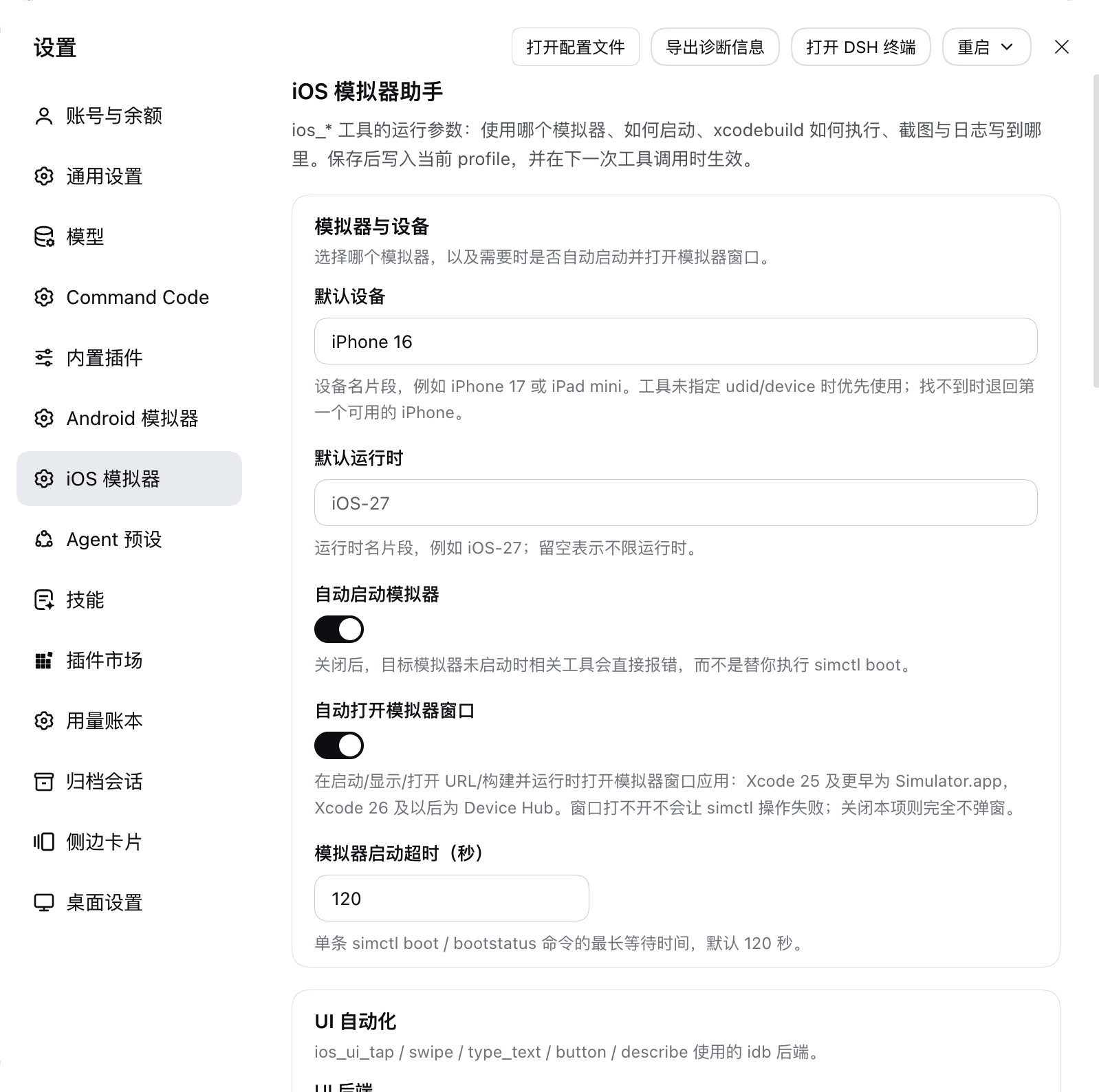
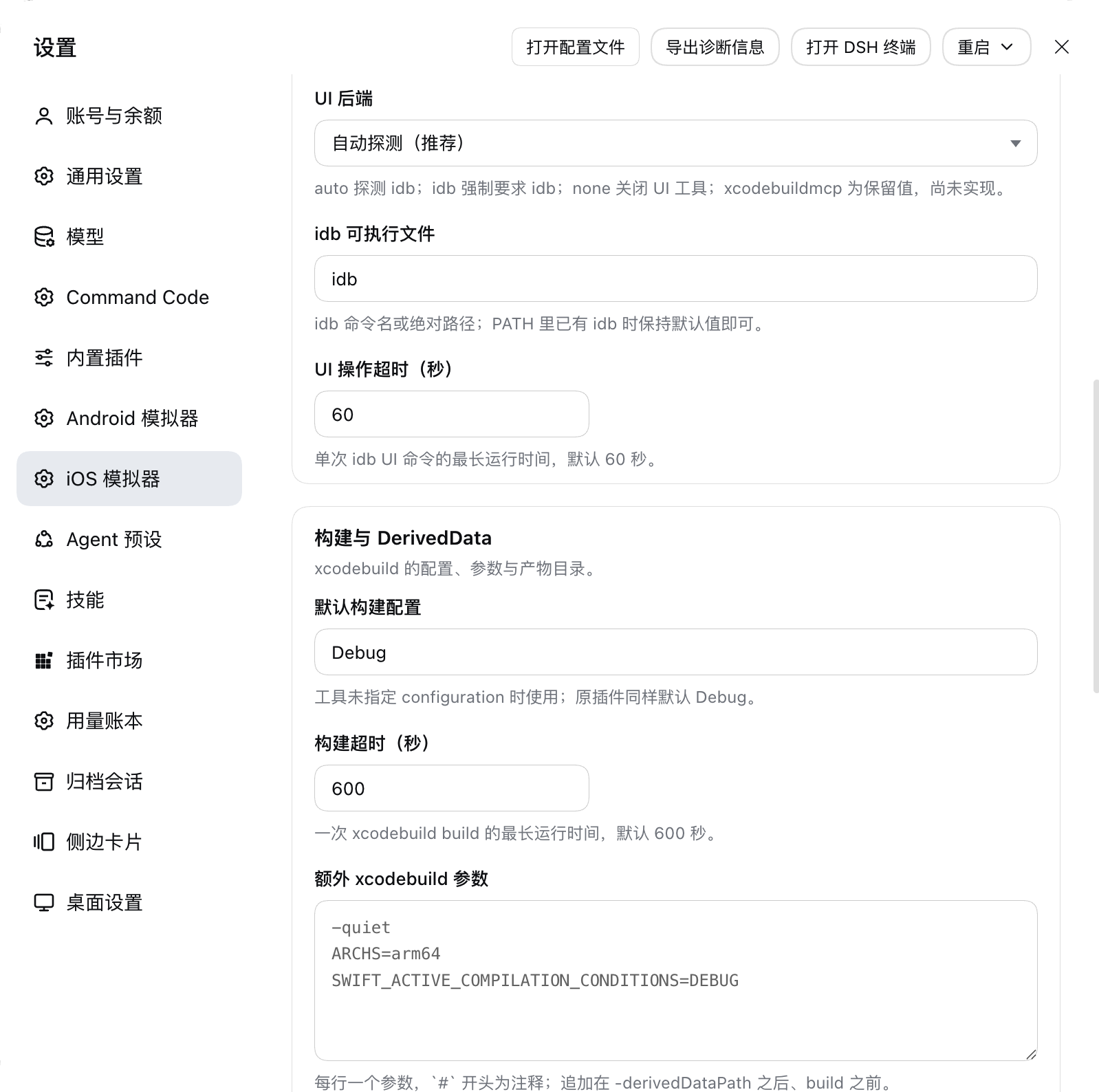
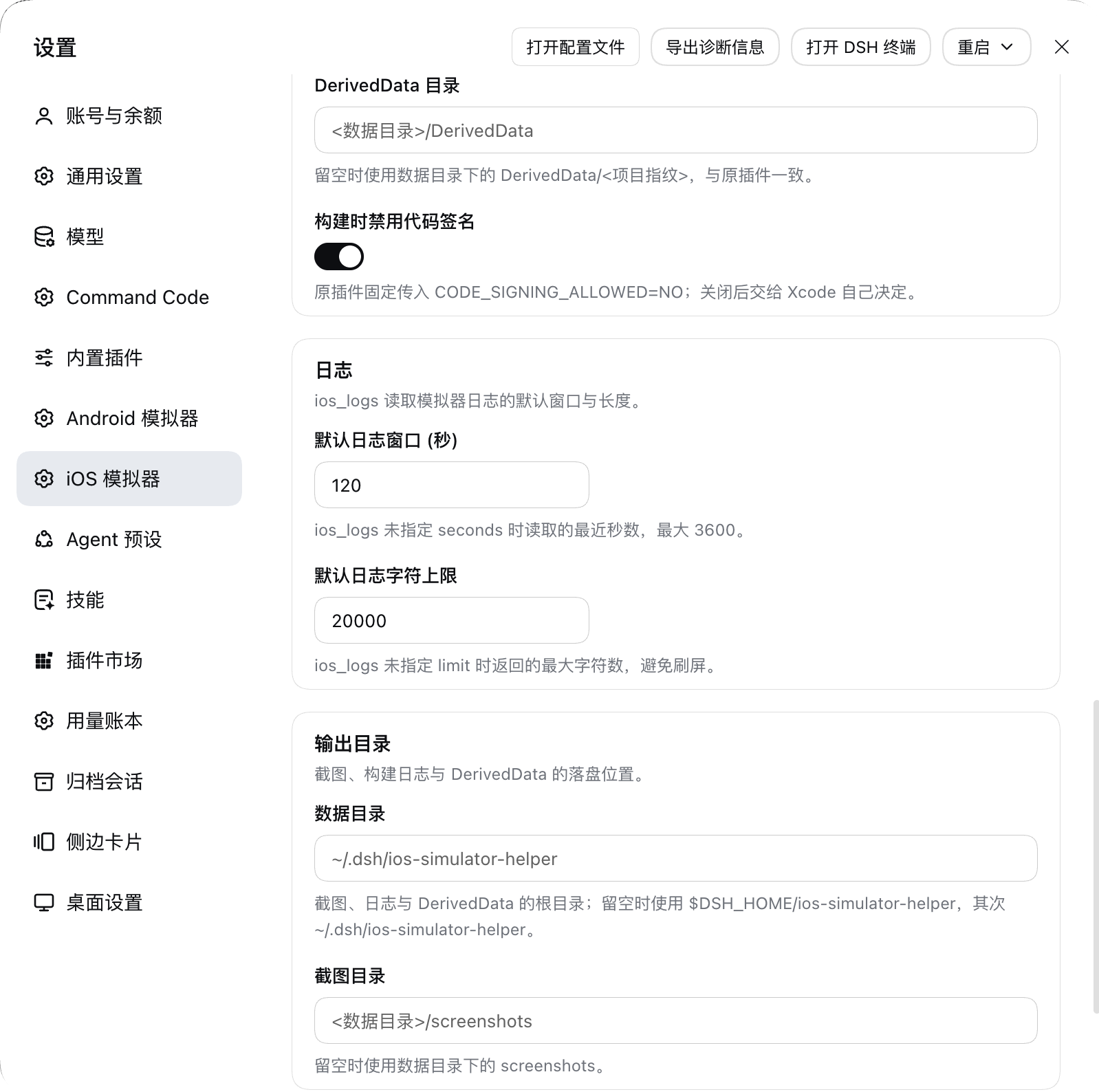
All four are the live page in DSH Desktop, in the order you scroll it — nothing is mocked up. They show the 1.1.0 card layout and the timeouts in whole seconds; the save bar only appears while an edit is staged, so it is not in these shots. The window ran the Chinese locale, so the section headings are Chinese while every field name is the same in both languages.
1. Simulator and device — the fields every ios_* call reads:
2. UI automation and builds — the idb backend and its timeout, then the xcodebuild configuration, build timeout and extra arguments:
3. Build tail and logs — the DerivedData directory and the code-signing switch, then the ios_logs window and character limit, and the start of the output directories:
4. Output directories and the host check — where screenshots, logs and DerivedData land, then the macOS verdict with the two detection buttons:
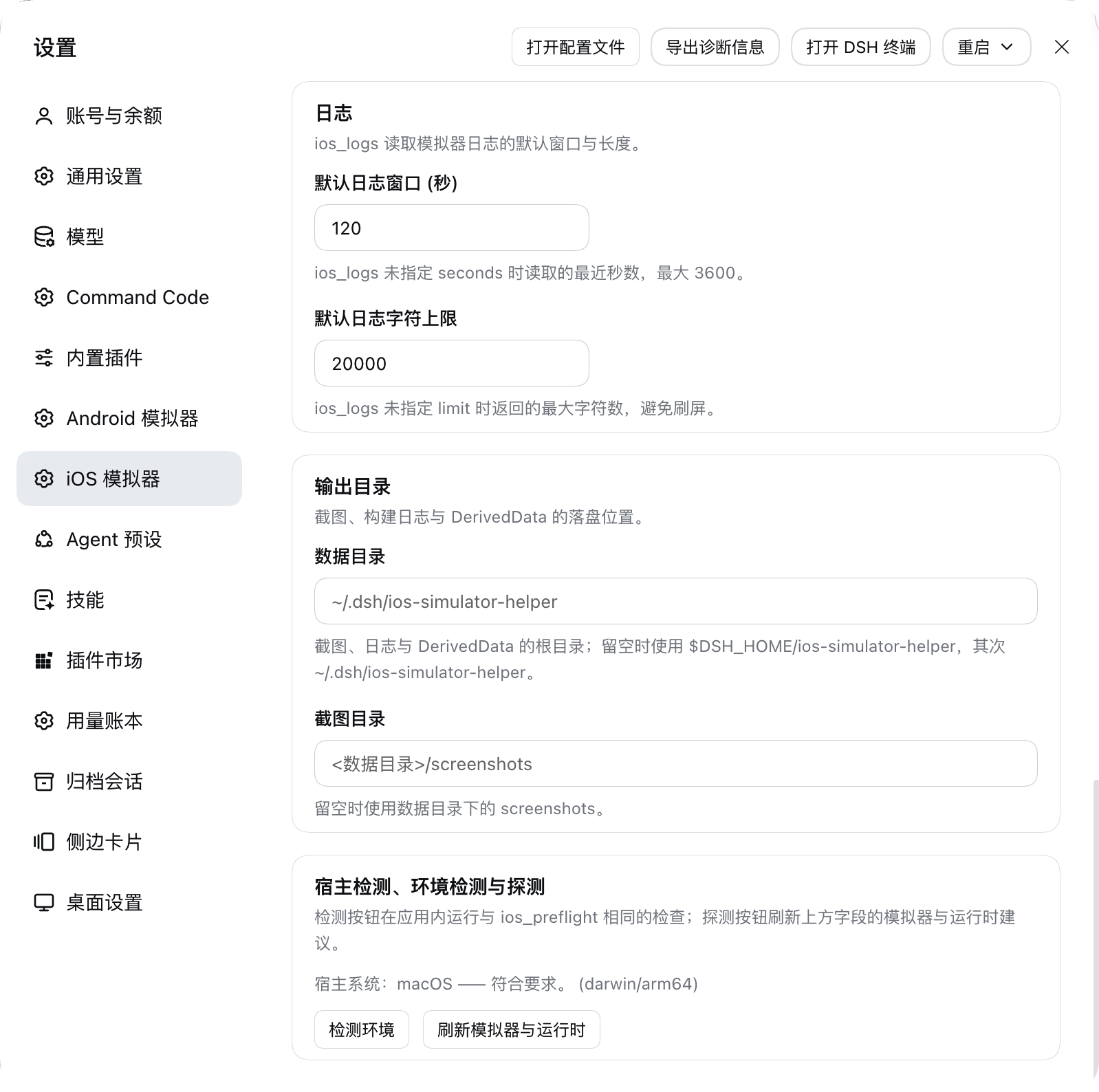
screenshots.json lists these four files in this order next to package.json in the repository, which is how a plugin market finds them.
Tools
21 tools: the original 20 with identical names and arguments, plus one addition.
| Tool | Purpose |
|---|---|
ios_preflight |
Check the host (macOS), Xcode, xcodebuild, simctl, runtimes, simulators and the UI backend, and echo the current settings. |
ios_list_simulators |
List iOS/iPadOS simulators and installed runtimes. |
ios_boot_simulator |
Boot the selected simulator, optionally opening the Simulator window. |
ios_show_simulator |
Open the simulator window app — Simulator.app on Xcode 25 and earlier, Device Hub on Xcode 26 and later — optionally focused on one UDID. |
ios_shutdown_simulator |
Added: shut the selected simulator down (simctl shutdown); already-stopped is a success, not an error. |
ios_discover_project |
Find .xcodeproj/.xcworkspace, schemes and bundle ids. |
ios_create_app |
Generate a minimal SwiftUI project (refuses to overwrite generated files by default). |
ios_build_app |
Build the iOS Simulator product with xcodebuild. |
ios_build_and_run |
Build → install → launch → show. |
ios_install_app |
Install a .app on the selected simulator (absolute paths allowed). |
ios_launch_app |
Launch by bundle id. |
ios_terminate_app |
Terminate by bundle id. |
ios_open_url |
Open a URL in the simulator. |
ios_screenshot |
Capture a PNG to disk, and return it as an image when the model accepts image input. |
ios_logs |
Read log show output, optionally filtered by bundle id. |
ios_ui_status |
Report UI-automation availability and the backend the settings selected. |
ios_ui_tap / ios_ui_swipe / ios_ui_type_text / ios_ui_button / ios_ui_describe |
idb-backed tap / swipe / typing / hardware button / accessibility tree. |
Two behaviours deserve their own note:
ios_screenshotalways writes the PNG to disk (under<data dir>/screenshots/by default) and additionally submits it to the host's attachment service for a canonical image block. When the current model declares no image input, or the deployment stores no attachments, the result degrades to text plus the file path instead of failing the call.ios_build_and_runresolves the bundle id in four steps — a fix over the original, which askedxcodebuild -showBuildSettingsalone and, in a restricted environment, silently returnedundefinedafter a successful build: explicitbundleIdargument →CFBundleIdentifierof the.appthat was just built (read withplutil, i.e. the value simctl installs) →-showBuildSettingswith the same-derivedDataPath→ identifiers found inproject.pbxproj. The winner is reported asbundleIdSource.
Skill and slash command
ios-devskill — shipped inskills/ios-dev/and registered by the host half throughctx.skills.register()as an embedded skill with the skill directory as itsresourceBase. Rewritten for DSH: nomcp__…prefix, environment configuration points at the settings page, and the macOS precondition plus the "shut the simulator down when you are done" step are spelled out./ios-dev [goal]command — registered throughctx.commands.register(). DSH user commands deliberately never create a model message, so this command does the one thing that is useful without the model: it runs the environment diagnostic and prints the verdict, the failing checks and their fixes.
Differences from the original
| Aspect | Original (ZCode) | This plugin (DSH) |
|---|---|---|
| Tool exposure | stdio MCP server ios-simulator; the model sees mcp__ios_simulator__* |
Native ctx.tools.register(); the model sees ios_* |
| User configuration | plugin.json userConfig (2 items), injected as environment variables |
Settings page with 17 fields on a schemastery Config, all .volatile(); the old environment variables remain as fallbacks |
| Host check | process.platform read once, inside ios_preflight |
Centralised requireMacOS() in front of every Apple-tooling call, plus the settings page's synchronous and authoritative verdicts |
| Working directory | process.cwd() |
exec.agent.session.header.cwd (the session workspace) |
| Data directory | IOS_SIM_PLUGIN_DATA / temp |
$DSH_HOME/ios-simulator-helper, configurable on the settings page |
| Path safety | inside(cwd, path) refuses escapes |
Same semantics, split into read-only paths (an absolute .app is fine) and write targets (must stay inside the session workspace) |
| Screenshot result | MCP image content (base64) | An image block built from a host attachment reference, degraded to text plus a disk path on refusal |
| Result normalisation | Providers return objects containing undefined |
Every tool result passes through toLosslessJson() (the registry rejects undefined) |
| Slash command | Injects a prompt into the model's conversation | Runs the diagnostic and prints the verdict |
| Process invocation | node:child_process spawn |
Unchanged |
Known limitations
- macOS only. On any other host
ios_preflightfails theHost OS (macOS)check and skips the remaining probes instead of producing meaningless spawn failures; every tool that drives Apple tooling refuses,ios_discover_project,ios_create_appandios_ui_statusstill answer, and the settings page keeps the notice at the top. ios_ui_*needsidb;ios_ui_statusexplains what is missing.xcodebuildmcpis only a reserved value (matching the original'sreservedBackends) and is not implemented.- The original's
ios_build_and_runalways opened the Simulator window; here that is theautoOpenSimulatorsetting (on by default, so behaviour matches).ios_build_appandios_screenshotstill do not open windows, as in the original. The window app is Simulator.app on Xcode 25 and earlier and Device Hub on Xcode 26 and later; a window that cannot be opened is reported in the result (opened: falseplusopenWarning) and never fails thesimctlsteps. ios_logsreadslog show(no live stream), with a configurable and clamped window and length.- Swift macros (
@State,#Preview) needswift-plugin-server, which cannot start its nestedsandbox-execwhen the caller is itself sandboxed.ios_build_appthen retries the build once withOTHER_SWIFT_FLAGS=-disable-sandboxand reportsmacroSandboxRetry: true; a caller that was never sandboxed never sees a retry. - The generated project template is byte-for-byte the original's (an Xcode 14-compatible
project.pbxproj,objectVersion = 56) and does not track newer Xcode templates. - The settings page has only been checked by eye in DSH Desktop: the plugin is installed into the
desktopprofile, and the four shots inassets/are the latest manual pass, top to bottom. Dark theme, narrow-width wrapping and the non-macOS notice are still covered by the render tests, not by eye. - No credential handling: the plugin never reads or forwards key/token/secret environment variables.
Releases
Every release is one commit in two places: tagged vX.Y.Z on main and published to npm from that tag, whose SHA npm records as gitHead. The list is at Releases — v1.1.2 is the latest, dated 2026-10-19, after v1.1.1, v1.1.0 and v1.0.0, all three dated 2026-10-17.
Contributing
Issues and pull requests are welcome at github.com/zhz8888/dsh-ios-simulator-helper. Every change has to keep pnpm check green — unit tests, a host/client consistency gate and a mount on a real Cordis host — and there is no CLA or form to fill in: a focused pull request that says what it changes and why is enough.
The package is shaped for the awesome-dsh-plugin market. Development conventions — commands, invariants, testing, commit and release rules — live in AGENTS.md.
License
MIT, copyright (c) 2026 zhz8888. Tool definitions, provider logic and the generated SwiftUI project template are ported from the ZCode official ios-simulator plugin, distributed under the MIT License by Z.ai; the template sources are kept verbatim. See the attribution at the end of LICENSE.
No comments yet. Be the first to write one.