@zhengjunyao/dsh-updater
English | 中文
Track DeepSeek Harness's own releases and update it in one click. It follows the npm
dist-tags (latest / next / alpha) and the GitHub releases (tag dsh-v*, bilingual
bodies), shows the changelog of every version between the running build and the target
plus a graded risk report, then hands the install to a detached helper: move the current
install aside with mv → npm install --prefix <prefix> → verify what landed → relaunch
with the exact same command → roll back automatically when the new build does not boot.
Why
DSH ships often (there are several 0.1.x-rc.x channels) and dsh has no self-update of
its own.
- After
npm i -g @deepseek-ai/dshyou still have to restart it yourself, and the restart command has to be exactly the one it was started with (port, profile, cwd and node path may all have changed). - A machine can hold more than one DSH install. The one identified from
process.argv[1], the first one onPATH, and the onenpm config get prefixpoints at can be three different directories — a naivenpm i -gupdates the last of them and changes nothing. - npm publishes frequently, but only GitHub releases say what changed, and a version on npm does not necessarily have a release (and vice versa: a version released only on GitHub cannot be installed at all).
This plugin chains "see the version → read the changelog → grade the risk → install → verify → restart → roll back on failure" and makes the install that is actually running the only update target.
Four capabilities
1. Track the latest version
- Three channels: the npm dist-tags
latest/next/alpha, selected bychannel. - Background checks:
checkIntervalMinutes(default 180, 0 disables) pluscheckOnBoot(one check 8s after boot). Their point is not to nag but to keep the cached registry / release snapshots warm, so opening the panel or asking the agent answers instantly instead of waiting on two networks. - Cache: results younger than
cacheTtlMinutes(default 30) are reused, stored incache/registry.jsonandcache/releases.json;forcebypasses the cache. - Upstream failures are never fatal: when registry or GitHub cannot be reached, the last good answer is reused with a warning saying it may be stale — "cannot reach GitHub" is never displayed as "no update available".
- A missing or lagging dist-tag falls back down the channel ladder: with no
next/alphatag, the newest prerelease at or abovelatestis offered instead of silently reporting "no update". - The panel also shows
newerElsewhere: whether a newer version exists outside the current channel.
2. Show what changed
- Which versions exist comes from npm (what can be installed); what changed comes from GitHub releases (the changelog).
- The notes cover every published version in the half-open interval
(current, target], not just a diff — runninglatestusually jumps several publishes. - Each version is rendered as sections taken from the release body's
<h3>/#headings. The bodies are bilingual (Chinese section,---, English section): the Chinese half is preferred and the English half is the fallback. - A version with no matching release is explicitly marked "no release notes found for this
version" (
notesMissing) rather than pretending nothing changed. - Versions released on GitHub but absent from npm are excluded from the selectable
targets (
installMissing) with an explanation. - Unauthenticated GitHub is limited to 60 requests/hour;
githubTokenraises it, and the panel shows the remaining budget and reset time.
3. One-click update
The entry point is the DSH-update settings card, the sidebar entry, or the dsh_update
tool. The install itself belongs to the detached helper helper/update-helper.mjs, because
a process cannot safely replace the code it is running:
- the host writes
pending-spec.json, spawns the detached helper, answers 202, and only then exits; - the helper waits for the old host to release its port (SIGKILLing it as a backstop);
- it moves the current install aside with
mv(rename) — not a copy of 30 000 files. A same-directory rename is instant and atomic, so rollback never depends on free space; npm install -g --prefix <running prefix> --registry <registry> --no-audit --no-fund @deepseek-ai/dsh@<version>(--prefixis always explicit, nevernpm config get prefix), with npm's output streamed into the log;- it verifies what landed: the
package.jsonversion must equal the target, the entry script<root>/lib/bin.jsmust exist, andnode_modules/@deepseek-aimust be populated (npm can exit 0 and still leave a half-written tree); - it relaunches with the exact same invocation (
process.execArgv+argv[1:]+ the original cwd and executable), sodsh web --port 3080, a custom profile and custom paths survive unchanged; - a failed boot renames the backup back and relaunches the old version;
- a recovery console is available throughout (default
http://127.0.0.1:3098, trying +1…+9 when busy).
4. Update risk report
The version number alone cannot answer "should I press this button?". The risk engine turns what is known about the target, this machine's install topology, the loaded plugins' contracts and the feasibility of the attempt into one ordered list, in three levels:
high— do not do this blindly; blocks the one-click path until acknowledged;warn— read this first;info— context.
Every check below comes from the source, not from guesswork:
| Finding | What it checks | Level |
|---|---|---|
prerelease |
The target carries a prerelease tag (rc / alpha / beta). Raised to high when the latest channel offers a prerelease |
warn / high |
breaking |
Scans the notes for breaking-change wording (BREAKING, 不兼容, 破坏性, 重大变更, 不再支持, 已移除, 移除了, 废弃, 已弃用, 必须升级, 需要手动, 要迁移, 升级指南, deprecat, backwards-incompatib, …) |
high when it hits; otherwise an info saying none was found |
migration |
Notes mentioning migration or renames (migrat, 迁移, 改为, 改名, 重命名, rename) |
warn |
version-jump / version-gap |
How far apart the versions are: ≥2 minors or a major change is warn (when ≥4 minors or a major change), a small gap is info |
warn / info |
notes-missing |
Some version in the interval exists on npm without a GitHub release; its changes are unknown | warn |
not-on-npm |
Some version in the interval is on GitHub but not on npm, so it cannot be installed; excluded from the targets | info |
install-unknown |
process.argv[1] does not resolve to an install root, so the update does not know which directory to replace |
high |
multi-install |
The machine has several DSH installs: explains that only the running one is updated, lists the others, and says plainly that if the PATH winner differs, a manual dsh after the update may start the old copy again |
high |
path-mismatch |
Only one install, but the PATH winner still differs from the running one |
warn |
prefix-drift |
npm config get prefix differs from the running install's prefix (a bare npm i -g targets the former) |
info |
preflight:* |
Every preflight result folded in (see below) | per check |
plugin-incompatible |
Whether each installed plugin's declared dsh.engines.dsh range covers the target; when it does not, the note warns that a bundle load failure takes the whole plugin tree down |
high when a plugin is incompatible; otherwise an info summary (including how many declare no range) |
backup |
Whether a pre-update backup will be taken; with backups off it states that npm leaves a half-installed tree and nothing can recover it | info / warn |
session-interrupt |
The update interrupts the current session, and whether automatic rollback is on | info |
Preflight checks (preflight, all from src/installs.ts, returned whether they pass or not):
| Check | Passes when | Level when it fails |
|---|---|---|
target |
A target version was resolved from the npm registry | high |
install-root |
The @deepseek-ai/dsh package root was resolved from process.argv[1] |
high |
install-writable |
The current user may write into the install root (and its prefix); no sudo needed | high |
install-complete |
node_modules/@deepseek-ai under the root has entries (otherwise the install looks broken: the update repairs it, but the rollback point is that broken state too) |
warn |
npm |
npm is on PATH |
high |
prefix |
The npm prefix can be derived from the install root (<prefix>/lib/node_modules layout) |
warn |
node |
Node major version ≥ 20 (@deepseek-ai/dsh declares no engines field, so npm will not stop a too-old runtime — the floor is imposed here); skipped when the major cannot be parsed |
high |
tarball |
A HEAD on the target's dist.tarball succeeds (a mirror/network hiccup is only a warn; an explicit 404 is high) |
warn / high |
disk |
At least 2 GB free (a new install, an equal-sized backup of the old one, and npm's own download copy); skipped when the filesystem reports nothing | high |
Grading and gating:
levelis the worst level present;scoreis a 0–100 weighted total (45 perhigh, 12 perwarn, 2 perinfo, capped at 100) that drives the panel's meter.vetted: falsemeans ahighfinding still stands — the update has not been vetted.confirmOnsets the one-click gate:high(default) blocks onlyhigh;warnalso blockswarn;neverdisables the gate entirely (the report is still shown).- When blocked, the HTTP route answers 428 (panel) and the tool returns
requiresRiskConfirmation: true(agent) along with the top reasons; retry withconfirmRisk: trueonce acknowledged. - The check is re-run at the moment the update is requested: the report the user acknowledged must be the report for what is about to happen.
Install
# from GitHub (the repo carries the dsh-plugin topic)
dsh plugin --profile web add github:zhengjy01/dsh-updater

# local development: link or file
dsh plugin --profile web add link:/path/to/dsh-updater
dsh plugin --profile web add file:/path/to/dsh-updater

# once published to npm
dsh plugin --profile web add @zhengjunyao/dsh-updater
A dsh web restart is required before the host half loads.
Where it lives in the GUI
- A settings card (
settings.section): running version and the directory it is actually loaded from, how many installs this machine has, the target version per channel, the changelog, the risk report, the one-click update button, history, the last failure report and the plugin settings. - A sidebar entry, controlled by
entry:sidebar(default, inline in the sidebar),ball(a fixed corner ball),both, oroff(no entry at all). - While an update runs, a full-screen overlay is shown (
showOverlay, default on) and the page reloads itself once the new host answers (autoReload, default on).
The sidebar tooltip / aria-label and the overlay titles use the same update wording, matching
the description above (settings.section, id updater, order 339).
Screenshots
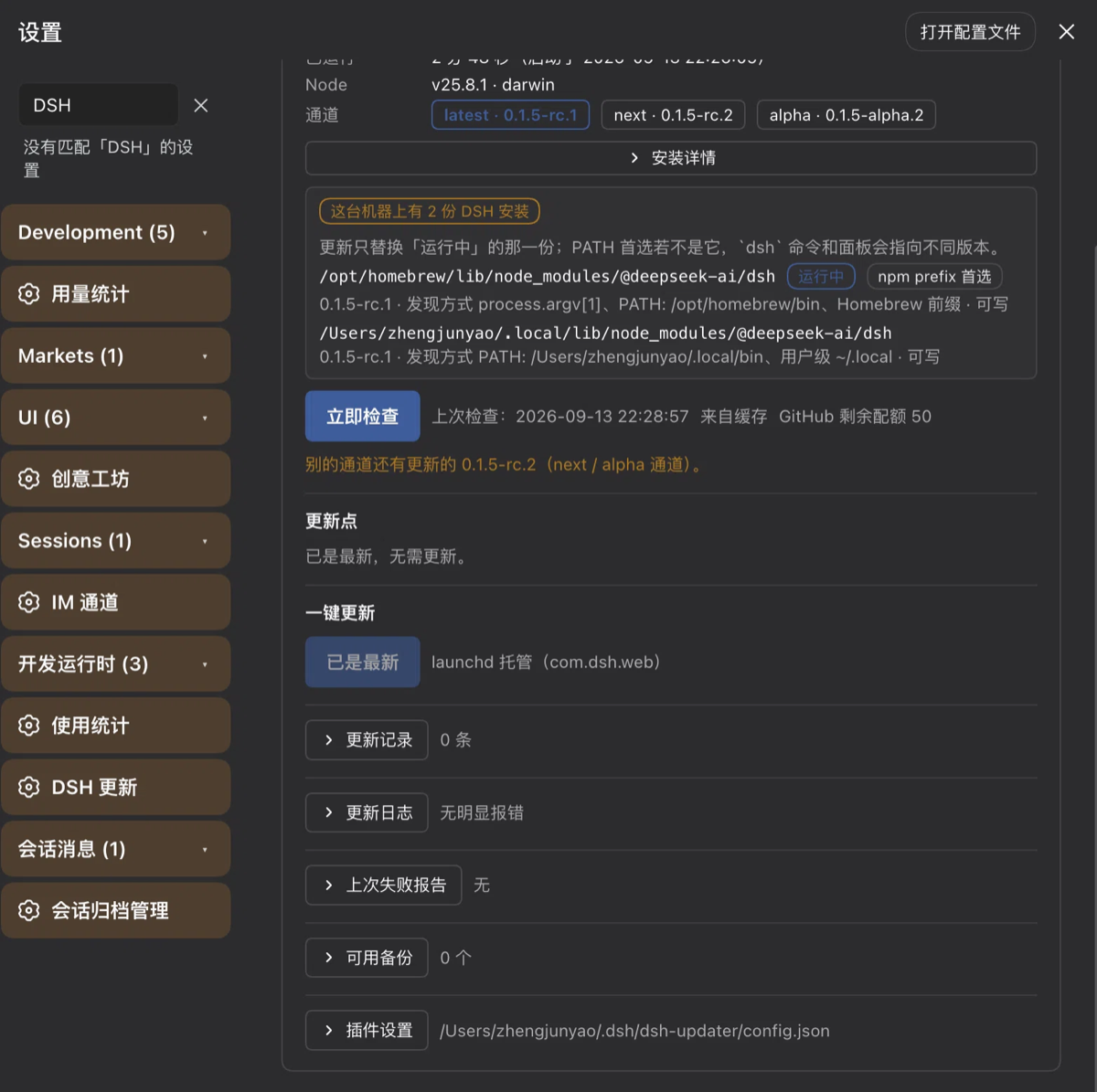
Three screenshots from a real machine (macOS, DSH 0.1.5-rc.1, window about 800px wide).
Click any of them for full size.
1. The default latest channel: already up to date
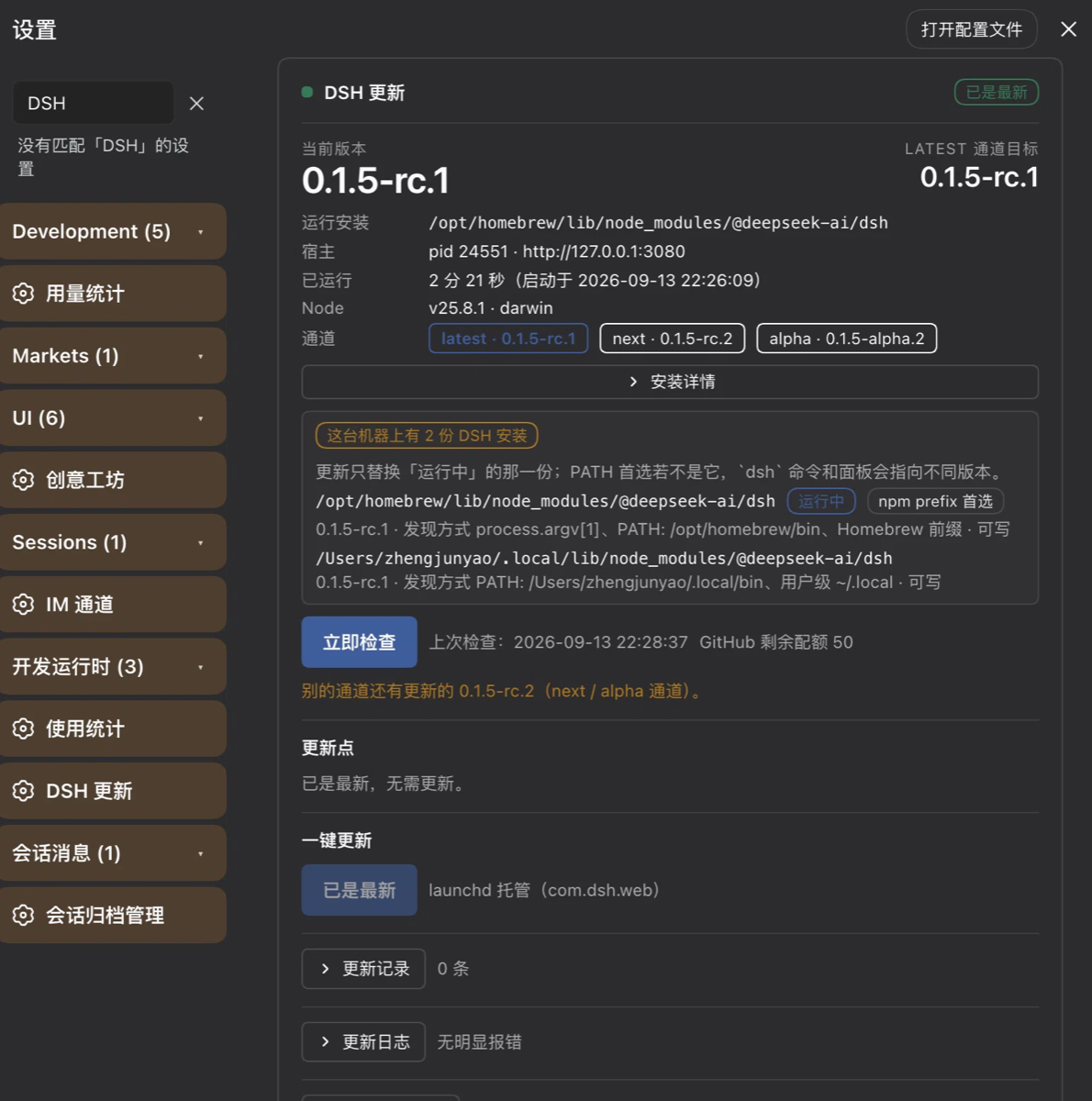
Note the amber install diagnostics block. Under latest there is nothing to update, and it
is shown anyway — because "this machine has two installs and PATH does not agree with the
running one" has nothing to do with whether an update exists. That is this machine's real
state, not demo data.
2. The collapsible sections: history, log, failure report, backups, plugin settings
3. Switched to next: an available version with its changelog
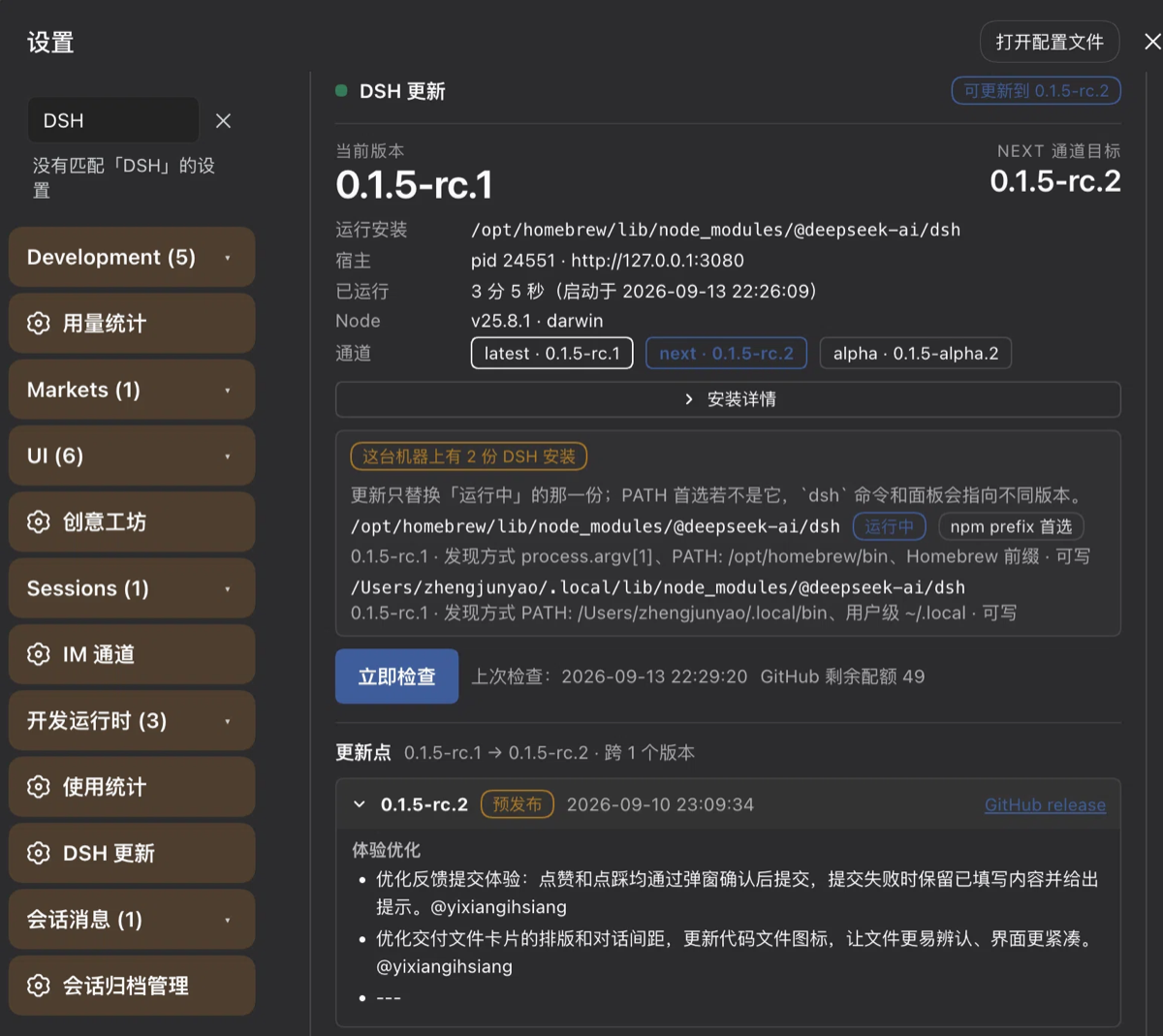
The badge goes from "already up to date" to "0.1.5-rc.2 available", the target version in the
header follows the channel, and the changelog expands as 0.1.5-rc.1 → 0.1.5-rc.2 · 1 version:
one collapsible block per version, with a prerelease badge, publish date and a GitHub release
link, and the body grouped under headings such as 体验优化.
HTTP routes
All registered under /api/dsh-updater/* and loopback-only (the peer address must be
127.0.0.1 / ::1 / ::ffff:127.0.0.1, the Host header must be 127.0.0.1 /
localhost / [::1], Sec-Fetch-Site: cross-site is rejected, and a present Origin must
be same-origin):
| Method | Path | Purpose | Key status codes |
|---|---|---|---|
| GET / HEAD | /api/dsh-updater/probe |
Tiny liveness probe polled while reconnecting | 200; 403 non-loopback; 405 other methods |
| GET | /api/dsh-updater/status |
Host + live helper + config + installs + backups + history + failure report | 200; 403 / 405 |
| GET | /api/dsh-updater/check |
Resolve the channel, fetch the notes, grade the risk (channel / version / force) |
200 |
| POST | /api/dsh-updater/update |
Hand off: write the spec, spawn the helper, answer 202, then exit | 202 scheduled; 400 no target version / no install root / no npm / helper script missing; 409 already current or the target is not newer; 428 risk confirmation required; 500 handoff failed |
| GET | /api/dsh-updater/logs |
Log tail plus the lines that look like errors (lines, which = latest / auto / spec / an absolute path) |
200 |
| GET | /api/dsh-updater/history |
Update records (limit, capped by historyLimit) |
200 |
| GET | /api/dsh-updater/failure |
The last failure report; ?format=md returns text/markdown |
200 |
| GET | /api/dsh-updater/installs |
Every DSH install on the machine plus toolchain facts | 200 |
| POST | /api/dsh-updater/config |
Patch the config; {"reset": true} restores defaults |
200; 400 invalid JSON |
| GET | /api/dsh-updater/helper |
The helper's live status, through the host | 200 |
| POST | /api/dsh-updater/helper/{retry|rollback|recheck} |
Relay a command to the recovery console | 200; 404 unknown command; 502 console unreachable |
/update deliberately replies first and exits later: commit() runs only after the response
is on the wire, so the browser always gets a definite answer.
Agent tools
| Tool | Access | Parameters | Returns |
|---|---|---|---|
dsh_update_status |
read-only | channel, force |
Running version and the directory it is loaded from, install count, PATH-first root, target per channel, whether an update is available, the last 6 history rows, available backups, helper phase and last outcome, the failure report body, upstream warnings |
dsh_update_check |
read-only | channel, version, force |
Per-version notes (with "no release notes" markers), the risk list ([level] title|detail), riskLevel / riskScore / vetted, incompatible plugins, failed preflight checks |
dsh_update |
write: installs and restarts | confirm, confirmRisk, channel, version, reason, delayMs |
Target version, helper pid, backup directory, log path, console URL, how many ms until this process exits |
The gates on dsh_update:
confirm: trueis required — never update without the user's consent. The local standing rule applies: DSH is never restarted or stopped on your own initiative. Withoutconfirm, the tool only returns an explanation and does nothing.- When the risk list contains a
highfinding,confirmRisk: trueis required as well (the blocked call returnsrequiresRiskConfirmation: trueand the top findings). - Recommended flow: call
dsh_update_checkfirst, present the changelog and the risks to the user, get explicit consent, then calldsh_update. - The update interrupts the current turn and this session's connection; the web page reconnects and refreshes on its own.
Configuration
File: DSH_HOME/dsh-updater/config.json (default ~/.dsh/dsh-updater/config.json, mode
0600). It is seeded once from the plugin's composition row; after that the file wins
(it is re-read before every update).
| Field | Type | Default | Meaning |
|---|---|---|---|
enabled |
boolean | true |
Master switch; when false the routes and tools stay unmounted |
announceToAgent |
boolean | true |
Announce the plugin (tools and behaviour) in the agent system prompt |
entry |
'sidebar' | 'ball' | 'both' | 'off' |
'sidebar' |
Where the panel entry lives in the GUI |
channel |
'latest' | 'next' | 'alpha' |
'latest' |
Which npm dist-tag to follow when resolving the target version |
checkIntervalMinutes |
number | 180 |
Background re-check interval in minutes (0 disables the timer) |
checkOnBoot |
boolean | true |
Run one check shortly after the host boots |
registry |
string | 'https://registry.npmjs.org' |
npm registry base URL |
apiBase |
string | 'https://api.github.com' |
GitHub API base URL |
githubToken |
string | '' |
Optional GitHub token — raises the 60 req/h unauthenticated release limit |
cacheTtlMinutes |
number | 30 |
How long a cached registry/releases fetch stays fresh (minutes) |
npmArgsExtra |
string[] | [] |
Extra arguments appended to the npm install command (at most 20) |
backupWhenUpdating |
boolean | true |
Take a full backup of the current install before replacing it |
backupCount |
number | 3 |
How many pre-update backups to keep |
autoRollback |
boolean | true |
Restore the backup automatically when the new version fails to boot |
confirmOn |
'warn' | 'high' | 'never' |
'high' |
Risk levels that require an explicit confirmation before updating |
fallbackPort |
number | 3098 |
Port for the detached recovery console (tries +9 further when busy) |
bootTimeoutMs |
number | 180000 |
How long the new host may take to answer before the attempt fails |
maxAttempts |
number | 2 |
Install attempts per update request (1 = no automatic retry) |
killGraceMs |
number | 6000 |
Grace period after SIGTERM before the helper SIGKILLs the old host |
portFreeTimeoutMs |
number | 25000 |
How long to wait for the old host to release its port |
lingerMs |
number | 4000 |
How long the helper keeps its console up after success before exiting |
readyConfirmMs |
number | 4000 |
How long a boot that answers the port must hold before it is called ready |
bootWatchMs |
number | 30000 |
How long a host that reported ready is still watched afterwards |
installTimeoutMs |
number | 600000 |
How long the npm install itself may run |
logLines |
number | 400 |
Lines of log kept for display |
autoReload |
boolean | true |
Auto-reload the page once the new host answers |
showOverlay |
boolean | true |
Show the full-screen overlay while waiting |
probeIntervalMs |
number | 1200 |
Reconnect probe interval (ms) |
historyLimit |
number | 40 |
Update records kept in history.json |
Every field is clamped to a sane range (maxAttempts 1–5, backupCount 0–20,
installTimeoutMs 30000–3600000, …); illegal values silently fall back to the defaults, so
the config file can never make the plugin throw.
Update flow
  panel button / dsh_update tool
        │ POST /api/dsh-updater/update (re-runs the check and the risk grading first)
        ▼
  host (old process)
        ├─ writes pending-spec.json (0600) + appends a history row (outcome: pending)
        ├─ spawns the detached helper: helper/update-helper.mjs --spec <spec>
        ├─ answers 202 (helperPid / logFile / consoleUrl / backupDir / exitInMs)
        └─ SIGTERMs itself only after the reply is on the wire (~700ms; hard exit after 15s)
        ▼
  helper (dependency-free Node ESM, outlives the host)
        ├─ starts the recovery console (3098, then +1…+9 when busy)
        ├─ waits for 127.0.0.1:<port> to free (SIGKILLs the old pid on timeout)
        ├─ mv the current install → .dsh-updater-backup-<version>-<stamp> next to it (rename, atomic)
        ├─ npm install -g --prefix <prefix> --registry <registry> --no-audit --no-fund @deepseek-ai/dsh@<version>
        ├─ verifies: package.json version == target; lib/bin.js exists; node_modules/@deepseek-ai non-empty
        ├─ relaunches the new host with the identical file/argv/cwd/env (stdout+stderr → logs/<stamp>-<pid>.log)
        ├─ triple readiness: port answers + process alive + no fatal boot line in the output,
        │                   held for readyConfirmMs (4s) before it counts
        ├─ after ready, keeps watching for bootWatchMs (30s): a drop or a fatal line re-marks it failed
        ├─ failed → rename the backup back → relaunch the old version (fresh attempt budget)
        ├─ still failing → stops in `failed`, console stays up for a human
        └─ success → prunes backups beyond backupCount → lingers lingerMs → exits
        ▼
  page polls /api/dsh-updater/probe → new host answers → location.reload()
Host and helper exchange state through status.json. The host cannot read a result written
after it died, so on every boot it reconciles the history: it adopts
outcome / landedVersion only when the target and source versions in status.json match
the newest record.
Files and directories
Everything the plugin owns lives under DSH_HOME/dsh-updater/ (override with
DSH_UPDATER_HOME; the config file additionally honours DSH_UPDATER_CONFIG):
| Path | Contents |
|---|---|
config.json |
Plugin settings (0600) |
history.json |
One record per requested update, newest first (bounded by historyLimit) |
status.json |
Live update state written by the detached helper |
pending-spec.json |
Handoff payload for the next helper run (0600) |
logs/<stamp>-<pid>.log |
npm and host output of one update |
cache/registry.json |
Last npm registry fetch (TTL'd) |
cache/releases.json |
Last GitHub releases fetch (TTL'd) |
last-failure.md |
A copy-ready failure report; deleted when a boot succeeds |
Pre-update backups deliberately live outside that directory, next to the install they protect:
<install root>/../.dsh-updater-backup-<version>-<stamp>/
e.g. /opt/homebrew/lib/node_modules/@deepseek-ai/.dsh-updater-backup-0.1.1-20260913-205812/
Only a same-directory sibling makes the rename work, so taking the backup and putting it
back are single syscalls; npm has been observed to leave such directories alone. Backups
beyond backupCount are removed after a successful update.
Security and limits
Stated plainly:
- An update interrupts the current turn, drops the browser connection and restarts the host. That is inherent to replacing the host process, not an option.
- A rollback restores the install as it was, i.e. the old code. It does not guarantee compatibility with data or configuration written by the newer version. "Rolled back" means the old version starts, not that everything is as it was.
confirmOn: 'never'disables the risk gate — the report is still shown, but ahighfinding no longer blocks the one-click path. That is a choice for the user's own machine; the default ishigh.- Prerelease builds (
-rc.*/-alpha.*/-beta.*) are not marked stable by upstream; interfaces and plugin contracts may change again at any time, and a rollback does not guarantee plugin compatibility. - The routes are loopback-only with same-origin and
Sec-Fetch-Siteguards. The recovery console, by contrast, is a local HTTP service with open CORS (Access-Control-Allow-Origin: *): any process on this machine that can reach that port can read the logs and the failure report and POST retry/rollback. It should only exist for the lifetime of one update. - The backup and the install root must be on the same filesystem: the backup is a
rename, which cannot cross filesystems, andtakeBackup()fails the install in that case (there is no slow-copy fallback). - An unwritable install root is a
highpreflight finding: the detached helper cannot type a password, so anything needing sudo has to be done manually in a terminal. - The helper registers no OS-level background service. It lives for one update only, lingers a few seconds after success, and stays put on failure waiting to be acted on (or killed).
Troubleshooting
Recovery console (default http://127.0.0.1:3098, +1…+9 when busy;
DSH_HOME/dsh-updater/status.json and /api/dsh-updater/helper carry the authoritative
fallbackPort):
| Console route | Contents |
|---|---|
GET / |
Page: phase and elapsed time, the current install step (the full npm command line), npm output, boot log, error-looking lines, the failure reason, the exit code |
GET /status |
The helper's status snapshot (JSON) |
GET /report |
The full failure report (markdown), for copying wholesale |
GET /log?lines=N |
Raw log tail (plain text) |
POST /retry |
Retry the boot (resets the attempt budget, clears the last failure) |
POST /rollback |
Restore the backup and relaunch the old version |
POST /recheck |
Re-probe the main port without relaunching |
The three buttons on the page (retry the boot / roll back to the old version / re-check) are
the last three routes. While the main host is still alive, the same commands can be relayed
through POST /api/dsh-updater/helper/{retry|rollback|recheck}.
Other material:
DSH_HOME/dsh-updater/last-failure.md— the failure report, better for pasting elsewhere than the raw log.DSH_HOME/dsh-updater/logs/— one file per update, holding npm output and the host's stdout/stderr.GET /api/dsh-updater/logsor the panel's log view — the tail plus the lines that look like errors (Error/EADDRINUSE/MODULE_NOT_FOUND/npm ERR/Cannot find module/ real stack frames).- When the host does not come up at all after an update (and the new version could not be
launched either), start with the
lib/bin.jsand dependency checks in the log; the console report lists the install root, prefix, npm command and landed version in one place.
Unverified: this README does not state where the host's own startup log lives. The plugin records "this update's log" in
logs/and on the recovery console, but where DSH itself writes depends on how it was started (terminal, launchd, …) and this repository's code never reads that file.
Portability verification
This repo follows the rule that nothing ships before it passes the portability gate: a
plugin is for other people's machines, so running under link: in the developer's own
profile does not count.
npm run build            # tsc -p tsconfig.build.json && tsdown
npm run verify           # node scripts/portability.mjs --health /api/dsh-updater/probe
npm run verify:quick     # --skip-audit --stability 5
npm run verify:full      # --stability 30
scripts/portability.mjs creates a fresh profile inside an isolated temporary
DSH_HOME, installs the npm pack tarball (never through link:), boots a separate
instance, hits the health route /api/dsh-updater/probe, fetches the index to confirm the
client bundle made it into __DSH_BOOT__.entries, and keeps watching stability for a while
after readiness. Isolating DSH_HOME is mandatory: a second DSH instance on the same
machine waits on the ~/.dsh/.credentials.yaml writer lock until it times out
(atomic-write: timed out waiting for the writer lock) and fails to start, so without
isolation the whole verification is fiction.
The write action (one-click update) is deliberately excluded from the scripted gate: it
runs npm install against this machine's real global deployment and restarts the real host,
and an automated gate must not trigger that.
The write action's correctness is covered by tests/helper.mjs, which runs end to end in
/tmp: each scenario builds a fake install root and a fake npm (one that does to
that directory exactly what a real npm would — write the package, or fail, or write the
wrong thing) and then runs the real helper/update-helper.mjs against them and inspects
the outcome. The scenarios are ok (install verified and the new build relaunched),
wrong-version (npm exits 0 but the version is wrong), missing-entry (right version, entry
script missing), empty-deps (right version, dependency scope empty), npm-fails,
boot-fails (installed fine, never boots → rollback plus the old build relaunched),
boot-really-fails (nothing comes up → the operator console stays), prune (a backup beyond
backupCount is removed after success), and restart-only (install: false never invokes
npm).
npm test # smoke → versions → risk → helper → routes → handoff
Every test runs against temp directories and a fake npm, so none of them touch the
machine's real DSH install. On the current working tree, npm run build && npm test passes
all 517 assertions (smoke 97 / versions 84 / risk 64 / helper 65 / routes 110 / handoff 97).
Compatibility
- Requires: DeepSeek Harness
>=0.1.5-rc.1(thedsh.engines.dshinpackage.json). - Node:
^22.19.0 || >=24.0.0. - Peers: see
peerDependenciesinpackage.jsonfor the@deepseek-ai/dsh-*packages plusreact/react-dom. - Platforms: developed on macOS. Install enumeration covers the Homebrew prefix,
/usr/local,~/.localand the Node prefix. A launchd-managed host moves the helper intoobservemode: it runs the owner's kick command and follows the owner's stdout/stderr log to judge liveness, and deliberately does no long observation (holding the port is the owner's job). It never spawns a second host to race for the port. Linux / Windows are untested. - Shares the detached-helper pattern with this author's
dsh-restart(same structure: the host replies first, the helper takes over, the console is the fallback). Since this version thepeerDependenciesrange explicitly declares compatibility with DSH 0.2.0-rc.2 (^0.2.0-rc.2is now included), so no compatibility warning appears on 0.2.0-rc.2. No functional change.
License
MIT — see LICENSE.
Repository: https://github.com/zhengjy01/dsh-updater
No comments yet. Be the first to write one.