dsh-tweakit


把 DeepSeek Harness 的设置窗口,调成你顺手的大小。
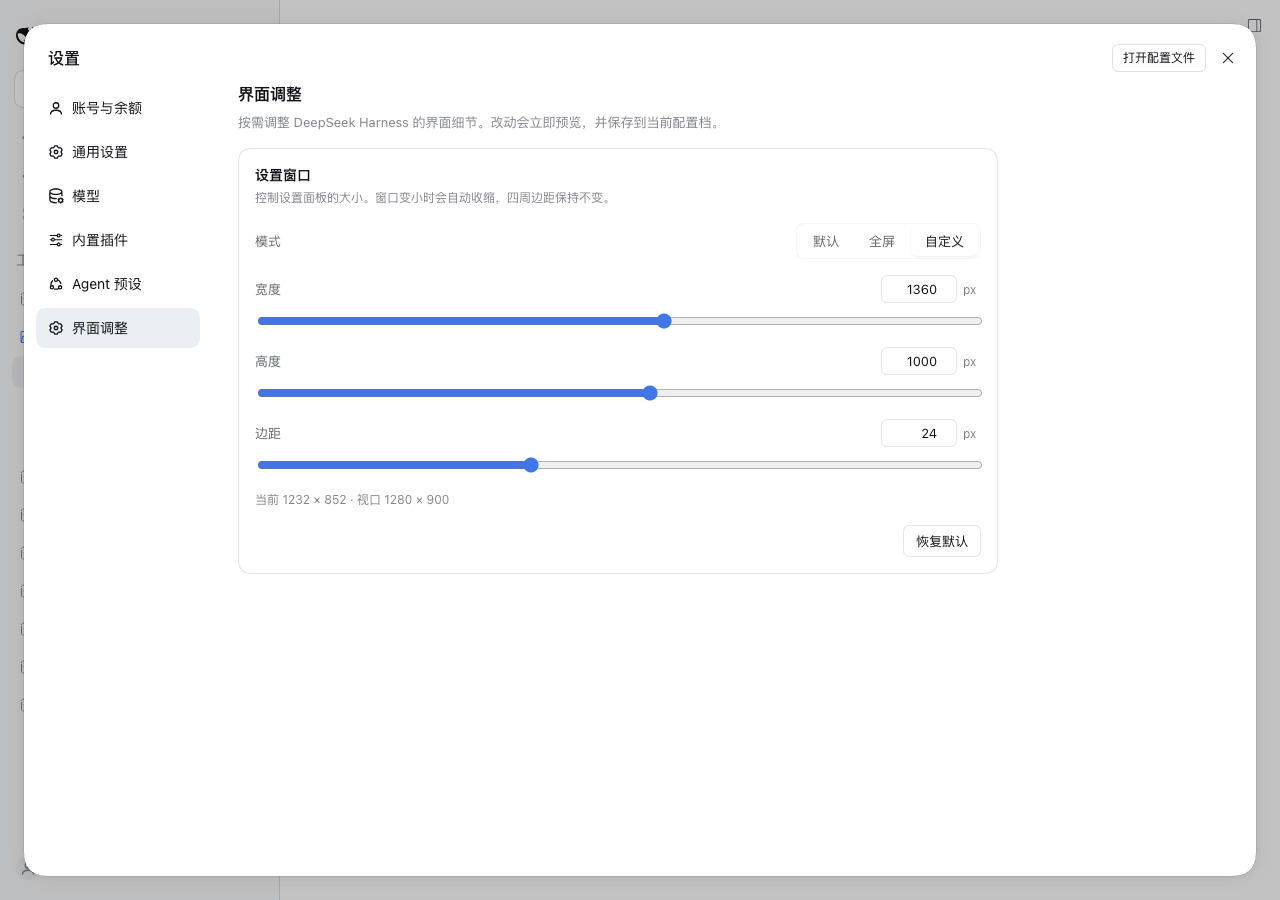
dsh-tweakit 在设置里加一个 界面调整 tab:默认、全屏、自定义三种尺寸模式,实时预览、自动保存、重启后还在。它也是后续所有界面 tweak 的统一入口。
为什么装它
DSH 的设置面板固定 800×800:在 4K 屏上浪费空间,在 1366×768 的笔记本上又显得局促。常见的做法是装一个只注入 CSS 的本地插件,把尺寸写死成 1360×1000——想改一次还得改代码。
dsh-tweakit 把这件事变成设置项:
- 三种模式:保持原生 / 全屏铺满 / 自定义宽高,边距 0–64px 可调;
- 实时预览:拖动滑杆,面板立刻跟着变,不需要刷新;
- 持久化:通过 DSH 官方 settings 服务保存,换端口、重启应用都不丢;
- 可逆:切回「默认」或卸载插件,样式节点立即移除,DSH 恢复原样;
- 为扩展而生:字段是声明式的,后续字号、圆角、间距等 tweak 复用同一套表单与 tab。
安装
Web profile
dsh plugin --profile web add -w dsh-tweakit
-w 不能省:profile 目录本身是 pnpm workspace root。
Desktop
桌面端的 desktop profile 由应用独占,请在应用内的「插件」页安装 npm 包 dsh-tweakit。不要在和桌面应用同时运行时用 CLI 修改该 profile。
如果之前装了其它强制设置面板尺寸的插件,先卸载它:它们都靠
!important抢同一个面板,同时存在会互相覆盖。
安装后打开 设置 → 界面调整;如果 tab 没出现,重启一次 dsh 进程。
升级与卸载
# 升级:重新执行安装命令;如果 pnpm 命中缓存,追加 --force 重新拉取
dsh plugin --profile web add -w dsh-tweakit@latest --force

# 卸载
dsh plugin --profile web remove dsh-tweakit
使用
| 模式 | 行为 | 实际尺寸 |
|---|---|---|
default |
完全不接管,保持 DSH 原生 800×800 | 不注入任何样式 |
full |
全屏,保留自定义边距 | w = 100vw - 2·margin;h = 100vh - 2·max(margin, overlayTop) |
custom |
自定义宽、高、边距;超出视口自动收缩 | w = min(width, 100vw - 2·margin);h = min(height, 100vh - 2·max(margin, overlayTop)) |
overlayTop 是 macOS 交通灯预留的顶部安全区。即使边距设为 0,面板也不会钻到标题栏下面。窗口宽度 < 768px 时不接管,交给 DSH 自己的移动布局。
首装默认值是 custom / 1360×1000 / margin 24,接近大屏下常见的设置面板尺寸。点「恢复默认」会清空用户层配置,回到这组默认值。
兼容与权限
- DSH:
0.2.1-rc.3实测通过;web 与 desktop profile 均可。更早版本未验证。 - 运行时:Node ≥ 22.6,pnpm 9。
- 只使用公开扩展点:
settings.section槽位、ctx.configForms、ctx.locale;不 patch DSH 源码、不改 hash 类名。 - 权限最小化:不发起网络请求、不读取凭证、不写业务文件;只读写自己的 settings 命名空间
dsh-tweakit。 - 作用范围:只向设置面板
[role="dialog"][data-shortcut-modal="settings"]注入尺寸样式。 - 已知限制:依赖上面的
data-shortcut-modal标记;如果未来 shell 改名,tab 会显示“未检测到设置面板标记”的提示,需要跟进适配。
路线图
| 能力 | 状态 |
|---|---|
| 设置窗口尺寸(默认/全屏/自定义) | ✅ 0.1.0 |
| 字号与信息密度 | 候选 |
| 圆角与间距 | 候选 |
| 侧栏 / 内容区宽度 | 候选 |
| 动效与过渡 | 候选 |
候选不是承诺,按 issue 的 👍 和实际反馈排期。想加什么,欢迎开 issue 描述你的使用场景。
参与贡献
- 报 Bug / 提建议:开 issue,附 DSH 版本、profile、复现步骤和截图(UI 问题最好有录屏)。
- 改代码:开发环境、测试、新增 tweak 的完整步骤见 docs/development.md。
- 给 AI agent:仓库约定写在 AGENTS.md。
- 设计先行:每个功能先写
docs/features/下的需求文档;不可逆决策补一篇 ADR。 - PR 要求:
pnpm check通过;UI 改动附前后截图;文档与代码同批提交。
文档
- 文档索引
- 开发指南
- 设置窗口尺寸 — 需求设计
- 插件架构设计
- ADR-0001:用 DSH settings 服务持久化偏好
- ADR-0002:设置面板尺寸三模式
- ADR-0003:配置驱动的 tweak 表单
- 贡献指南
English
dsh-tweakit adds an Interface tab to DeepSeek Harness settings. The first tweak resizes the settings dialog — default, full, or custom (width, height, margin) — with live preview and persistence through DSH's settings service. It is also the base for future UI tweaks.
dsh plugin --profile web add -w dsh-tweakit
Tested with DSH 0.2.1-rc.3 on the web and desktop profiles. It does not patch DSH, make network calls, or read credentials. Development setup: docs/development.md.
License
如果它帮你少改了一次 CSS,欢迎点个 ⭐。
No comments yet. Be the first to write one.