dsh-snippets
CSS and JS code snippets for the DeepSeek Harness web GUI.
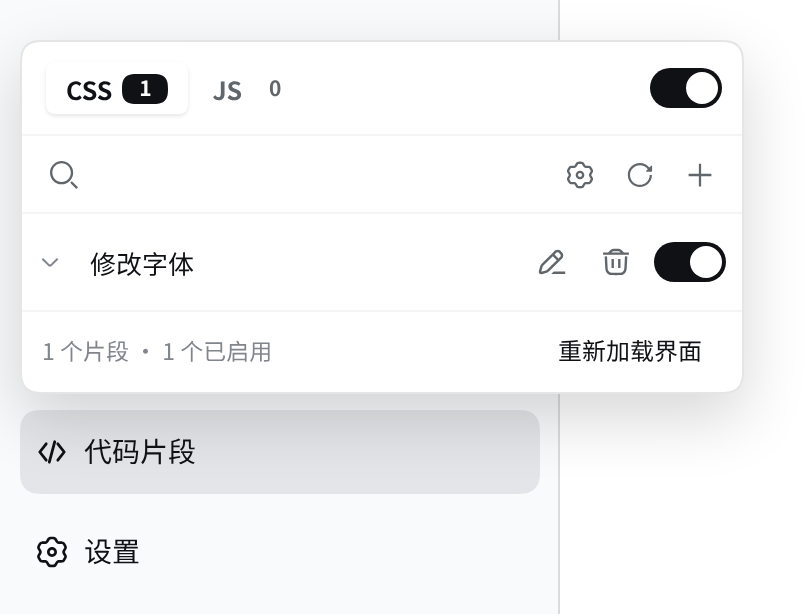
A full-width quick toggle in the sidebar footer, aligned column for column with
the Settings row above it (a </> glyph on the left, the name on the right),
opens a manager panel, and the plugin's page in the Plugins manager carries a
collapsible settings card with the full set of preferences. Enabled CSS is
injected into the page immediately; enabled JS runs after the page loads.
Inspired by TCOTC/snippets, the SiYuan note-taking app's snippet manager, and adapted to the DSH plugin contract.
Screenshots
The quick toggle fills a whole row of the sidebar footer, exactly like Settings, and opens the manager panel:
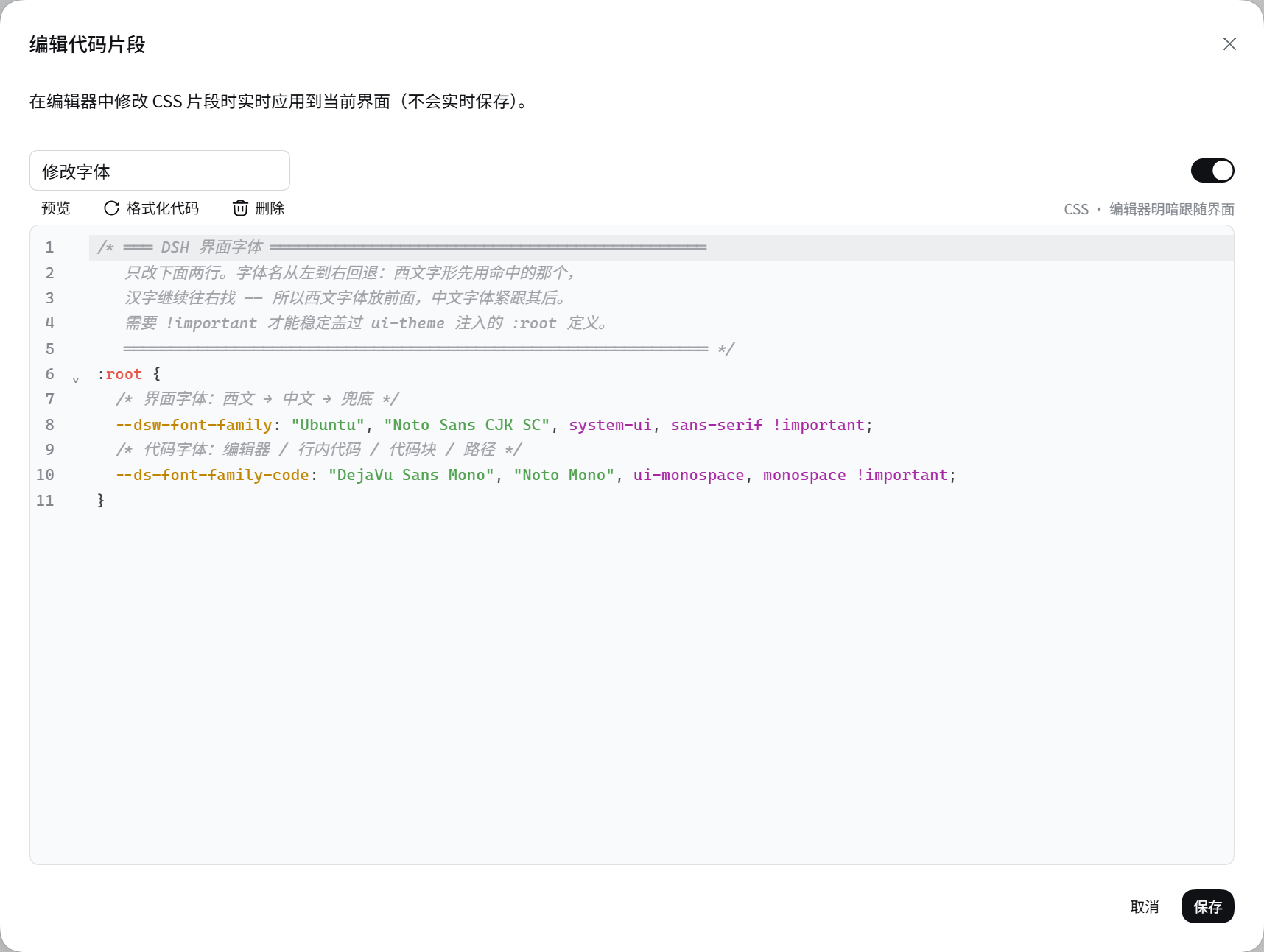
The editor is CodeMirror 6 — line numbers, CSS/JS highlighting, search and replace — sized to the viewport, with live CSS preview:
Features
Managing snippets
- CSS / JS tabs with live counts, one master switch per type, and search across titles, code, or both
- Its own settings card on the plugin's page in the Plugins manager, opened from a chevron and keyed by the package name
- Add, edit, duplicate, delete, enable/disable, and drag to reorder
- Ten sort orders (custom, enabled-first, title A→Z / natural, oldest/newest)
- Per-row edit / duplicate / delete buttons, each individually hideable
- One-click Reload the interface for changes only a reload can apply
Editing
- CodeMirror 6: line numbers, CSS/JS syntax highlighting, bracket matching, fold gutter, search & replace, history
- Configurable indent unit, font size and soft wrap; the theme follows the app, including dark mode
- Live CSS preview — see the page change while you type, without saving
- The editor dialog sizes itself to the viewport (up to 1040×760) instead of the shell's 380px form card, and the code area absorbs the leftover height, so a long snippet scrolls inside the card rather than pushing the dialog past the window edge
- Best-effort re-indent that only ever rewrites leading whitespace
- Content guards: CSS containing
</styleor<scriptis refused, and JS is parsed before it is saved
Beyond the browser
- Local folder watch — mirror a folder of
.css/.jsfiles into the snippet library, continuously or once at startup - Import / export the whole library as JSON, with an automatic backup before a destructive import
- GitHub Gist sync — publish a selection, or import with merge update, mirror overwrite or add only, previewing the per-file diff first
Install
Requires DeepSeek Harness 0.1.7-rc.1 or newer: 0.1.7 rewrote the settings line,
and earlier harnesses expose neither configForms nor an entry-scoped settings
API for a plugin to bind to.
dsh plugin --profile web add github:zhang24xiao/dsh-snippets
Then restart the web GUI. From a checkout:
git clone git@github.com:zhang24xiao/dsh-snippets.git
dsh plugin --profile web add link:$PWD/dsh-snippets
The built lib/index.js and client/client.js are committed, so a
github: install needs no build step.
Where things live
| Surface | DSH seat |
|---|---|
| Quick toggle + manager panel | sidebar.footer.action, a full-width row: </> glyph + the name |
| Settings | plugins.bundle.config, the collapsible card on this package's page in the Plugins manager |
| Editors, confirmations, toasts | shell.overlay |
| Snippet library | the dsh-snippets namespace of the profile's settings document |
| Backups, Gist token, watcher memory | $DSH_HOME/dsh-snippets/ |
Layout notes
The sidebar-foot trigger follows the column width in two shapes, and both are measured against the Settings row:
- wide is one whole row: 42px tall,
padding: 0 10px 0 8px, an 8px gap between glyph and label, radius 12, 14px/22px type — the Settings row's own numbers, field for field, which is what lands both rows' glyphs and labels on one column; - rail is a bare
36×36circle withmargin: 8px 0 10px, matching the circle in Settings' own rail row.
The wide row's label carries the name; the tooltip still reports the total and enabled counts.
- wide is one whole row: 42px tall,
That 4px side bleed in the wide state (
width: calc(100% + 4px); margin: 4px -2px) is copied from the Settings row's own container. Without it this row sits 2px to the right of Settings — that 2px is the alignment.The sidebar shell lays the foot out as a column but keeps
sidebar.footer.actiona row even when the column is collapsed to the 56px rail. With one action that is invisible; with two, the icons land side by side and overflow. This plugin therefore injects one narrowly scoped rule that makes the collapsed row a column again — and lets the wide row wrap, because the seat is shared: a full-width entry (this plugin, ordsh-mobile's phone entry) would otherwise push its neighbour past the sidebar edge, where the shell's overflow hides it:html [class*='_footerActions'] { gap: 6px; flex-wrap: wrap; } html [class*='_collapsed'] [class*='_footerActions'] { flex-direction: column; gap: 4px; … }The attribute-substring selectors are deliberate: if the shell's class hashes change, the rule simply stops matching and the rail falls back to the shipped layout instead of breaking.
How CSS and JS take effect
- Each enabled CSS snippet becomes one
<style data-dsh-snippet="<id>">element in<head>. Toggling one adds or removes exactly that element, so CSS applies and reverts instantly with no reload. - Each enabled JS snippet is compiled with
new Functionand called once per page load. There is no sandbox and no undo — this is deliberately the same trust model as pasting the code into the browser console, which is the point of the feature. Disabling, editing or removing a JS snippet therefore reports that a reload is required, andautoReloadAfterJsEditcan do it for you. window.__dshSnippetsexposes{ version, log, reload }for snippets that want an entry point.- Unloading the plugin removes every
<style>it injected. Executed JS is not undone; it cannot be.
Security notes
- Snippet data travels only over the official settings wire. The plugin adds no browser-writable snippet endpoint, so on a LAN or tunneled deployment an unpaired visitor cannot reach a route that would inject code into a page.
- The plugin's own endpoints (
/snippets/api/*) do the three things a browser cannot: read the watched folder, call GitHub, and open the backups directory. They answer loopback requests only; over a LAN or tunnel those sections disable themselves and say so. - The GitHub token is stored on the host at
$DSH_HOME/dsh-snippets/gist-token.jsonwith mode0600. It never enters the settings document, never reaches the browser, and the UI only ever learns whether one is configured.
Differences from TCOTC/snippets
Three settings describe SiYuan features that DSH does not have:
| SiYuan | DSH |
|---|---|
| Snippet "publish service" switches | Removed — DSH has no publish concept |
| "Open the native snippet window" | Replaced by "Open the backups folder" |
| Watched folder: relative paths only | Absolute paths and ~ are supported (the DSH host is a plain Node process) |
Development
pnpm install
pnpm run check     # typecheck, build, and all four test suites
pnpm run watch     # rebuild on change
npm run test runs four suites:
test/host.test.mjs— plugin mounting (the exportedConfigschema, the volatile fields it resolves to, the settings presentation owner, the routes, and the two config-commit signals), re-arming of the folder watcher when the watch settings change, the loopback fence on every route, backups, the folder mirror (including id stability across scans), the Gist import plan, and the content guards.test/cordis.test.mjs— mounts the built host bundle through the real@deepseek-ai/cordisand replays the plugin loader's own volatile commit, so thatContext.filterarbitrates delivery for real. It pins the two things a fake context cannot: the loader's filteredloader/volatile-updatereaches this plugin while a listener onrootdoes not (the negative control), andsettings/document-updatedis what re-arms the watcher, gated by namespace.test/client.test.mjs— loads the builtclient/client.jsthroughwindow.__ModuleLoader__.loadin jsdom and drives the runtime: an enabled CSS snippet produces exactly one<style>, an enabled JS snippet runs exactly once, disabling removes only that element, the type master switch gates injection, and teardown leaves nothing behind. It then server-renders all three registered seats, so a broken render path fails here rather than in the GUI.test/client-modules.test.mjs— hands this package's manifest to the real@deepseek-ai/dsh-client-modulesregistry through a scratchnode_modules/dsh-snippetssymlink, and asserts the whole browser-half contract: the composed boot graph carriesdsh-snippets,clientPath()resolves to this package'sclient/client.js,dsh.client.injectsurvives manifest parsing in order, and the advertised revision serves the real bundle over/plugins(while a stale revision 404s). It also proves the graph is driven by the Loader row rather than by the package merely being resolvable.
License
MIT
No comments yet. Be the first to write one.