@guowenzhang/dsh-ui-beautify
English | 中文
Background: DeepSeek Harness
DeepSeek Harness (dsh) is the open-source agent harness from DeepSeek AI, where nearly every capability is a plugin on Cordis. It is in developer preview and iterating fast, so expect compatibility-breaking changes (docs, 0.1.7-alpha.*); this plugin is a standalone third-party package that resolves @deepseek-ai/* from the running host.
The problem this plugin solves
The Web GUI body and code fonts were whatever the system fell back to and could not be changed; this plugin adds one font picker row for each under 设置 → 通用设置 and downloads a face on first use.
Screenshots
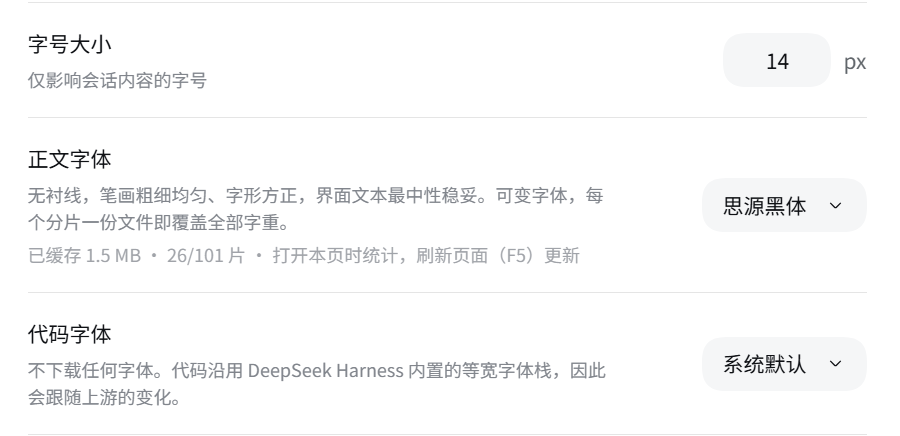 设置 → 通用设置: the 正文字体 and 代码字体 rows sit directly under 字号大小, each showing the selected face's description and its cache status.
Install
npx @deepseek-ai/dsh plugin --profile web add @guowenzhang/dsh-ui-beautify
From the npm registry: https://www.npmjs.com/package/@guowenzhang/dsh-ui-beautify — restart the host afterwards; local checkouts, git sources and troubleshooting are in AGENTS.md.
Usage
Pick a body font
Settings → 通用设置, under 字号大小: the 正文字体 row. Open the pill on the right and choose a face; the page restyles on selection with no confirmation step, and the choice is written to the current profile's settings file.
Pick a code font
The 代码字体 row, one line below the body font and above the work-process display. It defaults to system, so a fresh install changes nothing about how code looks until you choose otherwise.
Understand what system means
system removes the plugin's stylesheet links and token override, returning the tokens to ui-theme's own declaration. It is not a frozen copy of today's defaults — upstream default-font changes are followed. Selecting it is also the only way to switch custom fonts off; uninstalling is not required.
Read the cache status line
Each row shows a title, the selected face's description, and a status line such as 已缓存 103 KB · 1/101 片. There is no download button: fonts are pulled on demand as the page needs them. The counter is a progress read-out of on-demand downloading, not a failure — it rises as you browse and new characters appear. The numbers are read when the row renders and about 1.5 seconds after a font switch, not in real time; the status line therefore keeps a standing hint that refreshing the page (F5) re-counts.
Understand the download behavior
Downloads happen per shard, not as a whole package. A selected face's stylesheet is fetched first, then only the shards the page's characters actually need. Concurrent requests for the same file are coalesced, and later page loads read from local disk without touching the network.
| Situation | What you see |
|---|---|
| The host machine has no outbound network | Downloads fail; the GUI keeps rendering with its fallback fonts |
| The browser has network access but the host does not | Downloads still fail — the browser never contacts an external site |
The composer lane
The strip directly above the message box carries a cyclist. It moves while the model is writing and rolls to a halt when it isn't: a fast stream sends it across quickly, a slow one lets it crawl, and once the output stops it keeps the speed it had and bleeds it off over eight seconds before coming to rest. It is a report of output, not a looping decoration.
It is decoration, and it is deliberately quiet about it:
- It reads nothing you type and sends nothing anywhere; the only thing it measures is how much assistant output has arrived.
- Screen readers skip it (
aria-hidden).
Turning it on or off
设置 → 通用设置 → 输入框上方的动画, the row directly under the two font rows:
| Choice | What it does |
|---|---|
| Follow the browser (default) | Plays unless the browser asks for reduced motion, in which case the strip above the message box stays empty |
| Always play | Plays even when the browser asks for reduced motion |
| Off | Never appears |
The row's status line says why the strip is empty. If it reads that your browser reports prefers-reduced-motion: reduce, that is the whole explanation — and Always play is the way past it.
The lane is live in the settings document the moment you pick, but the Host needs a restart to know about the field at all: until then the row says the Host is running an older build of the plugin. That is the same one-time restart every new setting in this plugin needs.
Notes and caveats
- The host machine must reach the network for a font's first use. The browser only talks to the DSH origin; the host does the fetching. This is the one place the plugin depends on host connectivity, and it is the only reason a first use can fail while the browser itself is online.
systemis the code font's default, so a fresh install is visually a no-op until you pick something.maple-mono-cnis the only code font that covers Chinese. The other four cover Latin only and fall back to the built-in stack for CJK;maple-mono-cnis also 9 MB and reaches the machine through jsDelivr because the npm mirror does not carry that package.- A missing font never breaks the interface. Text renders first with the fallback font and swaps in when the shard arrives; if the download fails for good, the fallback simply stays.
- Two places ignore the font tokens because they hardcode their own font: the integrated terminal (an xterm constructor argument, not CSS) and a hardcoded
Interprefix in the queue panel's stylesheet. - The mirror list and cache directory are host-start configuration, not live settings — changing them requires restarting the host.
- The composer lane is decoration, not a read-out. It has no number, and its speed is an approximation of output speed rather than the
tok/sin the status bar: while a step is still streaming the provider has reported no token count, so the lane measures characters instead. - A new setting needs one Host restart. The browser half picks up a new build on reload, but the Host loads its settings schema once per process — so a row for a newly added field is disabled until dsh restarts.
- Fonts are not covered by this plugin's license. Each font keeps its own; see LICENSE and NOTICE.
License
The plugin itself is Apache-2.0 — see LICENSE and NOTICE.
The plugin distributes no font file. Fonts are downloaded on demand from npm mirrors into a local cache and keep their original licenses. Noto Sans SC, Noto Serif SC, ZCOOL XiaoWei, ZCOOL KuaiLe, ZCOOL QingKe HuangYou, Ma Shan Zheng, Zhi Mang Xing, Long Cang, Liu Jian Mao Cao, Inter, Geist, JetBrains Mono, Fira Code, Geist Mono, Noto Sans Mono and Maple Mono CN are SIL Open Font License 1.1, packaged by Fontsource or by the font's own publisher. LXGW WenKai, LXGW WenKai TC and LXGW WenKai Screen are SIL Open Font License 1.1; the npm packages carrying them — lxgw-wenkai-webfont, lxgw-wenkai-tc-webfont and lxgw-wenkai-screen-webfont — are MIT.
Further reading
- AGENTS.md — the full font catalogue, the download pipeline, the cache layout, the composer lane's mechanics, developer commands, the add-a-font procedure, and troubleshooting.
- dsh-web-design — a sibling plugin that previews and edits HTML in the DSH Sidebar.
- DeepSeek Harness documentation.
No comments yet. Be the first to write one.