description: "Manage MCP servers in DeepSeek Harness, load them on demand, and filter tools to reduce context usage" kind: "plugin-readme"
@guowenzhang/dsh-mcp-manager
中文 | English
The problem this plugin solves
Adding MCP servers to DeepSeek Harness is inconvenient, and loading every configured server's tools by default consumes substantial context.
This plugin adds server creation, editing, and per-row switches to the settings page. With on-demand loading, the initial context contains only MCP names and descriptions; the model enables servers as needed during a session. Tool filtering lets you load only the tools you select.
In the plugin list, display names and descriptions follow the Harness language setting in English or Chinese (English is the default fallback); English names use the package name without its npm scope, Chinese names describe the purpose, and installation still uses the unchanged real package name.
Screenshots
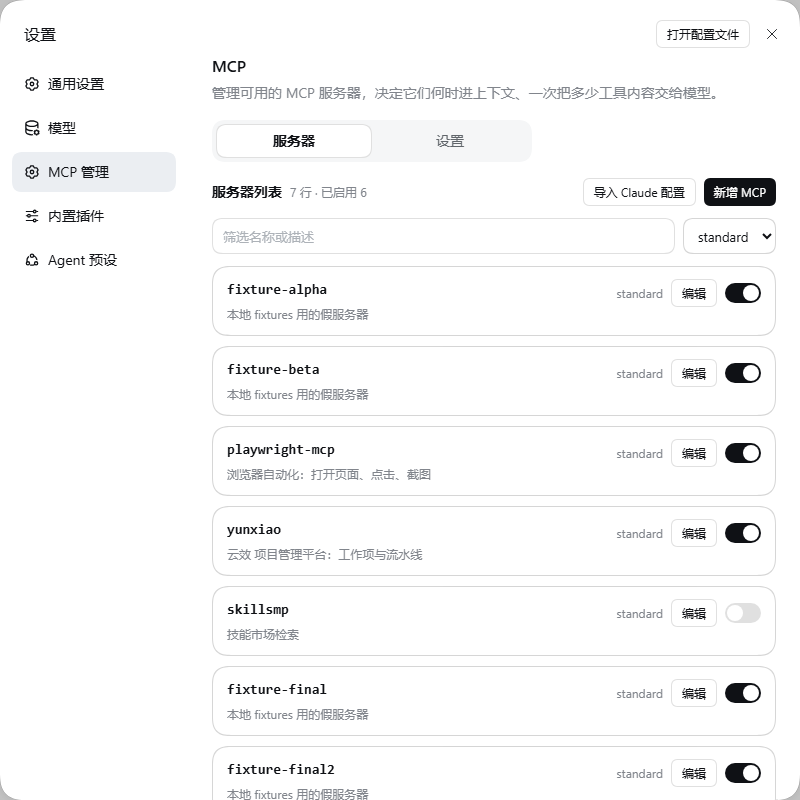
MCP management: Servers
MCP management: Settings
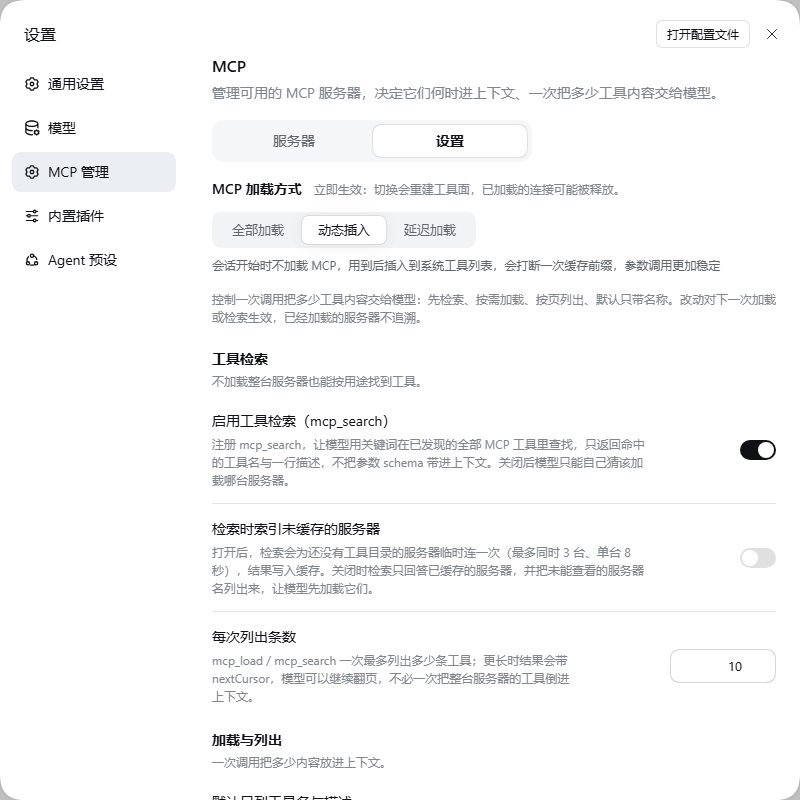
One page with two tabs: Servers holds the roster, Settings holds the loading mode and how much of a tool list one call hands to the model. The server list scrolls independently while the page heading, tabs, Add button and filters stay in place. Agent preset names use the same Host translations as the new-session picker and update with the interface language; authored names remain unchanged. The roster is one list — global rows first, labelled Global, then the rows of the agent preset picked in the filter bar. Click the card itself to open the editor: Config / Credentials / Tools; a row that carries an environment or a header opens straight on Credentials. Where an added row is written is chosen in the dialog's own Config scope select, which lists the global plane and every declared agent preset in one field; the tools pane shows each tool's estimated token cost and the totals for what is loaded and what a rule would drop. A switch that fails reports in its own row with a retry.
Install
Requires DeepSeek Harness, pnpm, and Node.js ≥22.18 or ≥24.2.
npx @deepseek-ai/dsh plugin --profile web add @guowenzhang/dsh-mcp-manager@^1.1.0
Restart the host and refresh the page, then open Settings → MCP management to add servers and describe their purpose. The page has two tabs: Servers (the roster: one list, global rows first with a Global label, then the rows of the agent preset the filter bar selects; click a card to open its editor, whose Config / Credentials / Tools panes hold the JSON, the environment or headers, and the tool list) and Settings (MCP loading, where Dynamic insert is the default, followed by how much of a tool list reaches the model). The Config scope select picks an added row's home in one field: the global plane, or one agent preset. In the add form the two fields marked * (server name, JSON configuration) are required, and the server name is filled from the JSON you paste (npx -y @upstash/context7-mcp → context7); once you edit it yourself, it is yours.
See AGENTS.md for other installation methods and development instructions.
Reduce context further: search, paging, names only
Settings → MCP management → Settings controls how much of a tool list reaches the model, and carries the loading mode. The MCP specification has no query parameter on tools/list and no names-only listing, and the client best-practices guide places progressive discovery in the host — which is what this tab is:
| Setting | Effect |
|---|---|
Tool search (search) |
Registers mcp_search: the model finds tools by keyword across every discovered server and gets names plus one-line descriptions only. |
Index uncached servers (searchIndex) |
Lets a search connect to a server it has no tool list for (3 at a time, 8 seconds each). Off by default, so a search stays a cheap read. |
Items per listing (pageSize) |
mcp_load / mcp_search list at most this many items and return nextCursor for the rest. |
Names and descriptions only (namesOnly) |
mcp_load omits argument schemas by default; asking for one tool by name still returns that tool's full schema. |
Tools collected per server (maxTools) |
Caps the paginated tools/list walk, so an enormous server cannot flood a request. |
Show tool annotations (annotations) |
Carries the server's readOnlyHint / destructiveHint / idempotentHint / openWorldHint into listings. |
Hide destructive tools (hideDestructive) |
Keeps tools whose destructiveHint is explicitly true out of the session entirely. |
The same page shows what the tool catalogue has cached (servers, tool counts, age) and can clear both memory and disk records. Every switch is a live setting: it applies to the next load, search, or re-index without a restart.
Tool catalogue database: all MCP catalogues, including local stdio and HTTP/SSE/Streamable HTTP servers, persist in <DSH_HOME>/cache/dsh-mcp-manager/<profile-hash>/catalog.sqlite. Local directories remain until invalidated and are never connected by the Refresh button. HTTP servers that advertise ttlMs are rediscovered on the next search after expiry; without a TTL their directory remains until a manual refresh. Catalogue state sits directly below Tool catalogue cache. Refresh reconnects only currently enabled HTTP/SSE servers, retaining previous records and reporting individual failures; Clear cache removes all directories. There is no user-set cache lifetime. A successful add-form probe saves the directory immediately but does not save the MCP configuration; failed probes do not prevent direct saving. Configuration digests distinguish changed commands, arguments, effective cwd/environment, URLs and headers. The database stores public definitions and digests, not raw configuration or credentials; definitions themselves can contain server-provided sensitive text. Executing tools still requires a real connection.
Notes
- On-demand loading covers both planes, and nothing starts at host start-up. Under Dynamic insert (
dynamic, default) and Lazy loading (lazy) an allowed row is suppressed before its plugin ever runs, so host start-up and Agent preset rebuilds start no MCP process at all; the firstmcp_loadstarts the connection. Global composition rows follow the same loading mode: Load all (eager) mounts them from the composition, whiledynamic/lazykeep them held untilmcp_loadstarts one on a connection shared with other sessions. Tool filters still do not take effect on a global row. - Load on demand, then reuse. Connections live in a host-level pool keyed by row and connection configuration: the same server loaded again — by the same session, another session, or a subagent — reuses that one connection (for stdio, the same child process).
mcp_unloadreleases only the calling session's reference; the server stops when the last session releases it, and a session that ends releases its references. The connection lives as long as the host process — committing a different loading mode rebuilds the tool set and releases that mode's references, and a host restart means loading the server again. "Nothing starts at start-up" holds whether or not the server was loaded before. - Dynamic insert (
dynamic, default) adds a server's tools to the session that loads it, registering only the tools your filter and the load request keep; Lazy loading (lazy) calls tools through a fixed proxy without changing the tool list. The model usesmcp_load/mcp_unload, andmcp_loadalso acceptsquery(load only matching tools),tool(load one tool and return its schema) andcursor/limit(page a long listing). - The roster is one list, with no group headings. Global rows come first and carry a Global label; the rows below belong to the agent preset the filter bar selects. The preset dropdown lists every declared preset (including ones that hold no rows yet) and also picks the destination when you add a server. Narrowing the roster never hides a plane: a selected preset still shows the global rows, because a session carries them whatever preset it runs. Editing a row writes to that row's own plane.
- Tool filters and optimization switches take effect on the next load; already-loaded servers are not updated automatically. Loading a server or listing its tools requires a connection and may wait for a child process to start.
- Servers loaded on demand do not provide server instructions or resource tools: their tools come from the same Harness adapter with the same binding quality, but the mount path that supplies instructions and shared resources is gone. Put the row in an Agent preset and choose Load all to keep those.
- The global plane works out of the box: it is created automatically when MCP management is first opened. A freshly installed profile mounts only the host's root Include (rewritten on every start), so Global used to be unwritable. The plugin now creates the missing file once, on the first roster read of each host process: it writes
mcp.cordis.yml(an empty entry list) beside the profile and appends onecordis:includepatch row (initial: []) tocordis.patch.yml, then reloads the composition so the Include mounts immediately — no click, and the host's root Include and every other setting stay untouched. If that automatic creation fails (or the host is older), the roster shows the reason and an Enable global (create it) retry; switching the add dialog's Config scope to Global performs the same creation. A creation that was written but did not mount says a restart applies it. - Global rows are switchable from the settings page when they live in your own Include file. A write targets the file of the one file-backed Include that is yours — the host's root anchor is excluded, so a profile that declares its own Include is no longer treated as read-only. Rows declared by the composition itself (or by a patch layer) have no line in that file, so they stay read-only: their switch and row button are greyed out, the card no longer opens the editor, and the reason is in the control's tooltip; the server rejects a write with
mcp/read-only. Such a row still loads on demand, reuses the pool and mounts under Load all. One known limitation: a global write rewrites that whole file, so comments and your own quoting style in it are lost and an enabled row keeps an explicitdisabled: false— the result is functionally right, but not byte-identical to what you wrote. - Verification status: behaviour is verified at three levels.
pnpm testpasses 31 files / 332 tests andpnpm run test:harnesspasses 7 files / 27 tests. The automatic global Include round ran on an isolated instance (@deepseek-ai/dsh@0.2.1-rc.2, final artifactslib/index.mjs2A4A2AF8…,lib/client.js9BB47956…): opening MCP management creates the writable Include with no click at all (11 assertions: created by the first roster read, written once, no duplicate after a reload, a global row authored straight after); the 19 main-flow, 8 dialog-path and 10 empty-state readings on earlier builds are in sections 十八–十九; this round is in section 二十 of the test record. Earlier readings are in sections 十一–十五 of the test record: roster alignment and full-width tabs, the single target picker and required marks in the add dialog, the tools pane's token figures and loading state, and the settings-page clean-up; the Claude-configuration import was removed entirely on request — see D29 — and the readings below it are earlier rounds'. The MCP client callback never runs underdynamic; global rows follow the same rules, including a row the composition mounted before this plugin loaded; two sessions share one connection andmcp_unloadreleases one reference at a time; a global row in its own Include file can be switched from the settings page, and a row you disabled reads as off immediately; one catalogue serves every registration generation; a connect that loses its time budget is closed instead of orphaning its process; pool claims are counted per load, so two parallel loads of one server settle on one view; a file-backed row held at publication keeps its file untouched). The same day's tab rename and loading-mode move (second tab 上下文 → 设置, the loading mode moved into that tab, the roster's switch sentence and the count's 筛选: suffix removed) was re-run on the isolated instance as well: the two tabs read 服务器 / 设置, the loading mode is the first block of the 设置 tab, the roster tab has a singleh3(服务器列表), page title / tabpanel / first row share both content edges at all 11 widths (320…1440px), light and dark render, and the console stays clean; productlib/client.jsE6F79864…, readings in section 九 of the test record. An isolated instance on the build of that day (lib/index.mjs121B8C0A…,lib/client.jsE1B1051A…) with@deepseek-ai/dsh@0.2.0-rc.2— the release that islatest/nexton npm and the version the everyday instance actually runs — took the readings: no MCP process at start-up underdynamic(no marker file ever created, zero processes, empty stderr), theeagercontrol keeping four servers alive, and one single child process reused across repeated loads in two sessions. Later fixes of the same day rebuilt the products (lib/index.mjs53FD00C5…,lib/client.js9777E8E9…); both suites were re-run green against them, but no isolated-instance readings were taken for those two products — the readings above describe the earlier build. Readings from the earlier builds (9B5D8D19…,D498FEC7…) remain in the test record as history. An earlier compatibility check ran on0.2.1-alpha.1(2026-10-07, adapting to the removal oflivePresetMounts); thatalphatag now points at0.2.1-alpha.4, and this work has not been re-run on the alpha line. Not covered: realnpx -ycold-start timing, the model-driven path in the GUI,tools/list_changedresync across sessions, switching the loading mode at runtime inside a live instance,lazypool reuse in a live instance, themcp_searchtool itself, browser tests for adding / deleting / importing rows on a preset plane, the editor's per-row save states, unit tests of the settings write queue (its store dependency does not load under Node), and comment preservation in your own Include file (the global plane's add-row and switch flows are covered in section 十八). - DSH Desktop: the current release (
0.2.1-rc.5) is verified working. - Host updates may introduce compatibility changes. See the design notes for detailed limitations. The alpha line is not known to be broken — this work simply has not been re-run on it.
License
Apache License 2.0 — see LICENSE. Includes MIT-licensed portions derived from DeepSeek Harness; see NOTICE.
No comments yet. Be the first to write one.