dsh-composer-live
Live Markdown rendering and typing enhancements for the DeepSeek Harness (DSH) web composer.



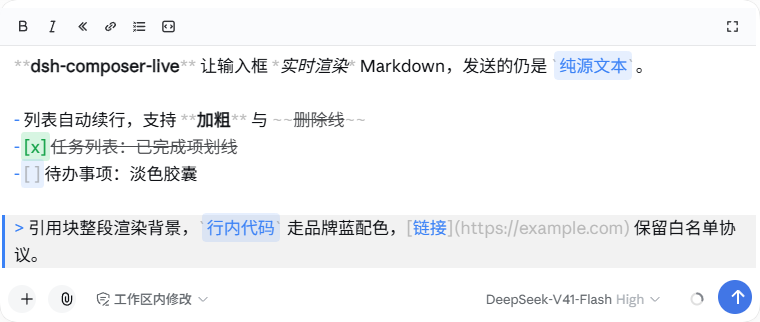
dsh-composer-live turns the DSH Web input box into an Open-WebUI-style live editor: you type Markdown, it renders as you type — bold, italic, code blocks with syntax highlighting, lists, quotes, tables — while the draft itself stays plain Markdown source, so what you send is exactly what you typed.
It is a pure browser-side plugin: zero runtime dependencies, no service injection, no patches to official code. It layers on top of the official 0.1.5 Lexical composer without touching what DSH already does natively.
Looking for the DSH 0.1.x (textarea composer) version? That's
dsh-composer-md, the predecessor of this plugin — discontinued.
Screenshots
Live markdown rendering
Code blocks
Selection toolbar
Features
Live Markdown rendering
- Inline styles render as you type:
**bold**,*italic*,`code`(brand-blue capsule),~~strikethrough~~,[links](url)(whitelisted protocols),capsules. - Character-perfect caret alignment. Marker characters (
**,`,~~,[]()) are dimmed but keep their exact width, and bold/headings use paint-only faux-bold — so the rendered line stays character-for-character aligned with the invisible editor text. The caret lands precisely everywhere, including inside formatted spans, with zero drift while typing. - Task list items:
- [ ]/- [x]render as checkbox capsules; completed items get struck through. - The draft always remains plain Markdown source. Rendering is purely visual — the message you send is the source text you typed.
Code blocks
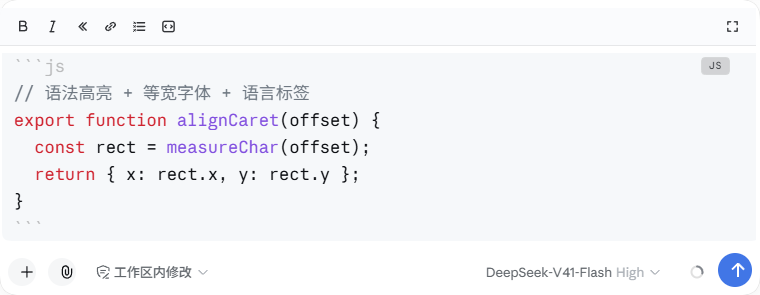
- Typing ``` shows plain text until the fence closes — no half-rendered blocks while you are still typing.
- Shift+Enter on an open fence auto-completes a closed block (blank line + closing fence + trailing line) and puts the caret inside, ready to code.
- ↓ on the last content line of a closed block jumps below the block.
- Zero-dependency regex syntax highlighting: js/ts/py/sh/json/yml/css/html, auto-detected from content when unlabeled — Chinese prose is never misdetected as code.
- Language label on the fence line; GitHub-dark / GitHub-light block themes; fence characters dimmed.
- Monospace: while a closed code block is present, the whole composer (editor + overlay) switches to a monospace stack synced with the official code font. CJK characters deliberately stay on the UI font so line wrapping never diverges between the two layers.
Lists, quotes, tables
- Enter at the end of a list line continues it:
-/*/+markers kept, ordered markers increment (1.→2.,3)→4)), indentation kept. Enter on an empty item exits the list — two Shift+Enter presses end a list. >quote lines continue the same way (>textwithout a space counts too); Enter on an empty quote item exits.- Tab / Shift+Tab indent / outdent by 2 spaces — single line or whole selection block. Tab with the caret in a list marker or leading whitespace nests the item. Tab is fully intercepted: it never moves focus out of the composer.
- A table header row (
|a|b|, ≥ 2 columns) followed by Enter completes the|---|---|separator row plus a blank line, caret on the blank line.
Toolbars and shortcuts
- Sticky top toolbar: B / italic / code / link / list / code block / expand. Wraps the selection, or inserts empty markers at the caret; B lights up when the caret sits inside
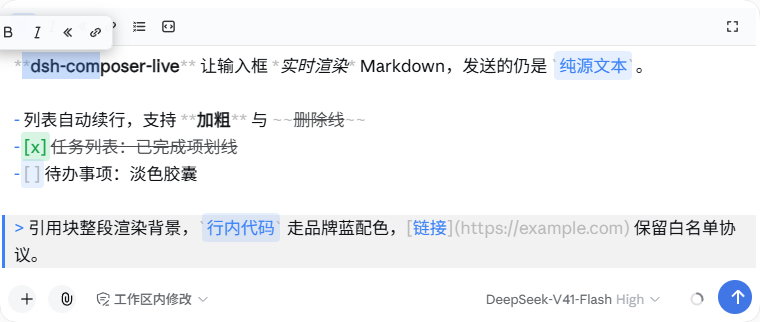
**…**. The bar is pinned to the top of the scroll area, so it never overlaps content or image attachments. - Selection floating format bar (Open WebUI style): select text and B/italic/code/link appear above the selection.
- Ctrl+B / Ctrl+I / Ctrl+E for bold / italic / inline code — which also blocks the browser's native contenteditable bold that would silently insert real
<b>tags into the draft.
Paste handling
- Large pastes (> 8 lines or > 4 KB) that look like code or logs are automatically wrapped in a code fence — one undo step, with a toast hint. Chinese prose is not misdetected; no wrapping when the caret is already inside a code block or the paste itself contains fences.
Esc dispatch, themes, compatibility
- Esc does the right thing in context: open candidate menus → official handler; expanded composer → collapse; generation in progress → stop generating.
- One-key 70vh expand for long-form writing.
- Light/dark theme aware; IME-safe (composition input never flashes); rendering is rAF-batched and incremental.
- @ mention chips stay official and editable. Paragraphs containing chips gracefully degrade to official rendering (chip widths cannot be replicated; zero misalignment wins). Text decorations are unaffected.
- Also fixes two official positioning glitches when image attachments are present: the trigger menu floating far above the composer, and toolbars overlapping thumbnails.
Not duplicated from DSH 0.1.5
The official composer already provides — and this plugin deliberately does not reimplement: / command menu, @ file mentions, paste-image/file to attachments, Enter-to-send / Shift+Enter newline, IME protection, draft persistence.
Quick reference
| Input | Context | Action |
|---|---|---|
| Enter | plain line | send (official) |
| Shift+Enter | plain line | line break (official) |
| Enter / Shift+Enter | end of list / quote line | continue the marker (ordered increments) |
| Enter / Shift+Enter | empty list / quote item | remove marker, exit the list / quote |
| Enter / Shift+Enter | unclosed fence line | close the block; caret lands inside |
| Enter / Shift+Enter | table header row (≥ 2 cols) | complete separator row + blank line |
| Tab | inside a code block | insert 2 spaces at caret |
| Tab | list/quote marker or leading whitespace | indent line (nested list) |
| Tab | anywhere else | insert 2 spaces at caret |
| Tab / Shift+Tab | multi-line selection | indent / outdent the whole block |
| Shift+Tab | any line | outdent up to 2 spaces (absorbs the key when none) |
| Ctrl+B / Ctrl+I / Ctrl+E | anywhere | wrap selection bold / italic / code, or insert empty markers |
| ↓ | last content line of a closed block | jump below the block |
| Esc | menus open → official · expanded → collapse · generating → stop | context dispatch |
Requirements
- DSH ≥ 0.1.5-rc.2,
webprofile — the plugin targets the 0.1.5 Lexical contenteditable composer. - A Chromium-based browser (Chrome, Edge, …): the transparency technique relies on
-webkit-text-fill-color. - OS-independent — it is pure DOM/CSS with no native dependencies.
Installation
# from npm (recommended)
dsh plugin --profile web add dsh-composer-live

# or from a local checkout (file: installs are physically copied)
dsh plugin --profile web add "file:/path/to/dsh-composer-live"
Restart the web instance after installing. Plugins load from a startup snapshot; refreshing the page alone can leave old and new bundles coexisting.
Running an isolated DSH instance? Point DSH_HOME at it so the plugin installs there instead of the default ~/.dsh:
DSH_HOME=/path/to/your/.dsh dsh plugin --profile web add dsh-composer-live
Usage
Everything is on by default — install, restart, and type Markdown in the composer.
Typical flows:
- Code block: type
```js, press Shift+Enter — a closed block appears with the caret inside. Code with live highlighting; Tab indents two spaces; press ↓ on the last content line to exit below the block. - List: type
- item, press Shift+Enter to continue items; press Shift+Enter on an empty item to end the list. Tab nests, Shift+Tab un-nests. - Long text: hit the expand button (or work as usual) — the composer grows to 70vh for long-form writing; Esc collapses it.
- Paste a log: a big chunk of code or log text becomes a fenced code block automatically; Ctrl+Z if you don't want that.
How it works
The official composer is a Lexical contenteditable editor. This plugin makes its text invisible with -webkit-text-fill-color: transparent (the color property is kept, so the caret and official decorations keep working) and paints its own rendering layer — with every rendered character positioned at the editor's real text coordinates, measured per-character from Range rects.
Because the overlay never does its own layout, alignment bugs (drift, jitter, misplacement) cannot exist by construction: measured deviation is ≤ 0.02px across scenarios, 0.00 per keystroke frame.
The plugin injects no official services. It reads the editor DOM directly and derives a "projection text" (chips → U+FFFC, <br>/paragraph boundaries → newlines), which keeps it immune to client API churn; DOM anchoring uses stable data- attributes instead of hashed CSS-module class names. Draft edits (list continuation, fence completion, indenting…) go through Lexical-native channels — synthetic beforeinput events that preserve the undo stack — never direct DOM mutation.
See docs/architecture.md for the full deep dive.
Known limitations
- Paragraphs containing @ chips render as plain official text (chip widths cannot be replicated; zero misalignment wins). Text-ref decorations are unaffected.
- Block visuals (headings, quotes, lists, table markers) are paint-only — color, weight, background. Never font size, line height, or indentation; the source layout is preserved so line metrics never change.
- Whole-composer monospace applies whenever a closed code block is present (not per-line — a literal-
\nsingle-text-node draft makes per-line font switching physically impossible). - Fence-completion caret placement waits 80 ms for Lexical's async commit; on very slow machines the caret may occasionally land slightly late.
- ↓ jump-out only triggers on the last content line of a closed block; an unclosed fence falls through to the official handler.
- "Stop generating" is matched by aria-label (English and Chinese enumerated); if upstream renames the label, use the button directly.
webprofile only; Chromium-family browsers only.
Development
node test-live.cjs                  # 188 unit tests (pure functions, no browser needed)
node e2e/run-e2e.mjs --with-deploy  # 53-scenario × 10-invariant E2E suite against a live instance
The E2E suite replays six real input channels (literal \n / literal \r\n / line-by-line br / insertParagraph / synthetic paste / refresh-restore multi-paragraph) and cross-checks an independent projection against the plugin's own, character by character. See e2e/README.md.
Version discipline: every change bumps package.json and gets a CHANGELOG.md entry.
FAQ
Why Chromium-only?
The transparency trick (-webkit-text-fill-color) and several caret behaviors are Chromium-specific. Firefox/Safari would need a different approach.
Does it change what I send? No. The draft is always plain Markdown source; rendering is purely visual.
Is per-character measurement slow?
It is batched per render frame and merged into a few absolutely-positioned spans. The overlay is pointer-events: none and out of flow, so it causes no reflow of the editor. Measured per-keystroke delta is 0; no perceptible input latency.
Will a DSH update break it?
Zero service injection plus data--attribute anchoring make it resilient to routine updates (class-name hash churn, client API refactors). When the official composer architecture itself changes — as 0.1.1 → 0.1.5 did, textarea → Lexical — the plugin needs a port. This plugin is that port: dsh-composer-md was its 0.1.x predecessor and is now discontinued.
No comments yet. Be the first to write one.