READMESource: main@cf26f060
dsh-upgrade-linux
DSH 版本检测与一键升级插件,Linux 优先,零硬编码路径。
参考 dsh-upgrade@1.1.0 的能力(版本检测 / 通道分流 / 备份 / 兼容性预检 / 一键升级 / 重启服务),
但把其中所有"只在作者 Mac 上成立"的假设改成了运行时探测。
为什么需要它
参考插件在 Linux 上有两处硬伤:
| 问题 | 参考插件 | 本插件 |
|---|---|---|
| 升级安装 | spawn 时重写 PATH=/opt/homebrew/bin:/usr/local/bin:...,导致 npm 落到系统前缀 /usr/local → EACCES |
继承原环境,前缀由 npm root -g 得出 |
| 服务重启 | 硬编码 launchctl kickstart -k gui/$uid/com.deepseek.dsh.web(macOS 专用)→ Linux 上 spawn ENOENT 崩溃 |
从 /proc/self/cgroup 反查 systemd 单元 + MainPID 校验 |
| 升级记录 | 写死 /Users/wonaren/XCCCC/...、/opt/homebrew |
全部按 os.homedir() / os.tmpdir() 生成 |
探测逻辑(全部运行时得出,无写死路径)
| 项目 | 探测方式 |
|---|---|
| npm 可执行文件 | dirname(process.execPath)/npm → 逐项扫描 PATH |
| npm 全局前缀 | <npm> root -g |
| dsh 包目录 | <全局前缀>/@deepseek-ai/dsh |
| 当前版本 | 读上面目录里的 package.json |
| DSH_HOME | $DSH_HOME → ~/.dsh |
| profile 名 | 命令行 --profile → $DSH_PROFILE → profiles/ 下唯一目录 → web |
| 重启单元 | /proc/self/cgroup 里最深的 .service(排除 user@*.service),并用 MainPID == process.pid 校验 |
| 备份目录 | 配置项 backupDir → os.tmpdir()/dsh-upgrade-linux-backups |
探测结果可随时查看:GET /api/dsh-upgrade-lx/env
通道与更新判定
通道只看 dist-tag,不看版本号里的后缀(这一点之前是错的,已修):
| dist-tag | 通道 | 含义 |
|---|---|---|
latest |
稳定通道 | 默认 npm i -g 装到的版本 |
next |
预览通道 | 下一个正式版的候选 |
alpha |
尝鲜通道 | 最早的内测版本 |
| 不在任何 tag 上 | 历史版本 | 已经被覆盖的旧版本 |
版本号里的 -rc / -alpha 只描述「版本性质」(候选版 / Alpha),不影响通道归属。
所以 0.2.1-rc.5 是「稳定通道的候选版」——它确实是 rc,但它就是 latest 指向的版本。
| 你所在的通道 | 和谁比 | 提醒条件 |
|---|---|---|
| 稳定通道 | 只和 latest 比 |
latest 比当前新且发布更晚 |
| 预览通道 | latest + next |
候选比当前新且发布更晚,取版本号最高 |
| 尝鲜通道 | latest + next + alpha |
同上 |
其他通道有新版本时不提醒,但面板会明确列出(带通道标签和日期),装一次即自动切换到该通道。
安装
从 npm 安装(推荐):
dsh plugin --profile web add dsh-upgrade-linux
systemctl --user restart dsh-web.service   # 或你自己的重启方式
从本地目录安装(开发调试):
dsh plugin --profile web add /path/to/dsh-upgrade-linux
systemctl --user restart dsh-web.service
平台要求:本插件仅支持 Linux(依赖
systemctl、/proc、npm root -g)。 包内已声明dsh.bundle.platforms: ["linux"],在 macOS / Windows 上 DSH 会跳过该组合包并给出原因,而不是崩溃。
HTTP 接口
| 方法 | 路径 | 说明 |
|---|---|---|
| GET | /api/dsh-upgrade-lx/env |
环境探测结果(自检用) |
| GET | /api/dsh-upgrade-lx/info |
当前/最新/latest/next/alpha + 版本列表 |
| GET | /api/dsh-upgrade-lx/compatibility?target= |
已装插件的 engines 校验 |
| GET | /api/dsh-upgrade-lx/status |
升级任务状态与日志 |
| GET | /api/dsh-upgrade-lx/ping |
存活性探测(重启后自动重连用) |
| POST | /api/dsh-upgrade-lx/upgrade |
body {"target":"0.2.2-rc.1"} |
| POST | /api/dsh-upgrade-lx/restart |
重启服务 |
升级流程
- 备份 profile 目录(排除
node_modules)→.tgz - 安装
npm install -g @deepseek-ai/dsh@<target>(继承环境,不重写 PATH) - 校验 安装后磁盘上的真实版本
- 重启 systemd 单元;非 systemd 托管时退化为退出进程并提示手动重启
与参考插件的行为差异
- 徽标只对稳定版亮起(参考插件会对 alpha 常态亮灯,长期挂着"有尝鲜版更新")
latest严格取自 dist-taglatest(参考插件会把任何非 alpha/beta 的最高版本提升为 latest,例如把0.2.2-rc.1当成稳定版)- 兼容性检查把"未声明引擎要求"的插件标记为
null(未知),而不是当作不兼容
注意
dsh plugin add用link:安装本目录,改代码后重启 DSH 即生效- 备份目录在
/tmp下,重启机器会清空;有需要请在配置里指定backupDir
界面
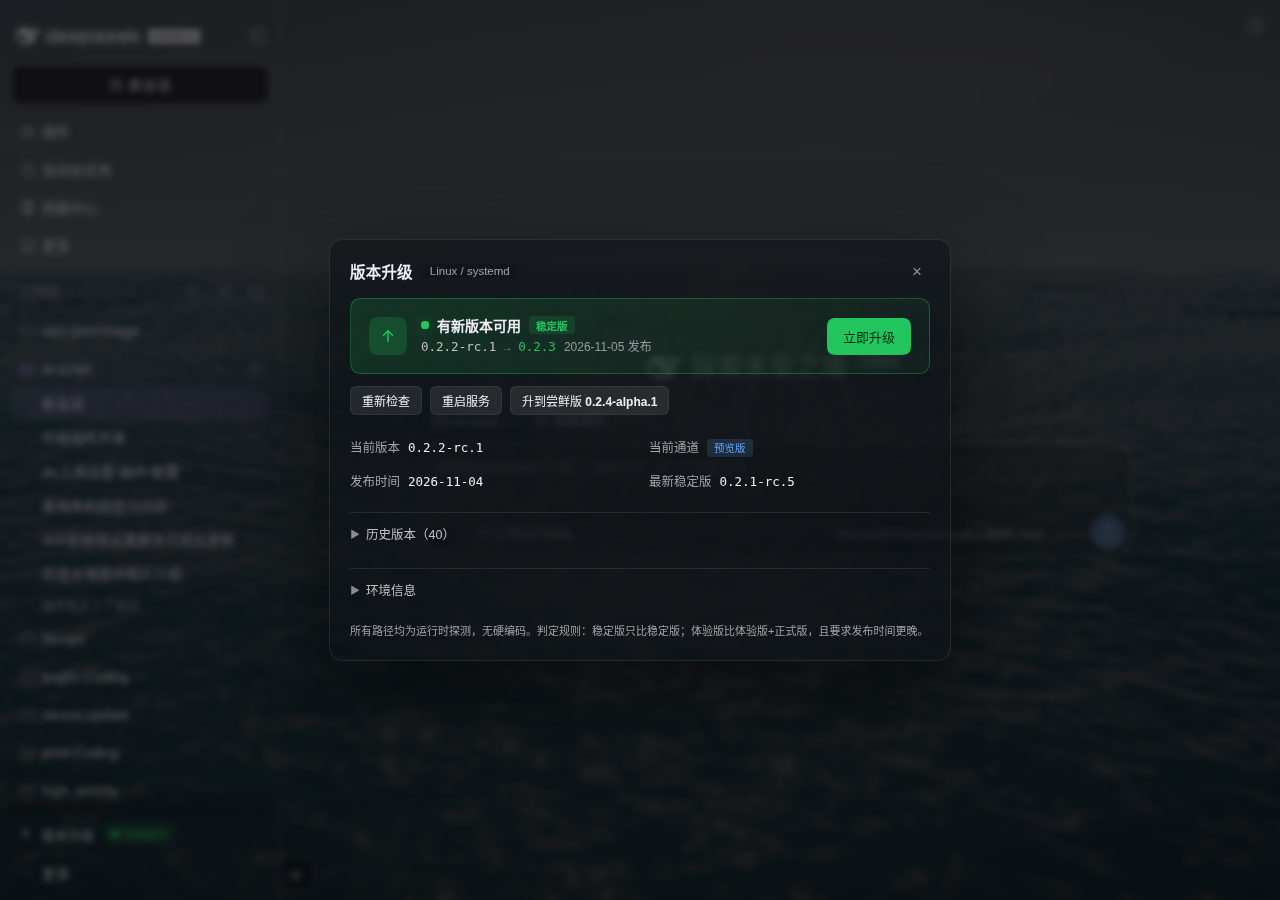
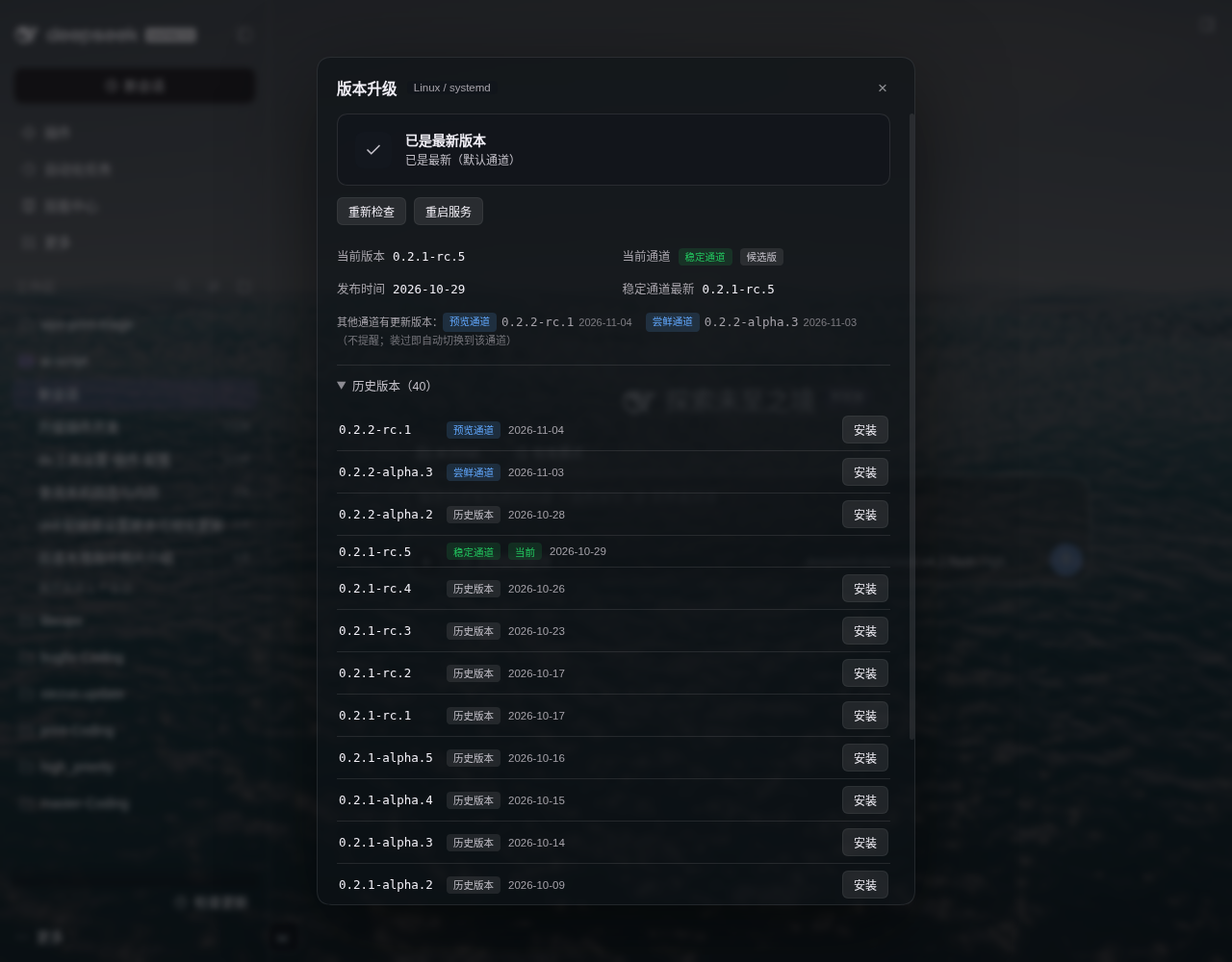
侧栏入口:有更新时显示绿色呼吸圆点 + 「有新版本」徽标;无更新时只显示图标与文字。
| 有更新 | 已是最新 |
|---|---|
 |
 |
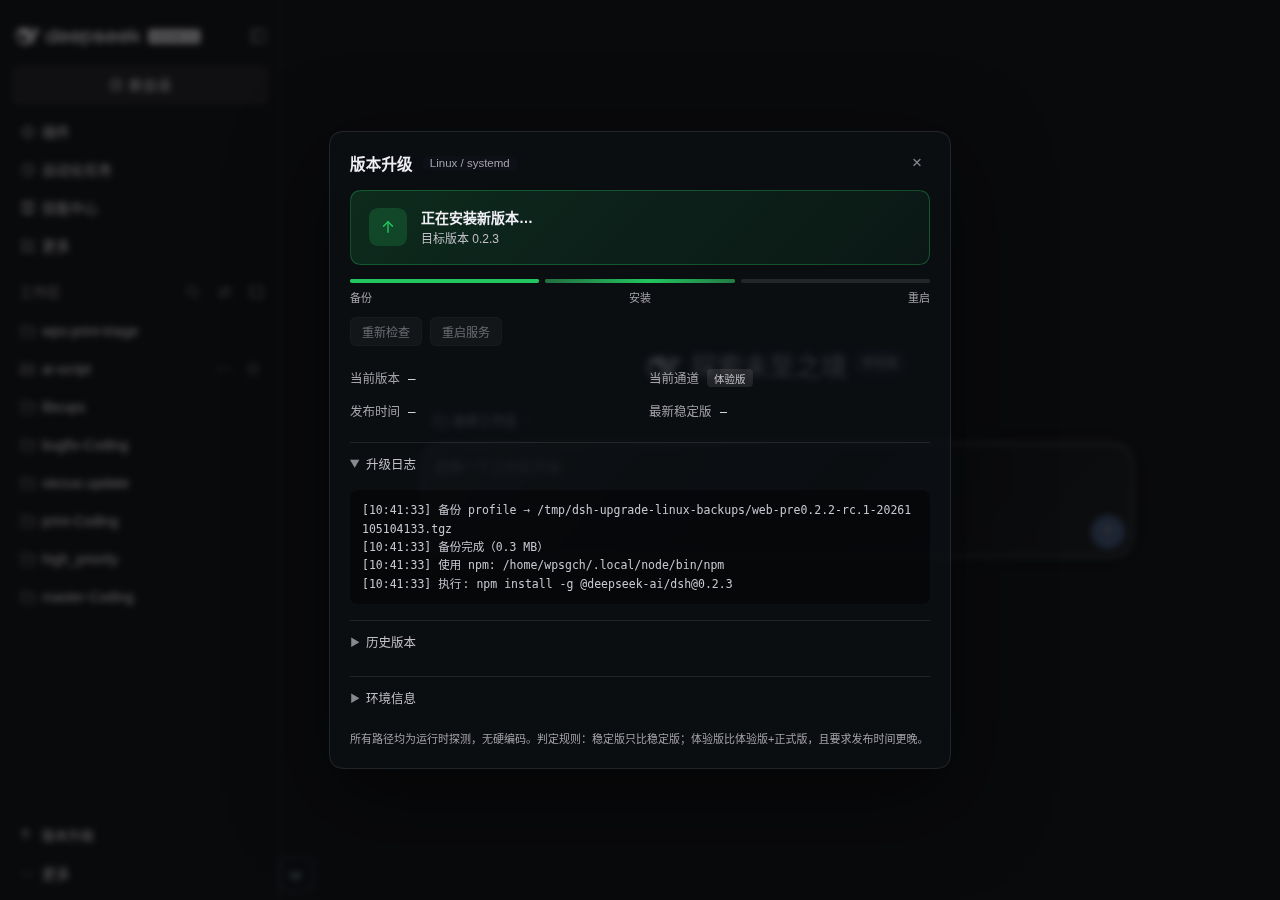
升级过程中显示「备份 → 安装 → 重启」三段进度条,日志实时滚动:
侧栏入口(有更新时):

No comments yet. Be the first to write one.