Secret Ask for DeepSeek Harness
Your agent needs an API key, token or password. Instead of asking you to paste it into the chat, it calls ask_secret and a masked card appears in the conversation. You type the value once; it goes straight into the local credential store through a loopback request and never appears in the message, the model's context, or the session log. Later the agent can run one command with that secret injected as an environment variable.


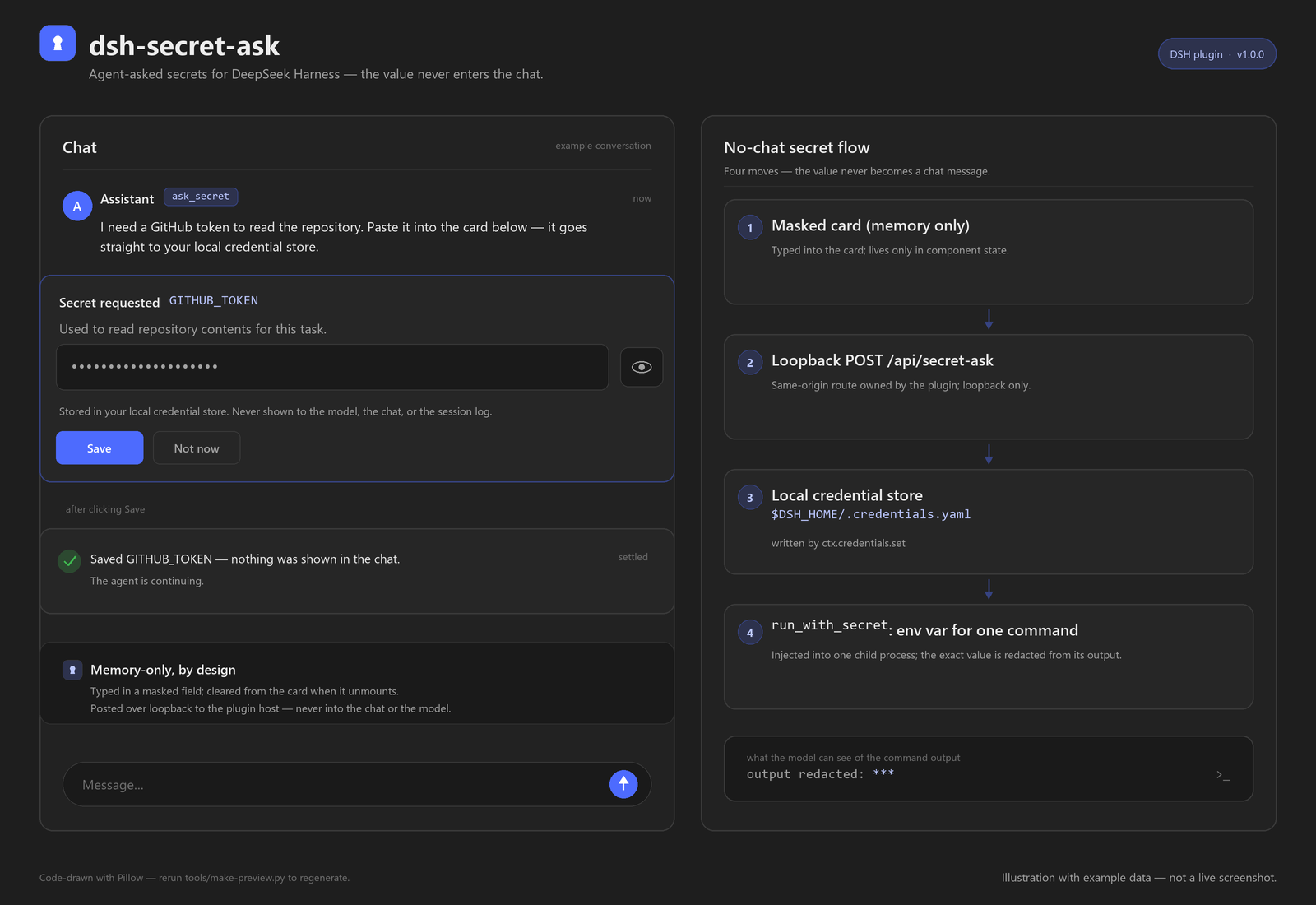
Illustration with example data — not a live screenshot.
What you get
- A masked card instead of a chat paste — a password field with an eye reveal toggle. The typed value lives only in that card's React state and is cleared when the card unmounts.
- Three small tools —
ask_secret(ask and store),run_with_secret(use it for one command),forget_secret(remove it). The model only ever sees the secret's name and whether it is configured. - One-command injection — the value is added as an environment variable to that one child process only, and exact value matches in the command output are replaced with
***. - Cancel is clean — "Not now" reports a cancelled request and stores nothing. No partial value, no draft.
- Plain files, no build step — the bundle is ESM JavaScript and the client half is a single React card. Nothing is compiled.
How it works
agent  ask_secret(name, purpose)
   │
   ├─ masked card in the conversation   (value stays in the card, in memory)
   │      │  POST /api/secret-ask  (loopback only, custom header, 64 KiB cap)
   │      ▼
   │  local credential store            ($DSH_HOME/.credentials.yaml)
   │      │
   └─ tool result: { ok: true, name }   (never the value)
          │
   run_with_secret(command, secrets)
          │  env: NAME=value for that child process only
          ▼
   output with exact secret values replaced by ***
Install
Option 1 — DeepSeek Harness app (easiest)
Open Plugins in the left sidebar.
Click Add plugin, paste this into the package field:
github:zayyehtut/dsh-secret-askClick Install, then Enable now.
Reload the window once so the client half (the card) is loaded.
Option 2 — dsh web (command line)
dsh plugin --profile web add github:zayyehtut/dsh-secret-ask
Restart dsh web afterwards. Replace web with your profile name if you use a custom one.
Using the DeepSeek Harness desktop app? Use Option 1. The desktop app manages its own profile, so a CLI install into
profiles/webwill not show up there.
Option 3 — dsh-market
The plugin is submitted to the community dsh-market catalog. Once it appears there, search for Secret Ask and install it with one click.
Manual profile setup (for development)Clone the repository anywhere on the machine:
git clone https://github.com/zayyehtut/dsh-secret-ask.gitIn your DSH profile's
package.json, add the package as a linked dependency and to the bundle list:{ "dependencies": { "dsh-secret-ask": "link:/absolute/path/to/dsh-secret-ask" }, "dsh": { "profile": { "bundles": [ "@deepseek-ai/dsh-base", "@deepseek-ai/dsh-web-app", "dsh-secret-ask" ] } } }Let the profile install its dependencies, then reload the Harness window.
Before you start
| Requirement | Check |
|---|---|
DeepSeek Harness 0.2.1 or newer (tested on 0.2.1-rc.5) |
dsh --version or the About dialog |
| A profile that includes the Web UI | The desktop app, or dsh web |
| Nothing else — no CLI, no token, no extra service | The credential store ships with the base composition |
First run
- Ask for something that needs a secret, for example: "Publish this with my GitHub token."
- The agent calls
ask_secret; a card titled Secret requested appears with the variable name and a one-line purpose. - Paste the value, press Save (or Enter). The card confirms, the agent continues — nothing is echoed into the transcript.
- The agent now calls
run_with_secretwhen it needs the value, for example a command that reads$env:GITHUB_TOKEN.
If the request already has a stored value, ask_secret is a no-op unless the agent asks with replace: true.
Tools
| Tool | What it does | What the model sees |
|---|---|---|
ask_secret |
Asks you for a named secret and stores it. No-op when already configured unless replace: true. |
the name + a configured flag |
run_with_secret |
Runs a PowerShell command with named secrets as environment variables for that process only. | redacted output + exit code |
forget_secret |
Removes a stored secret by name. | the name + a configured flag |
Calls that need a secret fail with a clear not configured: NAME error, which tells the agent to call ask_secret first.
Configuration
The bundle inserts one row with card mode on. To change it, add a matching patch to your profile's cordis.patch.yml:
- id: secret-ask
  config:
    entryMode: card        # card = masked card (default); question = stock question card
    timeoutMs: 600000      # how long the card may wait, in ms; capped at 1 hour
    # enabled: false       # mount the row but register no tools
entryMode: questionuses the stock question card instead of the masked card. It stores the same way, but the stock card keeps a draft in the Web UI, so card mode is recommended.enabled: falseis a staged-install switch: the row mounts and registers nothing.
Safety and privacy
- The value never enters the model's context. Tool arguments and results carry names only; the card's submit request carries the value directly to the local process.
- The submit route is local and narrow.
/api/secret-askaccepts loopback POSTs only, requires thex-dsh-secret-ask: 1header, checks the same origin, caps the body at 64 KiB, and never logs or echoes the value. - The card writes nothing to browser storage. No
localStorage, no draft store, no conversation entry; the input is cleared on unmount and after submit. - Redaction is exact-match best effort. Output is scanned for the exact stored value (4+ characters) and replaced with
***; a command that transforms or encodes the secret can still print the result. - Same-user access is discretion, not a boundary. The credential file is readable by any program running as your Windows user — the same limitation the Harness documents for its own credential store. Do not treat this plugin as an isolation sandbox.
- No background jobs and no sandbox escalation.
run_with_secretruns one command under the normal sandbox policy; it cannot keep a process alive after the tool returns.
Troubleshooting
| Symptom | Fix |
|---|---|
| The card never appears and the tool waits | The page was open before the plugin loaded. Reload the window; or set entryMode: question and let the agent ask again. |
| "No value was entered before the request timed out" | The card waited 10 minutes (default). Reload the window, then call the tool again. |
not configured: GITHUB_TOKEN |
The agent must call ask_secret for that name before run_with_secret. |
The output shows *** |
That is the redaction working — the exact value is never returned to the model. |
| A secret leaks in a transformed form | Redaction only matches the exact stored value. Avoid commands that encode or re-format the secret. |
| Install succeeded but nothing registers | Confirm the bundle is enabled on the Plugins page and your DSH is 0.2.1 or newer. |
Compatibility
- DeepSeek Harness: 0.2.1 or newer; developed and tested against
0.2.1-rc.5. - Profiles: any profile with the Web UI (desktop app,
dsh web). The card is plain web UI. - Platforms: Windows 10/11 tested end to end. The mechanics are platform-neutral; macOS and Linux are untested.
Development
There is no build step: the bundle is plain ESM JavaScript.
index.js           Host half — tools, the masked card's loopback route, credential store calls
client.js          Client half — the masked card (React) registered as the ask_secret tool view
cordis.patch.yml   The DSH bundle patch that inserts the plugin row (card mode)
icon.svg           Source icon
assets/            Generated preview illustration and storefront icon
screenshots.json   Declares the preview for marketplace cards
tools/             Generators for the illustration and icon (Pillow)
Regenerate the art from code (requires Pillow):
python tools/make-preview.py   # rewrites assets/preview.png
python tools/make-icon.py      # rewrites assets/icon-180.png
Link the repository into a DSH profile as shown under Manual profile setup, reload the window, and the card shows up on the next ask_secret. Client edits need a window reload; host edits need the plugin re-enabled or the app restarted.
Maintenance
Shared as-is. This project is not actively maintained: issues are not triaged and no response time is promised.
If something breaks or you need a change, point your AI agent at this repository and have it diagnose and patch your own copy or fork. Upstream pull requests may sit unreviewed.
License
MIT — see LICENSE.

No comments yet. Be the first to write one.