GitHub panel for DeepSeek Harness
Manage the GitHub account that is already signed in on your PC — from inside DeepSeek Harness. The panel runs the GitHub CLI (gh) for you and shows the result on one page. No token to paste, no API key, no extra sign-in.


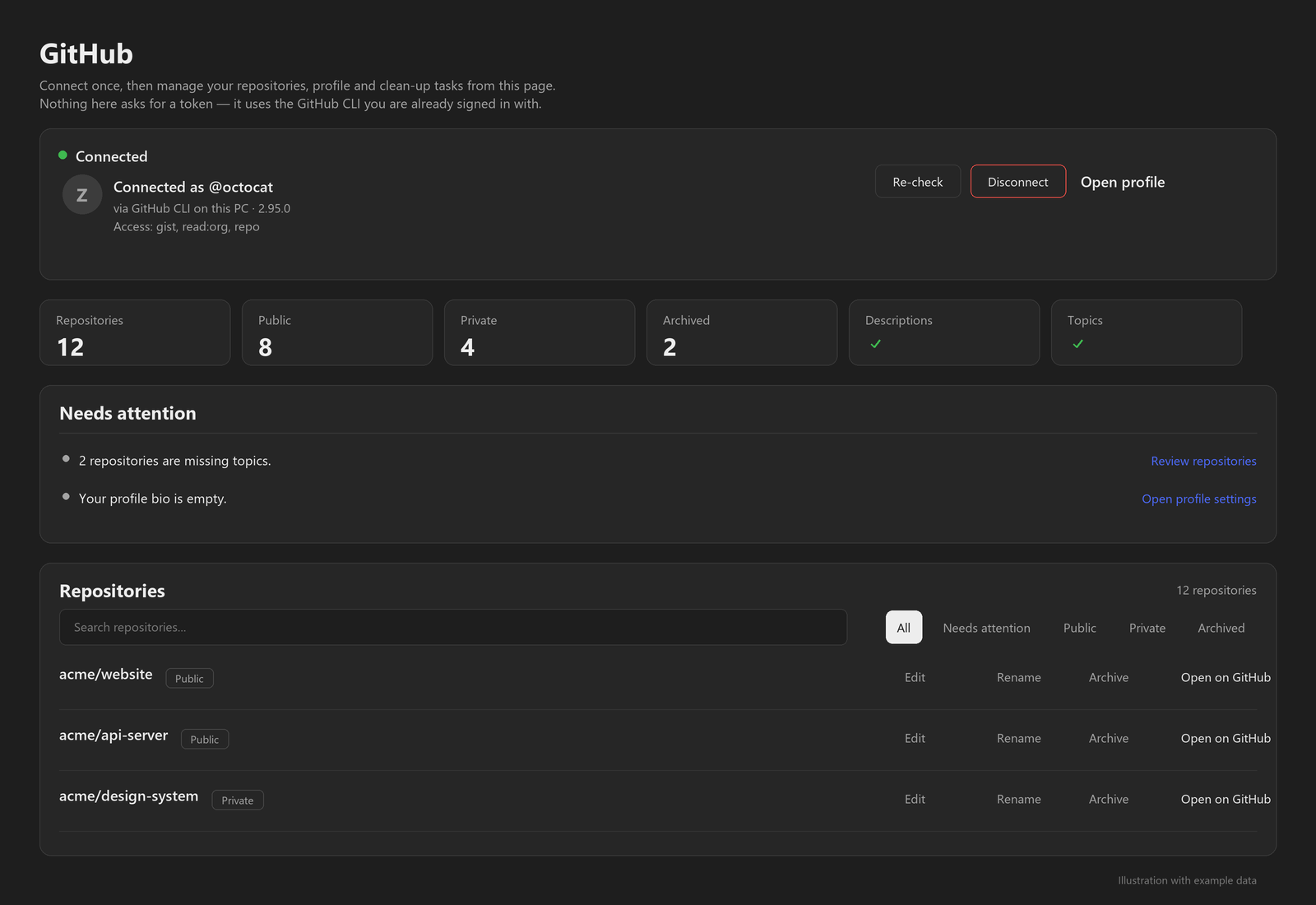
Illustrated preview with example data — not a live account.
What you get
- Your connection, at a glance — connected as
@you, via the GitHub CLI, with the token scopes GitHub reports. - Your repositories, counted — total, public, private, archived, descriptions and topics coverage.
- A "needs attention" list — missing descriptions or topics, empty repositories, forks you no longer use, profile README, empty bio, unused pins, duplicate gists.
- A searchable repository list — edit a description or topics inline, archive or unarchive, rename, or open a repository on GitHub.
- Profile & pins — what the GitHub API can and cannot change, with links to the right GitHub settings pages.
- A health report — README, license,
.gitignore, CI, tests and possible-secret checks per repository, with safe fixes you can apply in one click.
Install
Option 1 — DeepSeek Harness app (easiest)
Open Plugins in the left sidebar.
Click Add plugin, paste this into the package field:
github:zayyehtut/dsh-github-panelClick Install, then click Enable now.
Reload the window if the GitHub icon does not appear immediately.
Option 2 — dsh web (command line)
dsh plugin --profile web add github:zayyehtut/dsh-github-panel
Restart dsh web afterwards. Replace web with your profile name if you use a custom one.
Using the DeepSeek Harness desktop app? Use Option 1. The desktop app manages its own profile, so a CLI install into
profiles/webwill not show up there.
Option 3 — dsh-market
The plugin is submitted to the community dsh-market catalog. Once it appears there, you can search for GitHub panel and install it with one click.
Manual profile setup (for development)Clone the repository anywhere on the machine:
git clone https://github.com/zayyehtut/dsh-github-panel.gitIn your DSH profile's
package.json, add the package as a linked dependency and to the bundle list:{ "dependencies": { "dsh-github-panel": "link:/absolute/path/to/dsh-github-panel" }, "dsh": { "profile": { "bundles": [ "@deepseek-ai/dsh-base", "@deepseek-ai/dsh-web-app", "dsh-github-panel" ] } } }Let the profile install its dependencies (
pnpm installin the profile folder, or let the Harness plugin manager do it).Reload the Harness window.
Before you start
| Requirement | Check |
|---|---|
DeepSeek Harness 0.2.1 or newer (tested on 0.2.1-rc.5) |
dsh --version or the About dialog |
| GitHub CLI installed | gh --version — install from cli.github.com |
| Signed in to GitHub through the CLI | gh auth status |
If gh is not installed or not signed in, the panel tells you what to do instead of failing silently.
First run
- Click the GitHub icon in the left rail (next to Plugins and Automation tasks).
- The panel shows Connected as @you and your repository counts.
- If it says the account is not connected: run
gh auth loginin a terminal, then press Re-check. - Use the filters above the repository list to narrow down what you want to fix, and the Needs attention list to start.
Safety and privacy
- The panel is served by your own Harness process on
127.0.0.1only. - Every change re-reads the repository from GitHub first and needs admin rights on it; descriptions and topics are validated again before writing.
- The panel never reads the token. It only launches
gh, which holds the login in your OS keyring. - Nothing is written to disk by the panel; the action log is in memory and disappears when the Harness restarts.
- Repository deletion is not offered. Pins and profile name/bio are linked out to GitHub because the API has no write access for them.
Troubleshooting
| Symptom | Fix |
|---|---|
| The GitHub icon is missing | Confirm the bundle is enabled on the Plugins page, reload the window, and check that your DSH is 0.2.1 or newer. |
| "Not connected on this PC" | Run gh auth login, confirm with gh auth status, then press Re-check. |
| The panel shows the wrong account | Run gh auth switch (or gh auth login for the right account), then press Re-check. |
| "Loading your GitHub account..." never finishes | Check the network (GitHub API reachability) and that gh api user works in a terminal. |
gh is not found in a sandboxed host |
Set DSH_GITHUB_CONFIG_DIR to the directory holding the gh config, or make sure gh on PATH belongs to the user running the Harness. |
| A change fails with "permission" | The token needs the repo scope and you need admin rights on that repository. |
Compatibility
- DeepSeek Harness: 0.2.1 or newer; developed and tested against
0.2.1-rc.5. - Platforms: Windows 10/11 tested. macOS and Linux use
ghfromPATHand are untested. - GitHub CLI: 2.x; tested with 2.95.0.
Development
There is no build step: the bundle is plain ESM JavaScript.
index.js          Host half — loopback HTTP routes, runs gh, never touches the token
client.js         Client half — the rail icon and the panel UI
cordis.patch.yml  The DSH bundle patch that inserts the plugin row
locale/           Display metadata (English, Chinese)
assets/           The icon and the generated preview illustration
screenshots.json  Declares the preview for marketplace cards
tools/            Generator for the illustrated preview
The preview image is generated, not captured: python tools/make-preview.py redraws it from code (requires Pillow). It contains example data only and carries an "Illustration with example data" note.
Clone the repo, link it into a DSH profile as shown under Manual profile setup, and reload. Changes to client.js need a window reload; changes to index.js need the plugin to be re-enabled.
Maintenance
Shared as-is. This project is not actively maintained: issues are not triaged and no response time is promised.
If something breaks or you need a change, point your AI agent at this repository and have it diagnose and patch your own copy or fork. Upstream pull requests may sit unreviewed.
License
MIT — see LICENSE.

No comments yet. Be the first to write one.