dsh-omni-modal


Give a text-only model the ability to draw pictures and shoot videos — without touching a single line of DeepSeek Harness source.
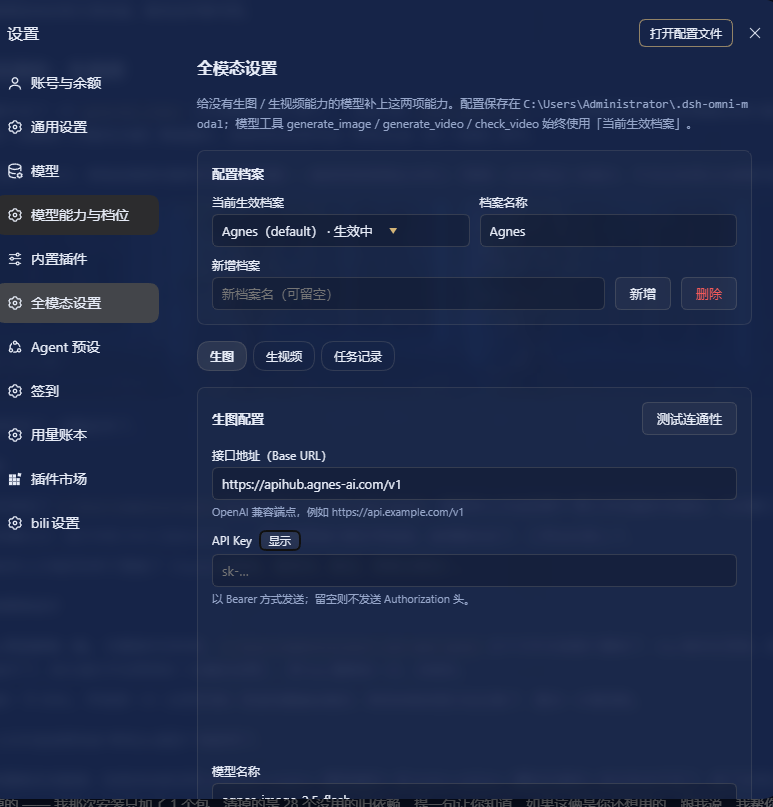
dsh-omni-modal adds an Omni-modal settings section to the DSH settings sidebar, where you can point the harness at any OpenAI-compatible image / video endpoint and register three model-visible tools:
| Tool | What it does |
|---|---|
generate_image |
Synchronous text-to-image. Saves the PNG/JPEG/WebP to disk and (when the attachment service is available) returns an inline preview card. |
generate_video |
Asynchronous submit. Returns a task id immediately — the clip is still rendering. |
check_video |
Poll that task; on success it downloads the finished video to disk. |
Status: usable, tracks the Harness developer preview — interfaces may change.
Features
- Live-editable settings page — a real DSH settings section (not a static skill). Change endpoint, key, model, path or default size and hit Save; the three tools pick it up on their next call, no restart.
- Multiple config profiles — keep several endpoints side by side, name them, switch the active one at a time. Every tool also accepts an optional
profileargument to use a non-active profile for a single call. - Separate image and video configuration — the two APIs rarely share a shape. Each profile carries an independent
baseUrl/apiKey/model/ path / size for each side. - Extra request parameters — a free-form JSON object merged into the request body, for endpoint-specific knobs (
{"quality":"high"},{"mode":"text","aspect_ratio":"16:9"}, …). - Connectivity test — one click probes
GET <baseUrl>/models(falling back to the base URL itself) without spending generation quota. - Async video by design — submit, remember the task, poll later. Task records survive restarts.
- No build step — plain ESM host half plus a hand-written CJS client bundle. Nothing to compile, no bundler needed.
Install
Requires Node.js ≥ 18 and DeepSeek Harness.
dsh plugin --profile <profile> add github:yzhclcl/dsh-omni-modal
<profile> is your DSH profile name (web, desktop, …). Add #v0.1.0 to pin a tag.
Then restart DSH — the host half registers its routes and tools at boot, and the settings section appears under Settings → Omni-modal settings.
Manual install (no pnpm / offline)
Copy this repository somewhere permanent, then add it to ~/.dsh/profiles/<profile>/package.json:
{
  "dependencies": {
    "dsh-omni-modal": "link:/absolute/path/to/dsh-omni-modal"
  },
  "dsh": {
    "profile": {
      "bundles": ["dsh-omni-modal"]
    }
  }
}
and mirror the same entry into the importers. → dependencies block of pnpm-lock.yaml, then create the link:
New-Item -ItemType SymbolicLink `
  -Path "$HOME\.dsh\profiles\<profile>\node_modules\dsh-omni-modal" `
  -Target "/absolute/path/to/dsh-omni-modal"
Never copy the package into
node_modulesinstead of linking it. DSH uses aSymbolas the cross-module call key; loading the module twice makes those symbols unequal and every tool call then throwsCannot read properties of undefined (reading 'prepare'), with no recovery after a restart.
Usage
Once installed, just talk to the agent:
- "Draw a strawberry on a pale blue plate." →
generate_image - "Make a short video of a paper boat drifting down a stream." →
generate_video, thencheck_video
Settings page
| Section | Contents |
|---|---|
| Config profiles | Pick the active profile, rename it, add one (copied from the current) / delete one |
| Image | Base URL, API key, model, request path, default size, extra request params |
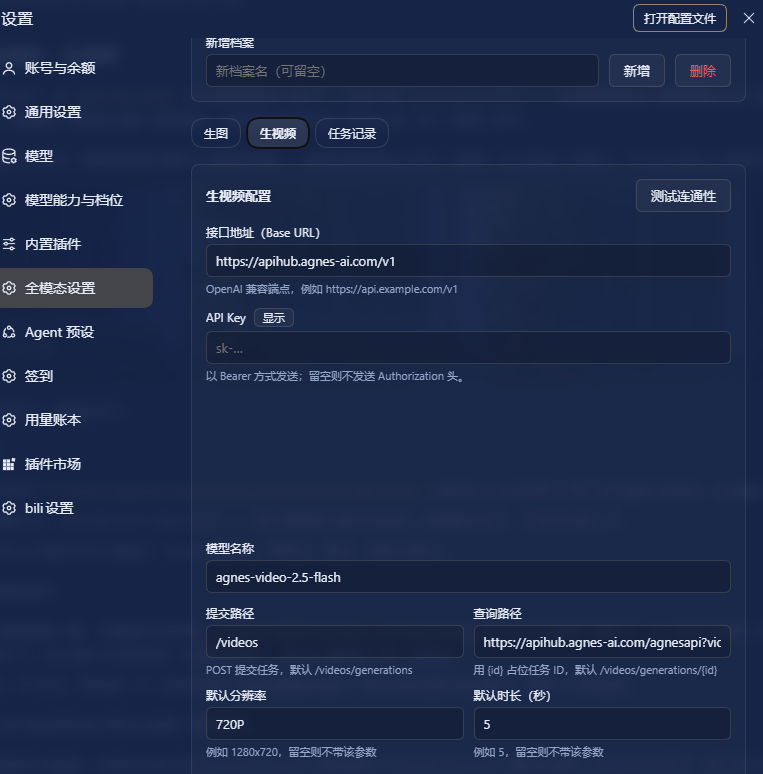
| Video | Base URL, API key, model, submit path, query path, default resolution, default duration, extra request params |
| Task records | Submitted video tasks with their status and artifact path |
Notes:
Saving takes effect immediately for the tools — no restart.
The base URL must be the address alone. Documentation examples are easy to copy verbatim as
POST https://api.example.com/v1; the plugin strips a leadingPOST/GET/… automatically, but writing justhttps://api.example.com/v1is safer.The query path accepts two forms: a relative path (
/videos/generations/{id}) appended to the base URL, or a full URL (https://api.example.com/agnesapi?video_id={id}&model_name={model}) used as-is. The full form is necessary when the query endpoint does not live under the base URL.Placeholders available in the query path:
Placeholder Replaced with {id}the task id returned by the submit call {model}the model name configured in that profile The tools always use the active profile unless you pass
profileexplicitly.
Tools
generate_image(prompt, size?, model?, profile?, save_to?)
generate_video(prompt, model?, profile?, size?, seconds?, image_url?)
check_video(task_id, profile?, save_to?)
generate_imagereturns synchronously. The file lands in the plugin data directory'smedia/and, if the attachment service is available, an image attachment is produced so the picture shows up in the conversation. The model itself cannot see the pixels — to actually look at the image, callread_imageon the returned path.generate_videois asynchronous: it returns ataskIdright away. Callcheck_video(task_id)later; when the status becomessucceededthe artifact is downloaded intomedia/automatically.- Passing a non-existent profile is a hard error that lists the available profiles, rather than silently falling back to another one — otherwise the model would quietly use the wrong endpoint and model while the result still claims the profile it asked for.
check_videofailures are soft failures: a missing task (404), an unreachable download URL or a failed download returnstatus: "failed"/"succeeded"plus amessage, instead of throwing. These are expected business outcomes, and throwing would abort the whole tool-calling round.- Video URL extraction covers the common response shapes:
video_url/videoUrl/url, nestedvideo.url,data.*,output.*,result.*,videos[0].url, and more. - Task id extraction prefers
video_id/videoIdoverid/task_id— some services (Agnes, for instance) return an internal id that cannot be used for polling. - 429 (rate limit) / 503 (busy, queue full) responses come back with a "retry in a moment" hint: they are retryable server states, not configuration errors.
Example: Agnes AI
Agnes AI's image and video endpoints have different shapes; the video side needs the official parameter set. Using apihub.agnes-ai.com:
Image
| Field | Value |
|---|---|
| Base URL | https://apihub.agnes-ai.com/v1 |
| Model | agnes-image-2.5-flash |
| Request path | /images/generations |
| Default size | e.g. 1312x736 |
Video
| Field | Value |
|---|---|
| Base URL | https://apihub.agnes-ai.com/v1 |
| Model | agnes-video-2.5-flash |
| Submit path | /videos |
| Query path | https://apihub.agnes-ai.com/agnesapi?video_id={id}&model_name={model} |
| Default resolution | 720P (Flash only accepts 720P; anything else returns 400) |
| Default duration | 5 (a string, range "4"–"12") |
| Extra request params | {"mode":"text","aspect_ratio":"16:9"} |
- Video submission is
POST /v1/videos(not/v1/videos/generations), andmodeis required (text/keyframe/reference) — put it in the extra params. - Polling goes through
GET /agnesapi?video_id=…&model_name=…, which is outside/v1, hence the full URL in the query path. - Output dimensions follow
aspect_ratio:21:9→1680x720,16:9→1280x704,4:3→960x720,1:1→720x720,3:4→720x960,9:16→720x1280. - The free tier is rate-limited fairly aggressively; repeated calls in a short window will return 429, and it recovers after a wait.
Data locations
| What | Where |
|---|---|
| Configuration | ~/.dsh-omni-modal/config.json (contains the API key, mode 0600) |
| Generated artifacts | ~/.dsh-omni-modal/media/ |
| Video task records | ~/.dsh-omni-modal/tasks.json |
Set DSH_OMNI_DATA_DIR to relocate all of it (handy for isolated testing).
Uninstall
dsh plugin --profile <profile> remove dsh-omni-modal
For a manual install, drop the dependency and bundle entries plus the pnpm-lock.yaml entry, then remove the link:
cmd /c rmdir "$HOME\.dsh\profiles\<profile>\node_modules\dsh-omni-modal"
Removing a symbolic link must be done with
cmd /c rmdiror[IO.Directory]::Delete(path, $false); neverRemove-Item -Recurse, which follows the link and deletes the source directory. Quit DSH completely first.
~/.dsh-omni-modal/ holds your data — delete it yourself if you want it gone.
Implementation notes
lib/index.js— the host half (Node ESM): config storage, the/omni-modal/*routes, and the three tool definitions.lib/client.js— the browser half (a hand-written CJS bundle loaded throughwindow.__ModuleLoader__.load): registers thesettings.sectionslot and renders the settings page.cordis.patch.yml— the plugin registry insert row, carried bydsh.bundle.patch.
The host half imports no bare @deepseek-ai/* modules (third-party plugins cannot resolve those internal exports) — only node:* and relative paths. Tool parameter and output schemas are written as standard JSON Schema (required as a string array) rather than the defineTool property-map DSL, which would make the LLM API reject the whole function schema.
中文文档
见 README.zh.md.
No comments yet. Be the first to write one.