APK Virtual Machine — a DeepSeek Harness plugin




Run a real Android APK inside a local, rooted, open-source Android VM and preview it in the DeepSeek Harness sidebar — streamed as H.264/WebCodecs video at up to 60 fps.
This repository contains the static DSH plugin dsh-apk-vm. It adds a first-class sidebar
entry ("APK Virtual Machine" / "APK 虚拟机") whose main panel boots an AOSP Android Emulator,
installs an APK into the guest, streams the guest display into the panel, and forwards
tap / swipe / key / text input back into the VM. The guest is a userdebug image prepared for
root (adb root on every boot), and the plugin exposes that rooted device to DSH through a
same-origin, loopback-only debug HTTP API and an apk_vm Agent tool.
中文简介:在 DeepSeek Harness 的侧边栏里预览 Android APK。插件会启动本地开源 AOSP Android 虚拟机(Android 14 / API 34,
system-images;android-34;default;x86_64), 安装 APK,并通过 scrcpy H.264 + WebCodecs 把画面串流到侧边栏(最高 60 fps),同时把 点击、滑动、按键、文本输入送回虚拟机。支持拖拽 APK 上传、环境自检卡片、root 调试 API 与apk_vmAgent 工具;多个 Agent 可各自使用独立的隔离虚拟机实例(多开)。 参考机上冷启动约 29.5 s、快照快速启动约 8.4–10.5 s。 当前 Windows x64 为端到端已验证平台;SDK/模拟器探测已覆盖 Windows / macOS / Linux。
Status: 0.3.13 · Apache-2.0 · no npm runtime dependencies · no build step.
This is an open-source DSH plugin published on npm as dsh-apk-vm. Repository:
github.com/yuxiaole-bili/dsh-apk-vm.
Maintainer: yuxiaole-bili.
Please read CONTRIBUTING.md, CODE_OF_CONDUCT.md,
SECURITY.md, docs/PRIVACY.md and docs/RELEASING.md before opening issues or
releasing.
One-line value
Turn DeepSeek Harness into a local Android APK workbench: boot a rooted AOSP VM, preview it at up to 60 fps in the sidebar, and let Agents install, tap, inspect and debug APKs without leaving the session.
Install
Install the published npm package (the command used by the DSH plugin center and the community market):
dsh plugin --profile web add dsh-apk-vm
For the Electron-managed Desktop profile, use Plugins → add/install local bundle with this directory, or install the package through the app's plugin manager.
Source fallback without npm:
dsh plugin --profile web add github:yuxiaole-bili/dsh-apk-vm
# local clone / non-Electron profile:
dsh plugin --profile desktop add <path-to-this-clone>
Capability category
开发与运维 / Developer Tools — Android VM lifecycle, APK install/preview, rooted debugging and Agent-facing UI automation for development workflows.
Risks, permissions and compatibility
Requirements
- Android SDK with
adb, emulator,sdkmanager/avdmanager, a matching system image and an AVD (the Environment card checks all of this; SDK bootstrap is opt-in). - Hardware virtualization: AEHD/WHPX on Windows, KVM on Linux, or HVF on macOS.
- Node.js ≥ 20 only for the repository's headless checks; the plugin itself has no npm dependencies or build step.
- Each running VM costs roughly 2.5 GB RAM;
maxInstancesdefaults to 3 extra VMs.
Permissions / risk
- The guest is intentionally
userdebugand rooted (adb rooton boot); do not put secrets or personal data in the AVD. apk_vmis registered for every Agent in the profile and exposes guest root shell, app install/uninstall, UIAutomator and input injection. Grant it the same trust as a terminal on a rooted Android device./apk-vm/*HTTP routes and WebSocket upgrades are same-origin and loopback-only by default;allowRemote: trueis an explicit opt-in for use behind a trusted authenticated proxy.- No telemetry. Network access only occurs for explicit SDK/system-image downloads through the
user's
sdkmanager, or when the user configures a remote adb device.
Compatibility
- Tested with DSH Desktop
0.2.1-rc.3(static bundle/plugin APIs). - Windows x64 is the only platform verified end-to-end (boot, H.264, rooted debug, Agent tool). macOS/Linux have headless setup/CI coverage but not a live emulator run in this repository.
- Optional integration with
dsh-better-sidebar; the plugin falls back cleanly when that service is absent. - AOSP Android 14 / API 34, x86_64 system image; physical/remote adb devices can be attached instead of the AVD.
Demo / visible proof
Real screenshots from the reference host:
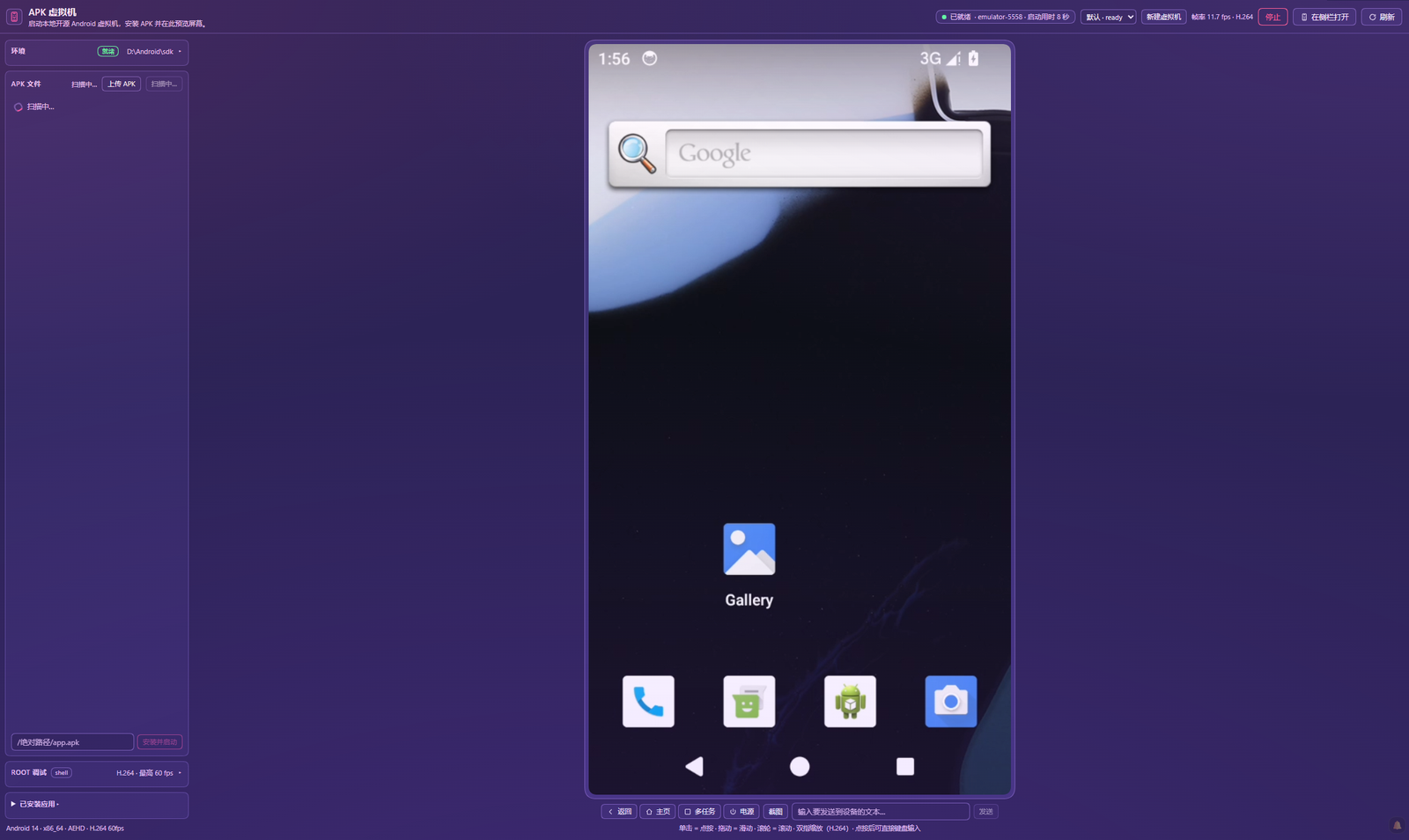
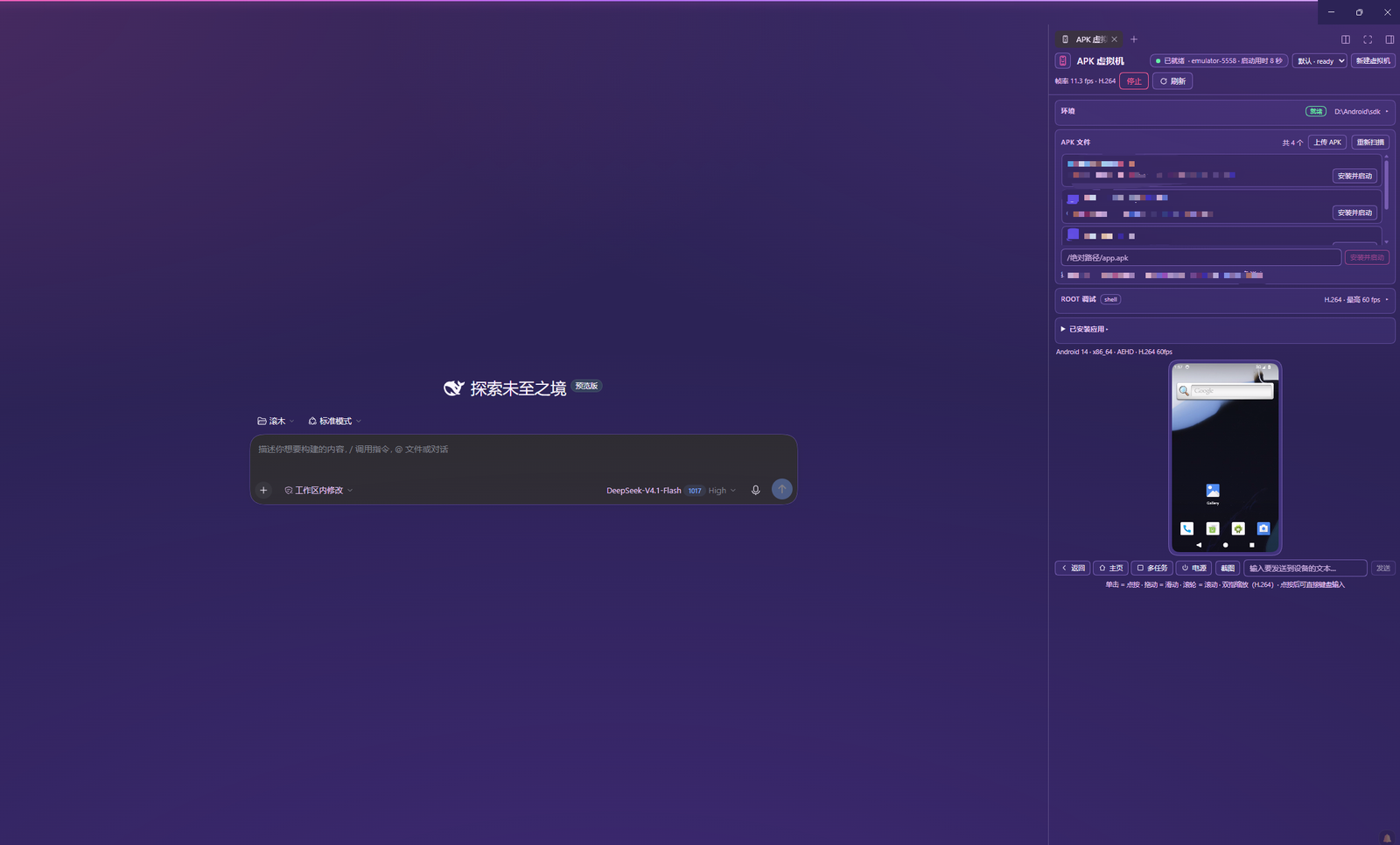
| Asset | Status |
|---|---|
docs/screenshot-panel.png |
✅ main panel: Environment, guest H.264, controls |
docs/screenshot-sidebar.png |
✅ right-sidebar layout next to a session |
docs/demo.gif |
optional — record a 20–30 s demo on a real host |
The Performance and Verification sections list exactly what was
measured, on which host, and how. Real apk_vm output from the reference run:
find_ui {"text":"Phone"}  -> Phone @ 102,1121
assert_text {"text":"Phone"} -> found 1 matching UI node(s)
tap_text {"text":"Phone"} -> tapped Phone at 102,1121
key {"text":"HOME"}       -> returned to launcher
Features
- Sidebar entry + main panel. Registers a localized sidebar item (
sidebar.panellist, idapk-vm, order 30) with a phone glyph (icon.svg), plus a full center-column panel (main, keyapk-vm). Both are live-verified in the reference profile. - Environment self-check card. A one-glance readiness report for the host — SDK,
adb, emulator, command-line tools (sdkmanager/avdmanager), the configured system image, the AVD, and CPU acceleration — with the missing pieces and the available repair actions (GET/POST /apk-vm/setup). The card can create the AVD when the system image is already installed, and — whenallowSetupDownloads: true— install missing SDK components, or bootstrap a completely empty host (download Google command-line tools, extract, accept licenses, install platform-tools/emulator/build-tools/platform). - Multi-agent isolation / multi-instance. Several DSH Agents can drive separate VMs at the
same time: the first Agent gets the default VM, later Agents are assigned isolated instances
with their own AVD, emulator port, snapshot, debug state and H.264/WebCodecs stream
(
maxInstances, default 3 extra; extra VMs use a 720×1280 preview display). Extra instances exposeowner/lastUsedAt/idleMs, and are stopped automatically afterinstanceIdleMswithout panel frames, stream clients or Agent commands (AVD kept for quick reuse). The panel selector and VM instances card show owner/idle state and offer Stop/Destroy. Theapk_vmtool acceptsinstanceand exposeslist_instances/create_instance/destroy_instance. - Multi-AVD switching. The Environment card lists the AVDs visible to the emulator and can
switch (
GET /apk-vm/avds,POST /apk-vm/avd); the current AVD is stopped, switched and restarted automatically. - APK upload by button or drag-and-drop. The panel has an Upload APK button and a
drop overlay on the screen area; the file is posted to
/apk-vm/upload(raw APK bytes, ≤ 500 MiB,.apk/ZIP magic checked), installed into the running VM and launched. Uploaded files live in the OS temp dir and are cleaned up when the plugin is disposed. Installing by absolute local path is still available (/apk-vm/install). - Installed-app management. The panel's Installed apps card lists third-party packages
for the active instance and offers force-stop, clear-data and uninstall; it uses the same
rooted
debug/packages+debug/actionAPI as the Agent tool. - Optional
dsh-better-sidebartab. When that community plugin is installed, this plugin registers a real tab type (apk-vm:preview) through its service — no fork, no DOM hacks, and it degrades cleanly when the service is absent (see compatibility). - VM lifecycle from the UI. Start / stop / restart the AVD or save a snapshot; the Environment card lists all adb devices (emulator, USB/physical, network) and can attach one at runtime. Detach restores the managed AVD identity. Live state, serial, boot mode/time, and a bounded diagnostic log are shown.
- APK discovery + one-click install. Recursively finds
*.apkunder the configured roots, reads package name / label / launcher activity withaapt2 dump badging, then runsadb install -rand launches the app witham start. - Static APK preview.
GET /apk-vm/apk-info?path=…reports version, min/target SDK, permissions, native ABIs, features and launcher activity without starting the VM;GET /apk-vm/apk-icon?path=…extracts the raster launcher icon directly from the APK ZIP. The APK list shows icons when a raster icon is present. - Live H.264 stream, up to 60 fps. Default transport is scrcpy 5.0.1 H.264 over the
same-origin WebSocket
/apk-vm/ws, decoded withWebCodecs VideoDecoderonto a<canvas>(configured for 60 fps, 540×960, 6 Mbps). Late clients get aRESET_VIDEOkeyframe request. IfWebCodecs/WebSocketis unavailable, the panel falls back toadb exec-out screencap -pPNG polling (target 1–10 fps). - Full input forwarding. Click → tap, drag → swipe, wheel → swipe, two-finger pinch/zoom
via the scrcpy control socket, plus Home / Back / Recents / Power and a text field; after
clicking the screen, common hardware keys (arrows/Enter/Escape/Tab/Backspace/Delete) and
printable characters are forwarded as Android key/text input. Clipboard text can be written to
the device (scrcpy
SET_CLIPBOARD) or read back (GET_CLIPBOARD). Coordinates are converted from the rendered phone frame to the device resolution. - Rooted debug surface + extra device tools. Auto
adb rootafter every boot, an on-device toolkit at/data/local/tmp/dsh/debug.sh, a same-origin debug HTTP API, and anapk_vmAgent tool every DSH agent can call: root shell, logcat, props, packages, install, push/pull, reboot, force-stop / clear-data / uninstall, screenshot, rotate, UIAutomator UI tree, 5-second screen recording (pulled to the host temp dir) and performance snapshot. - Fast start. Hypervisor detection (AEHD / WHPX / KVM / HAXM / HVF), host GPU rendering, quick-boot snapshots, prewarm and auto-start — measured cold 29.5 s, quick boot 8.4–10.5 s on the reference host (details).
- Cross-platform SDK discovery.
lib/setup.jsandlib/android.jsdiscover Android SDK,adb, the emulator and AVDs across Windows, macOS and Linux layouts (including.exesuffixes and per-OS fallback locations). Windows x64 is the only platform verified end-to-end so far. - Same-origin only. Every
/apk-vm/*HTTP route and the/apk-vm/wsupgrade rejects cross-origin requests; request bodies and command output are bounded, and host processes are spawned with argv arrays (never a shell string). - Themed + localized. All chrome uses
--dsw-alias-*theme tokens; English and 简体中文 are bundled in locale/. - Dependency-free backend. The Host half uses Node built-ins only: no npm dependencies, no build step.

Quickstart
1. Prerequisites
| Requirement | Notes |
|---|---|
| DeepSeek Harness | A profile that can install local plugin bundles (the desktop Web UI or any agent with the plugin_manager tool). |
| Android SDK | platform-tools (adb), emulator, build-tools (for aapt2), command-line tools (sdkmanager/avdmanager) and an AOSP system image. A JDK (17 works) is needed by the SDK command-line tools. |
| AOSP system image | system-images;android-34;default;x86_64 (Android 14, API 34) — the image used for all measurements below. Configurable with systemImage. |
| Hardware virtualization | Required for the x86_64 image: AEHD or WHPX on Windows, KVM on Linux, HVF on macOS. See acceleration matrix. |
| Disk / RAM | A few GB for the SDK + system image and the AVD; an emulator with a modern desktop GPU is recommended. |
| Node.js 24+ (optional) | Only for running this repository's checks (Verification). The plugin itself has no npm dependencies. |
The plugin's Environment card performs this check for you (see First run); the commands below are the manual equivalent.
CPU acceleration matrix
| Host OS | Backend | How to enable |
|---|---|---|
| Windows | AEHD (Android Emulator Hypervisor Driver) | Install via SDK Manager package extras;google;Android_Emulator_Hypervisor_Driver, or the standalone installer; requires administrator rights and a reboot. Recommended when Hyper-V/WHPX is not active. |
| Windows | WHPX | Enable the Windows Hypervisor Platform optional feature (and Hyper-V if desired), reboot. Alternative when Hyper-V is already in use. |
| Linux | KVM | Load kvm_intel/kvm_amd, ensure /dev/kvm exists and your user can access it (e.g. kvm group), then reboot/login again. |
| macOS | HVF (Hypervisor.framework) | Built into macOS; the emulator uses it automatically on Intel and Apple Silicon hosts. |
Check the host before starting the plugin:
"$ANDROID_HOME/emulator/emulator" -accel-check
The plugin also runs the SDK's emulator-check accel itself and reports the result in
/apk-vm/state (vm.accel), /apk-vm/setup (accel) and the panel log. If no hypervisor is
usable, it fails fast with an explicit error instead of hanging for 20 minutes (the x86_64
image cannot boot under pure TCG).
2. Install the plugin
Copy or clone this repository anywhere local:
git clone https://github.com/yuxiaole-bili/dsh-apk-vm.git
cd dsh-apk-vm
Then pick one:
- CLI npm install (community market / non-
desktopprofile):
Source fallback:dsh plugin --profile web add dsh-apk-vmdsh plugin --profile web add github:yuxiaole-bili/dsh-apk-vm. - DSH Web UI — open Plugins, choose to add/install a plugin bundle from a local
directory, and select this folder. The bundle patch is cordis.patch.yml;
the
dsh.clientdeclaration in package.json loadsclient.jsinto the Web UI. - Agent tool — ask a DSH agent to run
plugin_managerwith actioninstall_bundleand the target set to this folder path. - CLI local install (non-Electron profiles only) —
dsh plugin --profile <profile> add <path-to-this-folder>. The Electron-manageddesktopprofile must be managed from the app UI instead.
After installing or upgrading the plugin, reload the DSH Web page so the new client bundle is loaded.
3. Provide an Android SDK, system image and AVD
The plugin auto-discovers the SDK (sdkRoot, ANDROID_HOME, ANDROID_SDK_ROOT, then common
per-OS locations) and adb/emulator. Fastest path: open the panel, check the Environment
card, and use Create AVD once the system image is installed. If the image is missing and
allowSetupDownloads: true is set, the card can also run sdkmanager --install for it;
otherwise install it yourself:
sdkmanager --install "platform-tools" "emulator" "build-tools;34.0.0" \
  "system-images;android-34;default;x86_64"
avdmanager create avd -n dsh_apk -k "system-images;android-34;default;x86_64"
The plugin can also attach to an already-running adb device instead of spawning the AVD; set
serial (for example emulator-5558 or <device-ip>:5555) and leave emulatorPath/avdName
unset.
4. Configure
The bundle ships with portable defaults (SDK auto-detection, avdName: dsh_apk). Review the
config for your machine — at minimum roots if you want extra APK scan directories. The full
list of keys is in the configuration reference.
config:
  # sdkRoot: 'C:/Android/sdk'       # optional; otherwise auto-detected
  # emulatorPath: 'C:/Android/sdk/emulator/emulator.exe'  # optional; auto-detected
  # serial: 'emulator-5558'        # ...or attach an existing adb serial instead of spawning
  systemImage: 'system-images;android-34;default;x86_64'
  avdName: dsh_apk
  port: 5558
  roots: ['C:/projects']           # extra APK discovery roots (workspace is automatic)
  gpuMode: host
  accel: auto
  requireAccel: true
  quickBoot: true
  snapshotName: default_boot
  saveSnapshotAfterBoot: true
  prewarm: false                   # opt-in warm boot on plugin activation
  prewarmDelayMs: 3000
  autoStart: true
  multiInstance: true              # isolated VMs for concurrent agents
  maxInstances: 3                  # extra VMs (default VM is always available)
  instanceIdleMs: 900000           # stop idle extra VMs after 15 min (AVD kept)
  instanceReapIntervalMs: 60000
  allowRemote: false               # reject non-loopback VM API clients
  allowSetupDownloads: false       # gate the optional system-image download action
  scrcpy: true
  scrcpyMaxSize: 960
  scrcpyMaxFps: 60
  scrcpyBitrate: 6000000
  frameFps: 2                      # only the PNG fallback target (1-10)
If emulatorPath / adbPath are omitted, the plugin auto-discovers the Android SDK from
sdkRoot, then ANDROID_HOME / ANDROID_SDK_ROOT, then common per-user/system install
locations, and finally falls back to PATH. Spawning an AVD still needs avdName; use serial
to attach an existing device instead.
5. First run
- Open the DSH sidebar and click APK Virtual Machine. Check the Environment card:
green Ready means the SDK, image, AVD and acceleration were found; Setup needed lists
what is missing and offers Create AVD (and optionally Download image when
allowSetupDownloads: true). - Press Start VM (or let
prewarm/autoStartboot it). The first start is a cold boot (measured 29.5 s on the reference host); the plugin then saves the quick-boot snapshotdefault_boot, and later starts restore it (measured 8.4–10.5 s). - Install an APK: click Upload APK, drag an
.apkfile onto the panel, or pick one from the discovered list / install by absolute path. The app is installed and launched automatically. Use the phone frame for input and the Rooted debug card for root shell, logcat, props, UI tree, rotation, recording, perf and screenshot. - Or delegate to an agent, for example: "Use the
apk_vmtool to installC:/work/app.apkand take a screenshot."
Configuration
All keys are optional; defaults are shown in the Default column.
| Key | Default | Purpose |
|---|---|---|
emulatorPath |
auto-detected | Path to the Android emulator executable. Auto-discovered from the SDK / PATH. |
avdName |
— | AVD name to spawn. Required to spawn an AVD. |
serial |
— | Attach this adb serial instead of spawning an emulator. |
port |
5558 |
Emulator console port used when spawning. |
sdkRoot |
ANDROID_HOME / ANDROID_SDK_ROOT |
Android SDK root for adb, aapt2, emulator-check, sdkmanager/avdmanager. |
adbPath |
<sdk>/platform-tools/adb |
Explicit adb executable. |
systemImage |
system-images;android-34;default;x86_64 |
System image required by the Environment card and used for AVD creation. |
spawnEmulator |
true |
Set false to only attach (never spawn). |
emulatorArgs |
[] |
Extra argv appended to the emulator command line. |
roots |
[] |
Extra APK discovery roots. The DSH working directory, process.cwd() and the home directory are added automatically. |
bootTimeoutMs |
1200000 |
Max wait for the guest to report sys.boot_completed=1. |
gpuMode |
host |
host uses the real GPU; swiftshader_indirect is the software fallback for headless hosts. |
accel |
auto |
auto detects AEHD/WHPX/KVM/HAXM/HVF; on/off force the decision. |
requireAccel |
true |
Fail fast with an explicit error when no hypervisor is found, instead of booting forever under TCG. |
quickBoot |
true |
Restore the saved AVD snapshot when present; false adds -no-snapshot. |
snapshotName |
default_boot |
Snapshot name to load/save. |
saveSnapshotAfterBoot |
true |
Save a snapshot after the first successful cold boot. |
prewarm |
false |
Boot the VM in the background shortly after plugin activation. |
prewarmDelayMs |
3000 |
Delay before the prewarm start. |
autoStart |
true |
Start the VM on the first /apk-vm/state or /apk-vm/frame request. |
multiInstance |
true |
Allow isolated extra VMs for concurrent Agents. |
maxInstances |
3 |
Maximum number of extra instances (in addition to the default VM). Each running instance costs guest RAM/CPU. |
instanceIdleMs |
900000 |
Stop an extra instance after this long without panel frames, a video client, or an Agent command (AVD is kept). |
instanceReapIntervalMs |
60000 |
How often the idle reaper checks extra instances. |
allowRemote |
false |
Allow non-loopback clients to reach /apk-vm/* and /apk-vm/ws (only behind your own authenticated proxy). |
allowSetupDownloads |
false |
Allow the Environment card's install-image action to run sdkmanager --install (large download). |
frameFps |
2 |
PNG fallback target frame rate, 1–10 (the H.264 path is not affected). |
scrcpy |
true |
Enable the H.264/WebCodecs transport. |
scrcpyMaxSize |
960 |
Encoder max size; 960 yields 540×960 video. |
scrcpyMaxFps |
60 |
Encoder frame-rate cap, 1–60. |
scrcpyBitrate |
6000000 |
Video bitrate in bits/s. |
scrcpyPort |
27183 |
Local adb-forward port for the scrcpy server tunnel. |
scrcpyJarPath |
vendored JAR | Override the scrcpy server JAR path. |
The Environment report (GET /apk-vm/setup) returns ok, platform, sdkRoot, adbPath,
emulatorPath, avdmanagerPath, sdkmanagerPath, emulatorVersion, systemImage +
systemImagePresent, avdName + avdPresent + avdPath, accel { available, backend, detail }, hypervisorNotes, missing[] and actions[] with per-action availability.
Architecture
┌────────────────────────────── DSH Web UI ────────────────────────────────┐
│ sidebar.panellist [apk-vm, order 30] ──click──▶ main[apk-vm] panel       │
│                         Client half: client.js                           │
│  Environment card · upload/drop · APK list · phone frame (WebCodecs      │
│  canvas or PNG fallback) · Rooted debug card                             │
└──────────────────────────────────┬───────────────────────────────────────┘
                                   │ same-origin HTTP + WebSocket
┌──────────────────────────────────▼───────────────────────────────────────┐
│ DSH Host: index.js  (/apk-vm/* routes, ws relay, debug API, agent tool)  │
│  ├─ lib/android.js  AndroidVm: AVD lifecycle, adb, aapt2, input, debug   │
│  ├─ lib/setup.js    Environment detection, createAvd, installSystemImage │
│  ├─ lib/scrcpy.js   ScrcpySession: push server, adb forward, H.264 demux │
│  │                  (Annex-B → AVCC), control messages (RESET_VIDEO, …)  │
│  └─ lib/ws.js       dependency-free RFC 6455 WebSocket server            │
└──────────────────────────────────┬───────────────────────────────────────┘
                                   │ adb
                    ┌──────────────▼──────────────┐
                    │ AOSP Android Emulator        │
                    │ Android 14 / API 34, x86_64  │
                    │ userdebug, adbd as root      │
                    └──────────────────────────────┘
| Layer | Implementation | Role |
|---|---|---|
| VM | AOSP Android Emulator (emulator + system-images;android-34;default;x86_64) |
Boots the open-source Android system image; driven through adb. |
| Setup | lib/setup.js | Dependency-free SDK / adb / emulator / AVD / acceleration detection plus one-click create-avd and optional install-image. |
| Streaming | scrcpy 5.0.1 server (lib/vendor/scrcpy-server-v5.0.1.jar, pushed to /data/local/tmp/scrcpy-server.jar) + lib/scrcpy.js |
H.264 screen capture and the scrcpy control protocol, without the desktop scrcpy client. |
| Device bridge | adb from Android SDK platform-tools |
install / launch / screencap / input / logcat / file push-pull. |
| Plugin runtime | DSH plugin APIs (slots, locale, webServer, tools, dsh.client) |
Sidebar entry, main panel, same-origin HTTP/WebSocket control plane, agent tool. |
No npm dependencies are used: the Host half imports only Node built-ins, client.js is a
pre-built browser bundle, and the plugin has no build step.
Fast start: four layers
| Layer | What it does |
|---|---|
| Hardware CPU acceleration | Runs emulator-check accel; when AEHD / WHPX / KVM / HAXM / HVF is usable the emulator gets hardware virtualization. Pure TCG is never silently attempted for the x86_64 image (requireAccel: true fails fast with a clear error). |
| Host GPU | -gpu host renders the VM with the real GPU instead of SwiftShader; switch gpuMode on headless/no-GPU hosts. |
| Quick-boot snapshot | The first successful cold boot saves adb emu avd snapshot save default_boot; later starts pass -snapshot default_boot. A leftover ram.img without snapshot.pb is not treated as a valid snapshot. |
| Warm start | prewarm: true boots the VM ~3 s after plugin activation; autoStart: true boots it on the first /apk-vm/state//apk-vm/frame request. |
/apk-vm/state exposes vm.bootKind (cold / snapshot / attach), vm.bootMs,
vm.accel, vm.gpuMode and vm.snapshotAvailable; the panel shows cold Ns / quick Ns.
H.264 streaming and input
The default transport (when scrcpy: true) is:
scrcpy-server (guest H.264) → adb forward → ScrcpyVideoDemuxer → Annex-B→AVCC
  → /apk-vm/ws WebSocket → browser VideoDecoder → <canvas>
- WebSocket text frame
init:{ codec:"h264", codecString, description (avcC, base64), width, height, maxFps, bitrate }. - Binary frame:
[0]=1][1=keyframe flag][2..9]=pts (int64 LE)][10..]=AVCC NAL units]. - A client that connects to an already-running session triggers a scrcpy control
RESET_VIDEO(type 17) so it receives a fresh keyframe; clients drop delta frames until the first keyframe so the canvas never decodes garbage. - The session is shared by all connected clients; when the last client disconnects the scrcpy encoder is stopped after a grace period (the VM keeps running). Stopping/restarting the VM or unloading the plugin stops the stream.
- Input is independent of the streaming path:
/apk-vm/inputremains the only input channel (the panel does not bypass it), so input keeps working with the PNG fallback.
The protocol notes collected while implementing this against scrcpy 5.0.1 are in spike/scrcpy/PROTOCOL.md.
HTTP control plane (same origin, local only)
Every route rejects cross-origin requests; the WebSocket upgrade is checked the same way. JSON bodies are bounded to 64 KiB; the raw APK upload is bounded to 500 MiB.
| Method | Path | Purpose |
|---|---|---|
| GET | /apk-vm/state |
VM state, serial, boot time/kind, accel/GPU, root/debug status, display size, current APK, stream counters, log tail. |
| GET | /apk-vm/setup?force=1 |
Environment report (SDK/adb/emulator/tools/image/AVD/acceleration, missing items, available actions). Cached ~15 s. |
| POST | /apk-vm/setup |
{"action":"refresh"|"create-avd"|"install-image"|"install-tools"|"bootstrap-sdk"}. install-tools/bootstrap-sdk accept optional packages; all download actions require allowSetupDownloads: true (otherwise 403) and are never automatic. |
| GET | /apk-vm/apks |
Discover *.apk files under the configured roots. |
| GET | /apk-vm/apk-info?path=… |
Static APK metadata (package/version/targetSdk/permissions/features/native code/launch activity/icon path) via aapt2. |
| GET/HEAD | /apk-vm/apk-icon?path=… |
Extract the raster launcher icon from the APK ZIP (PNG/WebP/JPEG). |
| GET | /apk-vm/devices |
List adb devices (serial, state, kind, model, product, transport) plus current/managed-device metadata. |
| POST | /apk-vm/device |
{"serial":"<adb-serial>"} attach an online physical/network device; {"serial":""} detach and restore the managed AVD. |
| POST | /apk-vm/vm |
{"action":"start"|"stop"|"restart"|"snapshot"}. |
| POST | /apk-vm/install |
{"path":"C:/path/app.apk"} → install + launch. |
| POST | /apk-vm/upload |
Raw APK bytes (≤ 500 MiB) with the file name in the x-apk-name header → validate ZIP/APK magic, write to the OS temp dir, install + launch. |
| GET | /apk-vm/frame?t=… |
Latest PNG frame (409 while the VM is not ready). |
| POST | /apk-vm/input |
tap / swipe / key / text payloads. |
| POST | /apk-vm/touch |
Multi-touch scrcpy control ({"action":"down|move|up|cancel","pointerId":0,"x":…,"y":…} in video-frame coordinates) for pinch/zoom. |
| GET/POST | /apk-vm/clipboard |
Read the device clipboard (GET, scrcpy GET_CLIPBOARD) or write text (POST {"text":…}). |
| POST | /apk-vm/stream |
{"fps":1–10} — set the PNG fallback target frame rate. |
| GET (upgrade) | /apk-vm/ws |
WebSocket H.264 stream (see above). |
| GET | /apk-vm/instances |
List default + extra VM instances, including owner, lastUsedAt, idleMs, idleTimeoutMs, videoClients. |
| POST | /apk-vm/instances |
{"name":"agent-a","start":true} — create an isolated AVD/VM; every extra instance has its own H.264 stream. |
| DELETE | /apk-vm/instances/:id |
Stop/dispose an extra instance (the default cannot be destroyed). |
| GET/POST | /apk-vm/instances/:id/... |
Per-instance mirror of state, frame, vm, input, install, upload, debug/*. |
Uploaded APKs are written under <os temp>/dsh-apk-vm-uploads and that directory is removed
when the plugin is disposed (best-effort stale-file cleanup also runs before each upload).
Rooted debug surface
The VM image is the AOSP android-34;default;x86_64 userdebug build. After every boot the
Host half prepares a rooted debug environment and captures it in the quick-boot snapshot:
- adb root by default.
_prepareDebugSystem()runsadb root, waits for adbd, and verifiesuid=0(root). The image hasro.debuggable=1andro.adb.secure=0, so there is no adb authorization prompt. State reportsroot: trueplus identity (debugBuild,adbSecure). - Debug-friendly settings. adb/development settings enabled, package verifier and
adb-install verification disabled,
persist.sys.usb.config=adb, root-access property set. - On-device toolkit at
/data/local/tmp/dsh/debug.sh(+README.txt, mode 755):info | logs [lines] | prop <name> [value] | pkgs | install <apk> | help. - Snapshot persistence. Root state, settings and the toolkit are captured by
adb emu avd snapshot save default_boot; a quick boot restores them andadb rootis re-applied idempotently. - The emulator accepts only
-prop qemu.*arguments, so root/debug state is applied right after boot (not faked via a-prop ro.*flag) and then snapshotted.
Debug HTTP API (same origin)
| Method | Path | Operation |
|---|---|---|
| GET | /apk-vm/debug/info |
serial, identity (Android/API/ABI/debug), root, toolkit, display, uptime. |
| POST | /apk-vm/debug/shell |
{"command":"id; getprop …"} → rooted shell (bounded stdout/stderr/code). |
| GET | /apk-vm/debug/logcat?lines=200&buffer=main&filter=… |
bounded logcat dump; buffer=crash for the crash buffer. |
| GET/POST | /apk-vm/debug/prop |
read (?name=) / write ({"name","value"}) system properties. |
| GET | /apk-vm/debug/packages |
third-party (or ?all=1 all) packages with APK paths. |
| POST | /apk-vm/debug/root |
ensure adbd is root. |
| POST | /apk-vm/debug/push |
{"localPath","remotePath"} (remote under /data/local/tmp, /sdcard, /storage/emulated/0). |
| POST | /apk-vm/debug/pull |
{"remotePath","localPath"} (local confined to APK roots + temp). |
| POST | /apk-vm/debug/reboot |
{"mode":"system"|"recovery"|"bootloader"}. |
| POST | /apk-vm/debug/action |
force-stop / clear-data / uninstall by package name. |
| POST | /apk-vm/debug/rotate |
{"orientation":"portrait"|"landscape"|"left"|"right"|"upside-down"} or rotation 0..3; locks the guest rotation. |
| GET | /apk-vm/debug/ui |
UIAutomator hierarchy XML (bounded to 500 000 chars) plus node count and guest remote path. |
| POST | /apk-vm/debug/record |
{"seconds":1–60} (default 5) → screenrecord MP4 pulled to the host temp dir; returns localPath and byte size; the panel auto-downloads it. |
| GET | /apk-vm/artifacts?name=… |
Download a screenshot/recording previously written by the plugin into the OS temp dir (basename whitelist, no arbitrary paths). |
| GET | /apk-vm/debug/perf |
load average, /proc/meminfo totals/free/available and the first lines of dumpsys cpuinfo. |
| GET/HEAD | /apk-vm/debug/screenshot |
PNG download (Content-Disposition: attachment). |
Agent tool apk_vm
Registered globally through ctx.tools, so every DSH agent can operate the rooted VM directly:
info, shell, logcat, getprop, setprop, packages, install, push, pull,
reboot, root, force_stop, clear_data, uninstall, rotate, ui_dump, record, perf,
screenshot, high-level input tap / swipe / long_press / key / text (device coordinates),
UI automation find_ui / assert_text / tap_text (UIAutomator text/resource-id/content-desc/class),
clipboard clipboard_get / clipboard_set,
static apk_info (metadata without booting a VM),
device management (devices, attach_device, detach_device),
plus start / stop and instance management (list_instances, create_instance,
destroy_instance). It calls the same Host methods as the HTTP routes and the panel (no
duplicated logic).
For concurrent Agents, pass instance to target a specific VM; when omitted, the tool resolves
the calling Agent's assigned instance (first Agent → default VM, later Agents → isolated
instances created on demand until maxInstances). Each extra instance has its own H.264
WebSocket (/apk-vm/instances/<id>/ws) and falls back to PNG if WebCodecs is unavailable.
UI automation is live-verified against a multi-instance VM: find_ui {"text":"Phone"} returned
Phone @ 102,1121, assert_text {"text":"Phone"} found one node, tap_text {"text":"Phone"}
tapped that center and opened the app, and key HOME returned to the launcher.
Panel UI
The APK VM panel has an Environment card (readiness, missing items, Create AVD / Download
image / Re-check) and a Rooted debug card: root/shell badge, Android/API/ABI line, rooted
command input (equivalent to adb shell), Logcat / Live logcat / Crash log / Props / Root /
UI tree / Perf /
Record 5s / Rotate / Screenshot buttons, and a bounded output console.
Compatibility with dsh-better-sidebar
dsh-better-sidebar is the community sidebar workbench (right-sidebar tabs, bottom workbench, file viewers). When it is active, this plugin registers a real tab type through its documented service — no forks, no DOM hacks, no hard dependency:
- The client half defers with
ctx.inject(['betterSidebar'], …), so the plugin keeps working unchanged on a plain DSH and simply gains the tab when the service appears. ctx.betterSidebar.registerTab({ id: 'apk-vm:preview', title, description, icon, order: 60, single: true, component })— the tab appears in the native right Sidebar's + menu and in the bottom workbench, rendered with the same VM console adapted to a narrow pane (stacked APK list, compact header,visible-gated frame polling).- The main panel gains an "Open in side bar" action that calls
ctx.betterSidebar.openTab({ type: 'apk-vm:preview', target: 'right' })for the active session (with a clear message when no session is open). - Everything degrades cleanly: the service is optional, and a missing/broken service never
affects the native
mainpanel or the left sidebar entry.
Live-verified in the reference profile: the sidebar.right.pane.tab slot lists the occupant
dsh-better-sidebar:apk-vm:preview (active: true). The sandbox test
spike/ui-better-sidebar-smoke.cjs separately asserts
descriptor fields, localization, disposal, the "already present" path, and resilience when the
service disappears.
Performance
Measured on the reference host: Windows x64, AEHD 2.2 hardware acceleration, -gpu host
(NVIDIA RTX 5070 Ti), AOSP system-images;android-34;default;x86_64 (Android 14 / API 34).
These are observations from a single machine, not universal guarantees.
| Metric | Result |
|---|---|
| Cold boot (first boot; also after re-saving the snapshot for the current AVD config) | 29.5 s |
| Quick boot (snapshot restore) | 8.4 s measured (Boot completed in 8371 ms, bootKind: snapshot); 8.4–10.5 s across runs — inside the 30 s target |
Raw H.264 stream over /apk-vm/ws (60 Hz animation test app) |
~59.3 fps (425–474 packets in 8 s, zero protocol errors) |
| Headless browser software WebCodecs decode | 318 frames / 6.32 s = 50.3 fps (~57 fps excluding ~0.7 s startup) |
| Late second client (keyframe recovery) | 234 packets / 4 s (~58.5 fps) after RESET_VIDEO |
PNG screencap fallback |
~1.1 fps at 720×1280 (transport limit; not a regression) |
| Rooted guest | adb shell id = uid=0(root); ro.debuggable=1; ro.adb.secure=0; toolkit installed (755) |
FPS is content-driven: scrcpy only emits frames when the screen changes, so a static home
screen legitimately shows a low FPS. The 60 Hz animation test sustains ~59 fps over the wire.
The Target FPS selector applies only to the PNG fallback; the H.264 path is capped by
scrcpyMaxFps.
Verification
Automated checks (CI)
.github/workflows/ci.yml runs on ubuntu-latest with Node.js 24 on
every push and pull request (full headless suite), plus a cross-platform headless matrix
(ubuntu-latest, windows-latest, macos-latest) that runs syntax checks, setup detection,
instance lifecycle and the UI bundle smoke test:
node --checkonindex.js,client.jsand everylib/*.jsmodule;- spike/ui-smoke.cjs — 136 sandbox assertions against the real client bundle (module wrapper, registration, i18n, rendering states, POST handlers);
- spike/ui-better-sidebar-smoke.cjs — descriptor / localization / disposal / fallback assertions for the optional integration;
- spike/setup-smoke.mjs — 30 hermetic environment-detection /
create-avd / install-image / setup-report checks (mocked OS layouts and
exec, no SDK needed); - spike/android/mock-device.mjs — device critical path against
a mock adb (24 checks), including real
aapt2APK metadata parsing; - spike/android/launch-plan.mjs — fast-boot argv plans
(snapshot restore, fail-fast without a hypervisor, explicit TCG,
-no-snapshot).
No Android emulator or AVD is required in CI. Emulator-dependent integration tests are Windows-local only and are not suitable for hosted CI runners (nested virtualization is not available on GitHub-hosted runners).
Reference-host verification
| Check | Result |
|---|---|
Bundle install via DSH plugin_manager install_bundle |
application: applied, no warnings |
Sidebar registration (sidebar.panellist, id apk-vm, order 30) |
active in the live slot tree |
Main panel registration (main, key apk-vm) |
active in the live slot tree |
GET /apk-vm/state / GET /apk-vm/apks |
200 {"ok":true,…}; discovered the workspace sample.apk and user APKs |
GET /apk-vm/frame while stopped |
409 with JSON error (as specified) |
| Client bundle | node --check OK; 136/136 sandbox checks pass |
| dsh-better-sidebar tab | live sidebar.right.pane.tab occupant dsh-better-sidebar:apk-vm:preview; smoke test passes |
| Host/backend modules | node --check OK; lib/android.js smoke tests 11/11; mock-device 24/24 |
| Environment detection | spike/setup-smoke.mjs 30/30 (hermetic, runs on CI) |
| scrcpy relay | 160 assertions incl. a fake-device end-to-end protocol test; real emulator measured ~59 fps |
| H.264 / WebCodecs | raw stream 59.3 fps; headless software decode 50.3 fps; late-client keyframe recovery works |
| Fast boot | cold 29.5 s; quick boot 8.4–10.5 s (bootKind: snapshot) |
| Rooted guest / debug API | root:true, debugPrepared:true; /debug/info, /debug/shell, /debug/logcat, /debug/prop, /debug/packages, snapshot save all returned ok |
Agent tool apk_vm |
registered through ctx.tools; DSH reported the updated tool schema |
The APK upload, environment card, and the added device actions (rotate / UI tree / record / perf / screenshot download) are implemented in this release and covered by the syntax and headless suites where applicable; the measured table above only lists values that were actually observed. No screenshots are published yet (see Demo).
Run the same headless suites locally (Windows or any OS) from the repository root:
node --check index.js
node --check client.js
for f in lib/*.js; do node --check "$f"; done
node spike/ui-smoke.cjs
node spike/ui-better-sidebar-smoke.cjs
node spike/setup-smoke.mjs
node spike/android/mock-device.mjs
node spike/android/launch-plan.mjs
spike/android/mock-device.mjs needs a real aapt2; install Android SDK build-tools or point
ANDROID_HOME / ANDROID_SDK_ROOT at an SDK that has them.
Troubleshooting
The Environment card says "Setup needed"
The report lists each missing item: SDK path, adb, emulator, sdkmanager/avdmanager, the
configured system image, the AVD, or CPU acceleration.
- Missing SDK/emulator: install Android SDK packages and/or set
sdkRoot(orANDROID_HOME/ANDROID_SDK_ROOT). - Missing system image: install it with
sdkmanager, or setallowSetupDownloads: trueand use Download image in the card (large download; never automatic). - Missing AVD: use Create AVD in the card (requires the system image and
avdmanager) or runavdmanager create avd -n dsh_apk -k "system-images;android-34;default;x86_64". - Missing acceleration: see the next section.
"No usable CPU hypervisor (AEHD/WHPX) was found"
The plugin fails fast (requireAccel: true by default) because an x86_64 system image cannot
boot under pure software TCG. Check with "$ANDROID_HOME/emulator/emulator" -accel-check, then:
- Windows (AEHD): install the
extras;google;Android_Emulator_Hypervisor_Driverpackage or the standalone AEHD installer, then reboot. Conflicts with Hyper-V/WHPX, WSL2, memory integrity/VBS, or vendor emulator drivers (MuMu, BlueStacks, LDPlayer, Nox) can prevent AEHD from loading or cause an installer error such as 1450 — stop/disable the competing driver, reboot, and retry. Do not run two hypervisor stacks at the same time. - Windows (WHPX): enable the Windows Hypervisor Platform feature and reboot. If the Windows component store is damaged, enabling WHPX can fail (for example DISM error 14098); repair Windows or use AEHD instead.
- Linux: enable KVM in the firmware, load the KVM module, and make sure your user can open
/dev/kvm. - macOS: HVF is built in; make sure the machine is not running inside another VM.
Setting requireAccel: false / accel: off is only useful for diagnostics — the x86_64 guest
is not expected to finish booting that way.
AEHD installed but the emulator is slow or refuses to start
- Confirm the driver is running (
sc query aehdon Windows) and that virtualization is enabled in the BIOS/UEFI. - A stale vendor driver (for example MuMu's
MuMuVMMDrv) can hold AMD-V/VT-x. Stop/disable it and reboot. (Restore it later if you still use that emulator.) - A reboot is required after changing hypervisor-related Windows features or drivers.
Emulator / scrcpy port conflicts
| Port | Used for | Fix |
|---|---|---|
5558 (port) |
Emulator console port | Change port, or close the stale emulator/adb process. |
27183 (scrcpyPort) |
Local adb forward for the scrcpy tunnel | Change scrcpyPort. |
5037 |
adb server | adb kill-server if a stale or foreign adb server owns it. |
Quick boot fails: "different AVD configuration", black screen, or no snapshot
- The snapshot is only valid for the AVD configuration that created it. After changing the AVD
(API level, ABI, resolution, GPU mode,
-writable-system, …) delete the old snapshot and let the plugin create a new one: remove~/.android/avd/<avdName>.avd/snapshots/<snapshotName>(on Windows,%USERPROFILE%\.android\avd\<avdName>.avd\snapshots\<snapshotName>), then start cold again. - A snapshot directory with
ram.imgbut nosnapshot.pbis not a valid snapshot; the plugin ignores it. Delete it or setquickBoot: falseonce to force a clean cold boot. - If a stale offline adb emulator is attached,
adb kill-server(or kill the leftoveremulator/qemu-system-*process) and retry.
APK upload fails
- The upload endpoint accepts raw
.apk/ZIP bytes up to 500 MiB; larger files return413and non-ZIP content returns400. Use Install from path for unusual cases. - Only one install (path install or upload) can run at a time — a concurrent request returns
409; wait for the current install to finish. - A file that installs on a phone can still be rejected by the emulator (ABI/split APK); the
error is shown in the panel and in
/apk-vm/state.
The sidebar panel does not update after install/upgrade
- Reload the DSH Web page so the new
client.jsbundle is loaded; a long-lived tab may keep the old bundle cached. - If API requests return
401/403after a DSH restart, sign in / refresh the session — the DSH Web GUI requires its auth token, and the plugin routes live behind the same server. - Check the plugin log tail in the panel (
/apk-vm/state→vm.logTail) and the DSH host log.
Low FPS / a blank canvas
- A static screen legitimately shows low FPS — scrcpy only encodes frames when the display changes. Measure with an animation, not the home screen.
- A blank canvas that never receives a keyframe: reload the page; the panel requests
RESET_VIDEOon connect. If the browser has noWebCodecs/WebSocket, the panel falls back to PNG polling (~1 fps) automatically. - The
Target FPSselector changes only the PNG fallback; usescrcpyMaxFpsfor H.264.
APK is not listed / aapt2 errors
- Add the project directory to
roots; the DSH working directory,process.cwd()and the home directory are searched automatically. - Install Android SDK
build-tools(providesaapt2) and make sureANDROID_HOME/ANDROID_SDK_ROOTpoints at the SDK, or set the SDK root via config. - A malformed or non-APK file is rejected by
aapt2 dump badging; the panel surfaces the error.
macOS / Linux notes
SDK/adb/emulator/AVD discovery covers the standard per-OS layouts (including Homebrew and
/opt style installs), but end-to-end emulator + streaming behavior has only been verified on
Windows x64 so far. If you hit a platform issue, include /apk-vm/setup output in the bug
report — it lists exactly which paths were detected.
Security
This plugin intentionally exposes powerful local control over an Android emulator. Read this before pointing the DSH Web UI at an untrusted network.
- The plugin manages processes on your machine. It spawns the Android emulator,
adb,sdkmanagerandavdmanagerwithchild_process.spawn(exe, argv)— never through a shell — so user-supplied strings are not shell-interpreted. Paths are validated (APK paths must exist and end in.apk; push/pull paths are restricted to/data/local/tmp,/sdcard,/storage/emulated/0and allowed local roots). - The guest is deliberately rooted and debuggable.
adb root,ro.debuggable=1andro.adb.secure=0mean anything you install inside the VM is not sandboxed from root. Do not put real secrets or personal data in the AVD. - The debug HTTP API is a local root shell for the guest.
/apk-vm/debug/shellruns arbitrary commands inside the emulator (not on the host), and/apk-vm/debug/actioncan uninstall packages. Requests are same-origin only and bounded, but any page/extension that can make same-origin requests to your DSH Web server can exercise them. - Upload and environment setup are privileged local actions. Upload accepts only APK/ZIP
bytes up to 500 MiB and installs them into the guest;
create-avdwrites an AVD; andinstall-imagerunssdkmanager --installonly when the user opted in withallowSetupDownloads: true(defaultfalse). All of these are reachable only from the same origin. - The
apk_vmAgent tool is available to every agent in the DSH profile. Grant agent access to this plugin with the same care as giving an agent a terminal on an Android device. - Loopback-only by default. In addition to the same-origin check, every
/apk-vm/*HTTP route and the WebSocket upgrade reject non-loopback clients unlessallowRemote: trueis explicitly set (for use behind your own authenticated reverse proxy). This means exposing the DSH Web UI on the LAN does not automatically expose the root debug API. - Keep the DSH Web server local. If you expose the DSH Web UI beyond localhost (reverse proxy, LAN bind, tunnel), you also expose the plugin routes. Add authentication at the proxy layer or keep the port local; do not disable the same-origin/loopback checks.
- No telemetry. The plugin makes no network requests of its own to third-party services;
it only talks to the local adb/emulator and the same-origin DSH Web server (the opt-in
install-imageaction runs the user's ownsdkmanager, which does contact Google's SDK repository).
To report a vulnerability, follow SECURITY.md — please use private disclosure, not a public issue.
Roadmap
The features below are not shipped yet — they are tracked for future releases. Everything described above is implemented in this release.
- Physical-device switching — first-class selection/attachment of adb-attached physical
devices from the panel (config
serialalready supports attaching one; multi-AVD switching is shipped via/apk-vm/avds+/apk-vm/avdand the Environment card). - Audio streaming — forward guest audio alongside the video stream.
- Cloud / remote VM execution — run the guest on a remote host and stream it to the panel.
- Static APK preview (optional) — inspect an APK's manifest, resources and launcher UI without booting a full VM.
QEMU + Android-x86 for hosts without hardware virtualization and -writable-system image
customization remain research notes in DESIGN.md §8.
Known limitations
- Windows x64 is the only end-to-end verified platform. SDK/adb/emulator/AVD discovery is
implemented for Windows, macOS and Linux, but emulator + H.264 behavior on macOS/Linux (and
arm64-v8aimages on Apple Silicon) is unverified. - Hardware virtualization is mandatory for the x86_64 AOSP image; pure TCG fails by design.
- Quick boot is snapshot-based. Changing AVD configuration invalidates the snapshot; recreate it as described in Troubleshooting.
- H.264 FPS is content-driven. Static screens show low FPS; the PNG fallback is ~1 fps by transport limitation.
- The rooted debug API is local-only by design. Do not expose the DSH Web port to untrusted networks.
- No audio and no physical-device switching yet (multi-AVD switching is available; see Roadmap).
Contributing
Contributions are welcome. Start with CONTRIBUTING.md for the development workflow, repository layout, the checks to run before a PR, and the rules for the UI half (theme tokens, localization, no new npm dependencies). All participants are expected to follow CODE_OF_CONDUCT.md. Security issues should follow SECURITY.md. By contributing you agree that your contributions are licensed under the repository's Apache-2.0 terms. Release mechanics are in docs/RELEASING.md.
Quick reference for a change:
node --check index.js && node --check client.js
for f in lib/*.js; do node --check "$f"; done
node spike/ui-smoke.cjs
node spike/ui-better-sidebar-smoke.cjs
node spike/setup-smoke.mjs
node spike/android/mock-device.mjs
node spike/android/launch-plan.mjs
node spike/instances-smoke.mjs
node scripts/privacy-scan.mjs
Use .github/ISSUE_TEMPLATE/bug_report.yml for bugs and .github/ISSUE_TEMPLATE/feature_request.yml for features. Emulator integration testing is Windows-local only (see CONTRIBUTING.md); hosted CI runs the headless suites only.
License
Licensed under the Apache License, Version 2.0 — see LICENSE. Third-party components and attribution are listed in NOTICE.
- scrcpy — © Genymobile and contributors, Apache-2.0. The server JAR
lib/vendor/scrcpy-server-v5.0.1.jaris redistributed unmodified under that license and is pushed to the guest at runtime; the desktop scrcpy client is not used. - AOSP Android Emulator / system images / adb — © The Android Open Source Project, Apache-2.0. They are installed separately through the Android SDK and are not bundled in this repository.
- dsh-better-sidebar — a separate community plugin (not bundled here); the optional integration uses its published service only.
This project is not affiliated with or endorsed by Genymobile, the Android Open Source Project, or the DeepSeek Harness project. "Android" is a trademark of Google LLC.
No comments yet. Be the first to write one.