dsh-turn-alert
English | 中文
Flash the Windows taskbar button and raise a system notification when a turn finishes, with live switches under Settings → 回答完成提醒.
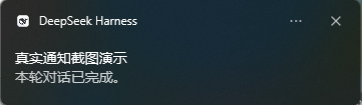
DeepSeek Harness raises no desktop signal of its own when a reply completes. This plugin watches the Session event stream for turn/end and, for each turn worth interrupting you for, flashes the taskbar and raises a toast.
Install
From a Git checkout — this is the route that works without publishing to npm:
dsh plugin --profile web add github:yurin7/dsh-turn-alert
Or from a local clone or the packaged tarball:
git clone https://github.com/yurin7/dsh-turn-alert.git
dsh plugin --profile web add ./dsh-turn-alert
# or
dsh plugin --profile web add ./dsh-turn-alert-1.2.1.tgz
Restart dsh web afterwards. On DSH Desktop, install from the app's own plugin page instead, so the profile the app uses is the one that changes.
Requires dsh 0.2.2-rc.1 or newer, on Windows.
What it does
| Signal | What you see | Setting |
|---|---|---|
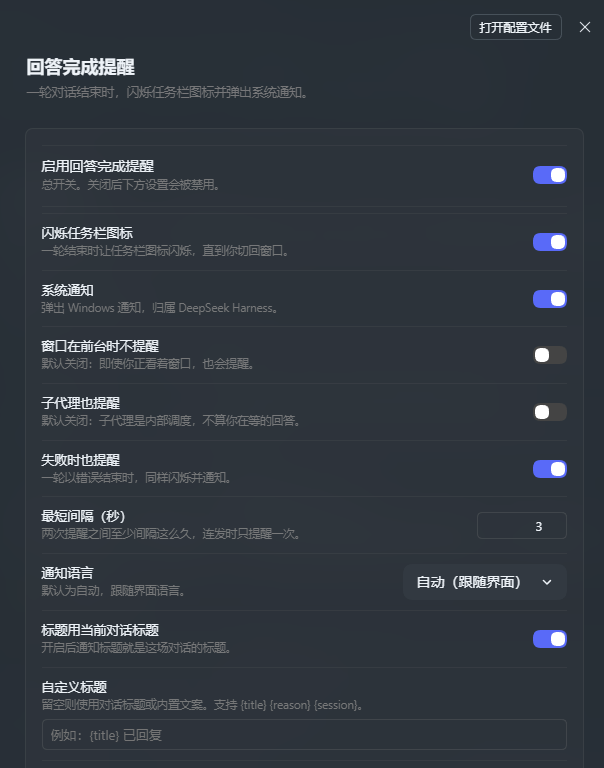
| Taskbar flash | The app button keeps flashing until you switch back to the window | 闪烁任务栏图标 |
| System notification | A Windows notification from DeepSeek Harness | 系统通知 |
Both are skipped by default for subagent turns: those are internal delegation, not a reply you are waiting on. Turn them on with 子代理也提醒.
Settings
Open Settings → 回答完成提醒. Turning the master switch off disables everything below it. Changes apply immediately — no restart.
| Option | Default | Meaning |
|---|---|---|
enabled |
true |
Master switch for every alert. |
flashTaskbar |
true |
Flash the taskbar button. |
notify |
true |
Raise the system notification. |
skipWhenFocused |
false |
Stay silent while the DeepSeek Harness window is in the foreground. Off means you are alerted even while watching. |
alertOnError |
true |
Also alert when a turn ends in failure. |
includeSubagents |
false |
Also alert for subagent sessions. |
cooldownSeconds |
3 |
Minimum seconds between two alerts. |
language |
auto |
Notification language: auto, zh, en, ja, ko, es, fr, de, ru, pt. |
titleFromSession |
true |
Use the conversation title as the notification headline. |
customTitle |
empty | Custom headline. Empty keeps the conversation title or built-in copy. |
customBody |
empty | Custom body. Empty keeps the built-in copy. |
appUserModelId |
com.deepseek.dsh |
The app identity the notification is shown under. |
trace |
false |
Write one diagnostic line per turn end to %TEMP%\dsh-turn-alert.log. |
Custom text
Both the headline and the body accept a template with three placeholders:
| Placeholder | Expands to |
|---|---|
{title} |
The conversation title, empty while the session has none yet |
{reason} |
Why the turn ended: completed, error, max-tokens |
{session} |
The session id |
Resolution order:
- A non-empty
customTitle/customBodyuses the template, with placeholders substituted - Otherwise the headline is the conversation title (when
titleFromSessionis on and one exists) and the body is the built-in copy - Otherwise both come from the built-in copy in the active language
For example, a headline of “<title> replied” with the reason in the body:
- id: turn-alert
  name: dsh-turn-alert
  config:
    customTitle: '{title} replied'
    customBody: 'Ended with: {reason}'
Language
The toast text and the Settings page both follow the interface language, and the two resolve it differently because they run in different processes:
- Settings page. Uses the Client locale service (
ctx.locale), so it switches the moment you change the language, without a reload. - Toast. The Host cannot read the browser's active locale, so it reads the locale the GUI persisted (
locale.preferencein the settings document) and otherwise falls back to the runtime locale, which mirrors the operating system. Thelanguagesetting overrides both when it names a language.
Nine languages ship in the box: Simplified Chinese, English, Japanese, Korean, Spanish, French, German, Russian, and Brazilian Portuguese. An unmatched language falls back to English.
The same values can be written into cordis.patch.yml, which is what the Settings page edits:
- id: turn-alert
  name: dsh-turn-alert
  config:
    includeSubagents: true
    cooldownSeconds: 10
License
MIT
No comments yet. Be the first to write one.