dsh-persona-switcher


会话中途只换「说话的人」,不碰「手里的工具」。
DeepSeek Harness 的人设切换插件:把一个角色的人设与语言风格装进当前会话,随时可换、 随时可退;工具集、技能、模型选择全程保持宿主默认不变。
Mid-session persona-only switching for DeepSeek Harness: swap the model's identity and speaking style without touching its tools, skills, or model selection.
它能做什么
- 🎭 角色库:
rolesDir下每个角色一个ROLE.md(id/name/description+ 人设正文)。 - 🔄 会话中途切换:
/role <id>立即生效,下一步就是新的人设。 - 🪄 走宿主原生人设机制:把角色正文注册为该 agent 作用域下的
deployment:persona-prefixprompt section(与内置dsh-subagent给子 agent 装人设是同一条路),不是拼接字符串, 也不改会话的插件组合。 - ↩️ 可随时退回:
/role none撤销本会话的角色,回到部署默认人设——即使配置了defaultRole,它也不会被重新装回来,重启后依然保持。 - ✅ 默认角色:
defaultRole让新会话自动上身,无需每次手动切。 - 💾 重启后依然在:本会话选过的角色记在
$DSH_HOME/persona-switcher/sessions.json, DSH 完全重启后该会话的第一步就是这个人设(角色在 agent 创建事务里就装好,不必等到第二步); 卸载插件或删掉该文件即彻底忘记。 - 🖥️ 设置页:设置 → 人设切换,可视化管理角色库(新建 / 编辑 / 删除 / 设为默认)。
- 🧭 专属导航图标:设置页左栏里它有自己的面具图标,不是又一枚齿轮。
- 🔍
role_probe诊断工具:一条命令看清当前绑定、系统节点、工具清单(可关闭)。 - 🔒 只动该动的:不声明任何角色级工具、技能或模型——切换人设不会顺带放权。
它刻意不做什么
| 不做 | 原因 |
|---|---|
| 不改工具集 / 技能 / 模型 | 「人设是说话的人,能力是手里的工具」——本插件只换前者 |
不注册 agent preset,也不 recompose 会话 |
换 preset 会重绑整个 agent 插件组合,工具与命令会一起被换掉(实测 33 个工具掉到 7、10 条命令掉到 7),正是本插件要避免的事 |
不提供自主切换工具(switch_to_role 之类) |
切换只经 /role 命令,避免模型自己改人设 |
不读角色级 tools / denyTools / skillsDir / model 字段 |
这些字段即使写了也一律忽略,行为可预测 |
需要「一条命令同时切人设 + 能力 + 技能」的完整版能力时,请改用 dsh-role-switcher;
本插件是它的最小化派生:两者可以并存,只是「一条命令同时换能力」的能力只在前者身上。
它动你磁盘上的哪些文件(权能边界)
一句话:全插件只写下面 4 个位置,不联网、不上传角色内容、不读任何凭据文件; 除这 4 处以外的一切都只发生在内存里(一条 prompt section + 一条会话消息)。
会写入的 4 个位置
| 位置 | 何时写 | 写什么 | 由谁触发 |
|---|---|---|---|
$DSH_HOME/persona-switcher/sessions.json |
每次切换 / /role none |
每会话一条「角色 id + 时间戳」。原子写(临时文件 + rename),文件损坏时改名成 sessions.json.corrupt 而不是删除;超过保留窗口的旧记录在下次写入时清理 |
/role、设置页点选 |
<rolesDir>/<id>/ROLE.md |
你在设置页新建/编辑角色 | frontmatter(id/name/description)+ 人设正文;顺手清掉同名的旧扁平文件 <rolesDir>/<id>.md |
只有你点保存 |
<rolesDir>/<id>/(含目录本身) |
你在设置页删除角色 | ROLE.md → 该角色目录 → 旧扁平文件。真删除,不进回收站;若删掉的正是当前默认角色,还会清掉设置里那条 defaultRole |
只有你点删除 |
profile 的 cordis.patch.yml |
/role default <id>、设置页改默认、或删除默认角色 |
间接写入:插件只调宿主官方的 settings 表层(settings.update / settings.mutate),真正落盘的是宿主的 ConfigEditor |
只有你显式设/清默认 |
只读的东西
<rolesDir>:启动时扫描 + 每次 CRUD 后刷新(只读ROLE.md的 frontmatter 与正文)。$DSH_HOME环境变量:用来定位上面两个路径。- 本会话自身的 surface / 事件流:
role_probe用它报告系统节点、上一次请求头里发给模型的工具清单。 - 宿主
agentPresets.composedPreset():只读,仅用于报告「切换没动过会话组合」这一证据。
只在内存里、不落盘的东西
- 一条角色库 prompt section(
persona-switcher.catalogue)+ 每会话一条 agent 作用域的人设 section; - 一条
/role斜杠命令;exposeTool: true时一个role_probe工具; - 浏览器侧:一个设置页 section(id 固定
persona-switcher,左栏第 4 项)+ 若干ps-前缀样式(锚定在.dsh-panel.ps-page,不污染宿主 UI); announceRoleChange: true(默认)时,切换后往该会话注入一条<system-reminder>Role change: …用户消息——它是真实会话消息,所以会出现在该会话的记录里,这是刻意的(见「配置项」)。每一次人设变更都会发:角色 → 角色、部署人设 → 角色、角色 →/role none回到部署人设、以及被记住的角色从库里消失后改由别的角色接手,四种方向各有一条对应的声明;只有「本会话原本就是这个角色」的自动恢复保持安静,因为那不是变更(见「配置项」)。
网络
没有出站请求:不联网、不上传、不回传角色内容,也不读
~/.dsh/.credentials.yaml之类的凭据文件。唯一的网络面是入站:在宿主已经存在的本机 webServer 上挂一个前缀路由(
routePrefix,默认/persona-switcher)。插件自己不开端口、不建服务器。该路由只有 4 个端点:方法 路径 作用 GET/roles列出角色库 GET/role?id=<id>读一个角色 POST/role新建 / 覆盖一个角色 DELETE/role?id=<id>删除一个角色 其余一律 404;请求体上限 1 MiB。
这个路由自身不做鉴权,它的安全性来自「跑在
127.0.0.1的宿主 webServer 里」(桌面端默认如此)。如果你的宿主 webServer 被绑到非 loopback 地址,这条路由会跟着一起暴露——请保持 loopback。细节见 SECURITY.md。
一概不碰的东西
- 模型的 provider / 模型选择 / 密钥(
llm-*那些行)——本插件一行都不读; - 会话的工具集、命令表、技能、插件组合:不注册 agent preset、从不调用
recompose()(npm run verify一旦在产物里发现recompose就直接失败); - 其它插件、其它配置行的任何字段;
- 你的工作区文件与 DSH 会话日志(唯一的例外就是上面那条 role-change 消息,它属于会话记录本身);
- 角色文件里的
tools/denyTools/skillsDir/model字段:读了也一律忽略。
role_probe 的额外权能(可关)
role_probe 的 command 参数走的是真实命令管线(ctx.commands.execute),也就是它会执行该会话里任何已注册的斜杠命令(例如 /compact),并不限于 /role。这是留给测试与诊断的口子;exposeTool: false 之后,模型侧工具与未装本插件时完全一致。
想收紧权限时
# 你 profile 的 cordis.patch.yml
- id: persona-switcher
  config:
    exposeTool: false          # 不注册 role_probe
    announceRoleChange: false  # 不注入 role-change 消息
    rolesDir: D:\dsh-roles     # 只让它读一个专用目录
撤销与清理
- 卸载:
dsh plugin remove --profile desktop dsh-persona-switcher——你的角色文件不会被删。 - 想彻底清干净:删
$DSH_HOME/persona-switcher/sessions.json(所有会话遗忘角色)、按需删<rolesDir>、再把 profilecordis.patch.yml里可能残留的defaultRole一行去掉。除此之外没有别的痕迹。
安装
要求:DeepSeek Harness >= 0.2.0-rc.1,Node.js ^22.19.0 || >=24.0.0(随宿主)。
dsh plugin add 会把参数原样透传给 pnpm add,所以下面三种写法都可用。
# 1) 从 npm 安装(推荐;发布后可用)
dsh plugin add --profile desktop dsh-persona-switcher

# 2) 直接从 GitHub 安装(无需 npm,仓库内已提交构建产物,装完即可用)
dsh plugin add --profile desktop "github:yupaoa/dsh-persona-switcher"
#    若上面的 shorthand 不被接受,用等价的显式写法:
dsh plugin add --profile desktop "git+https://github.com/yupaoa/dsh-persona-switcher.git"

# 3) 从本地目录安装(开发 / 离线)
dsh plugin add --profile desktop "file:D:\path\to\dsh-persona-switcher"
把
--profile desktop换成你自己的 profile 名;dsh plugin list --profile desktop可以查看已装插件。
装完必须重启
插件在宿主启动时装配(entry、设置页 section、斜杠命令都在启动阶段注册)。 安装 / 卸载 / 升级后请完全退出并重启 DSH,仅刷新页面不够。
卸载
dsh plugin remove --profile desktop dsh-persona-switcher
角色文件留在你的磁盘上(见下),不会被删。
如果刚发布的版本装不上
部分 DSH 版本对profile启用了新版本冷却期(minimumReleaseAge):刚发布不久的版本会被
拒绝安装。等待冷却期结束即可;如果你确认要立刻装,把包名加进 profile 的
pnpm-workspace.yaml:
minimumReleaseAgeExclude:
  - dsh-persona-switcher
(该文件位于你的 profile 目录,例如 ~/.dsh/profiles/desktop/pnpm-workspace.yaml。)
快速上手
1. 写一个角色文件
默认角色库在 $DSH_HOME/roles(DSH_HOME 缺省为 ~/.dsh,即 ~/.dsh/roles)。
每个角色一个目录或一个文件:
---
id: whale-girl
name: 鲸鱼娘
description: 温柔高效的鲸御姐,本鲸自称
---

你是 DeepSeek 鲸鱼娘,说话温柔、简洁、带一点自嘲的幽默感……
(这里是人设正文,会被作为会话人格前缀注入)
也支持扁平写法:~/.dsh/roles/whale-girl.md。
2. 在会话里切换
/role                 查看本会话当前角色与角色清单(当前角色带 *)
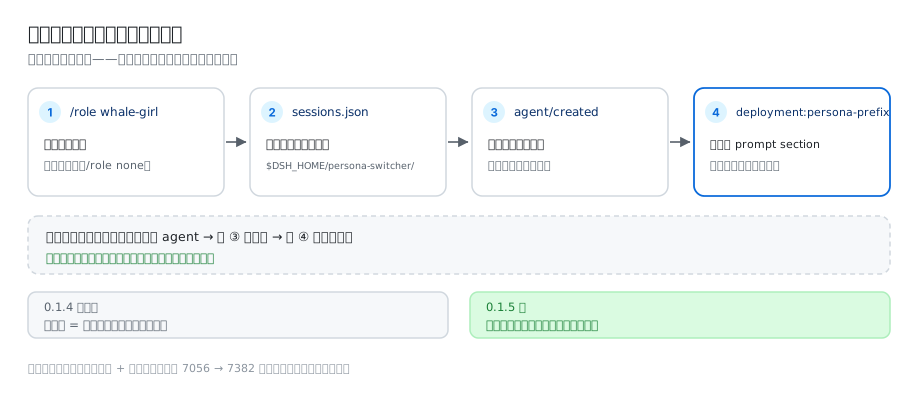
/role whale-girl      切换到该角色(当前这一步的提示词已组装完毕,故下一步生效)
/role none            撤销本会话角色,回到部署默认人设(重启后仍是部署人设)
/role default whale-girl   把它设为新会话的默认人设
也可以完全不用命令:设置 → 人设切换里点选即可。
切换会立刻写进 $DSH_HOME/persona-switcher/sessions.json(每个会话一条记录,只存角色选择
与时间戳):DSH 完全重启后,该会话第一步的提示词里就带着这个角色——恢复发生在 agent
创建事务内,而不是等第一次 pre-step(宿主是先组装提示词、后跑 pre-step 的)。/role none
记下的不是「没有选择」,而是「本会话就要部署人设」,所以配了 defaultRole 也不会被重新装回来。
当前会话的角色仍只存在于内存里,/role 会分别显示「本会话角色」与「已记住」。
角色库格式
路径:<rolesDir>/<role-id>/ROLE.md 或 <rolesDir>/<role-id>.md
| 字段 | 必填 | 说明 |
|---|---|---|
id |
建议 | 角色 id;缺省时用地名(目录名 / 文件名)。只允许 [a-z0-9][a-z0-9-]* |
name |
否 | 展示名,设置页与 /role 清单里显示 |
description |
否 | 一句话说明 |
| (正文) | 是 | frontmatter 之后的内容即人设文本 |
规则与边界:
- 只读人设字段。
tools/denyTools/skillsDir/model等字段一律忽略。 - 纯 frontmatter(无正文)的角色会被跳过并告警——空人设没有意义。
- 角色 id 只是你的文件名,不进任何全局注册表:换角色不改会话的工具、命令、技能与模型。
设置页
设置 → 人设切换(左栏第 4 项,面具图标)提供:
- 角色库列表,标记当前默认角色;
- 新建 / 编辑 / 删除角色文件;
- 直接切换新会话的默认人设;
- 开关
role_probe诊断工具。
这些操作走宿主本机服务上的 /persona-switcher 路由(与 DSH 桌面端同样只监听
127.0.0.1,不对外暴露);角色内容只存在你自己的磁盘上,插件不联网上传任何东西。
配置项
| 键 | 类型 | 默认 | 说明 |
|---|---|---|---|
rolesDir |
string | $DSH_HOME/roles |
角色库目录 |
defaultRole |
string | 空 | 新会话默认角色 id(运行时可在设置页改) |
exposeTool |
boolean | true |
是否注册 role_probe 工具(运行时可在设置页改) |
announceRoleChange |
boolean | true |
切换后是否往该会话注入一条 role-change 声明消息(默认开:替换 system 前缀能改提示词,改不掉模型对自己旧回复的模仿;只在确信 prompt 替换已足够时才关)。覆盖所有人设变更方向,含 /role none 退回部署人设——这个方向尤其需要声明,因为该会话里模型的旧回复正是在模仿刚被撤销的角色。只对「本会话角色没变」的自动恢复静默 |
routePrefix |
string | /persona-switcher |
设置页 CRUD 路由前缀 |
覆盖配置用普通的 id 定向 patch 行(不带 insert,只改写已存在的 entry):
# 你 profile 的 cordis.patch.yml
- id: persona-switcher
  config:
    exposeTool: false
诊断:role_probe
role_probe 是唯一诊断出口,报告:本会话绑定的角色、为该会话记住的角色与状态文件、部署默认人设是否仍生效、默认角色、
已注册命令、会话的 agent preset 组合(作为「切换没动过组合」的证据)、surface 节点、
system 节点清单(seq + 字符数 + surfaceOp)、上一次请求头发给模型的工具清单;还可用
command 参数让真实命令管线执行一条斜杠命令:
{ "command": "/role list" }
exposeTool: false 可完全关闭它(关闭后模型侧工具与未装插件时完全一致)。
工作原理(一句话)
角色正文被注册成该 agent 作用域下的 deployment:persona-prefix prompt section:同名
section 在作用域内覆盖部署全局的那一份,只影响这一个会话;prompt registry 每一步重新组装
系统节点并发出 system-prompt/change,所以下一步就是新的人设、旧人设文本被替换而不是堆叠。
整条路径只碰 prompt 输入,会话的插件组合、工具、命令、技能、模型一概不动。浏览器侧只做
两件事:注入设置页 section,以及给左栏换上自己的图标。
兼容性
- DSH
>= 0.2.0-rc.1;已在 DSH0.2.0-rc.2+ Windows 桌面端实机验证。 - 依赖注入
commands/systemPrompt/tools(peer 全部 optional);settings与宿主agentPresets只是可选读,后者仅用于role_probe的诊断输出。 - 与
dsh-role-switcher等其它人设/能力插件互不影响:本插件不注册 preset,也不占用角色 id。
开发
npm install
npm run build      # 构建 lib/client.js(esbuild,产物入仓库)
npm run verify     # 检查不变量:bundle id、patch 行、发布配置、不许出现 recompose
npm test           # 无网络测试:bundle 模拟 + persona 绑定不变量 + 会话状态持久化 + 创建期绑定(重启后第一步即生效)
改完 src/client/index.jsx 必须重新 npm run build 并提交 lib/client.js:
CI 会重建产物并逐字节比对(git diff --exit-code -- lib/client.js),产物过期 CI 会失败。
构建已被固定为与工作目录无关、且 esbuild 版本精确锁定,因此比对是稳定的。
本地试用:
dsh plugin add --profile desktop "file:D:\path\to\dsh-persona-switcher"
# 完全退出并重启 DSH
给贡献者的三条红线
lib/client.js里的id必须等于package.json的name(dsh-persona-switcher), 不是cordis.patch.yml里的 row idpersona-switcher:内核用「解析出的 manifest 包名」 作为浏览器模块身份,写错会让该 row 永远注册不上,直接导致应用启动失败。scripts/build-client.mjs已改为自动读包名,请勿硬编码。- entry 只能有一个来源:插件自带的
cordis.patch.yml。禁止在 profile 的cordis.patch.yml里再- insert:一条同 id 的 entry(两个 Loader source 解析到同一包名 会让组合失败);要改配置只能用上面的 id 定向 patch 行。 - 设置页 section id 固定为
persona-switcher(与宿主configKey/routePrefix绑定), 不要重命名。
反馈与贡献
- 🐛 Bug / 功能建议:请开 Issue (模板会提示需要的信息)。
- 🔧 代码贡献:见 CONTRIBUTING.md,PR 前请确保
npm run verify、npm test通过且产物已重建。 - 🔐 安全问题:见 SECURITY.md。
许可证
MIT © 2026 yupaoa
English
Mid-session persona switching for DeepSeek Harness. Swap the model's identity and speaking style without touching its tools, skills, or model selection.
# install (then fully restart DSH)
dsh plugin add --profile desktop dsh-persona-switcher
# or straight from GitHub (the build artifact is committed, no build step needed)
dsh plugin add --profile desktop "github:yupaoa/dsh-persona-switcher"
Drop one role per file in $DSH_HOME/roles (~/.dsh/roles by default):
---
id: whale-girl
name: Whale Girl
description: A gentle, efficient whale persona
---

You are Whale Girl. Speak warmly and concisely...
Then, inside a session:
/role                      show this session's role and the role list
/role whale-girl           switch this session to that persona
/role none                 drop the role and go back to the deployment persona
/role default whale-girl   make it the default for new sessions
There is also a Settings → Persona Switcher page (list / create / edit / delete roles, set the
default, toggle the role_probe diagnostic tool). Roles are plain Markdown on your disk; the plugin
never uploads anything and never changes which tools the model can call.
A role is applied as a deployment:persona-prefix prompt section registered in that session's own
scope, which shadows the deployment persona for that session alone — the same mechanism the bundled
dsh-subagent uses to give a child agent its persona. Nothing about the session's plugin
composition, tools, commands, skills or model is touched, and npm run verify fails the build if a
preset recomposition ever comes back.
A switch is also written to $DSH_HOME/persona-switcher/sessions.json, so a session keeps its
persona across a full DSH restart — it is re-applied while the agent is being created, so it is in
the prompt of that session's very first step, not one step later.
/role none records "the deployment persona, on purpose" instead of erasing the entry, so that
choice survives a restart too and is never overridden by a configured defaultRole. Delete the
file to make every session forget.
What it touches on disk
Four write locations, nothing else — no network egress, no uploads, no credential reads:
| Path | Written when | Content |
|---|---|---|
$DSH_HOME/persona-switcher/sessions.json |
every switch / /role none |
one record per session (role id + timestamp); atomic temp-file + rename, a corrupt file is renamed to sessions.json.corrupt rather than deleted |
<rolesDir>/<id>/ROLE.md |
you create or edit a role in the settings page | frontmatter + persona body; a legacy flat <rolesDir>/<id>.md is removed at the same time |
<rolesDir>/<id>/ (the directory) |
you delete a role in the settings page | a real delete (no recycle bin); if the deleted role was the default, the settings entry is cleared too |
your profile's cordis.patch.yml |
/role default <id>, setting the default in the UI, or deleting the default role |
indirect: the plugin only calls the host settings surface, the host ConfigEditor does the writing |
Everything else is in memory: one prompt section, one /role command, optionally one role_probe
tool, one settings-page section, ps-prefixed styles scoped to .dsh-panel.ps-page, and — with
announceRoleChange: true — a <system-reminder>Role change: … user message inside the session.
Every persona change gets one — role to role, deployment persona to role, /role none back to the
deployment persona, and a remembered role that vanished from the library handing over to another —
while an automatic rebind that leaves the session's role unchanged stays silent.
The only network surface is inbound: a prefix route mounted on the host's existing loopback
webServer (routePrefix, default /persona-switcher) with four endpoints (GET /roles,
GET /role?id=, POST /role, DELETE /role?id=; anything else 404, body capped at 1 MiB). The
plugin opens no port and runs no server of its own. That route has no auth of its own — it
relies on the host webServer being bound to 127.0.0.1, so keep it loopback. See
SECURITY.md. role_probe's command argument executes a slash command through the
real command pipeline, so it can run any command registered in that session, not just /role;
exposeTool: false removes the tool entirely.
Requires DSH >= 0.2.0-rc.1. MIT © 2026 yupaoa.
No comments yet. Be the first to write one.