dsh-ui-spec
English | 简体中文





Turn a UI screenshot into an implementation-grade web specification that a text-only DeepSeek model can actually use.
dsh-ui-spec combines native OCR, deterministic image analysis, scene-graph reconstruction, font and shape evidence, reusable asset extraction, and rendered-image comparison. On supported Windows systems, the default pipeline works locally without sending the source image to a vision model.
Result Showcase
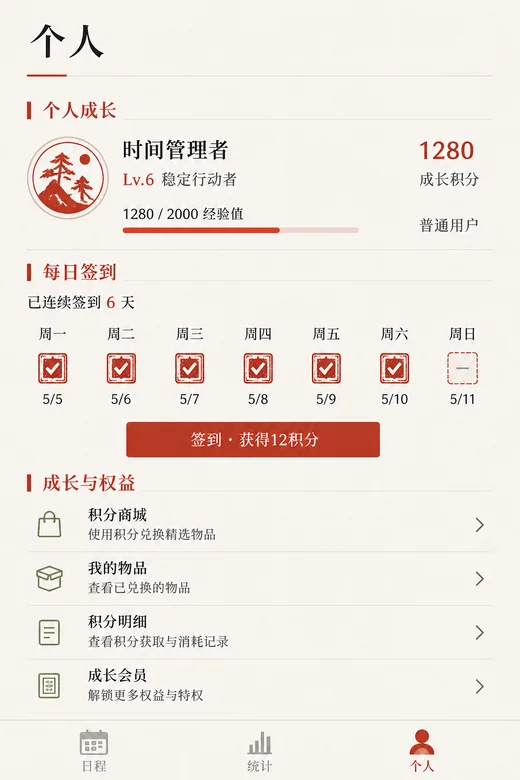
| Reference | DeepSeek implementation |
|---|---|
 |
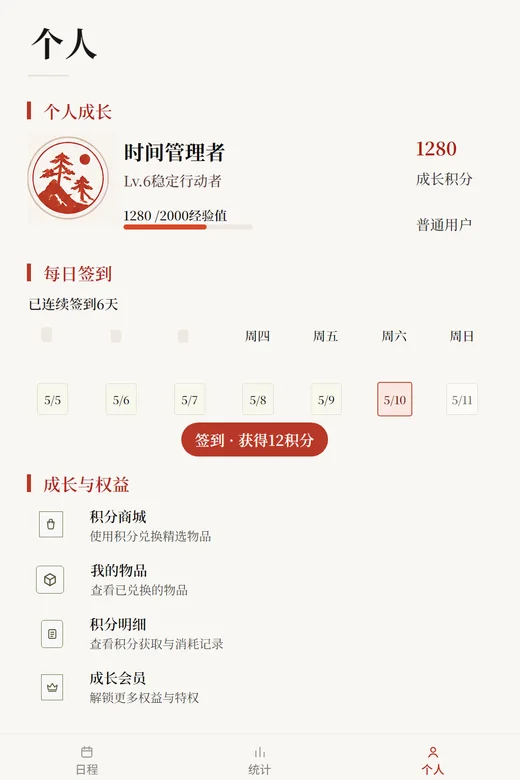 |
The example above was implemented autonomously by deepseek-v4-flash in DSH standard mode with high reasoning effort. The plugin supported a measure → implement → render → compare loop: the first rendered comparison scored 77/100, the next reached 85/100, and the final three comparisons remained at 85/100.
What It Produces
One analyze_ui_image call produces JSON plus a model-facing Markdown brief containing:
- exact image dimensions, layout bands, spacing evidence, and functional color tokens;
- normalized OCR copy with line and word boxes;
- a hierarchical scene graph with sections, groups, repeated items, relations, and confidence;
- a generation contract for viewport, allowed copy, component counts, navigation slots, and prohibited invention;
- local palettes, shape descriptors, CJK font candidates, and extracted reference assets;
- global and per-region comparison metrics for a rendered implementation;
- explicit OCR runtime metadata, fallback state, and coordinate precision.
Why It Helps Text-Only Models
A text model cannot inspect pixels directly. Plain OCR gives it words, but not the visual rules needed to reconstruct a UI. This plugin adds the missing implementation evidence:
- OCR runtime selection — Windows.Media.Ocr first, explicitly authorized vision fallback when native OCR is unavailable.
- Text-masked geometry — recognized glyphs are removed before non-text components are detected.
- Evidence fusion — text, geometry, color, repetition, and local visual details become one scene graph.
- Generation constraints — the model receives exact counts and a copy whitelist instead of being invited to improvise.
- Render feedback — screenshots are scored globally and by scene region so the model can correct the largest mismatch first.
Quick Start
Install from npm after a release:
dsh plugin --profile web add dsh-ui-spec
Install the current GitHub version (pnpm 11 requires an explicit build-script allowlist):
# Add this to the consumer project's pnpm-workspace.yaml before installing:
# allowBuilds:
#   "dsh-ui-spec@git+https://github.com/yumimanji/dsh-ui-spec.git": true
dsh plugin --profile web add github:yumimanji/dsh-ui-spec
The GitHub source package runs its prepare build step during installation. If your DSH profile does not expose the workspace allowlist, install the published npm package instead.
Then ask DeepSeek in DSH:
Use ui-spec to analyze C:\path\to\reference.png and implement the web UI.
The model can call analyze_ui_image directly. Supplying out_dir also writes:
<name>.web.ui-spec.json
<name>.web.ui-spec.md
assets/reference-asset-*.png
Core Capabilities
- Exact local OCR on Windows using
Windows.Media.Ocr, including word and line bounding boxes. - Cross-platform fallback through an OpenAI-compatible vision endpoint with approximate coordinate marking.
- No silent image upload: automatic remote fallback requires explicit permission.
- Decorative marker filtering so OCR artifacts such as section rules do not become visible copy.
- Typography matching against installed CJK serif, sans-serif, and Kai font families.
- Reference asset extraction for complex visual clusters that should not be replaced by generic icons.
- Regional comparison covering pixel MAE, palette distance, edge projections, OCR alignment, viewport size, and unauthorized copy.
- Legacy vision semantics remain available as an optional layer.
Tool Parameters
| Parameter | Required | Description |
|---|---|---|
image_path |
yes | Absolute path to the reference screenshot or mockup. |
max_components |
no | Maximum low-level component candidates; default 80. |
ocr_mode |
no | auto (default), native, or vision. |
allow_remote_fallback |
no | Permit auto mode to upload the image when native OCR is unavailable. |
enable_vision |
no | Request optional vision semantics; also permits remote OCR fallback. |
rendered_image_path |
no | Screenshot of the current implementation for deterministic comparison. |
out_dir |
no | Directory for JSON, Markdown, and extracted reference assets. |
OCR Modes and Privacy
| Mode | Behavior |
|---|---|
auto |
Probe Windows.Media.Ocr and use it when available. Vision fallback requires explicit upload permission and a configured vision model. |
native |
Require Windows.Media.Ocr; fail with an actionable error when unavailable. |
vision |
Use the configured vision model directly; selecting this mode explicitly permits image upload. |
The native capability probe checks the real runtime: operating system, PowerShell, WinRT initialization, OCR engine creation, and recognizer language availability. Failures use stable codes such as UI_SPEC_OCR_BACKEND_UNAVAILABLE, UI_SPEC_REMOTE_FALLBACK_NOT_ALLOWED, and UI_SPEC_VISION_NOT_CONFIGURED.
Validated with DeepSeek
Validation date: 2026-08-16.
| Item | Result |
|---|---|
| Provider | deepseek-official with an official API key; the secret is not recorded |
| Model | deepseek-v4-flash |
| Reasoning effort | high |
| DSH preset | standard |
| Reference / render size | 1024×1536 / 1024×1536 |
| Final deterministic score | 85/100 |
| Pixel MAE | 0.0481 |
| Palette distance | 0.0364 |
| Text alignment error | 0.0412 |
The recovered structure was correct: 3 sections, 3 bottom-navigation items, 4 benefit-list items, and 7 calendar cells. The extracted illustration was reused rather than replaced by a generic avatar.
The session log confirms five analyze_ui_image calls: one initial extraction and four render-comparison iterations. This demonstrates a usable autonomous reconstruction loop, not a pixel-perfect guarantee.
Current fidelity limits
- inferred benefit-list icons differ from the source and dominate regional error;
- calendar stamps, fills, and borders still need more local shape evidence;
- the generated check-in button is pill-shaped while the reference uses a small-radius rectangle;
- rendered OCR produced two false-positive variants, causing an unauthorized-copy warning;
- the vertical projection delta of
0.0349shows remaining fine spacing differences.
The current output is suitable as a strong first implementation and iterative correction baseline. A practical next target is >=93/100, no unauthorized-copy warnings, and reference-backed treatment for the remaining icons and stamps.
Vision Fallback Configuration
Vision OCR requires an explicitly named multimodal model:
$env:DSH_UI_SPEC_VISION_API_KEY = "..."
$env:DSH_UI_SPEC_VISION_BASE_URL = "https://your-provider.example/v1"
$env:DSH_UI_SPEC_VISION_MODEL = "your-vision-capable-model"
$env:DSH_UI_SPEC_ALLOW_VISION_FALLBACK = "true"
DSH_UI_SPEC_VISION_API_KEY falls back to DEEPSEEK_API_KEY, then OPENAI_API_KEY. Fine alignment should always be verified when coordinate_precision is approximate.
Requirements and Development
For normal use, an existing DeepSeek Harness profile is assumed. Native OCR additionally requires Windows, PowerShell, WinRT OCR, and an installed recognizer language. The package requires Node.js >=22.19.0.
For contributors:
git clone https://github.com/yumimanji/dsh-ui-spec.git
cd dsh-ui-spec
npm install
npm run typecheck
npm run build
sharp provides prebuilt binaries; Python is not required. The prepare lifecycle builds lib/ for Git-based installations and npm publication, while prepublishOnly blocks publication when type checking fails.
Recovering a pnpm Store Mismatch
If DSH reports ERR_PNPM_UNEXPECTED_STORE, the profile's existing node_modules was created with a different pnpm store path. The error happens before the plugin is downloaded. Rebuild that profile directory with the current pnpm store, then retry the DSH command:
cd $env:USERPROFILE\.dsh\profiles\web
Rename-Item node_modules node_modules.store-mismatch-backup
pnpm install
dsh plugin --profile web add dsh-ui-spec
Keep the backup until DSH starts normally; it can be removed after verification. Do not add a store-dir setting to this plugin package: store selection belongs to the DSH profile and must be consistent for all plugins.
Maintainer Release
The repository is public, but the package is not published to npm automatically by GitHub. To publish a release:
npm login
npm publish --access public
GitHub CLI authentication does not authenticate npm. Push the committed source, README images, and package metadata separately:
git push origin main
No comments yet. Be the first to write one.