dsh-plugin-model-capability




Model Capability Manager — manage the llm-pi-ai provider routes of DeepSeek Harness (DSH Web) from a dedicated Model Capability page in the in-app settings: per-model thinking levels, context window, output cap, input modalities, per-route defaults, gateway compatibility fields, one-click presets, and an EN/中文 switchable UI.
简体中文说明 · Report Bug · Request Feature
Table of Contents
- Why this plugin exists
- Screenshots
- Features
- Installation
- Uninstall
- How it works
- Development
- Publishing
- Related Plugins
- License
Why this plugin exists
DSH stores provider configuration in llm-pi-ai.providers inside settings.yaml. Editing it by hand is error-prone, and two classes of problems bite people often:
- Gateway incompatibility — not every vendor accepts the same protocol dialect. For example Alibaba Cloud (DashScope) in
compatible-mode, Moonshot/Kimi, Zhipu/BigModel, MiniMax, Volcengine Ark, SiliconFlow, Baidu Qianfan and other gateways may rejectdeveloperrole messages orreasoning_effortechoes the way the OpenAI/Anthropic dialects expect. Turningcompat.supportsDeveloperRoleon against such a gateway produces 400-style errors. - Thinking-level wiring — the 7 levels (
off / minimal / low / medium / high / xhigh / max) each need a wire value the upstream provider understands (e.g.low→"low"for one vendor,"h3"for another). Max-thinking configs and per-modelreasoningEffortsare tedious to author by hand.
This plugin gives you a GUI for all of it, plus one-click presets that bake in dialect-safe configurations (see Presets).
Screenshots
| Settings entry | Section overview (EN) |
|---|---|
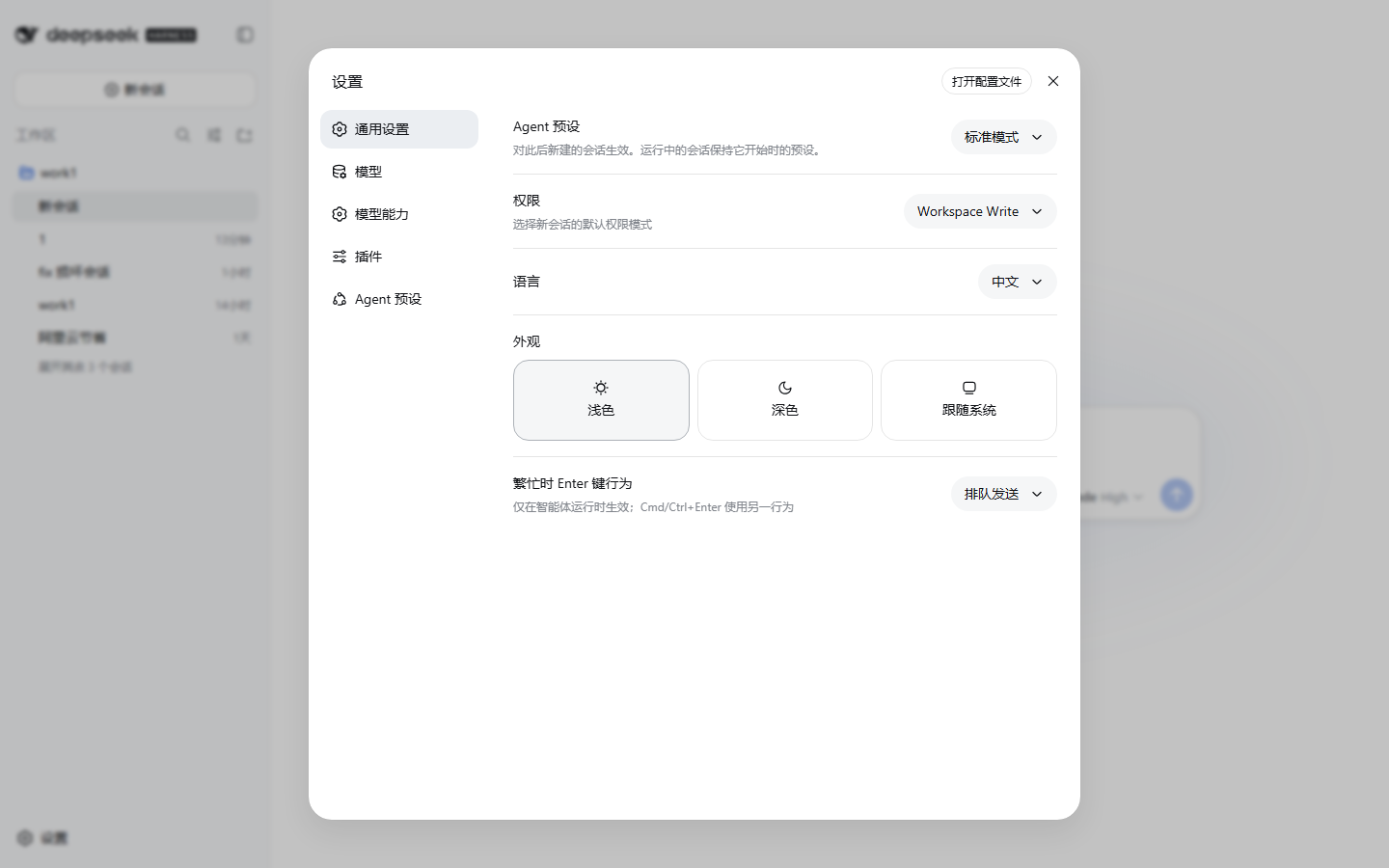 |
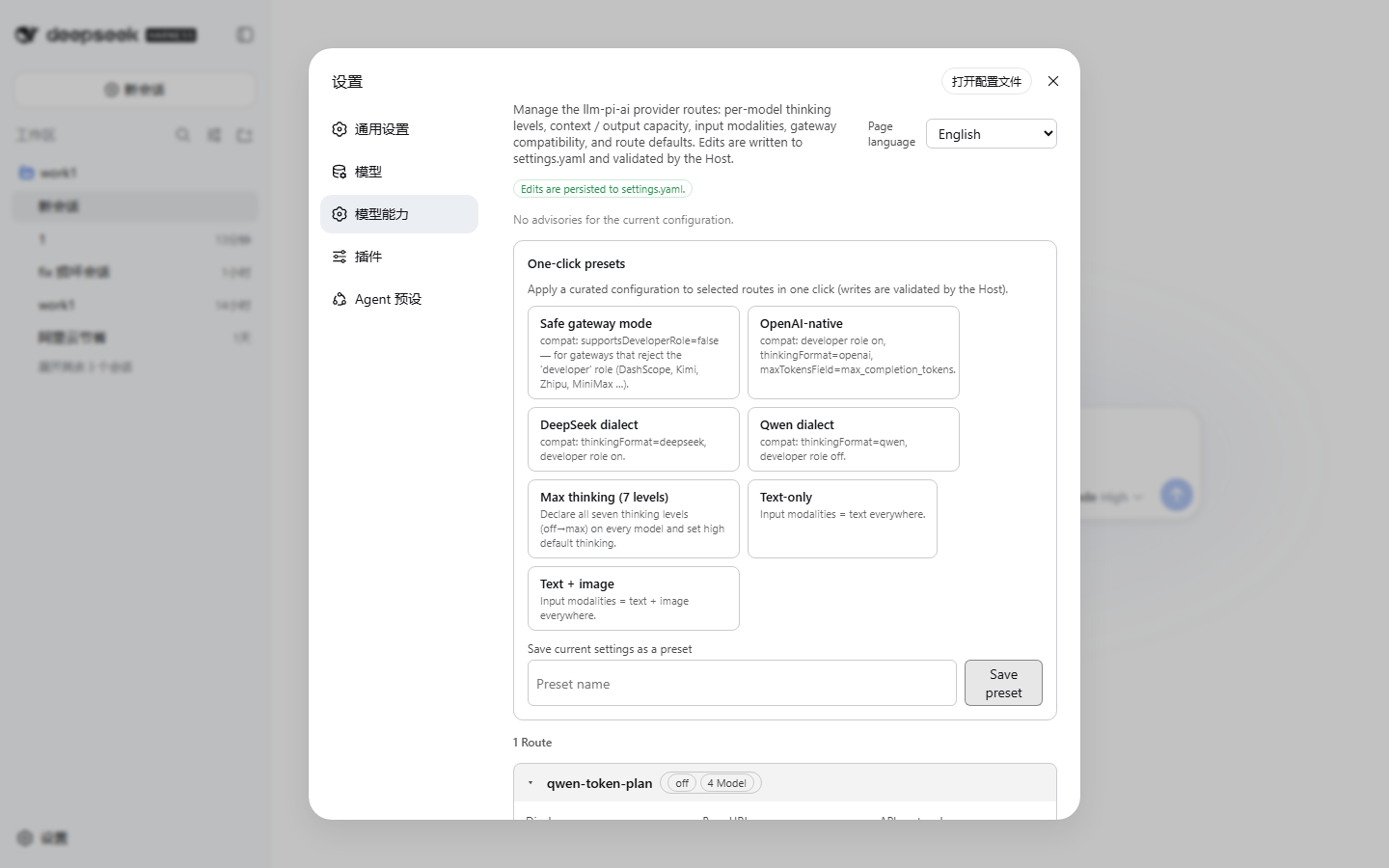 |
| Model editor (EN) | Gateway compatibility fold (ZH) | Section overview (ZH) |
|---|---|---|
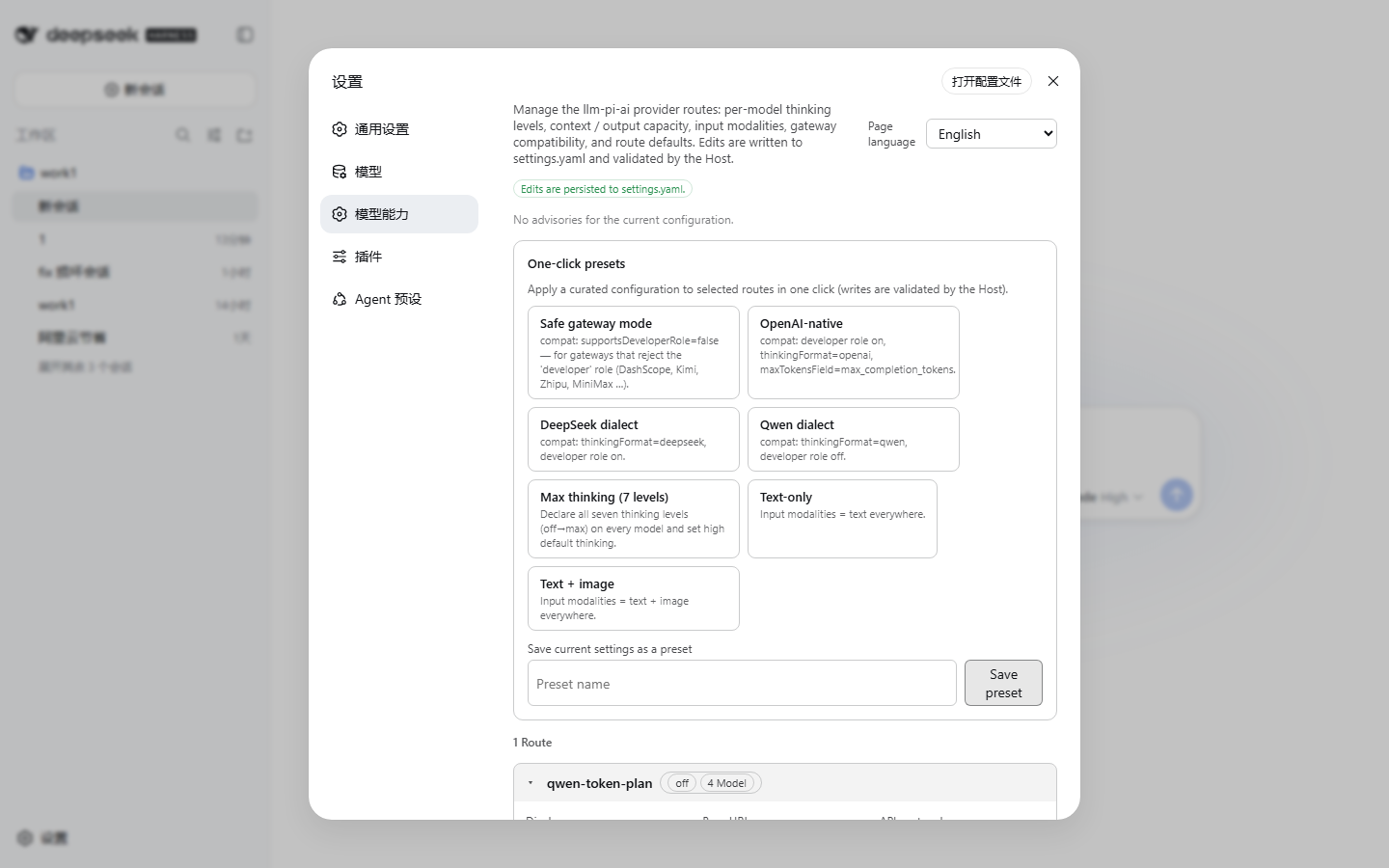 |
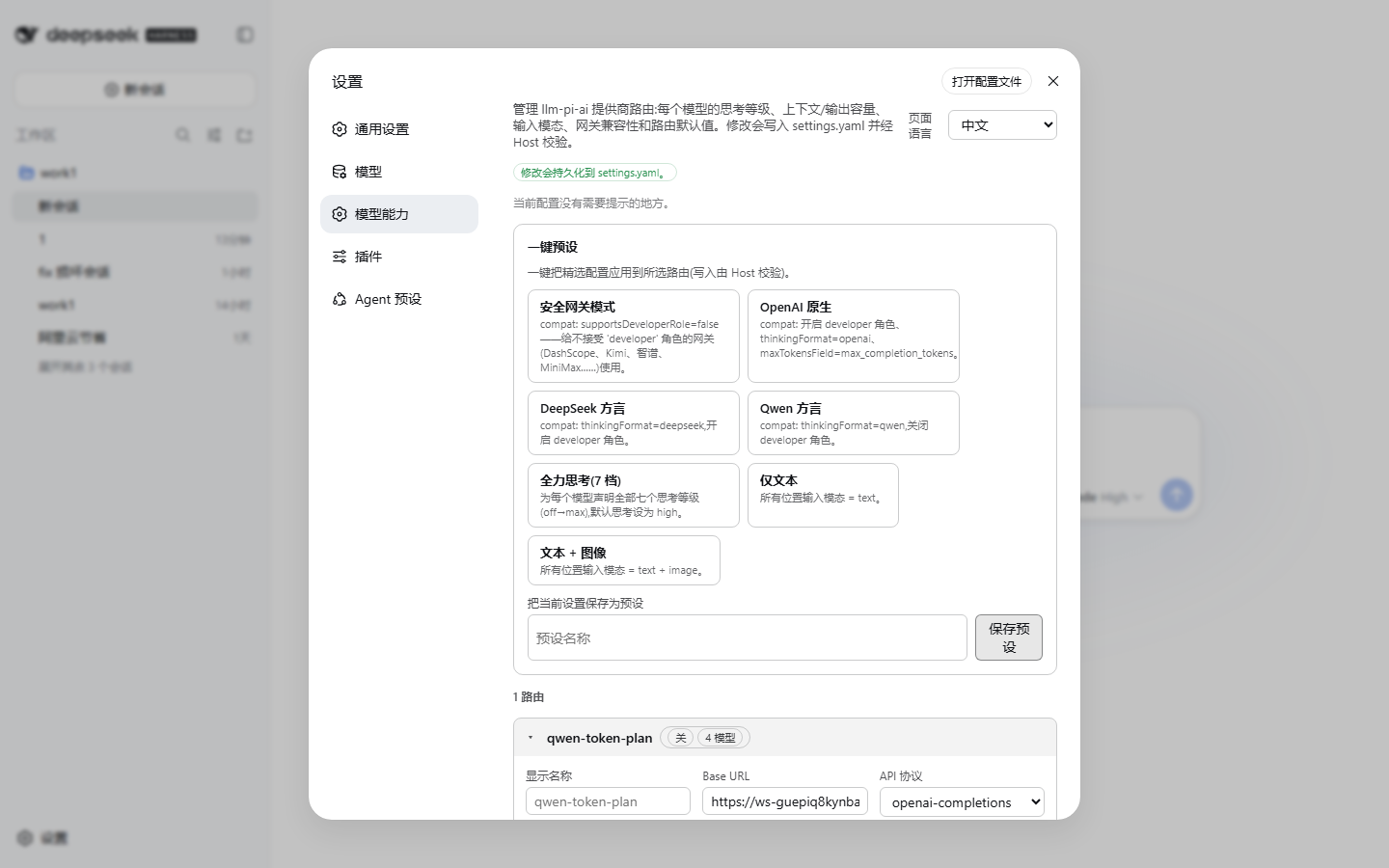 |
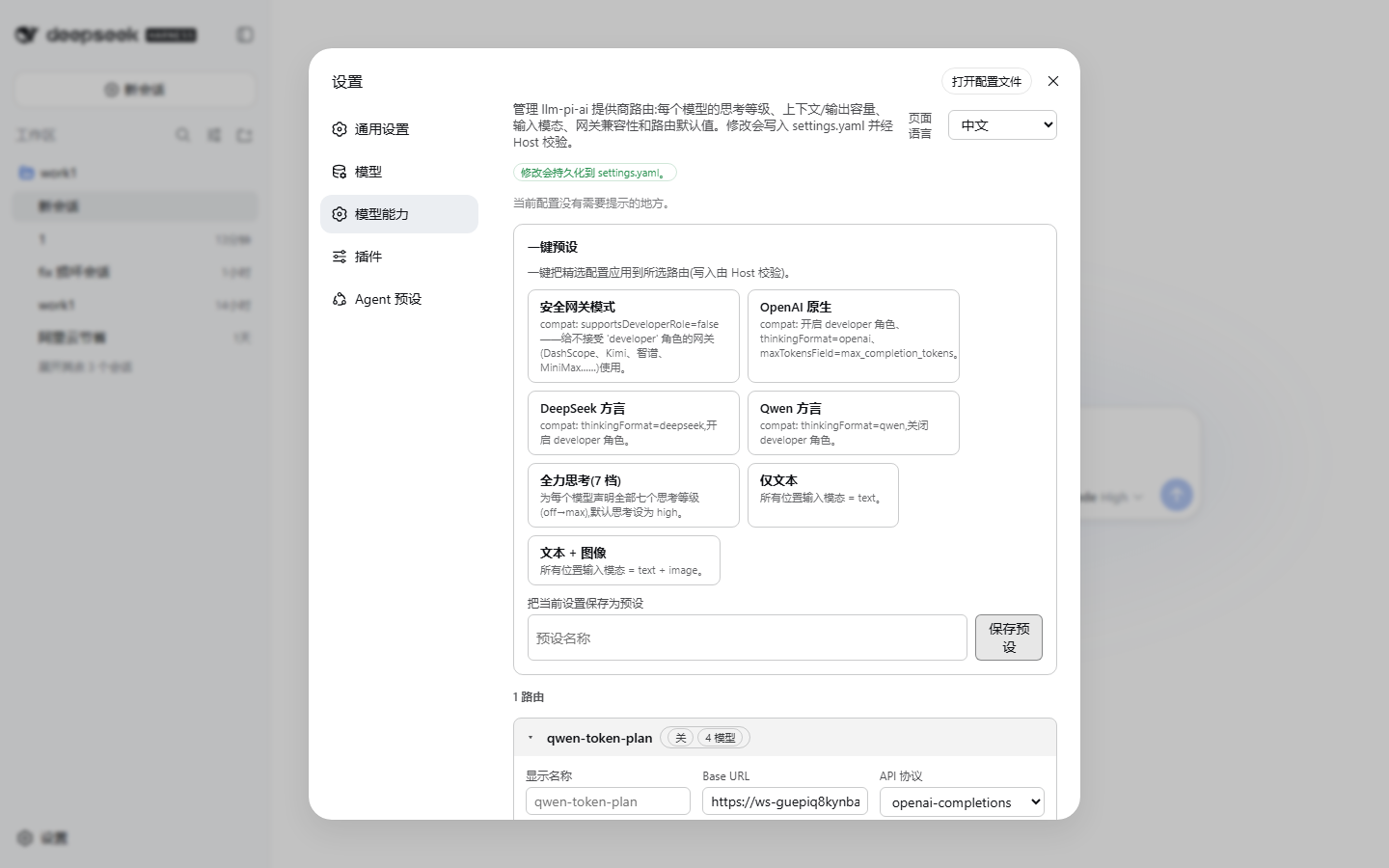 |
Features
- Per-model editor for every route:
name,contextWindow,maxTokens— capacity fields accept plain numbers orK/Msuffixes (262144,256K,1M).inputmodalities —text/imagecheckboxes with de-duplication.- Thinking toggle — switch the whole model between reasoning off and the full 7-level matrix (
off/minimal/low/medium/high/xhigh/max), each level with its own wire value. Empty non-offlevels are prevented (the Host rejects them), and a one-click fill all levels with the same value button is included. - Apply field to all models of the route (name / contextWindow / maxTokens / input / reasoningEfforts).
- Per-model
compateditor (folded away by default).
- Per-route editor:
displayName,baseURL,api(openai-completions / openai-responses / anthropic-messages).- Defaults:
defaultContextWindow,defaultMaxTokens,defaultInput,reasoning,thinkingBudgets(minimal/low/medium/high),cacheRetention,transport. - Route-level
compateditor and an Advanced fold: timeouts, max image bytes / pixel budget,headers, plus a read-only raw JSON view.
- One-click presets — 7 built-in recipes plus your own saved presets:
Preset What it does Safe gateway compat.supportsDeveloperRole=false,supportsReasoningEffort=true— for gateways that rejectdeveloperrole messages (DashScope compatible-mode, Kimi/Moonshot, Zhipu, MiniMax, Ark, SiliconFlow, Qianfan, …)OpenAI native developerrole +reasoning_effort+thinkingFormat=openai+maxTokensField=max_completion_tokensDeepSeek dialect thinkingFormat=deepseek,developerrole on,reasoning_effortonQwen dialect thinkingFormat=qwen,developerrole off,reasoning_effortonMax thinking (7 levels) every model declares all 7 levels, reasoning=high, generousthinkingBudgetsText only defaultInput=['text']and per-modelinput=['text']Image ready defaultInput=['text','image']and per-modelinput=['text','image']- Apply any preset to a selected subset of routes. Save your current configuration as a custom preset; apply and delete them anytime. Custom presets are stored under
model-capability.customPresetsinsettings.yaml. - Applying a custom preset replaces the whole
llm-pi-aiuser section viasettings.replace, not a merge. Any route that was added to the user section after the preset was saved will be deleted. This is not an additive recipe — treat the preset as a full snapshot. - Header credential protection — credential-shaped header names (
authorization,api-key, etc.) are blocked in the headers editor, and theheadersdict is stripped from every provider route when saving a custom preset (credentials travel asapiKeyEnvreference names, never as literal header values). Existing presets that were saved before this safeguard are detected at startup and reported in the advisory checks.
- Apply any preset to a selected subset of routes. Save your current configuration as a custom preset; apply and delete them anytime. Custom presets are stored under
- Advisory checks — the page shows diagnostics about your current setup: legacy-gateway lookalike URLs with
supportsDeveloperRoleon (hint: use Safe gateway), reasoning levels that map to no wire value, models without an explicitcontextWindow, and routes without models. - Language switch — the page follows the DSH UI language, and a select in the page header lets you pin English / 中文 / follow DSH. The choice persists into
settings.yaml(model-capability.language), not just to the browser session.
All writes go through the DSH settings service with revision fencing (expectedRevision), the same pattern the built-in Models page uses; conflicting concurrent edits are retried via the live mirror. If the page is opened from a non-loopback origin (where writes are not allowed), every control is disabled with a hint.
Installation
Requires a DSH installation with the web app (any profile that serves the browser UI), DSH ≥ 0.1.1-rc.2.
Install the latest version
dsh plugin --profile web add dsh-plugin-model-capability # latest stable, or pin @<version>
Then restart dsh --profile web (the running Web UI is not hot-reloaded on plugin install). The Model Capability entry appears under Settings.
For other profiles, replace web with your profile name.
Pin the exact version when you need a specific release — see Getting the latest version below. Installing without a version may resolve to an older release cached locally or on the registry CDN.
Getting the latest version (cache / publish-delay caveats)
A new release is only picked up when all three caches agree — the npm registry
CDN metadata, your local pnpm store, and the profile's lockfile. Any one of them
stale means dsh plugin add dsh-plugin-model-capability (no version) keeps
installing the old build. To guarantee you get the newest version:
Check what the registry currently has:
npm view dsh-plugin-model-capability versionIf this does not show the version you expect, the registry CDN still serves stale metadata — wait ~1–2 minutes and retry (npm publishes are usually visible in seconds, but the
packumentmetadata is cached per-TTL).Uninstall any previously installed copy first (see Uninstall below). The profile lockfile (
node_modules/.pnpm/lock.yaml/pnpm-lock.yaml) otherwise keeps the old version pinned.Install with the exact version — this bypasses metadata resolution:
dsh plugin --profile web add dsh-plugin-model-capability@<version>
# e.g. dsh plugin --profile web add dsh-plugin-model-capability@1.1.1
Clear stale local caches if the profile still reports an old version:
pnpm store prune # remove unreferenced store packagesor, for the profile itself:
cd "$HOME/.dsh/profiles/web"
pnpm store prune
Verify what actually got installed:
grep -A2 '"dependencies"' "$HOME/.dsh/profiles/web/package.json"(Windows PowerShell:
Select-String -Path "$HOME\.dsh\profiles\web\package.json" -Pattern "model-capability") The version shown next todsh-plugin-model-capabilitymust match the version you intended to install.Restart the web UI — the plugin is loaded at startup, never hot-reloaded:
dsh --profile web
Registry note: an already-published version can never be overwritten. If a bad
build got released under 0.1.2, the fix is a new version (0.1.3, 1.1.1, …),
not a re-publish — which is exactly why "install the latest" means pin the
version, not npm update.
Uninstall
dsh plugin --profile web remove dsh-plugin-model-capability
If the command reports no such dependency found (a broken install whose
dependency entry is missing from package.json), remove it directly inside the
profile:
cd "$HOME/.dsh/profiles/web"
pnpm remove dsh-plugin-model-capability
After either step, restart dsh --profile web.
To verify the plugin is fully gone:
"$HOME/.dsh/profiles/web/package.json"— nodsh-plugin-model-capabilityentry underdependencies"$HOME/.dsh/profiles/web/node_modules/dsh-plugin-model-capability"— directory no longer exists"$HOME/.dsh/profiles/web/pnpm-lock.yaml"— nodsh-plugin-model-capabilityreference (0 hits)
The host half also loads headlessly (it registers the settings schema); the settings UI itself needs the web app.
How it works
One npm package with two halves, installed as a profile bundle by dsh plugin add:
lib/index.js— the host half: registers themodel-capabilitysettings namespace (language + custom presets) with schemastery so the Host round-trips it like any native setting.lib/client.js— the web client half: a classic-script bundle registered with the web shell's module loader (window.__ModuleLoader__.load({ id, factory })), exactly like every shipped@deepseek-aiclient bundle. It injects a section into thesettings.sectionslot, binds both thellm-pi-aiandmodel-capabilitysettings scopes, and drives all edits throughapi.settings.mutatewith path ops and revision fencing.cordis.patch.yml— declares the bundle row, sodsh plugin addwires the whole thing automatically (no manual patch editing).
The llm-pi-ai schema itself is owned by DSH — this plugin only edits its values, so the Host keeps validating every write (assertServiceable etc.).
Development
pnpm install
npm run build        # esbuild → lib/client.js (loader-wrapped) + lib/index.js
Local testing: create a dev profile (e.g. web-dev), add the web app and the plugin, and restart the server on a separate port:
dsh plugin --profile web-dev add @deepseek-ai/dsh-web-app@0.1.1-rc.2
# add the local package, then note: `file:` dependencies are snapshotted —
# re-add after every rebuild, or replace the installed copy with a junction:
dsh plugin --profile web-dev add file:D:/path/to/dsh-plugin-model-capability
dsh --profile web-dev --port 3091 --no-open
Screenshots are captured with the included script (needs playwright-core and a local Chrome/Edge):
node scripts/screenshots.mjs [baseURL] [outDir]
node scripts/verify-dom.mjs  [baseURL]   # shadow-DOM-aware rendering checks
node scripts/e2e-write.mjs   [baseURL]   # end-to-end write smoke test (back up settings.yaml first!)
Publishing
Full step-by-step instructions (including a post-release checklist) are in
PUBLISHING.md. Summary:
npm publish— run afternpm run build(theprepublishOnlyhook rebuilds automatically). The package shipslib/,cordis.patch.yml,img/, license, the English README and the Chinese guide indocs/.- GitHub — repository + releases; tag versions to match
package.json.
Related Plugins
Check out other DSH plugins in the ecosystem:
- dsh-plugin-desktop-launcher — Desktop shortcut for DSH web: one-command install, smart re-entry (reuses running instance), complete uninstall, cross-platform (Windows/macOS/Linux).
- awesome-dsh-plugins — Curated list of DSH plugins and resources (coming soon).
Know another DSH plugin? Suggest it for the list.
No comments yet. Be the first to write one.