dsh-decision-split
English | 简体中文
A split-view reader for long AI agent responses in the DeepSeek Harness (DSH) Web UI.
dsh-decision-split is an open-source DSH Web UI plugin that lets you read a completed assistant message in a native right-side tab, without losing your place in the main conversation. The selected message has its own scrollable Markdown view, so you can reference long responses while continuing to work in DSH.
- Package: dsh-decision-split on npm
- Releases: GitHub Releases
- License: MIT
Features
- Open a completed response: Adds a “在侧栏查看全文” (“View full message in sidebar”) action to completed assistant messages containing text. The action does not appear while a response is still being generated.
- Read full Markdown: Displays the selected message in a separately scrollable panel, including tables, code blocks, and inline code.
- Switch without duplicate tabs: Selecting another message updates the existing plugin tab rather than opening a new one.
- Use DSH's native sidebar: On DSH 0.2.x, the plugin uses the built-in rightbar tab system, including native close/collapse controls and user-adjustable width.
- Keep existing message actions: Integrates with
conversation.chat.assistant-actionsalongside the host's built-in actions, such as deliverables and feedback.
This is a read-only message viewer. It does not add decision forms, an embedded prompt field, or automatic decision submission; use DSH's native ask_user_question flow for interactive decisions.
Preview
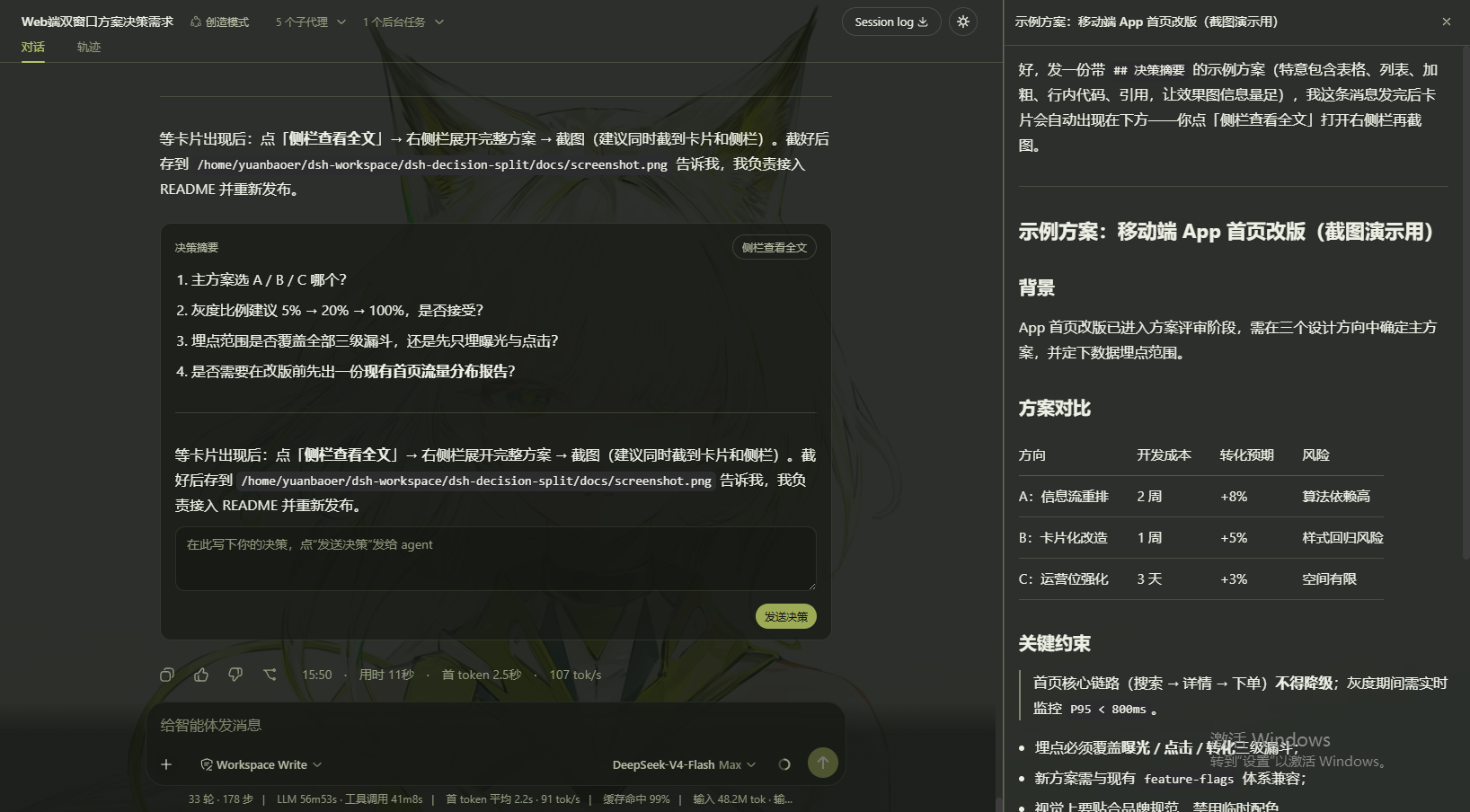
The screenshot shows the earlier DSH 0.1.x interface. Plugin v0.2.5 uses DSH 0.2.x's native rightbar tab layout instead.
Install
DSH 0.2.x (current plugin)
Install the latest published version from npm:
dsh plugin --profile web add dsh-decision-split
Restart your running dsh web process after installation.
Alternatively, install the v0.2.5 release archive directly:
dsh plugin --profile web add https://github.com/yuanbaoerer/dsh-decision-split/releases/download/v0.2.5/dsh-decision-split-0.2.5.tgz
Compatibility: v0.2.5 was tested with DSH
0.2.1-rc.2. Compatibility with every future DSH 0.2.x release is not guaranteed; check the compatibility notes when upgrading.
DSH 0.1.x (legacy)
Use plugin v0.2.4 instead of v0.2.5:
dsh plugin --profile web add dsh-decision-split@0.2.4
Plugin v0.2.4 was tested with DSH 0.1.2-rc.1. The newer rightbar implementation is not compatible with the old DSH 0.1.x layout.
Usage
- Open your conversation in
dsh weband wait for an assistant response to finish. - Click “在侧栏查看全文” at the end of a text response.
- Read its full Markdown in the right-side tab. Click the action on another completed message to switch the content in the same tab.
- Close the tab or collapse the right sidebar using DSH's own controls.
No plugin-specific configuration is required.
Compatibility
| DSH version | Plugin version | Verified result |
|---|---|---|
0.2.1-rc.2 |
0.2.5 |
✅ Verified with runtime end-to-end checks (October 19, 2026) |
0.1.2-rc.1 |
0.2.4 |
✅ Verified (September 7, 2026) |
0.2.1-rc.2 |
0.2.4 |
❌ Incompatible: DSH removed the legacy details/sidebar APIs |
See docs/COMPATIBILITY.md for specific API changes, validation steps, and test notes.
Known limitations
- The sidebar action appears only for completed text-containing assistant messages with a message ID.
- In DSH 0.2.x, a tab restored after refreshing the page may not retain the previously selected message and can show an empty state.
- Sidebar width is managed by DSH, not forced by this plugin.
- Compatibility with plugins that also customize the right sidebar has not been comprehensively verified.
Development and contributing
The v0.2.5 implementation registers a rightbar tab via ctx.sidebarRightTabs and opens it through ctx.sidebarRight.openTab. Message actions are registered in conversation.chat.assistant-actions; the tab's content and title use the native sidebar slots.
For the project layout, local development workflow, and release process, see docs/DEVELOPMENT.md.
Bug reports and contributions are welcome through GitHub Issues. If reporting a compatibility problem, include the DSH version, plugin version, steps to reproduce, and any relevant console errors.
License
MIT.
No comments yet. Be the first to write one.