dsh-plugin-rapidspeech
English | 简体中文
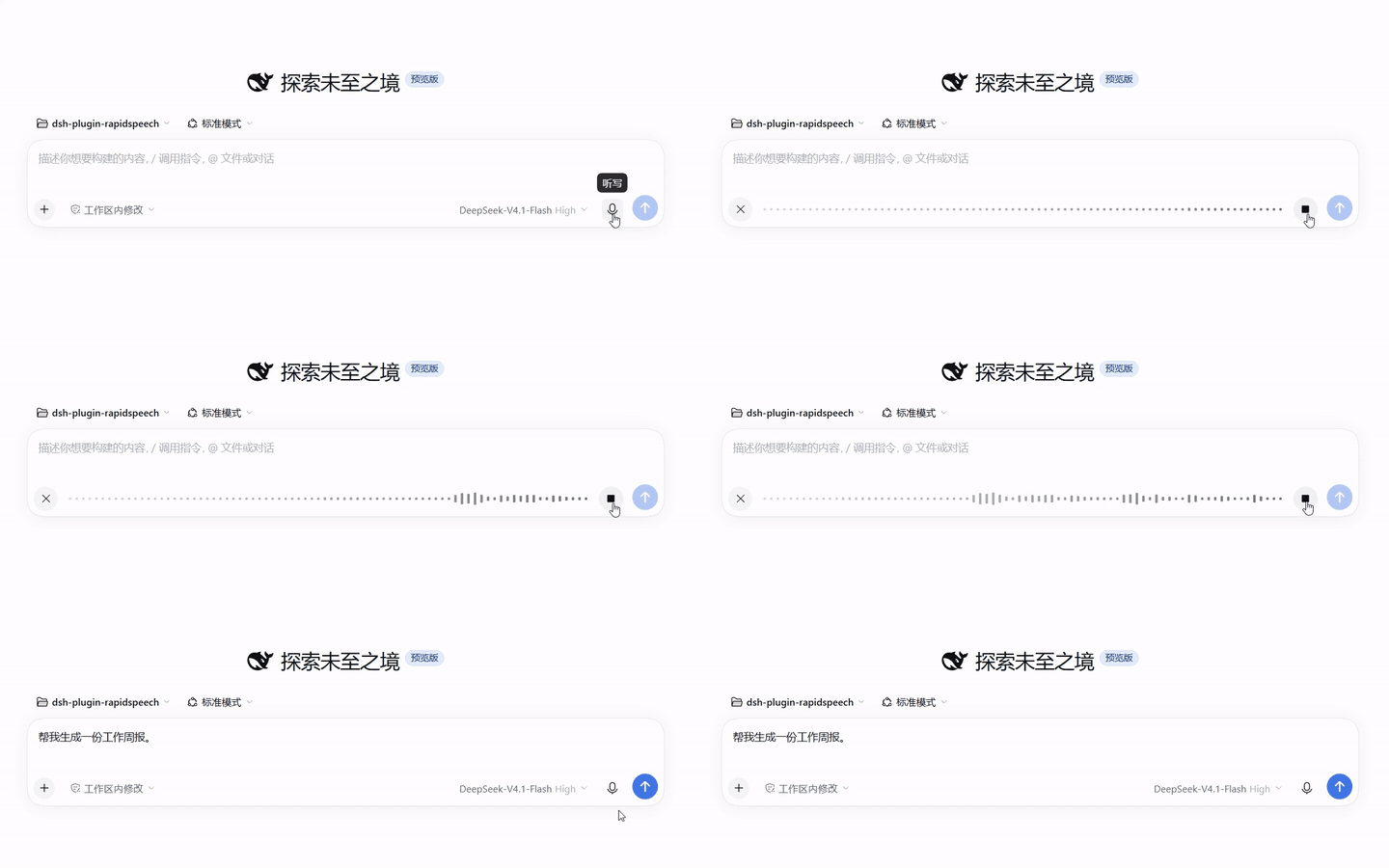
Local, offline speech-to-text for the DeepSeek Harness (dsh). Click the microphone in the composer, speak, and the recognized text is inserted into your draft — transcribed by a RapidSpeech.cpp rs-server running on your own machine. Audio never leaves your computer.
Features
- Fully offline — audio, model inference, and transcripts stay on this machine end to end.
- Managed server — on first use, dsh downloads the
rs-serverbinary and your chosen model, verifies their integrity, spawns the server on a loopback port, and reclaims it after idle time. No manual services. - Model switching from the plugin page — pick a model in the plugin's settings; it downloads on the next recording and hot-swaps. Every downloaded model stays cached, so switching back is instant.
- Curated model catalog — X-ASR, SenseVoice, and FunASR-Nano from RapidAI's official mirrors (ModelScope, HuggingFace, hf-mirror), each pinned to a SHA-256.
- Coexists with other providers — installs beside the official SenseVoice plugin; pick a provider per recording from the voice-input selector.
- External mode — point the plugin at an
rs-serveryou run yourself; the plugin then only connects and never manages it.
Requirements
- DeepSeek Harness 0.2.2 or newer (npm CLI or Desktop app)
- CPU with AVX2 — Intel Haswell (2013) / AMD Excavator (2015) or newer. Both the Linux and Windows builds target AVX2 as their baseline, so the requirement is identical on either OS.
- Disk: ~200 MB–1 GB per model; RAM: ~1–2 GB while transcribing
- Windows x64 and Linux x64
Install
From the plugin marketplace (Desktop / Web UI)
Two ways — both put RapidSpeech ASR (local) in your plugin list:
Search and install (simplest): open the market's install page, search for
dsh-plugin-rapidspeech, and install it. The package lives on the official npm registry; if your npm mirror lags behind, give it a few minutes or point the registry back atregistry.npmjs.org.Index source (curated card with a description): add this index URL in the market's index settings, then find RapidSpeech ASR (local) and install:
https://github.com/yoletPig/dsh-plugin-rapidspeech/releases/latest/download/market-index.json
From the CLI
dsh plugin --profile <your-profile> add dsh-plugin-rapidspeech
Or install a specific release artifact without any build tooling:
# Download dsh-plugin-rapidspeech-<version>.tgz from GitHub Releases, then:
dsh plugin --profile <your-profile> add ./dsh-plugin-rapidspeech-<version>.tgz
git clone https://github.com/yoletPig/dsh-plugin-rapidspeech.git
cd dsh-plugin-rapidspeech
npm install          # the prepare script builds lib/
dsh plugin --profile <your-profile> add ./dsh-plugin-rapidspeech
On pnpm ≥ 10, the first add from git asks you to allow the build script — add the
package key printed by pnpm to the profile's pnpm-workspace.yaml under allowBuilds.
Quick start
- Start dsh and open the composer.
- Click the microphone, then Install when prompted — the rs-server binary and the model download in the background (one-time, ~180 MB for the default model).
- Record. Stop, and the transcript appears in your draft, ready to edit and send.
The server reclaims itself after 5 idle minutes and wakes in about 2 seconds on the next recording.
Models
modelId |
Size | Languages | Mirrors |
|---|---|---|---|
xasr-q8_0 (default) |
178 MB | auto, zh, en | ModelScope |
sense-voice-small-q4_k |
182 MB | auto, zh, en, yue, ja, ko | HuggingFace, hf-mirror, ModelScope |
funasr-nano-q4_k_m |
692 MB | auto, zh, en | HuggingFace, ModelScope |
Switching models
Open the plugin's page in dsh and pick a model — the field is live: the next recording downloads it (after your consent) and subsequent recordings use it. All catalog models live in the same cache, so switching back to a previously downloaded model needs no download.
X-ASR is only published on ModelScope, so the HuggingFace mirror is not offered for it; choosing an unavailable mirror fails explicitly rather than falling back.
Advanced overrides
Set these in the plugin page or in your profile's cordis.patch.yml (precedence
top to bottom):
modelPath— use a local GGUF file directly.modelDownloadUrl— download from any HTTPS URL.modelId— a catalog entry.
Configuration
| Field | Default | Description |
|---|---|---|
managementMode |
managed |
managed: the plugin downloads, spawns, and reclaims its server. external: connect to an existing rs-server at endpoint. |
modelId |
xasr-q8_0 |
Catalog model to download. Editable live from the plugin page. |
modelDownloadUrl |
— | Any HTTPS GGUF URL; takes precedence over modelId. Editable live. |
modelPath |
— | Local GGUF file; takes precedence over both. Editable live. |
modelSha256 |
— | Integrity hash for a manually specified model. Editable live. |
dataRoot |
dsh home cache | Directory for the downloaded binary (bin/) and models (models/). |
endpoint |
http://127.0.0.1:8080 |
Server address in external mode (loopback or allowedHosts only). |
serverBinaryPath / serverLibraryPath |
— | Use a self-provided binary / shared-library directory. |
languages |
auto, zh, en |
Language hints advertised to the UI (catalog models use their own list). |
stripControlTokens |
true |
Remove SenseVoice-style `< |
requestTimeoutMs |
120000 |
Per-transcription timeout. |
maxAudioBytes |
32 MiB | Recordings above this size are rejected before upload. |
prepareTimeoutMs / downloadTimeoutMs |
120000 / 1800000 |
Budgets for startup and for one asset download. |
idleTimeoutMs |
300000 |
Idle time before the managed server stops; 0 keeps it until unload. |
graceMs |
1000 |
Termination grace period. |
maxLogBytes |
64 KiB | Server output tail kept for diagnostics. |
allowedHosts |
[] |
Explicit whitelist for non-loopback endpoint hosts. |
Troubleshooting
- Download fails with
fetch failed— the host cannot reach the download origin. On Windows, native dsh does not read the system proxy; declare yours in%USERPROFILE%\.dsh\.envand restart dsh:
(Loopback traffic is always direct, so the local server is unaffected.)HTTPS_PROXY=http://127.0.0.1:7897 HTTP_PROXY=http://127.0.0.1:7897 - The server is blocked or silently killed — antivirus software may flag the
unsigned binary. Whitelist the cache's
bin/directory. Unsupported RapidSpeech language— the selected model does not advertise the configured language; check the model table above.- Linux
Illegal instruction/ Windows0xC000001D— your CPU predates AVX2; releases target AVX2 as the minimum. - WSL: the Web UI is unreachable from Windows — use the full token URL printed
at startup, or bind the WSL address with
--host.
License
This plugin is MIT licensed. Third-party components are used as follows:
| Component | License | Distribution |
|---|---|---|
RapidSpeech.cpp (the rs-server binary is built from its sources in CI) |
Apache-2.0 (declared in upstream metadata; the repository ships no license text) | Binary released with a generated NOTICE.txt naming the source commit |
| ggml (statically linked) | MIT | ggml-LICENSE ships in the same archive |
| ASR models (X-ASR, SenseVoice, FunASR-Nano) | Apache-2.0 per the RapidAI model repository | Downloaded at runtime from official sources with user consent; never re-hosted here |
| DeepSeek Harness (the host runtime) | MIT | Installed by the user |
No comments yet. Be the first to write one.