READMESource: master@169fd59f
dsh-opencode-go-usage
DSH 插件:在侧边栏底部显示 OpenCode Go 用量徽章。
功能
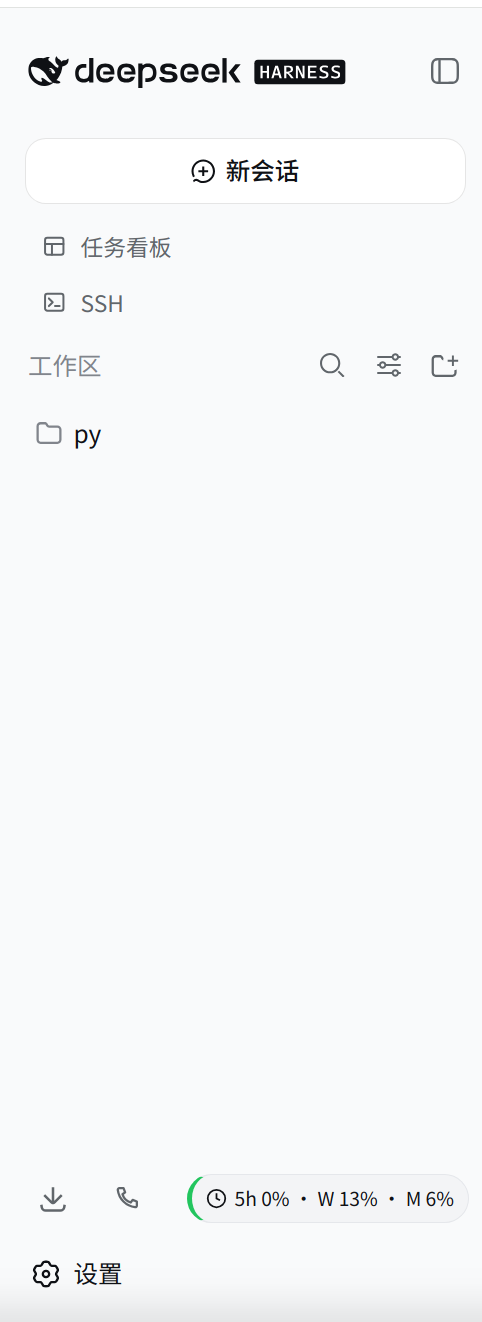
- 侧边栏底部工具栏显示用量徽章(5h 滚动 / 本周 / 本月)
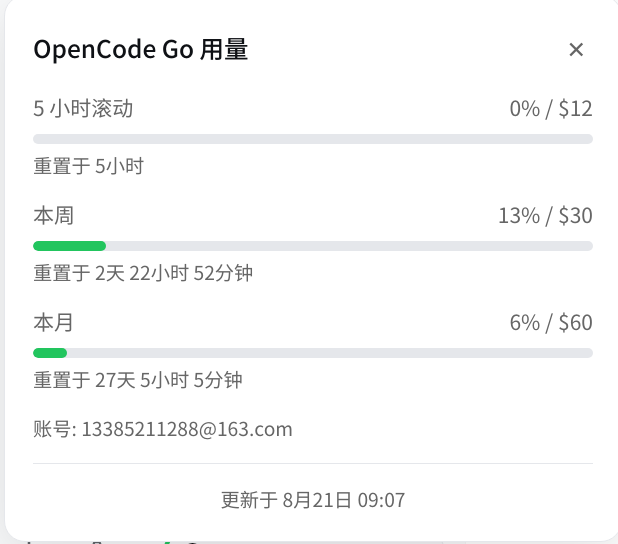
- 点击徽章展开详细用量面板,含进度条和重置倒计时
- 根据用量自动变色:绿色(< 70%)、黄色(70-90%)、红色(> 90%)
- 每 60 秒自动刷新,可配置刷新间隔和告警阈值
- 仅允许本地回环访问(安全防护)
效果预览
侧边栏徽章
用量详情面板
安装
一键安装(推荐)
curl -fsSL https://raw.githubusercontent.com/yk1288/dsh-opencode-go-usage/main/install.sh | bash
手动安装
# 进入 DSH web 配置目录
cd ~/.dsh/profiles/web

# 添加插件依赖
pnpm add @yk1288/dsh-opencode-go-usage
安装后重启 DSH:
dsh web
配置
安装完成后需要配置 OpenCode Go 凭据,插件才能获取用量数据。
获取凭据
- 浏览器登录 https://opencode.ai
- 按 F12 打开开发者工具
- 进入 Application → Cookies,复制
auth的值 - 从浏览器地址栏获取 workspace ID(格式为
wrk_xxx)
配置方式
编辑 ~/.opencode-go-usage.json:
{
  "workspace_id": "wrk_xxx",
  "auth_cookie": "你的 auth cookie 值"
}
设置文件权限(仅自己可读):
chmod 600 ~/.opencode-go-usage.json
环境变量(可选)
也可以通过环境变量配置,优先级高于配置文件:
export OPENCODE_GO_WORKSPACE_ID="wrk_xxx"
export OPENCODE_GO_AUTH_COOKIE="你的 auth cookie 值"
使用
- 徽章:安装后自动显示在侧边栏底部下载/电话图标所在行的最右侧
- 点击:展开用量详情面板,显示各窗口用量百分比和进度条
- 颜色:
- 绿色边框:用量 < 70%
- 黄色边框:用量 70-90%
- 红色边框:用量 > 90%
- 关闭面板:点击面板右上角 ✕ 按钮,或按 ESC 键
开发
# 克隆仓库
git clone https://github.com/yk1288/dsh-opencode-go-usage.git
cd dsh-opencode-go-usage

# 安装依赖
pnpm install

# 构建
pnpm build

# 类型检查
pnpm typecheck

# 监听模式(开发时自动重新构建)
pnpm watch
文件结构
├── public/
│   └── client.js        # 客户端模块(ModuleLoader 格式)
├── src/
│   ├── index.ts          # 服务端插件(凭据解析、API 路由、轮询)
│   ├── client/
│   │   └── sidebar-badge.tsx  # 客户端组件(参考,实际运行 public/client.js)
│   ├── fetcher.ts        # OpenCode Go 页面抓取
│   └── types.ts          # TypeScript 类型定义
├── lib/                  # 构建产物(git 忽略)
├── cordis.patch.yml      # DSH 插件注册配置
├── install.sh            # 一键安装脚本
├── package.json
└── README.md
常见问题
徽章不显示
- 检查 DSH 是否正常启动(
dsh web无报错) - 检查浏览器控制台是否有
[dsh-opencode-go-usage]相关错误 - 确认
~/.opencode-go-usage.json已正确配置
显示 "Go --" 或暂无数据
- 确认
workspace_id和auth_cookie正确 - 登录 https://opencode.ai 检查账户是否有效
- 查看 DSH 终端日志中的
[dsh-opencode-go-usage]输出
License
Apache-2.0
No comments yet. Be the first to write one.