dsh-chatgpt-connect



English | 中文
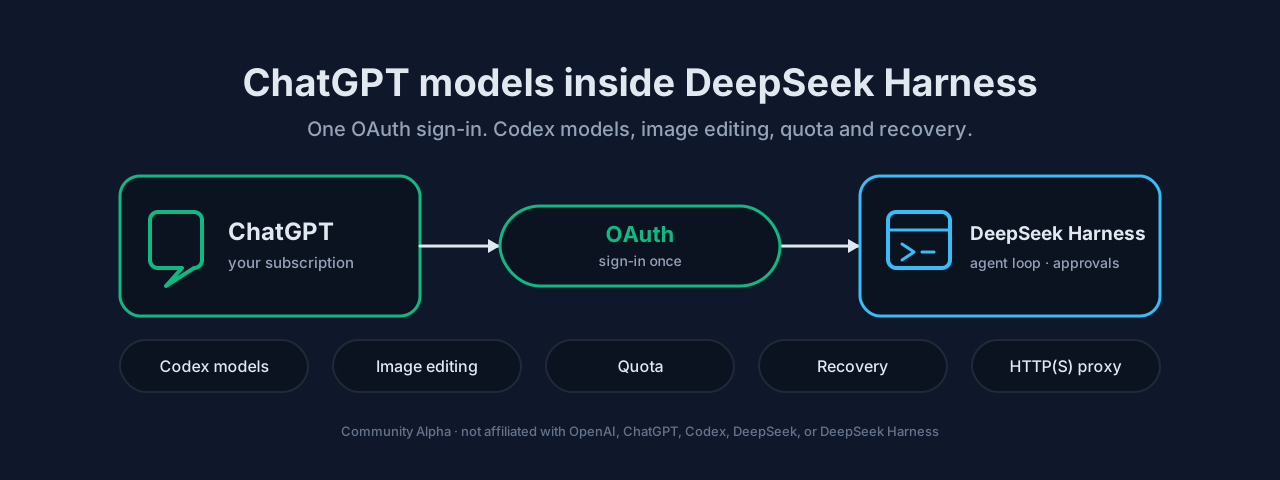
Connect your ChatGPT subscription to DeepSeek Harness over OAuth: Codex models inside the normal Harness agent loop, optional GPT Image generation and editing, an optional HTTP(S) proxy scoped to this plugin's traffic, user-controlled defaults, Harness-native approvals, quota display, diagnostics, and reliable session recovery.
Community Alpha. This project is independent and is not affiliated with, sponsored by, or endorsed by OpenAI, ChatGPT, Codex, DeepSeek, or DeepSeek Harness.
Fork status — 0.3.1-alpha.2, published 2026-11-07 on the npm alpha dist-tag through
Trusted Publishing. This is the self-maintained fork of
franksong2702/dsh-codex-connect, which
derives from Yan-Zero/dsh-codex. The package and the
CLI are both named dsh-chatgpt-connect; the settings panel is titled ChatGPT Connect.
Upstream's own release records are preserved verbatim at the end of this file under their
previous package name.
What this fork changes relative to upstream:
- Admission and verification are separate decisions. The package declares a bounded Host
range, so a DSH update inside that range no longer refuses to load. A version is reported as
compatibleonly when it is on the maintainer-verified list; any other version inside the range is reported asunverified, never asserted as working. Availability of a Host is decided by the declared range; trustworthiness is decided by the verified list. - Package, CLI, and repository names are unified. Package and CLI are
dsh-chatgpt-connect; the settings panel title isChatGPT Connect, and under the Chinese interface language the ANB 工具 tab reads 「ChatGPT连接」. - The in-panel update check is disabled in this fork. The panel reports that update information is unavailable and makes no network request while disabled. Install upgrades through the plugin manager, not through this panel.
- Windows acceptance paths are usable. The native-compaction acceptance scripts no longer apply POSIX-only permission and ownership checks on Windows; POSIX behaviour is unchanged.
Codex Connect adds the openai-codex model provider to the normal Harness agent loop.
Harness continues to manage tools, permissions, approvals, attachments, session persistence,
compaction, and recovery. Installing the plugin does not change your default model or search
route, and it does not turn a ChatGPT subscription into an OpenAI Platform API key.
Requirements
| Requirement | Value |
|---|---|
| Plugin | dsh-chatgpt-connect@0.3.1-alpha.2 |
| DeepSeek Harness | Declared range >=0.1.7-rc.1 <0.3.0. This version is reported compatible only on the fifteen hosts verified for it: 0.1.7-rc.1, 0.1.7-rc.2, 0.2.0-rc.1, 0.2.0-rc.2, 0.2.1-alpha.1, 0.2.1-alpha.2, 0.2.1-alpha.3, 0.2.1-alpha.4, 0.2.1-alpha.5, 0.2.1-rc.1, 0.2.1-rc.2, 0.2.1-rc.3, 0.2.1-rc.4, 0.2.1-rc.5, 0.2.2-alpha.3. Any other Host inside the declared range is reported unverified, never asserted as working. |
| Node.js | ^22.19.0 || >=24.0.0 |
| Account | ChatGPT OAuth with access to the requested Codex model; availability is decided by OpenAI |
The exact pairing recorded for this release is in
compatibility.json; latestDshVersion is 0.2.2-alpha.3. A Host entry
that is missing from the verified list means the combination is unverified, not known to be
broken. Do not infer support for a newer Host from an older pairing, and do not upgrade or
downgrade Harness merely to match a row.
Quick start
1. Install
dsh plugin --profile web add dsh-chatgpt-connect@0.3.1-alpha.2
dsh web
Replace web with your existing profile name, and use that same profile when starting
Harness. From a DSH source checkout, prefix the commands with pnpm.
Always pass the exact version. npm's latest tag still points at the 0.0.0
name-reservation placeholder, so an unpinned install cannot run; alpha is the only channel
this fork publishes to, and a moving tag is not a compatibility guarantee for other Hosts.
Other profiles and the full installation checks are in INSTALL.md.
2. Authorize and select a model
Open Settings → Models → Openai-Codex → Authorize, then complete the approval yourself in
the browser. If an embedded window is blocked, select Open ChatGPT sign-in page. Choose an
openai-codex model in the normal Harness model picker.
Never paste an authorization URL, code, token, or account identifier into an issue, log, chat, or configuration file. For a browser on another device, the optional manual callback form can complete the pending login without forwarding the localhost callback port; see Remote browser authorization.
3. Check the installation
For a package-manager-free diagnostic, run the already installed bin directly, replacing these independently identified paths:
node /absolute/profile/node_modules/dsh-chatgpt-connect/lib/bin.js doctor --json \
  --install-anchor /absolute/dsh/node_modules/@deepseek-ai/dsh/package.json
doctor --json reports local installation metadata without a network request or raw
credentials; an anchor does not prove that installation is running. Wrappers such as
dsh plugin exec may reconcile dependencies. Development builds containing that change also
distinguish page, Host-loaded, and installed plugin versions in settings. A passing diagnostic
is not proof of model access; an actual request requires separate authorization.
Core capabilities
- Accounts. Save up to 16 accounts on the DSH host and manually select the active account for subsequent requests. Account selection is not a per-session binding. Requests keep their captured account; the plugin does not rotate accounts or silently fail over.
- Models and Astra support. The currently verified DSH and plugin combination supports
gpt-6-astra. The plugin supplies its missing model definition with Low, Medium, High, Xhigh, and Max reasoning levels; Default preserves the provider default. Saved Off/Minimal selections require an explicit update. When the installed dependency catalog includes Astra, the plugin preserves its native metadata while retaining these five calibrated reasoning choices. A model appearing in the list does not mean the current account has permission to use it. - Fast Mode. Request priority service for one conversation, off by default. Optional, separate profile settings can enable it for newly started top-level or subagent conversations without changing existing conversations. Actual speed and quota consumption depend on the service; no fixed speed multiplier is guaranteed.
- Network proxy. Optional credential-free HTTP(S) proxy that applies only to this plugin's
traffic, including compressed OAuth and quota responses. Unrelated Fetch calls keep the
host's original transport, and a failed proxy request never silently retries directly. This
is the setting that makes the plugin usable behind a corporate egress, a local gateway, or
any network that cannot reach the provider directly. Enable it with
enableProxy; the exact behaviour is in the table below. - Quota. Show the server-returned
5hand7dwindows and reset times, normally refreshed every 60 seconds while signed in and the tab is visible; failures back off. Missing windows are not invented; Spark uses its separate quota bucket. - Plugin updates. The in-panel update check is disabled in this fork. It never contacts a registry and reports the information as unavailable; no DSH change is ever recommended from it.
Optional capabilities
Every option below is off on a fresh installation. Edit them in Settings → Plugins → Plugin configuration → ChatGPT Connect or Settings → Models → Openai-Codex → More settings, then select Save changes. A conflict or failed save preserves your draft.
| Capability | Enable with | Important behavior |
|---|---|---|
| Proxy | enableProxy |
Credential-free HTTP(S), scoped to this plugin's traffic, including compressed OAuth and quota responses. Unrelated Fetch calls retain the host's original transport. A failed proxy request does not silently retry directly. |
| Codex Search | enableSearch |
Selects Codex for the entire profile's search route; disabling restores the previously active route. |
| Image viewing | enableImageTool |
Adds view_image to vision-capable models for local files and validated public HTTP(S) images. |
| GPT Image generation and editing | enableImageGeneration |
Generate from a prompt or edit selected conversation images with ordered references. Availability, dimensions, and quota remain account- and service-controlled. Also gates the cross-route image handle bridge, which persists the ChatGPT Connect image selection handles into image tool results on non-Codex routes so image editing works there too; the openai-codex route is skipped because its adapter already injects the same handles per request. Optional imageHandleBridgeTools restricts the bridge to specific tools. |
| Auto-review | enableAutoReview |
Sends bounded approval context, tool arguments, working directory, and the planned action to chatgpt.com, with confirmation on first enablement. Failures return to human approval. |
Use the image generation capability included with your current GPT subscription. Successful images appear below the conversation answer without opening its processing details; the original tool card remains available there. Generated originals are stored separately from attachment previews; disabling the capability or uninstalling the plugin does not delete them. See Configuration and recovery for storage and access rules.
Auto-review operates after Harness policy requires approval; it does not bypass that policy. Read Auto-review behavior before enabling it.
Luna Reserve has been removed. Legacy enableReserveFallback settings are ignored; no
Reserve negotiation or automatic model switching remains. Select an ordinary model explicitly
for an old gpt-reserve conversation. If the Host cannot change that conversation's model,
preserve it and start a new conversation with the model you choose. Old return files are not read, migrated or deleted. Account quota UI and the read-only quota tool retain ordinary
60-second caching and failure cooldowns, with no background polling. See
migration guidance.
Optional model quota observation. Profile composition can set enableQuotaTool: true and
reload the plugin to expose the read-only codex_connect_quota tool. It is off by default and
has no custom settings-card toggle. It reports shared Codex window percentages, reset times and
freshness, excluding balances and account identifiers. See
quota observation.
Percentages are not task budgets; resource limits never justify dropping requirements, tests,
or safety checks.
Task orchestration is frozen. Development follows the core maintenance scope: maintain connection, compatibility, diagnostics, and recovery. Task controls remain paused — activation is rejected, and existing current-Host browser regressions show no controls in fresh Sessions. Adaptive Task, automatic delegation, and unproven optimizations are frozen; previously published options are not removed or remotely disabled by this decision.
FAQ and important limits
Where are my credentials stored?
OAuth credentials are stored on the host running DSH and used there to authenticate and send requests to OpenAI. Normal browser account responses return account summaries, not raw tokens. A remote browser device is not necessarily the DSH host.
Does uninstalling sign me out?
No. OAuth state is stored separately at $DSH_HOME/.openai-codex-auth.json (~/.dsh by
default). The plugin does not copy or modify ~/.codex/auth.json. Use Sign out all
accounts, or logout before uninstalling, only when deleting credentials is intentional.
Can I switch accounts for different conversations?
Subsequent Codex requests use the selected active account; conversations do not bind their own accounts. Fast Mode is conversation-scoped. Cancelling a new authorization preserves existing accounts; an explicit revoked-refresh response asks for reauthorization, while temporary failures preserve the account for retry. See Account behavior.
Why does a listed model fail?
Model HTTP/SSE failures include bounded, request-local diagnostic metadata after the existing
error message. An overloaded message alone does not establish an account block. See
persistent-error diagnostics
for scope and reproduction.
Account permissions, plugin/host compatibility, and network conditions all affect availability. Access on another client does not guarantee this integration will work. OpenAI controls model access, quota, context capacity, and service behavior; catalog entries are not proof of entitlement.
Does changing client headers prevent persistent authorization failures?
No such guarantee is established. This project is a third-party integration; it does not
impersonate Codex Desktop or fabricate installation/attestation headers. The pi-ai model/OAuth
route and auxiliary routes currently identify themselves differently. OpenAI's
App Server documentation asks integrations to
identify their own client with clientInfo; it does not establish acceptance rules for this
plugin's direct backend calls. An overloaded message is not proof of a block. Capture the
bounded error metadata and compare successful and failed windows before attributing the cause;
share request IDs privately, never tokens or full session archives.
Can I keep the original dsh-codex plugin installed?
Not in the same effective configuration: both register openai-codex. Follow
MIGRATION.md; remove only the confirmed conflicting entry, not credentials or
unrelated providers.
What do diagnostics prove?
doctor is local. Capability and reviewer probes may make network requests and consume quota
when their preconditions are met. auto-review-probe checks only the reviewer route and
structured response, not the full Harness approval integration or execution of the reviewed
action. Commands, limits, and exit codes are in the
diagnostics reference.
A missing entry in the compatibility record means a DSH/plugin combination is unverified, not known to be broken.
Documentation and development
The docs/ tree is not shipped inside the npm package, so those links point at GitHub and are
always current there.
- Installation and upgrades
- Versioning policy · Migration from
dsh-codex - Configuration, diagnostics, and recovery
- Architecture and security details
- Auto-review behavior
- Local request metrics: enable, report, and disable
- Chinese README
- Release runbook · Contributing · Security policy
pnpm install --frozen-lockfile
pnpm run check
pnpm run test:browser
pnpm run check:dsh-install
check covers static checks, unit tests, build, compatibility, and packaging.
lint:metadata checks package and release rules; lint:source checks host and browser
TypeScript for unhandled or misused promises, invalid awaits, duplicate cases, and unreachable
code. Browser regression and isolated DSH installation are separate commands. These checks use
no real OAuth authorization and do not replace real-account acceptance.
lib/ is a committed build product. Rebuild it on Linux — the same sources produce different
bytes on Windows and the committed-output check will fail. See the release runbook.
Contributing, security, and support
Issues and pull requests are welcome at https://github.com/yiyunet/dsh-chatgpt-connect. Report a suspected credential or authorization problem privately, never in a public issue; the security policy describes the channel. Do not attach full session archives, tokens, or account identifiers to any report.
License and acknowledgements
Copyright 2026 Frank Song for the original Codex Connect work. Copyright 2026 yiyunet for this fork's modifications and additional work. This project contains software derived from Yan-Zero/dsh-codex and is forked from franksong2702/dsh-codex-connect; all upstream copyrights are retained. All are distributed under Apache-2.0; see NOTICE and LICENSE.
The published artifact carries a SLSA provenance attestation naming the exact commit and workflow that built it, so the tarball can be tied back to this repository without trusting a maintainer's machine.
Historical upstream releases (previous package name dsh-codex-connect)
Everything in this section describes releases published upstream under the previous package name. Package names, version numbers, tag states, and Host counts are upstream's own records at the time they were written and are intentionally not rewritten; they do not describe this fork and do not contain this fork's changes. Use the quick start above to install this fork.
Historical upstream installs used
dsh plugin --profile web add dsh-codex-connect@0.2.0-alpha.12. That is a different npm
artifact, published by upstream under the previous package name; it is not this fork and does
not contain any of this fork's changes.
Published Alpha 12: 0.2.0-alpha.12 adds exact stock DSH 0.2.2-alpha.3 with the recovery-only restriction below, retires Luna Reserve and fixes the stock Auto review preset's unsupported Codex Responses temperature. It is published on alpha; latest remains Alpha 10. See the release and migration notes. This does not request a DSH upgrade.
On exact DSH 0.2.2-alpha.3, saved Task records are recovery-only: inspect state, stop or take over manually. Automatic routing, resume and evidence-child creation are rejected, including internal direct entry points. Existing safe-disable/archive exits retain their owner, receipt and cleanup checks. The prior fourteen Hosts keep their behavior; Task's public activation gate remains closed everywhere.
Historical Alpha 11: 0.2.0-alpha.11 delivers GPT-6.1 Terra, the unified speed menu, exact DSH rc.4/rc.5, seeded-fork originals and bounded native bili preflight, with a higher direct Undici minimum. All fourteen exact Hosts passed against one package; npm version/alpha, Git tag, prerelease and archive integrity were independently read back. latest remains Alpha 10. See the release record; keyless checks do not establish real-account/model or Desktop acceptance, and Computer Use is not included.
Historical Alpha 10: 0.2.0-alpha.10 adds only exact DSH 0.2.1-rc.3, retains the eleven previous hosts, and delivers the default-off read-only quota tool and compact speed menu. npm version, alpha tag, Git tag, prerelease and archive hashes were independently verified; latest is unchanged. The upstream rc.3 Git-source mapping remains unverified; keyless contracts do not establish real-account/model or Desktop acceptance. See the release record.
This guide recommends Codex Connect 0.2.0-alpha.12 / DSH 0.2.1-rc.5; the other exact supported hosts are listed below. Check dsh --version first and use doctor --json for local diagnostics; the CLI version alone does not prove which model-runtime packages are installed, and missing metadata is reported as unknown. For other versions, use Installation and upgrades. A moving npm tag such as alpha is not a compatibility guarantee.
| Requirement | Historical upstream verified pairing |
|---|---|
| Codex Connect | 0.2.0-alpha.12 |
| DeepSeek Harness | 0.1.7-rc.1, 0.1.7-rc.2, 0.2.0-rc.1, 0.2.0-rc.2, 0.2.1-alpha.1, 0.2.1-alpha.2, 0.2.1-alpha.3, 0.2.1-alpha.4, 0.2.1-alpha.5, 0.2.1-rc.1, 0.2.1-rc.2, 0.2.1-rc.3, 0.2.1-rc.4, 0.2.1-rc.5 or 0.2.2-alpha.3 (consistent package set) |
| Node.js | ^22.19.0 || >=24.0.0 |
| Account | ChatGPT OAuth with access to the requested Codex model; availability is decided by OpenAI |
Historical maintenance release: 0.2.0-alpha.9 adds an optional reasoning-effort fallback and independent Standard / Fast / Ultrafast defaults for new top-level and ordinary subagent conversations. Explicit request effort and later manual speed choices win; omitted/reset settings retain the corresponding legacy defaults. Existing/resumed sessions remain respected. Ultrafast still requires sign-in and an eligible model/account route; eligibility and actual served tier remain unknown. Finite SSE and Task pause remain unchanged; no measured speed multiplier or real-account/Desktop acceptance is claimed.
Historical maintenance release: 0.2.0-alpha.8 adds explicit conversation Standard / Fast / Ultrafast selection, preserves the Host retry policy, sets the GPT-6.1 Sol context default to 500,000 tokens, and repairs recovery/file identity and Windows packaging checks. Ultrafast remains opt-in for the two documented Codex model IDs; defaults for new main/subagent conversations are not included. Eligibility and the actual served tier remain unknown; finite SSE and existing opt-in defaults are retained. No measured speed or real-account/Desktop acceptance is claimed.
Historical image-recovery release: 0.2.0-alpha.7 retains completed, validated originals when Harness preview saving fails, with original download and explicit continued editing. Tool help clarifies that chat can stay on DeepSeek while Codex Connect handles images through its separate ChatGPT OAuth lane. Its eleven original exact host pairings remain verified; the underlying image interface and credentials are unchanged. Synthetic checks do not establish real-account or Desktop acceptance.
0.2.0-alpha.4 extends exact host support to DSH 0.2.1-alpha.2 and 0.2.1-alpha.3, retaining the previous five hosts. Existing supported hosts do not require an upgrade; Task remains paused and defaults are unchanged.
Historical maintenance release: 0.2.0-alpha.5 delivers exact DSH 0.2.1-alpha.4, 0.2.1-alpha.5 and 0.2.1-rc.1 support plus Host/browser runtime-identity diagnostics, retaining the seven previously published hosts. Diagnostics share one version policy. Publication and keyless verification do not establish new real-account, Desktop or authenticated-browser acceptance; #339 remains open for separate acceptance.
Historical release 0.2.0-alpha.3 adds official Desktop sign-in compatibility and Desktop-specific account diagnostics while preserving the Web flow. Desktop uses its own profile and bundled CLI; follow the Desktop installation instructions. The declared host versions, defaults and account storage are unchanged.
Historical release 0.2.0-alpha.2 publishes exact DSH 0.2.1-alpha.1 compatibility and the cross-route image selection handle repair. The earlier 0.2.0-alpha.1 artifact remains unchanged and rejects that host. Existing supported hosts do not require an upgrade.
As of 2026-11-04, npm alpha points to 0.2.0-alpha.12, while latest remains 0.2.0-alpha.10. Those are upstream's package and upstream's dist-tags, not this fork's; this fork's alpha carries 0.3.1-alpha.2. Default installation of the upstream package therefore selected Alpha 10, and a moving npm tag is not a compatibility guarantee for other hosts.
Historical release 0.2.0-alpha.1 adds gpt-6.1-sol through a model-catalog fallback and begins the shorter independent plugin numbering. The four supported DSH versions are unchanged; no host upgrade is required.
It retains Alpha 4.54's handling of initial system instructions and tool definitions on DSH 0.2.0-rc.2, diagnostics for differing host/plugin provider libraries, and Canary's normal-request checks, along with Alpha 4.53's core maintenance changes, existing-task recovery and safety, and 4.52's opt-in local request metrics. Collection stays off until a private directory is configured; unknown usage is not zero. No Task reopening or model-library/OAuth upgrade is included.
The upstream package passed keyless installation/runtime regression on all fifteen exact DSH versions above. Task controls remain paused: activation is rejected and existing current-host browser regressions show no controls in fresh Sessions. These checks do not establish live OAuth, real-account image editing, authenticated browser acceptance on the new host, or full user acceptance; migration of earlier Task grants across a Harness upgrade is not verified. Older supported pairings and their task behavior are documented in Installation and upgrades.
Historically, on 2026-10-10 the maintainer reported successful login and normal use on Desktop 0.2.0-rc.2 with the identified local adaptation build. Only the historical 0.2.0-alpha.3 client was compared with that local adaptation and found to differ only by the package-version string. This comparison does not establish 0.2.0-alpha.4 Desktop or live-account acceptance, nor acceptance of later npm artifacts; no new real Desktop acceptance was performed. See the Desktop acceptance record.
No comments yet. Be the first to write one.