dsh-material-library
A material library for DeepSeek Harness (dsh): collect what a conversation produced — a folder, a file, a note — keep it in real folders with tags, and jump back to the chat it came from in one click.
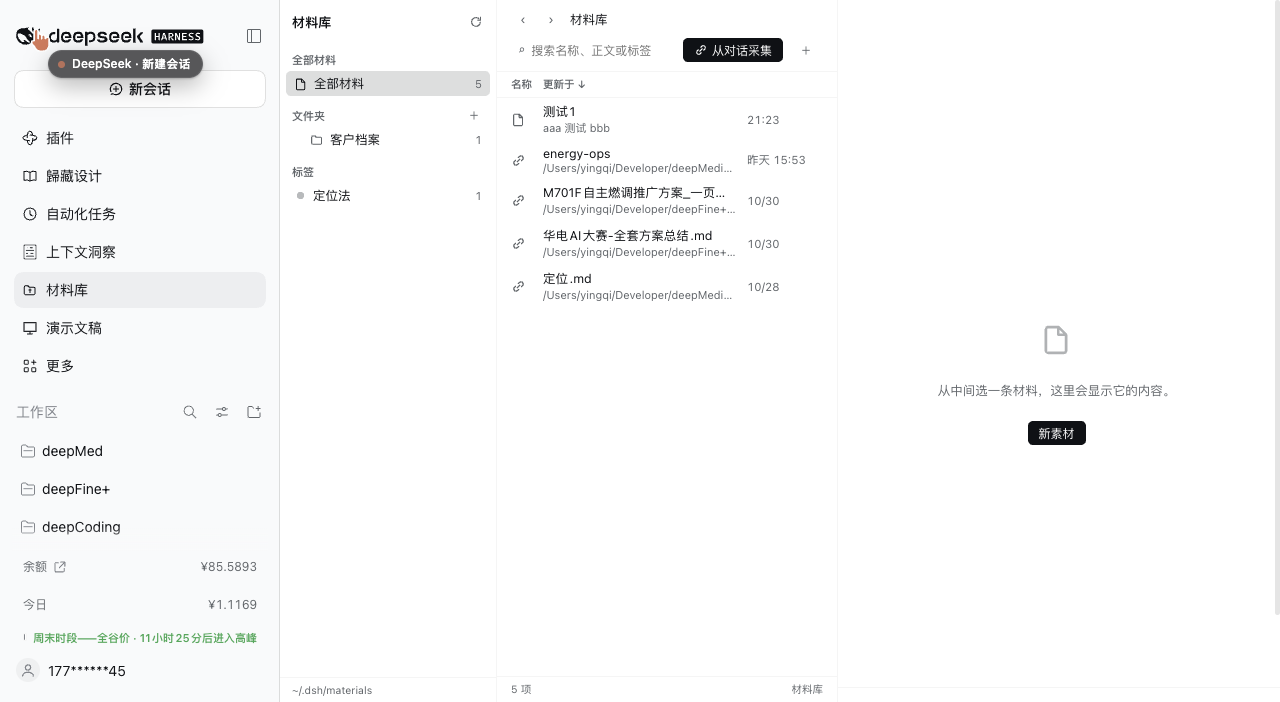
What it does
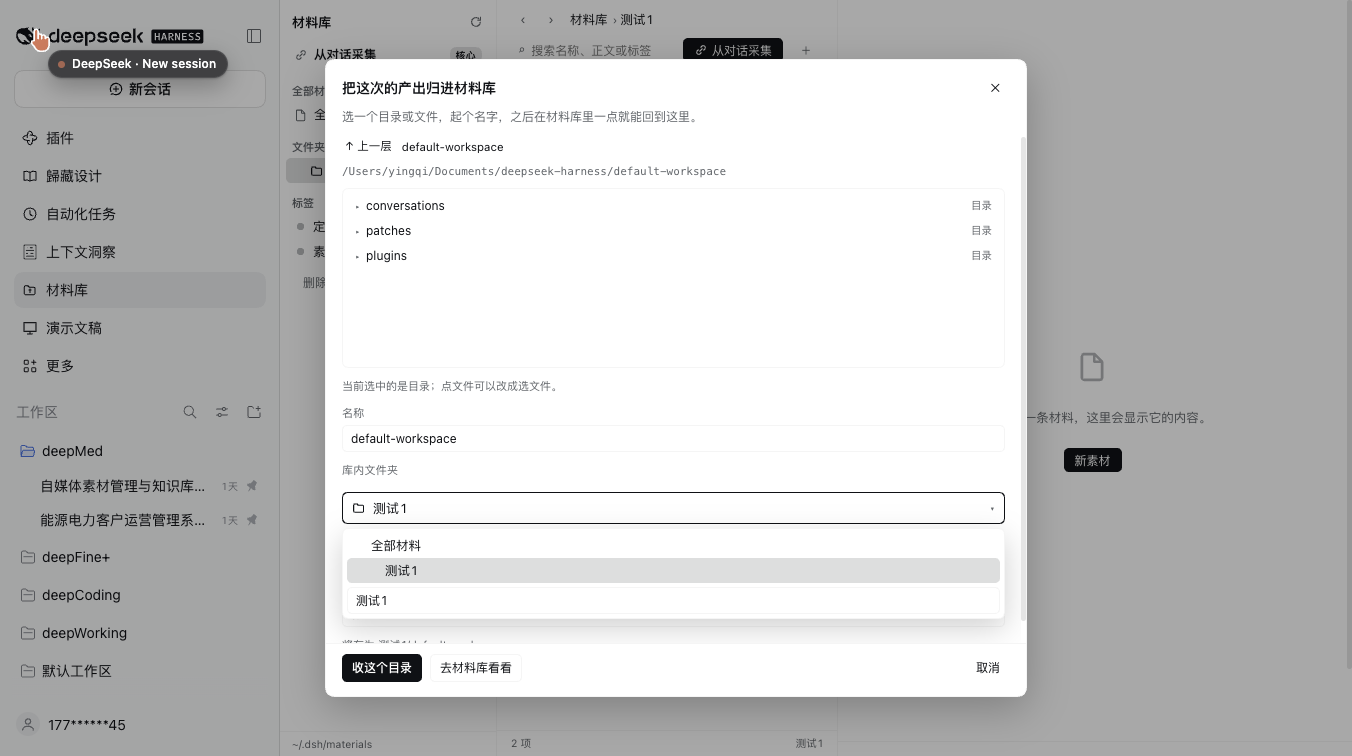
- Collect from a conversation. A button in the session header and a
从对话采集 / Collect from chatbutton in the library open a picker: choose a conversation, browse its working directory, pick a folder or a file, name the entry, choose the library folder and tags. Entries point at the original path; nothing is copied. - Real folders, real files. A note is a
.mdfile on disk; the folder tree is the directory tree under the library root (default~/.dsh/materials). Tags live in.index.jsonbeside it. You can edit either from outside the app. - Finder-like browsing. Source list (all materials / folders / tags) · list view with name, updated, folder and tags · detail pane with a file card, a default-app button and an "open with…" menu.
- Open with… runs the macOS
opencommand: the default app, or another installed application picked from a menu, or reveal in Finder. Images preview inline; text and Markdown render in the detail pane. - Read like a chat. Markdown is rendered with the typography of conversation messages — headings, nested lists, quotes, code blocks, tables, rules — including when the entry is a reference to a file outside the library.
- Reopen the source. For a collected entry,
Open in original sessionswitches to that conversation and opens the folder in its right sidebar. - Everything is editable. Rename or delete a folder or tag from the sidebar (a tag rename rewrites it everywhere; a folder rename moves its files), edit name/folder/tags of any entry, search names, bodies and tags.
Install
dsh plugin --profile <your-profile> add dsh-material-library
Published on npm as dsh-material-library; installing straight from GitHub also works: dsh plugin --profile <your-profile> add github:yingqi-studio/dsh-material-library.
In DSH Desktop, open Plugins, search the name, and install it there. Restart dsh web (or refresh the page) and the library appears as an icon in the sidebar.
Requires a host with the sidebar-entry and right-sidebar slots (dsh.web 0.2.x). engines.dsh is declared as >=0.2.0.
Where things are stored
~/.dsh/materials/            # library root (override with the plugin config `root`)
├── .index.json              # tags for notes, plus the references you collected
├── 使用说明.md               # a note = a real markdown file
└── 客户项目/                 # a folder = a real folder
    └── 需求.md
Set root in the plugin config to move the library elsewhere. Writes are serialized and atomic (.tmp + rename); paths are confined to the library root, and collected targets must stay inside your home directory.
HTTP API
The UI talks to the host over same-origin JSON routes under /api/dsh-materials (no generated remotes, so it stays dependency-free):
| Method | Route | Purpose |
|---|---|---|
| GET | /health |
library root, readiness |
| GET | /home |
home directory (fallback start for the picker) |
| GET | /state |
folders, notes, references, tag counts |
| GET | /list?path= |
list a directory outside the library (for the picker) |
| GET | /file?path= |
read a note |
| GET | /ref/preview?id= |
read a referenced text file for the detail pane |
| GET | /ref/raw?id= |
raw bytes of a referenced file (images) |
| GET | /openers?path= |
installed apps that can open a target, with icons |
| GET | /search?q=&tag= |
search names, bodies and tags |
| GET | /session-times |
last-modified time per session (picker ordering) |
| POST | /create /update /delete |
notes |
| POST | /folder /folder/rename /folder/delete |
folders |
| POST | /tag/rename /tag/delete |
tags |
| POST | /ref/add /ref/update /ref/delete |
collected references |
| POST | /open |
open / reveal a target with the OS |
Everything that mutates goes through one serialized store; conflicts (duplicate name, non-empty folder, unknown application) come back as readable 4xx errors.
Notes and limits
- A collected entry is a reference, not a copy: if the original moves, the entry shows as missing.
- Only targets inside your home directory can be collected.
- Files you drop into the library by hand are listed but have no tags until you tag them in the UI.
- The Markdown renderer is built in (~150 lines, no dependency): it covers common syntax but not inline HTML, footnotes or task-list checkboxes.
- No agent tools yet — everything is done in the UI.
中文说明
把对话里产出的目录、文件和笔记收进一个材料库:真实文件夹 + 标签,Finder 的观感,点开像对话消息一样阅读,一键跳回原始会话。
- 从对话采集:会话标题栏按钮 / 库内「从对话采集」按钮 → 选对话、浏览目录、选文件或目录、起名、选库内文件夹与标签。收进来的是引用,原文件不动。
- 真实目录:笔记就是磁盘上的
.md,文件夹就是目录树(默认~/.dsh/materials),标签存在.index.json。 - 三栏浏览:左栏 全部材料 / 文件夹 / 标签;中栏列表(名称、更新、文件夹、标签);右栏文件卡 + 默认应用 + 「打开方式」菜单。
- 打开方式:默认应用 / 其它已安装应用 / 在 Finder 中显示;图片行内预览,文本与 Markdown 在右栏渲染。
- 像对话一样阅读:标题、嵌套列表、引用、代码块、表格、分隔线,引用外部文件时同样渲染。
- 在原始会话右侧打开:切回那个对话并打开右侧文件面板。
- 都能改:文件夹、标签可就地改名或删除(标签改名全库生效、文件夹改名带走文件),条目的名称/文件夹/标签可编辑。
安装:dsh plugin --profile <profile> add dsh-material-library(未发布 npm 时用 github:yingqi-studio/dsh-material-library)。
License
MIT
No comments yet. Be the first to write one.