DSH Session Deck
简体中文 · npm · Latest release · Release CI
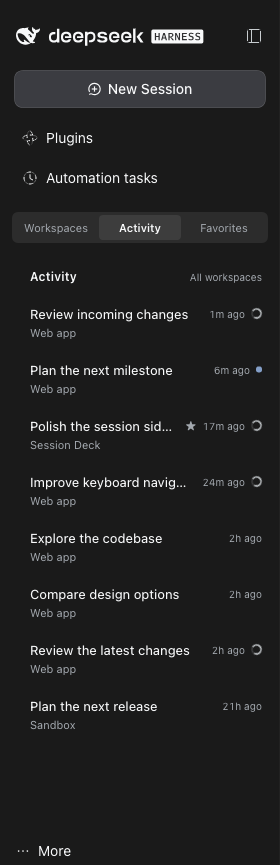
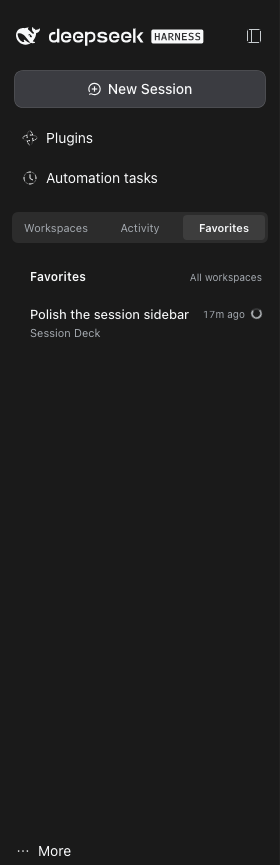
Keep track of work across DSH workspaces without leaving your conversation. Session Deck adds Activity and Favorites views to the native DeepSeek Harness sidebar, so you can spot running agents, reply to waiting sessions, and return to completed results.
A community plugin with an English interface, no extra npm dependencies, and no telemetry. Licensed under MIT.
Three views, one sidebar
| View | What it helps you do |
|---|---|
| Activity | Follow running, waiting, unread, and recent sessions across all workspaces. |
| Favorites | Keep important sessions close using DSH's native pinned sessions. |
| Workspaces | Return to the native workspace tree, its management tools, and other plugins' menus. |
Switching views keeps your current conversation open. Session rows show the title, workspace, time, and status; their menus provide favorite, rename, fork, archive, and copy-ID actions.
Screenshots captured from a local DSH installation in English; session titles and workspace names anonymized.
| Activity | Favorites | Workspaces |
|---|---|---|
| Follow active work and unread results. | Return to native pinned sessions. | Keep the complete workspace controls. |
 |
 |
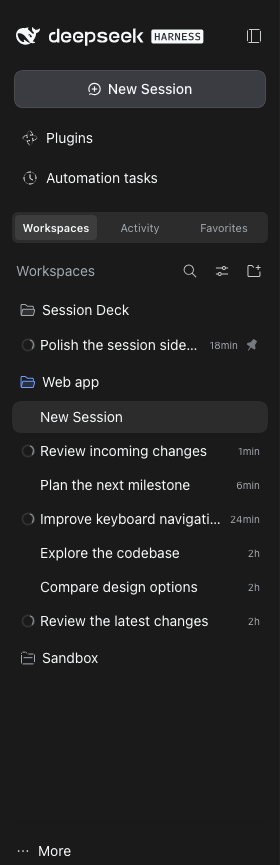 |
Screenshots show the switcher above the workspace region without host patches, below global panels. The interface and anonymized session titles are English; browser menus, tabs, and the address bar are excluded.
Install from npm
Install the latest release from npm. As historical validation, the initial 0.1.2 release tarball was installed in isolation, its SHA512 integrity verified, and its host, client, and patch files checked against the source; this does not establish verification of later releases.
Requirements:
- Node.js 22 or newer.
- DSH Web GUI 0.2.1-rc.2. This is the exact supported host version; other versions are unverified.
- DSH's native sidebar, session, and workspace plugins enabled.
Migrating from an earlier installation: disable and remove the old plugin instance in DSH's plugin manager before installing from npm, to avoid two instances controlling the sidebar. You can keep its browser storage.
dsh plugin --profile web add @yiliang114/dsh-session-deck@latest --ignore-scripts
Replace web if you use another profile. Refresh your existing DSH GUI, then choose Workspaces / Activity / Favorites above the workspace region, below global panels. On the supported DSH 0.2.1-rc.2 layout, the plugin places the switcher there automatically without patching installed DSH files. The native workspace browser remains available in Workspaces. Refresh after client changes too; hot reload is not assumed.
The plugin's own labels are English. To make the rest of DSH English too, use More → Settings → General → Language → English. Session titles remain in the language you wrote them.
Alternative: link a local checkout
git clone https://github.com/yiliang114/dsh-session-deck.git
cd dsh-session-deck
npm run verify
dsh plugin --profile web add "link:$PWD" --offline --ignore-scripts
There are no dependencies to install. The repository includes the client bundle; build checks JavaScript syntax rather than generating it. Keep the checkout in place while using a linked installation.
You can also install through Plugins → Add plugin → Install a third-party plugin: enter link:/absolute/path/to/dsh-session-deck, choose Install, then Enable now, and refresh the page.
Alternative: install from a tarball
To distribute the plugin without npm, run from the checkout:
npm run verify
npm pack --ignore-scripts
Copy the generated archive to the target machine, then install using its absolute path. Replace VERSION with the version in the filename produced by npm pack:
dsh plugin --profile web add /absolute/path/yiliang114-dsh-session-deck-VERSION.tgz --ignore-scripts
Refresh the GUI. A tarball installation does not depend on the original checkout. Both linked and tarball installations place the switcher above the workspace region automatically on the supported rc.2 layout; neither needs a host patch.
Custom plugin market
The market index lists registry-verified npm releases. Add the following raw JSON URL as a source in DSH's custom plugin market:
https://raw.githubusercontent.com/yiliang114/dsh-session-deck/main/market-index.json
This is a user-added custom market source, not an official DSH listing. Publishing to npm does not automatically add the plugin to an official DSH market.
Maintainers: pushing to main queues an automatic patch release (for example, 0.1.2 → 0.1.3). Rapid pushes can be combined: stale queued runs skip, and the latest eligible run includes the accumulated changes. To choose a minor version, run npm version minor --no-git-tag-version, then commit and push normally; an explicit greater stable version such as 0.2.0 is preserved, and the following release becomes 0.2.1. The workflow runs verification, creates the version commit and tag, publishes with provenance, and updates the market index and GitHub Release. See the release guide for authentication prerequisites and recovery.
How session status works
- Activity keeps all running, waiting, and unread sessions, plus at most 20 ordinary recent sessions, sorted by DSH's
updatedAtrather than last-opened time. Favorites has no 20-session limit. - Favorites are native DSH pins, shared with the workspace tree. Archived, subagent, and empty sessions are omitted from the lists; ordinary forks remain visible.
- Status priority is waiting for a reply → running → unread. A parent remains running while any known subagent descendant is running; ordinary forks do not propagate status to their source.
- Aggregation covers only descendants known to DSH's session directory. Independent background shell jobs are not tracked: an idle session does not mean every process it launched has exited.
- A session becomes unread when it and its known descendants finish while you are viewing something else. Opening it clears the marker. Persisted observations can recover completions across a refresh, but cannot reconstruct work that started and finished while every page was closed or was never observed.
- Archiving an active session requires a Stop and archive confirmation. There is no permanent-delete action. Switch to Workspaces for the complete native menus, including actions from other plugins.
DSH compatibility and switcher position
This plugin declares an exact engines.dsh match of 0.2.1-rc.2. Automatic top placement uses a DOM compatibility adapter for that release, not an official DSH extension API.
| DSH sidebar | Placement mechanism | Session Deck support |
|---|---|---|
| Official 0.2.1-rc.2, without patches | No official sidebar.workspaces.before slot; the adapter places the switcher above the workspace region by default. |
Supported target, with a precise rc.2 DOM structure guard. |
| 0.2.1-rc.2 with the legacy local patch | Reuses the existing sidebar.workspaces.before slot below global panels. |
Compatible; the patch is no longer needed. |
| Official 0.2.1-rc.3 | The published client and slot contract still lack the before-slot. | Not supported: full compatibility is unverified and the exact engine declaration excludes it. |
On the recognized rc.2 layout, the adapter renders a React portal into its own DOM host immediately before the workspace region, below global panels such as Automation tasks. It does not write installed DSH files or replace the native workspace browser. An unknown DOM layout falls back to the footer. Disabling the plugin removes its scoped observer and DOM host.
The rc.3 published files were inspected on 2026-10-23; that inspection does not establish plugin compatibility. Supporting another host version requires validating its session, workspace, slot, and UI APIs and DOM layout before widening engines.dsh.
Legacy sidebar patch rollback
The sidebar patch script is retained for rollback and backward compatibility. New installations do not need it. If you previously installed its local before-slot patch, the plugin can reuse that slot, or you can restore the original sidebar.
Locate the @deepseek-ai/dsh-client-ui-sidebar package actually used by your running DSH. From this repository, replace the placeholder with that package's directory, not the DSH root or this plugin directory:
node scripts/patch-sidebar-before.mjs /path/to/dsh-client-ui-sidebar --rollback
Rollback requires the original adjacent .dsa-before.backup files and refuses to overwrite unrelated changes. Refresh the GUI after rollback: the new plugin still places the switcher above the workspace region on the supported unpatched rc.2 layout. If rolling back a DSH source checkout, rebuild the affected client artifacts as well.
Privacy and local storage
Session Deck uses DSH's session and workspace APIs. It makes no model calls, sends no telemetry, and has no external upload endpoint.
Browser localStorage retains the original keys for compatibility:
| Key | Stored data |
|---|---|
dsh-session-activity.mode.v1 |
Selected view. |
dsh-session-activity.pending.v1 |
Session IDs, observed running state, and completion/unread metadata. |
No conversation bodies are stored by the plugin. Favorites remain in DSH's native pinned data. View and unread state sync between tabs on the same origin, not across devices. If storage is unavailable, state stays in memory. Clearing browser storage resets this metadata; processed records are capped at 1,000, while running and unread records are retained.
Disable or remove @yiliang114/dsh-session-deck in DSH's plugin manager to stop using it. Disabling removes the adapter's observer and DOM host and restores the native workspace browser. Removal does not clear browser storage or undo a legacy host patch; use the rollback command separately if needed.
Development
npm run verify
This runs syntax checks, Node.js tests for session selection and state handling, and a dry-run package-content check. CI runs it on Node.js 22 and 24. There is no separate lint or TypeScript check, and automated checks do not replace testing the real DSH GUI.
The client lives in lib/client.js, with a minimal host entry and Cordis configuration. Report bugs with your DSH version, installation method, and reproduction steps in GitHub Issues.
License
MIT. Independently maintained; not an official built-in DSH component.
No comments yet. Be the first to write one.