READMESource: main@b516a46d
dsh-plugin-top · DSH 插件雷达
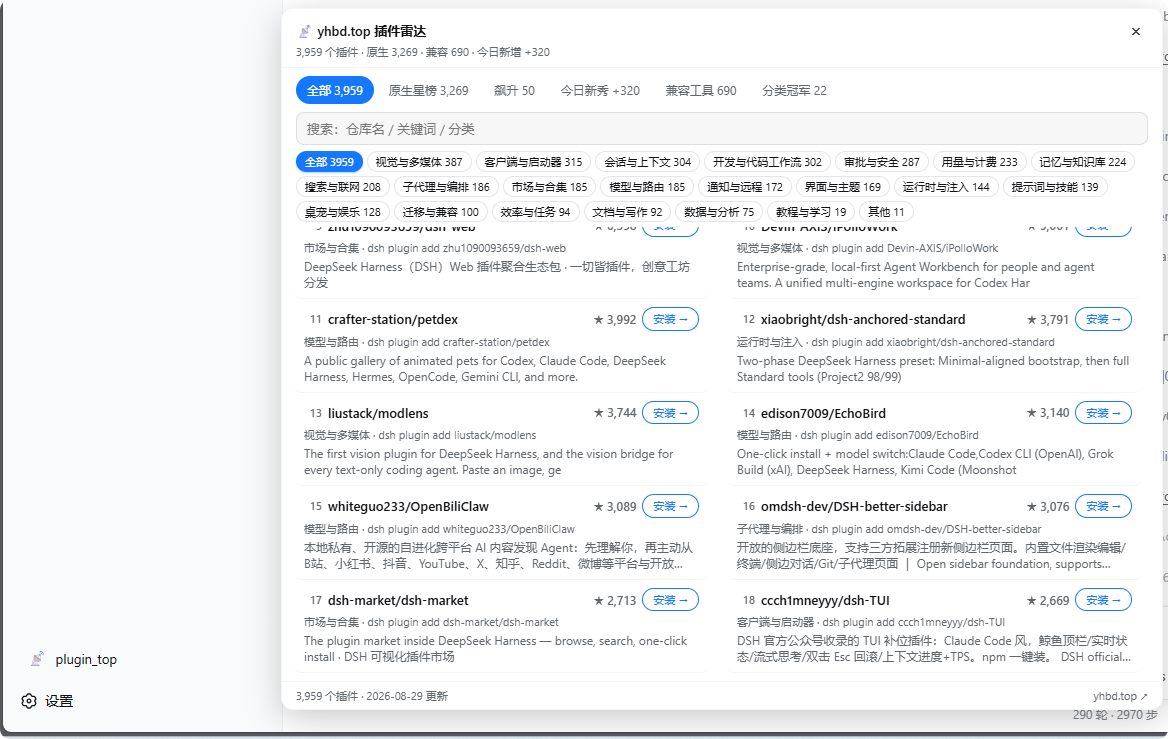
侧边栏一键打开 www.yhbd.top 插件雷达:搜索框 + 22 分类 + 站点同款五榜单(原生星榜 / 飙升 / 今日新秀 / 兼容工具 / 分类冠军),看中哪个点「安装 →」,安装指引直接落进当前会话输入框。
你会得到什么
浏览器侧(DSH Web 装完即用):
- 侧边栏底部出现
📡 plugin_top按钮(窄栏只显图标,宽栏带文字) - 点开大面板(最大 880×700,双栏列表):顶层 「全部」(3900+ 插件全集 ★ 序)+ 站点同款细分榜单——原生星榜(native ★ 全量)· 飙升(▲delta)· 今日新秀(+N)· 兼容工具榜(非 DSH 原生生态)· 分类冠军(每分类 ★ 最高 native,🏆)
- 分类条随榜单联动:切到哪个榜,分类 chips 只统计该榜内的插件分布(如今日新秀 +320 → 分类加总=320);点分类是榜内过滤、不跳回全集;本地即时搜索(仓库名 / 关键词 / 分类,秒响应)可与分类叠加
- 每行右侧「安装 →」按钮 → 引导语写入当前会话输入框:
请帮我了解这个 dsh-plugin 社区插件:【项目名称】【github仓库地址】,安装前要做安全审查。回车即让 Agent 先审查再装(已有内容自动换行追加,不覆盖);没有活动会话时降级为复制到剪贴板 - 点仓库名或行空白处 → 新开插件详情页
- 数据由插件内置的同源反代
/api/plugin-top/data拉取,sessionStorage 6h 缓存,深浅色主题跟随 DSH - ESC / × / 面板外点击关闭
Agent 侧(会话里直接说人话):
| 工具 | 用途 | 示例 |
|---|---|---|
plugin_top_search |
按关键词/分类/星数搜插件,返回简介+安装命令+详情页 | "帮我找个发 QQ 消息的插件" |
plugin_top_trending |
当日新入库 / 近期飙升 / 原生总星榜 | "DSH 插件圈最近有什么新货" |
安装
# 从 GitHub 源码安装(当前主渠道;pnpm 首次 add 需要构建授权:
# 把 pnpm 打印的包键加入 profile 的 pnpm-workspace.yaml → allowBuilds,重试即可;
# 建议锁 commit:github:yhbd-top/dsh-plugin-top#<sha>)
dsh plugin --profile web add github:yhbd-top/dsh-plugin-top

# npm 安装(发布到 registry 后可用)
dsh plugin --profile web add dsh-plugin-top

# 本地 tgz(在仓库目录 npm pack 得到)
dsh plugin --profile web add ./dsh-plugin-top-1.0.0.tgz
装好后重启 DSH(schtasks /run /tn DSHWeb 或你的等效方式)并硬刷新页面,侧边栏即出现 plugin_top 按钮。
卸载:dsh plugin --profile web remove dsh-plugin-top
零依赖部署
本插件把 micro.json 拉取做成 DSH Web 进程内反向代理(/api/plugin-top/data → https://www.yhbd.top/data/plugins.micro.json),所以:
- 不需要 yhbd.top 加 CORS 头
- 不需要 nginx 改任何配置
- 不需要 iframe / CSP frame-ancestors
- 一个插件搞定所有事:用户
dsh plugin add dsh-plugin-top即可使用
唯一前提:DSH Web 进程能访问 https://www.yhbd.top(绝大多数部署都满足)。
配置(Agent 侧可选)
在 profile 的 cordis.patch.yml 里覆盖:
- id: plugin-top
  name: dsh-plugin-top
  config:
    baseUrl: https://www.yhbd.top   # 数据源站点(影响 agent 工具 + 浏览器反代源)
    cacheTtlHours: 24               # agent 工具侧目录索引缓存时长
    timeoutMs: 10000                # agent 工具 / 反代拉取超时
数据与隐私
- 浏览器侧:fetch 同源
/api/plugin-top/data,由插件内置反代拉 yhbd.top 静态索引(gzip ~300KB) - 缓存:
sessionStorage(关掉标签页即清),不落盘、不跨会话 - Agent 侧缓存:
~/.dsh-plugin-top/micro-cache.json,断网/站点不可用时自动回退旧缓存并标注日期 - 无任何上传、遥测、凭证;「安装 →」按钮只写输入框,不代发任何消息
开发
npm install
npm run typecheck
npm run build          # tsdown(服务端 ESM,含 webServer 反代路由)+ scripts/build-client.cjs(浏览器 CJS 包裹)
node scripts\smoke-client.cjs   # 模拟 loader 冒烟
# 本机联调(不安装,用 patch overlay 临时加载):
dsh web --patch ./cordis.local.yml
结构说明:
- 服务端:
src/index.ts→dist/index.mjs(cordis bundle,声明 agent 工具 + 挂/api/plugin-top/data反代路由 + 配置 schema) - 浏览器端:
src/client.js→dist/client.js(window.__ModuleLoader__.load官方同形包裹,渲染sidebar.footer.action按钮 + 搜索/分类/榜单面板) package.json同时声明dsh.bundle.patch与dsh.client;exports必须含./package.json,否则 client-modules 的require.resolve('<pkg>/package.json')会静默跳过你的 client bundle(踩过,勿删)
License
MIT
No comments yet. Be the first to write one.