Tongji Course Workbench
English · 简体中文


A DeepSeek Harness (DSH) bundle that turns a folder of course
slides into a study desk: one sidebar panel listing every course, plus /outline, /notes and
/review commands and five skills that read your .pptx / .pdf / .docx courseware and write
Markdown + PDF deliverables into the course folder.
Built for a marine-geoscience undergrad at Tongji University, but nothing in it is course-specific — point it at any folder where each subfolder is one course.
What it does
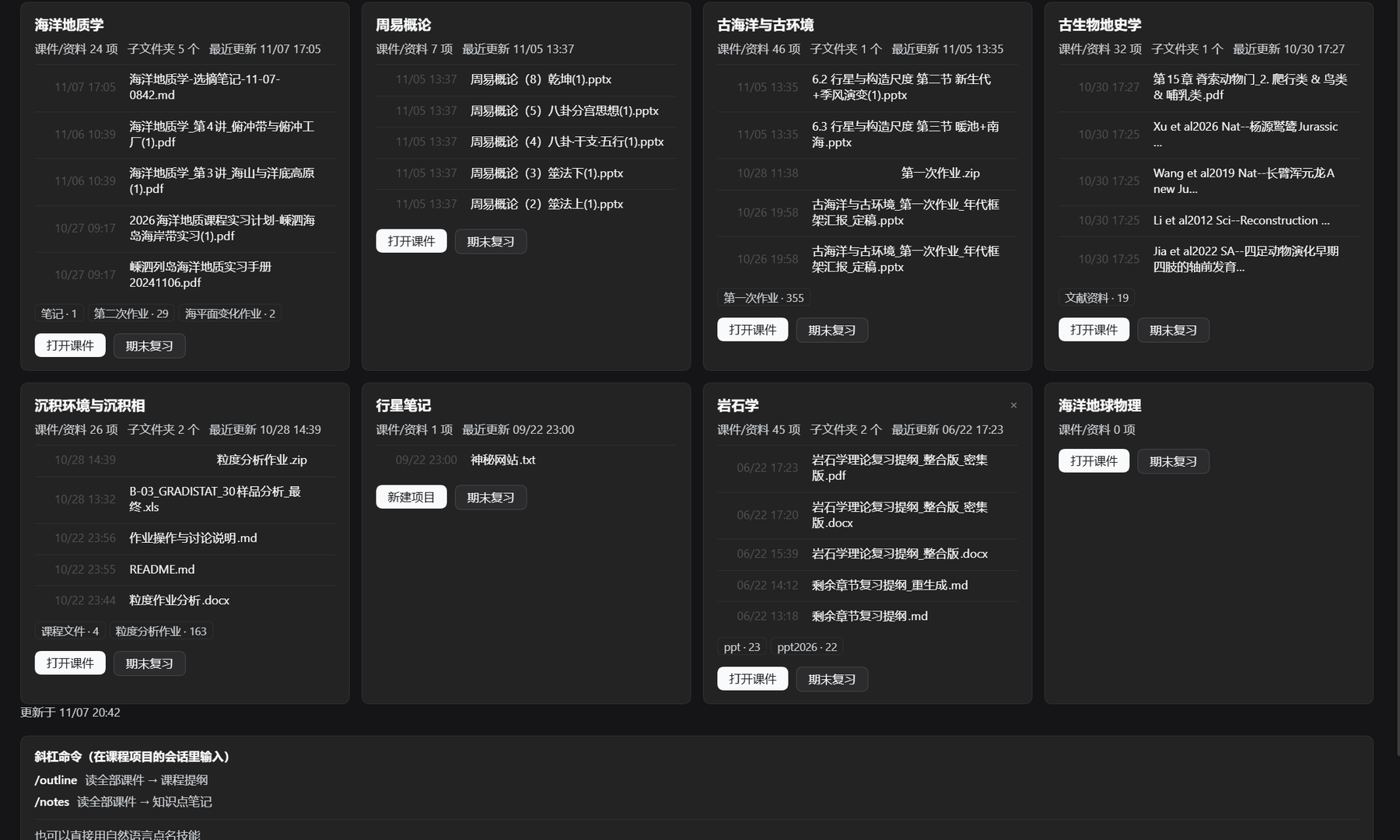
| Course panel | Sidebar icon (graduation cap). Cards show courseware count, subfolders, last update and the 5 newest files. One click enters a course. |
| Pick-and-generate | Inside a course, tick the exact slides you want and generate a note — the model only reads those files, not the whole folder. |
| Final review | The 期末复习 button builds a summary plus a problem set with full solutions: questions already in your slides, past exam papers found in the folder, and predicted questions. |
| Notes view | Second tab lists every generated deliverable grouped by course; click one to preview it in the right-hand sidebar. |
| Per-course Q&A | One conversation per course (课程名 笔记问答和期末复习) reused by every note and review, created on demand. |
| Three commands | /outline, /notes, /review — the same workflows without touching the panel. |
Output is always Markdown + PDF in <course>/<course name>笔记和复习/. The Markdown is what
the preview renders; the PDF is what you print.
Requirements
- DSH with the
desktopprofile (the panel is a client plugin). - Windows for the installer and the PDF tooling (PowerShell + Windows fonts). The panel and
the skills work on other platforms, but you would adapt
scripts/install.ps1yourself. - Python 3.9+ on
PATHfor PDF export (onlyfpdf2is needed; no LibreOffice, no Word). - Node.js 20+ to run the smoke test.
Install
No git? Download the ZIP from Releases,
unzip it, and double-click install.bat. It runs the same steps below and keeps the window open
so you can read the result.
With git:
git clone https://github.com/yaoyikai8-png/dsh-course-workbench.git
cd dsh-course-workbench
powershell -NoProfile -ExecutionPolicy Bypass -File scripts/install.ps1
That copies the five skills to ~/.dsh/skills/, the converter to ~/.dsh/tools/md2pdf.py,
installs fpdf2 into ~/.dsh/tools/pypdf, and verifies the converter end to end.
Then register the panel with DSH's plugin manager, pointing target at the cloned folder, and
enable it. Edit cordis.patch.yml first and set courseRoot to the folder that holds your
courses:
- insert:
    - id: tongji-course-workbench
      name: 'tongji-course-workbench'
      config:
        courseRoot: 'D:\courses'   # each subfolder = one course
Finally hard-refresh the web UI (Ctrl+Shift+R) and look for 课程 in the left sidebar:
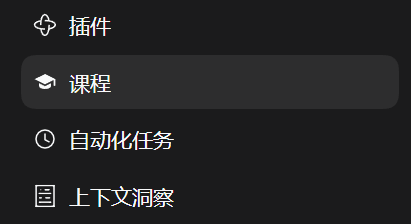
Any folder of courses can also be added later from the panel with + 新增项目.
Using it
- Panel → course card → 打开课件. First click creates a DSH project + session for that course folder; later clicks go straight to the file list.
- Tick files → 生成笔记. The host hands exactly those paths to the course's session.
- Panel → 笔记 tab. Every generated file is grouped under its course; click to preview.
- 提问 next to a note opens (or creates) the course's Q&A conversation and pins the note in the right sidebar.
- 期末复习 on a card does the same but asks for a full review, and renames the conversation
to
<course> 笔记问答和期末复习.
Commands
| Command | What it produces |
|---|---|
/outline |
Course outline by lecture, plus a materials index scraped from the slides (references, further reading, figure sources) |
/notes |
Lecture-by-lecture knowledge notes: definitions, formulas, confusable points, exam markers |
/review |
Final review: topic-based summary, problem set with full solutions, cheat sheet |
All three accept extra instructions, e.g. /review only the last six lectures.
Skills
Installed to ~/.dsh/skills/ and visible to every DSH session:
| Skill | Purpose |
|---|---|
course-outline |
Course skeleton + materials index |
course-notes |
Full knowledge notes per lecture |
course-review |
Final review + graded problem set |
course-digest |
One lecture's slides → lecture note + index |
course-assignment |
Homework / lab report: outline → draft → document |
How the PDF is made
No LibreOffice, no Word, no network: tools/md2pdf.py lays Markdown out as A4 PDF with
fpdf2 and the system simhei.ttf font (falling back to Deng.ttf for missing glyphs).
python %USERPROFILE%\.dsh\tools\md2pdf.py in.md out.pdf --title "Course review"
It understands a deliberate Markdown subset — headings, paragraphs, ordered/unordered lists,
tables, **bold**, inline code, fenced code, blockquotes. HTML, footnotes, mermaid and image
syntax are printed as literal text, so the skills are written to avoid them.
How it works
index.jsis the host half: HTTP routes under/dsh-course-workbench/*(overview, preview queue, generate, note-chat mapping, diagnostics, self-test) plus the three slash commands.client.jsis the web half: one sidebar entry and one panel, rendered throughctx.slots.register. It never touches the filesystem — it posts a file list to the host and the host forwards it to the right agent session.- Deliverables are handed to the model as an exact absolute path, so no file ever gets written somewhere unexpected; the right-hand preview opens the Markdown as soon as it appears.
Development
npm run check     # syntax-check both halves, then run the headless smoke test
npm test          # smoke test only
smoke-client.mjs stubs React and the Cordis client context, renders the panel twice (loading
and loaded), clicks through the tabs, the review view and the note Q&A flow, and asserts the
prompt and the sidebar resource address.
Limitations
- Windows-first:
install.ps1, the skill instructions and the font paths assume Windows. - The PDF renderer is intentionally small; complex layouts (multi-column, floats) are not supported.
- Courseware is read with DSH's
office-*skills; scanned PDFs without a text layer will be reported as "not extracted" rather than guessed at. - The panel assumes one DSH project per course folder.
No comments yet. Be the first to write one.