Manage DeepSeek Harness Plugins from Chat
Now supports DSH
0.1.2-rc.1while retaining0.1.2-alpha.3compatibility. The stable channel includes the evidence-backed DSH Registry search provider and anonymous operational analytics. Install it from npm · Compatibility evidence.
Release channel: install
relay-dsh-plugin-manager@latestto receive the current stable manager.
npx @deepseek-ai/dsh@0.1.2-rc.1 plugin --profile web add relay-dsh-plugin-manager@latest
npx @deepseek-ai/dsh@0.1.2-rc.1 web







English | 中文
npm package: relay-dsh-plugin-manager
· Relay DSH plugin catalog
Find and manage DSH plugins by describing what you need, without leaving the conversation or editing Profile files by hand.
relay-dsh-plugin-manager lets DeepSeek Harness Chat discover, install, update,
enable, disable, and remove plugins. Search and inspection are read-only. Before
any change, DSH shows the plan and waits for a separate confirmation.
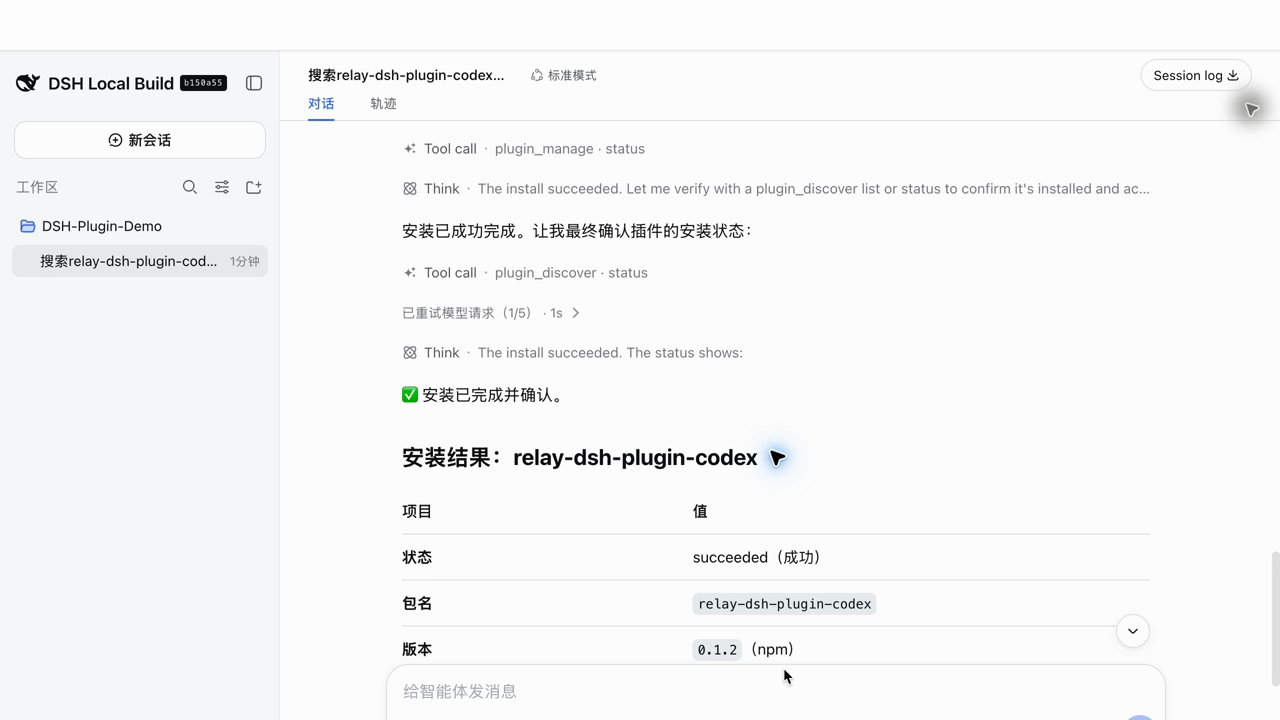
Watch the 40-second real DSH run:
search, review a no-change plan, confirm separately, and finish with the Codex
plugin installed. Recorded on official DSH commit
b150a551
with Plugin Manager 0.1.0-rc.3 and Codex plugin 0.1.2.
If conversation-first plugin management is useful to you, star this plugin and share your install result or missing plugin use case.
Install
If you installed official DSH yourself, stop DSH Web and install the published npm package with the DSH CLI:
dsh plugin --profile web add relay-dsh-plugin-manager@latest
Then start or restart DSH Web:
dsh web
If dsh is not on PATH, replace it with
pnpm dlx @deepseek-ai/dsh@0.1.2-rc.1 in both commands.
The plugin appears under Settings > Plugins > Recommended plugins, the tab that Settings > Plugins opens on. It presents the recommended conversation-backend plugins and a short help view; plugin management itself happens in Chat.
Installed by KeySync
When you use KeySync to install DSH with its one-click setup, this plugin is included and installed automatically. You do not need to install it again. The command above is for standalone official DSH installations or Profiles where the plugin was removed.
Use
Describe what you want in ordinary language:
Find a plugin that connects to Lark
Find DSH plugins owned by GitHub user yangbobo2021
Install relay-dsh-plugin-codex
Install relay-dsh-plugin-codex, relay-dsh-plugin-files, and relay-dsh-plugin-terminal together
List my installed plugins and their status
Disable example-dsh-plugin
Remove example-dsh-plugin
You can also use the single /plugins command:
/plugins find a workspace file browser
/plugins search owner:yangbobo2021
/plugins install relay-dsh-plugin-files
Search and inspection are read-only. Installation, update, removal, enablement, disablement, and restart always show a plan. You can confirm with DSH's choice UI, or explicitly approve in a later Chat message. When you request multiple installs together, DSH shows one ordered plan and any missing companion peers, waits for one confirmation, and runs the installs in sequence. Completed changes that still need restart are reported explicitly as restart-required or waiting for a manual restart.
Anonymous usage analytics
Anonymous operational analytics are enabled by default to measure plugin-manager search and installation outcomes. To opt out without disabling plugin management, set this when starting DSH Web:
RELAY_PLUGIN_MANAGER_TELEMETRY=0 dsh web
Registry operators performing a production acceptance run can mark only that run as test traffic:
RELAY_PLUGIN_MANAGER_TELEMETRY_TEST=1 dsh web
This adds only is_test: true; ordinary users do not send the marker.
The manager sends events only to the first-party
https://dsh-plugins.tech/v1/telemetry/events endpoint. The Registry validates
the exact event schema and forwards accepted events to its PostHog analytics
project. The plugin records only the manager action type and plugin
install start, success, or failure events produced by the manager. Install
events contain the public package name, activation/restart booleans, and a
bounded error code. Search terms, conversation content, local paths, command
output, error text, IP geolocation, and account identity are not sent. A random
anonymous ID is stored in .relay-plugin-manager/telemetry.json inside the
current Profile to avoid counting one installation as many users; delete the
file to reset it.
These events measure manager use and manager-executed installs. They do not claim that another plugin's feature was actually used merely because it loaded or activated.
DSH Registry discovery provider
The source-only Registry search provider uses https://dsh-plugins.tech by
default. Set plugin option registryUrl or environment variable
DSH_PLUGIN_REGISTRY_URL to override the Registry origin (for example, a local
preview at http://127.0.0.1:4174). Non-local URLs must use HTTPS. Set
registryUrl: false to disable Registry discovery explicitly.
This provider sends only the task query, inferred Chinese/English locale, and result limit. Returned candidates are always inspected locally through the same npm/GitHub flow before any plan can be created; Registry descriptions are untrusted text and cannot authorize changes. Search returns one relevance-ranked page (twenty candidates by default). The Agent is instructed to preserve that order and show every possibly relevant candidate instead of silently shortening the page to a fixed top five; results whose plugin purpose is clearly unrelated to the request are excluded.
Part of Relay
This plugin is developed in the Relay integration workspace and is published as an independently installable DSH plugin. Relay explores durable Agent work, external-event delivery, reusable DSH views, and multiple conversation backends.
Other Relay DSH plugins:
See the complete Relay DSH plugin guide for installation combinations and compatibility notes.
Feedback
Report bugs and feature requests in the issue tracker.
还没有评论,来写第一条。