Claude Code Conversations for DeepSeek Harness







English | 中文
npm package: relay-dsh-plugin-claude
· All Relay DSH plugins
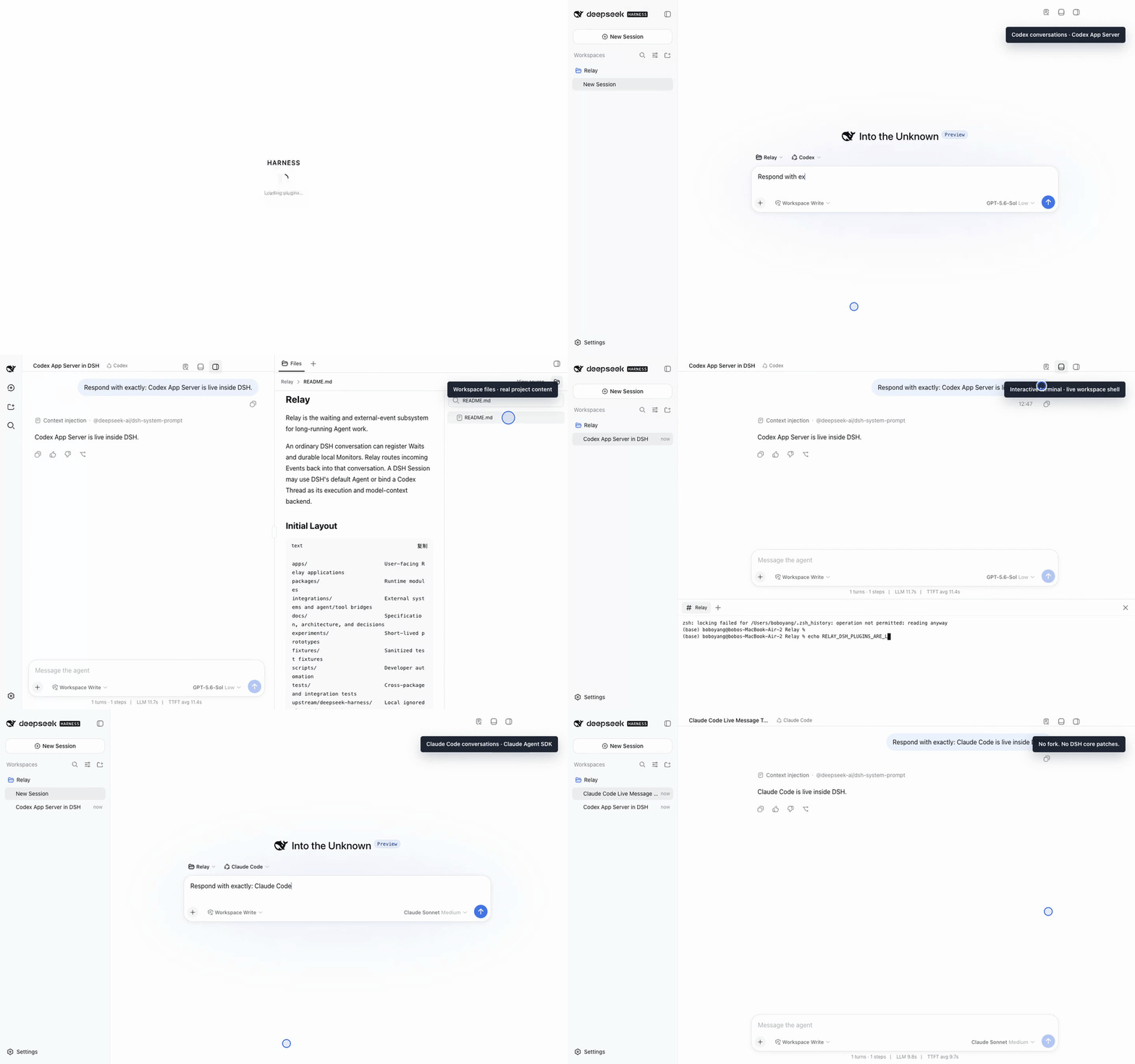
Real npm-installed demo on official DSH: live Codex and Claude replies, a workspace file preview, and an executed terminal command. Watch the H.264 MP4.
relay-dsh-plugin-claude adds Claude Code as a conversation backend to the
official DeepSeek Harness
(DSH) Web UI. After installation, Claude Code appears in DSH's New Session
mode menu. One DSH Session is bound to one Claude Agent SDK session.
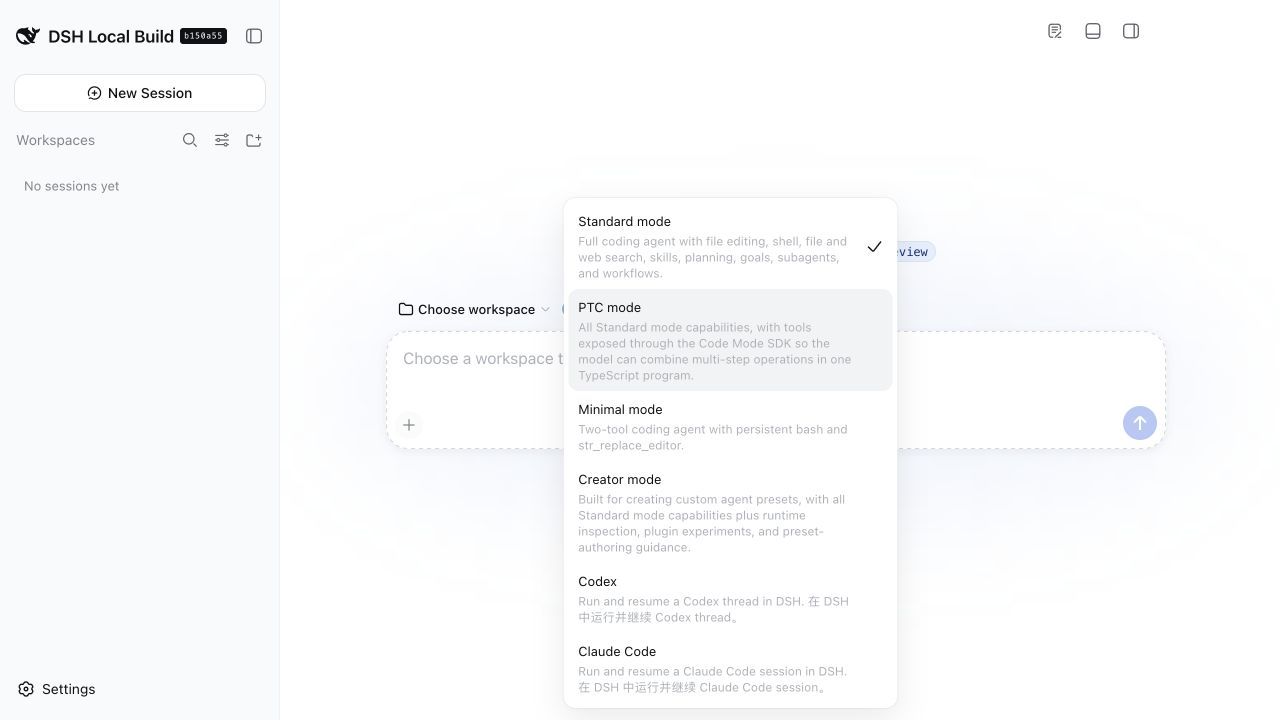
The screenshot was captured from official DSH 0.1.1-rc.2 with the Codex and
Claude plugins installed. If you install only this plugin, only Claude Code
is added.
Do I Need This Plugin?
Install it when you want to:
- use Claude Code inside DSH instead of switching to a separate Claude Code interface;
- keep DSH's native conversation history, composer, approvals, questions, and tool presentation;
- let one DSH Session continue the same Claude Agent SDK session across turns;
- use Claude models, reasoning, interruption, and DSH-contributed tools in the same conversation.
You do not need it to use DSH's standard agents. It also does not add Relay Events, file browsing, or a terminal panel. Those are separate optional plugins.
Quick Start With Official DSH
The steps below were validated with:
- DeepSeek Harness
0.1.1-rc.2, commitb150a551 - Node.js 22.13 or newer
pnpmavailable onPATH
DSH is currently a developer preview and may introduce compatibility-breaking changes. This repository tracks official releases and records its tested version here.
1. Prepare Claude Code authentication
The Claude Agent SDK is installed as a normal dependency of this plugin. Before starting your first DSH Claude session, complete normal local Claude Code setup and authentication for the user that will run DSH.
Follow the official Claude Code setup documentation, then start Claude Code once to verify that authentication succeeds:
claude
Credentials stay under Claude Code's normal local authentication mechanism; this plugin does not collect them.
2. Choose a package source and install
Stop a running DSH Web process before changing Profile bundles. Choose one of the following sources.
Stable npm release
The published npm package name is
relay-dsh-plugin-claude.
Use @latest to install the current stable release:
npx @deepseek-ai/dsh@0.1.1-rc.2 plugin --profile web add relay-dsh-plugin-claude@latest
At the time of writing, latest resolves to stable version 0.1.0. The linked
npm page is the source of truth for the current version.
npm prerelease (recommended during DSH preview)
Use @next to try the newest release candidate that has passed the repository's
CI publishing and official DSH compatibility checks. The current candidate also
contains the latest model-selection synchronization fix:
npx @deepseek-ai/dsh@0.1.1-rc.2 plugin --profile web add relay-dsh-plugin-claude@next
At the time of writing, next resolves to 0.1.1-rc.2.
GitHub development build
Install the current main branch when testing an unreleased change:
npx @deepseek-ai/dsh@0.1.1-rc.2 plugin --profile web add github:yangbobo2021/relay-dsh-plugin-claude#main
main can change at any time. For a reproducible GitHub install, pin a Tag or
full Commit SHA instead. For example:
npx @deepseek-ai/dsh@0.1.1-rc.2 plugin --profile web add github:yangbobo2021/relay-dsh-plugin-claude#v0.1.1-rc.2
The official DSH CLI initializes the web Profile if it does not exist, asks
pnpm to install the selected package and Claude Agent SDK dependencies, and
adds the plugin's bundle layer. No Relay checkout is required. The first
installation can take longer while platform-specific Claude Agent SDK packages
are downloaded; wait for pnpm's final Done message or an explicit error. If
you already installed the dsh command, replace the
npx @deepseek-ai/dsh@0.1.1-rc.2 prefix with dsh in any command above.
3. Start or restart DSH Web
npx @deepseek-ai/dsh@0.1.1-rc.2 web
If you use an installed command, run dsh web instead. Bundle membership is read
at startup, so restarting after installation, update, or removal is required.
4. Start a Claude Code conversation
- Open the DSH URL printed in the terminal. The default is
http://127.0.0.1:3080. - On first launch, read the DSH testing notice and select Continue.
- Select Add workspace in the left sidebar and choose the project directory Claude may work in.
- Select New Session.
- Open the mode menu labeled Standard mode and choose Claude Code.
- Enter a message and send it. Choose the backend before the first message; existing sessions keep the backend with which they were created.
There is no separate activation command. A successful install plus a DSH restart activates the bundle and registers the managed Claude Code mode automatically.
What Works
- One persistent Claude Agent SDK session per DSH Session
- Model and reasoning selection
- Streaming answers and tool activity in the native DSH conversation
- DSH approval and user-question flows
- Interruption and session continuation
- Generic DSH tools exposed through an in-process Claude SDK MCP server
Tools execute through the owning Agent's DSH tool runtime and remain subject to DSH permissions and Claude approval behavior. The tool bridge requires the default SDK backend. If a developer explicitly selects the CLI fallback, the plugin refuses contributed DSH tools instead of silently dropping them.
Plugin Boundary and Relay
This repository was designed and compatibility-tested in Relay, an open-source project for long-running agent work, external-event delivery, reusable DSH workbench views, and multiple conversation backends.
The plugin is independently installable. It has no runtime dependency on the Relay application, Relay Events, or another Relay plugin. It does not replace the official DSH layout or install Files and Terminal views. This separation lets a user install only Claude while the broader Relay project can compose Codex, Claude, events, waits, monitors, and workbench extensions when those capabilities are needed.
Explore or star Relay to follow that broader work: https://github.com/yangbobo2021/Relay.
Update, Inspect, or Remove
Stop DSH Web before changing the bundle, then restart it afterward.
# Show why the plugin is installed
dsh plugin --profile web why relay-dsh-plugin-claude

# Update the npm dependency
dsh plugin --profile web update relay-dsh-plugin-claude

# Remove it
dsh plugin --profile web remove relay-dsh-plugin-claude
Use the npx @deepseek-ai/dsh@0.1.1-rc.2 prefix instead of dsh when you do not
have a persistent DSH command.
Troubleshooting
Claude Code is missing from the mode menu
Restart DSH Web. Then run dsh plugin --profile web why relay-dsh-plugin-claude. If pnpm cannot find the package, repeat the npm
installation command and read its final error.
The first message reports an authentication error
Start claude in the same user environment that starts DSH and complete normal
Claude Code authentication. Restart DSH afterward.
The composer is disabled
DSH requires a workspace before starting a coding conversation. Select Add workspace, choose a directory, and return to New Session.
Installation says pnpm is missing
Install pnpm using its official installation guide
and confirm pnpm --version works in the same terminal.
DSH changed and the plugin no longer starts
DSH is a developer preview. Include the output of dsh --version, the plugin
source revision, and the startup error in a
GitHub issue.
Development
git clone https://github.com/yangbobo2021/relay-dsh-plugin-claude.git
cd relay-dsh-plugin-claude
npm install
DSH_ROOT=/path/to/deepseek-harness npm run verify
npm pack
npm run verify runs type checking, tests, and the production build. Boundary
tests reject accidental runtime dependencies on Relay or another feature plugin.
Feedback
Report bugs and feature requests in this repository's issue tracker.
No comments yet. Be the first to write one.