dsh-save-chat



Keep the good answers. One heart saves a whole conversation turn — your question and the complete reply — as a real Markdown file inside your project. Later, your own panel browses them, and the model can search them on demand.
Zero dependencies. No database. Just Markdown files you own.
60-second start
Once it is installed, one pass through the plugin looks like this:
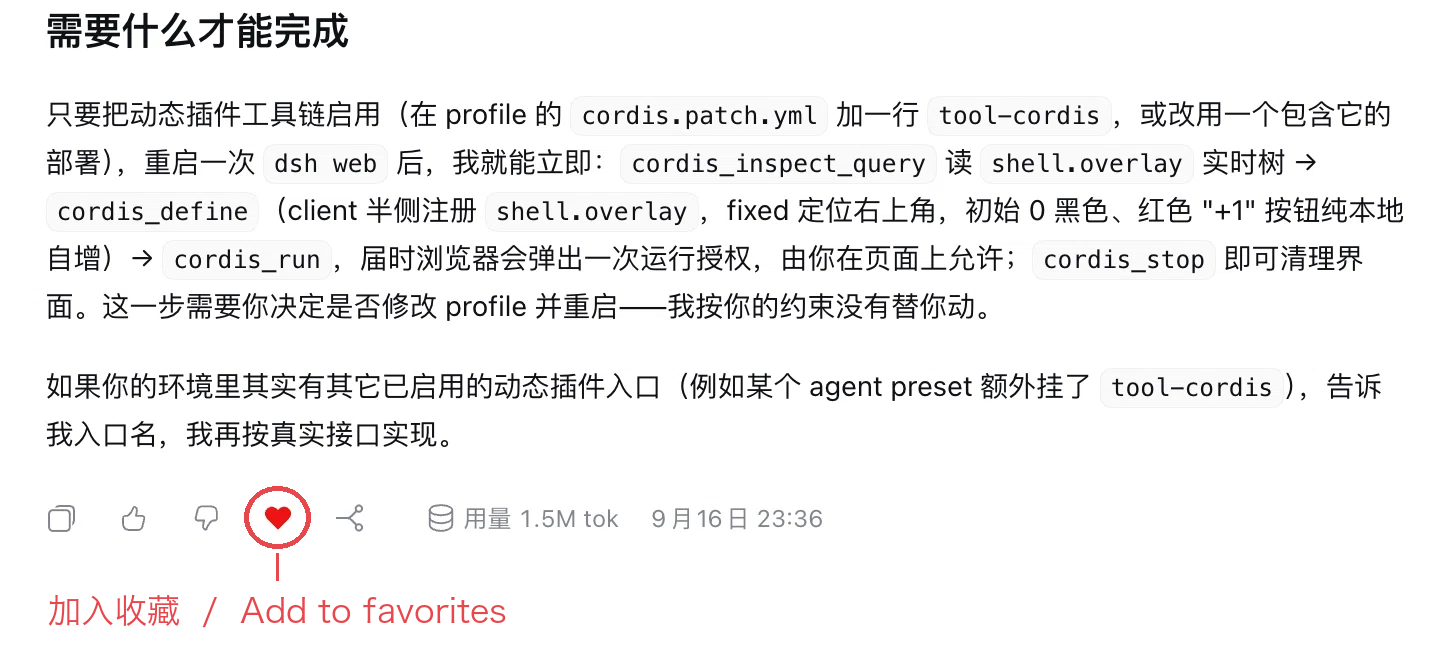
1. One heart, one turn kept. The heart on a reply's action row is the save button — the whole turn (your question plus the complete answer) is written to <session workspace>/.dsh-favorites/<session title>.md.
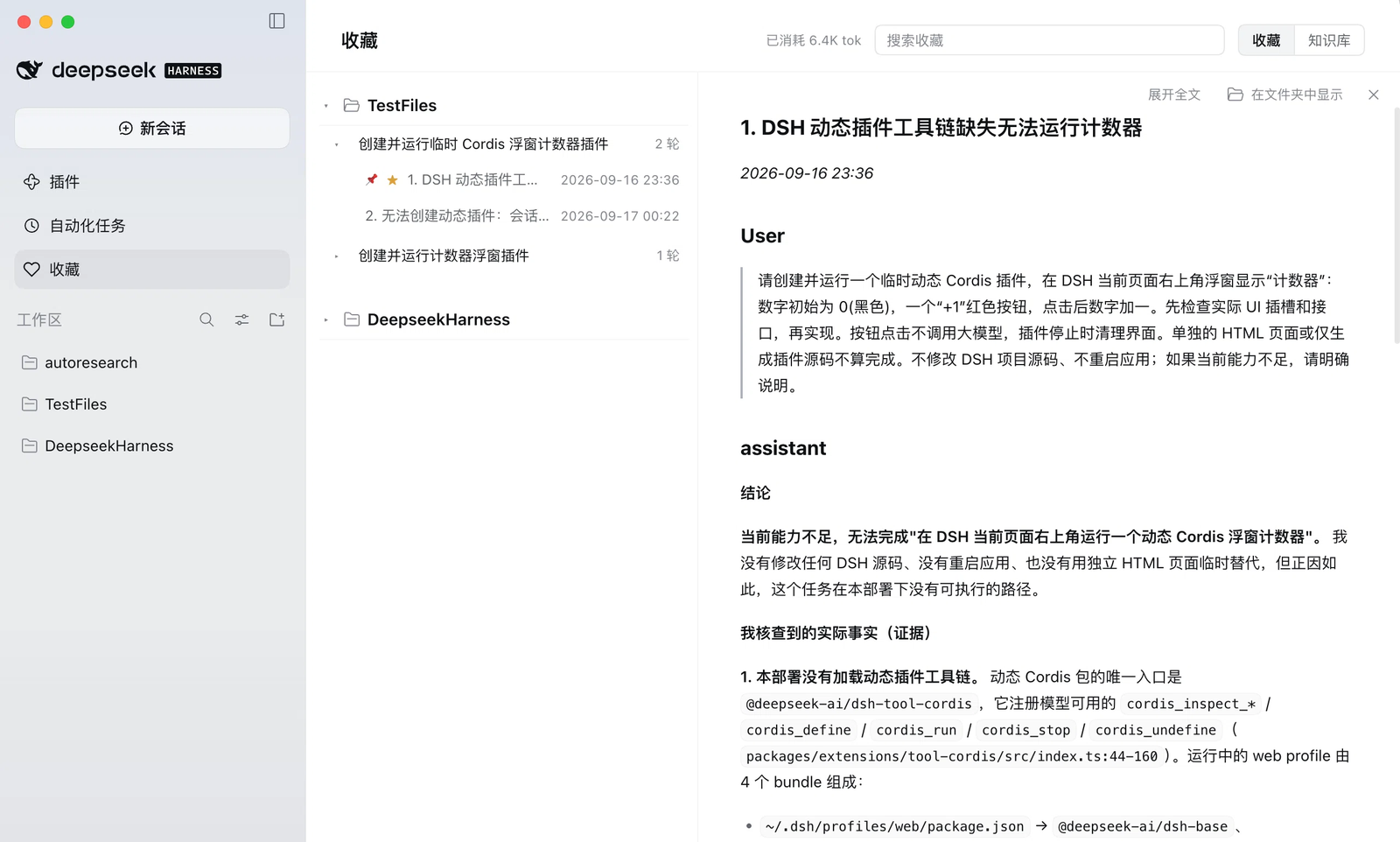
2. Browse it in the sidebar. A searchable tree grouped by workspace, session, and turn (the knowledge-base view is grouped by month) on the left, the selected section rendered beside it. The toolbar switches between this section and the whole file, reveals the file in your file manager, and closes the reader.
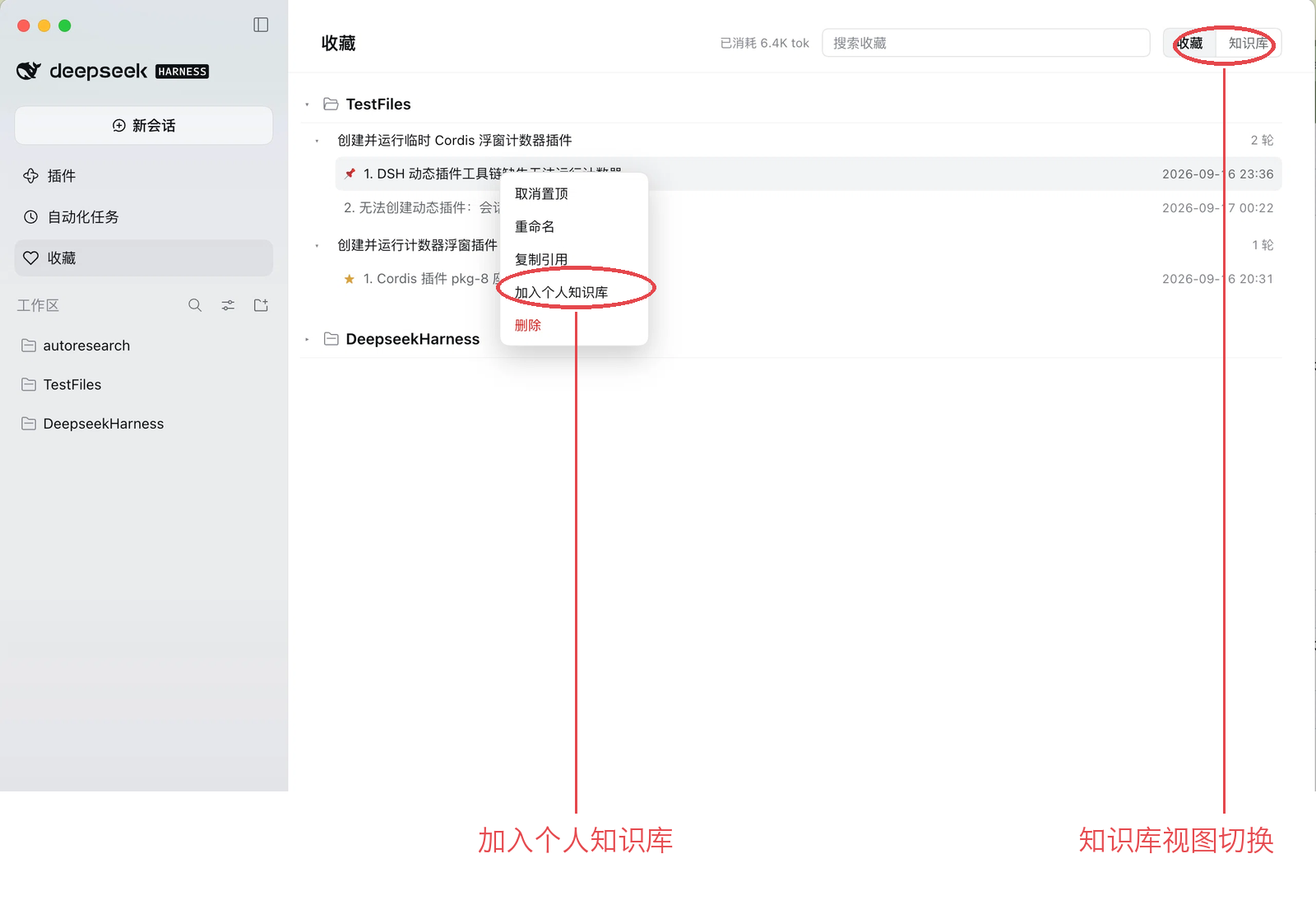
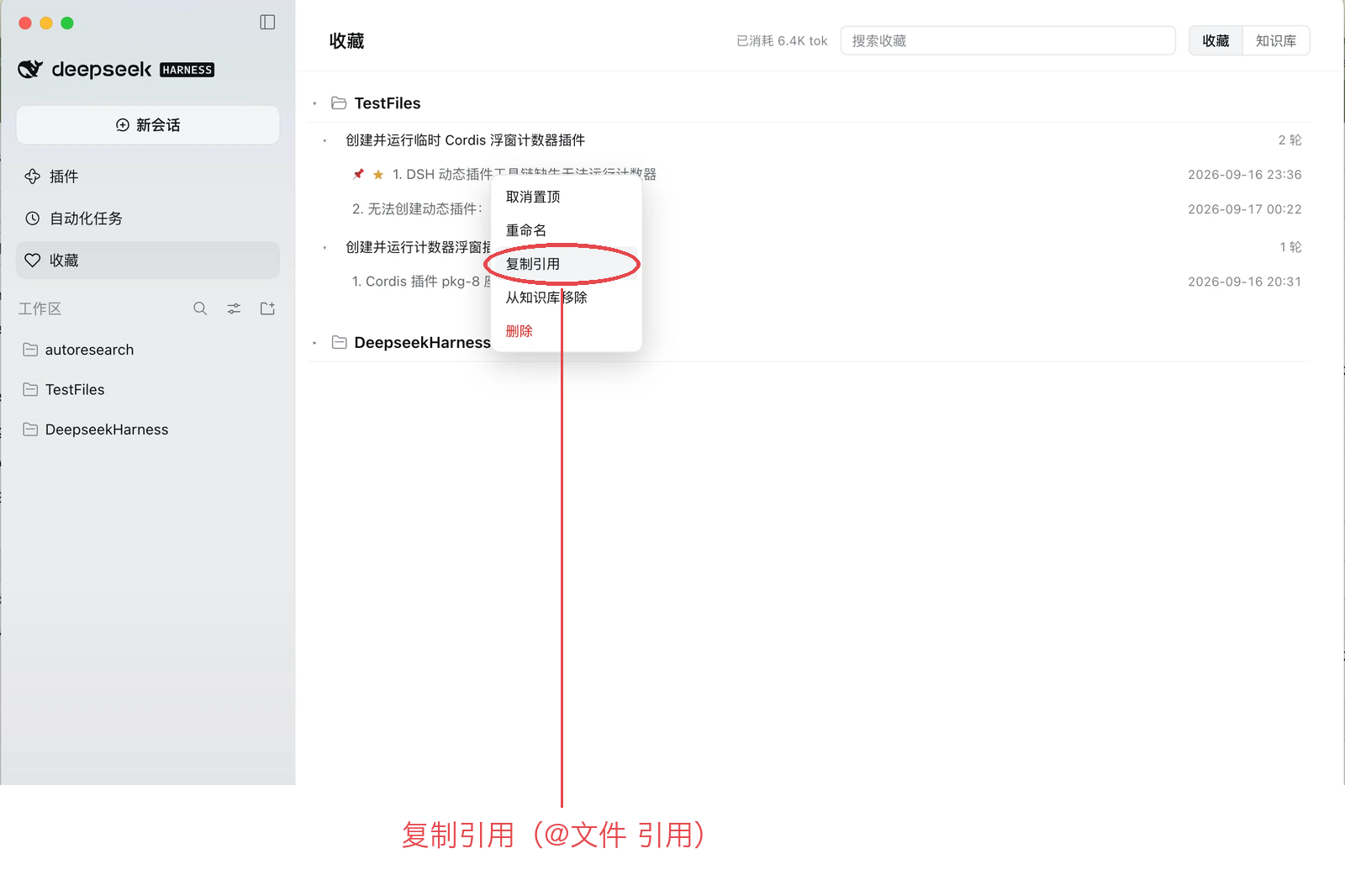
3. Promote what is worth keeping. Right-click any row: pin, rename, copy a reference, add it to your personal knowledge base, or delete. The 知识库 switch at the top right opens the knowledge-base view, whose hint states how it behaves.
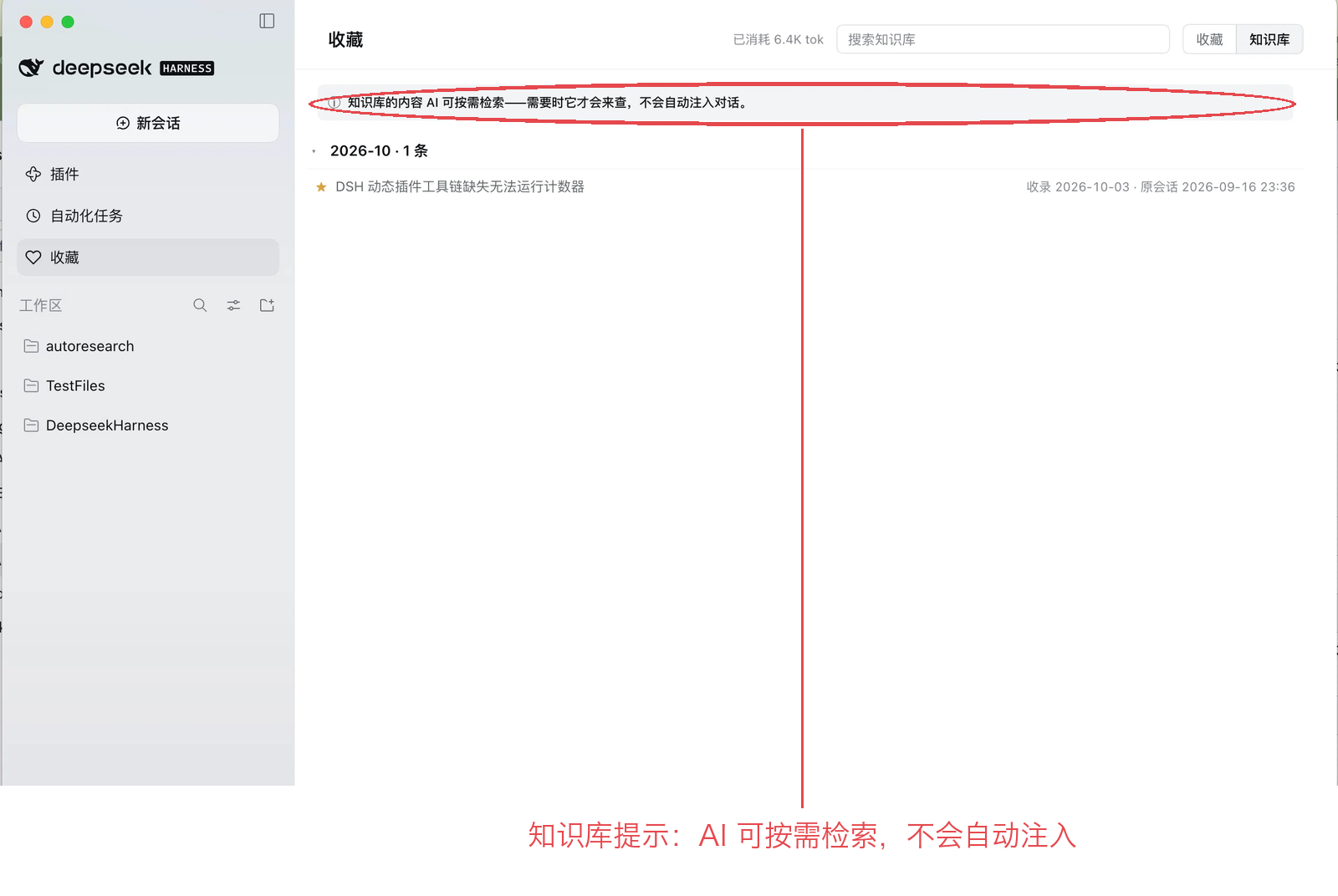
4. Use it in later conversations. Copy reference puts @/path/file.md on the clipboard; paste it into a new conversation and the model reads that record. You can also just ask "what did we conclude last time?" — it calls search_knowledge and answers with the file and the date. Knowledge-base content is retrieved only when the model needs it, never injected automatically.
Install
Either path works in both flavours — the desktop app and dsh web. The plugin installs into the profile that is running: desktop in the app, usually web for dsh web. The UI needs no profile name; the command needs the right one.
In the UI (works everywhere, including dsh web)
Open Settings → Plugins → Add plugin. It accepts a package name, a repository URL, a prebuilt .tgz, or a local path; in day-to-day use it is usually one of these two:
| Paste | Comes from |
|---|---|
dsh-save-chat |
npm (the China mirror works too) |
| an absolute path to a local checkout | development |
Then restart DSH — for dsh web, restart the process — and reload the page.
From the terminal
dsh plugin forwards its arguments to pnpm and requires --profile <name>: the profile you actually run (desktop for the app, web for dsh web, or your own). The directory you run it from does not matter.
# dsh web
dsh plugin --profile web add dsh-save-chat
# desktop app
dsh plugin --profile desktop add dsh-save-chat
The command takes the same kinds of specs (npm name, repository URL, prebuilt .tgz, local path) — for example the tarball, which needs no clone and no build:
dsh plugin --profile web add https://github.com/xypang33-sketch/dsh-save-chat/releases/latest/download/dsh-save-chat.tgz
dsh here is the command you already start DSH with — dsh web, or the copy bundled inside the desktop app. It runs from any directory; if you do not have that command (a desktop-app-only install, for example), use the UI above instead.
Plugin Market (optional)
If you have the community Plugin Market (dshmarket) installed, this plugin will also be listed there and installable with one click. The market is a plugin itself, not part of DSH, so this path only exists once you install it.
DSH does not auto-update plugins yet — to upgrade, uninstall and install the new version.
Why this one
There are already bookmark plugins. This one differs in four ways:
| dsh-save-chat | |
|---|---|
| What gets saved | The whole turn — your question and the complete answer — not a single message or a link. |
| Two layers | Per-session collections (project-local, raw) plus a personal knowledge base you promote the good ones into (cross-project, durable). |
| The model can search it | search_knowledge / read_knowledge let the model retrieve on demand. Nothing is auto-injected, so an unused library costs zero tokens. |
| Plain files, zero deps | One Markdown file per session, images copied beside it, no database, no lock-in, no npm dependencies — it survives core revisions and works with git, Obsidian, or grep. |
What you get
- A heart in the action row — one click, optimistic UI, revert on failure.
- A collection panel — workspace → session → turn tree, per-turn ordinals, small-text timestamps, collapse at every level, search over the current view, month grouping for the knowledge base, “reveal in folder”, and a close button for the reader.
- Row actions — pin, rename, copy reference (
@/path/file.md, paste it into a later conversation), add to / remove from the knowledge base, delete. - Images are kept, not lost — an image a turn carried is copied next to the Markdown and rendered in the reader; promoting it to the knowledge base copies it again and writes a one-sentence image summary underneath, so the picture becomes findable by what it shows.
- Search that knows what you saved — BM25 over paragraph-sized chunks with CJK bigrams, one result per turn, later turns win when two contradict.
- Token honesty — the panel shows what naming your favorites has cost so far.
The model side
Two tools, both on demand — the model sees nothing until it asks:
| Tool | What it does |
|---|---|
search_knowledge |
Searches your knowledge base (or scope: "all" to include collections) and returns small hits: title, date, file#lines, a snippet, and an id. |
read_knowledge |
Pulls one section back in full (capped at 8 KB) when a snippet is not enough. |
By default the model searches only the personal knowledge base — promoting a turn is how you tell it “this one is worth your attention”. Your raw collections stay yours unless you promote them or ask explicitly.
FAQ
Where are the files? <session workspace>/.dsh-favorites/<session title>.md; the knowledge base is ~/.dsh/knowledge/<YYYY-MM>.md (configurable). Both are ordinary Markdown — open them in any editor.
Does it send anything anywhere? Not on its own: there is no telemetry and no server of ours, and both the collections and the knowledge base are local files served over loopback-only routes. The only content that leaves your machine is what DSH already sends for you — naming a saved turn, and summarising an image when you promote it — through the provider you configured.
What does it cost? Favoriting makes one small model call to name the turn (a few hundred tokens, shown in the panel). Promoting an image makes one small vision call for its summary. Searching is local and free.
Does it slow DSH down? Parses are cached by file size and mtime, so the catalog only re-reads what changed.
What if I delete the project? Collection files go with it. Anything you promoted into the knowledge base stays — pictures included.
Can the model see my whole collection? Only if it searches with scope: "all", which it does when you ask about past work. Otherwise it sees what you promoted.
Feedback
GitHub Issues — open an issue: there are bug-report and feature-request templates. The bug template lists the diagnostics worth attaching; the feature template only needs to know what you are trying to do.
If you would rather not fill in a template, three facts are enough for me to start: the plugin version (npm view dsh-save-chat version), whether you run dsh web or the desktop app, and what went wrong or what you would like improved (paste the error if there is one).
Development
npm test # host unit tests + real-DOM tests (jsdom)
The reference — file format, every HTTP route, design notes, limitations — lives in docs/reference.md.
License
MIT
No comments yet. Be the first to write one.