
Scientific Figure Library
Website · 简体中文 · Quickstart · User Guide (online) · Protocol · Releases · Wisp Science
Scientific Figure Library (SFL) is a local-first MCP server and MCP App for your scientific figures. You import a figure and its code, review them, publish an immutable Release to one global Library on your machine, then reuse that exact template across projects in Claude Science, Wisp Science, Codex, Cursor, Pi, dsh, and other stdio MCP hosts.
The Library stays on disk you choose. Nothing is copied into every project until you confirm a materialization. The server does not execute plotting code and does not contain a second model: the host agent inspects files; SFL hashes, versions, gates, and publishes them.
The default retrieval order is Local Published → FigureYa → Open Figure
Modules → enabled dynamic personal Providers. The bundled Community snapshot
is retained for explicit compatibility, but is frozen and excluded from default
search (includeInDefaultSearch: false). The source of truth for your own
figures is always Local Published.
A bundled extra catalog may currently contain zero releases after an authorized redaction; that is a healthy empty source, not a failure, and default search continues across other providers.
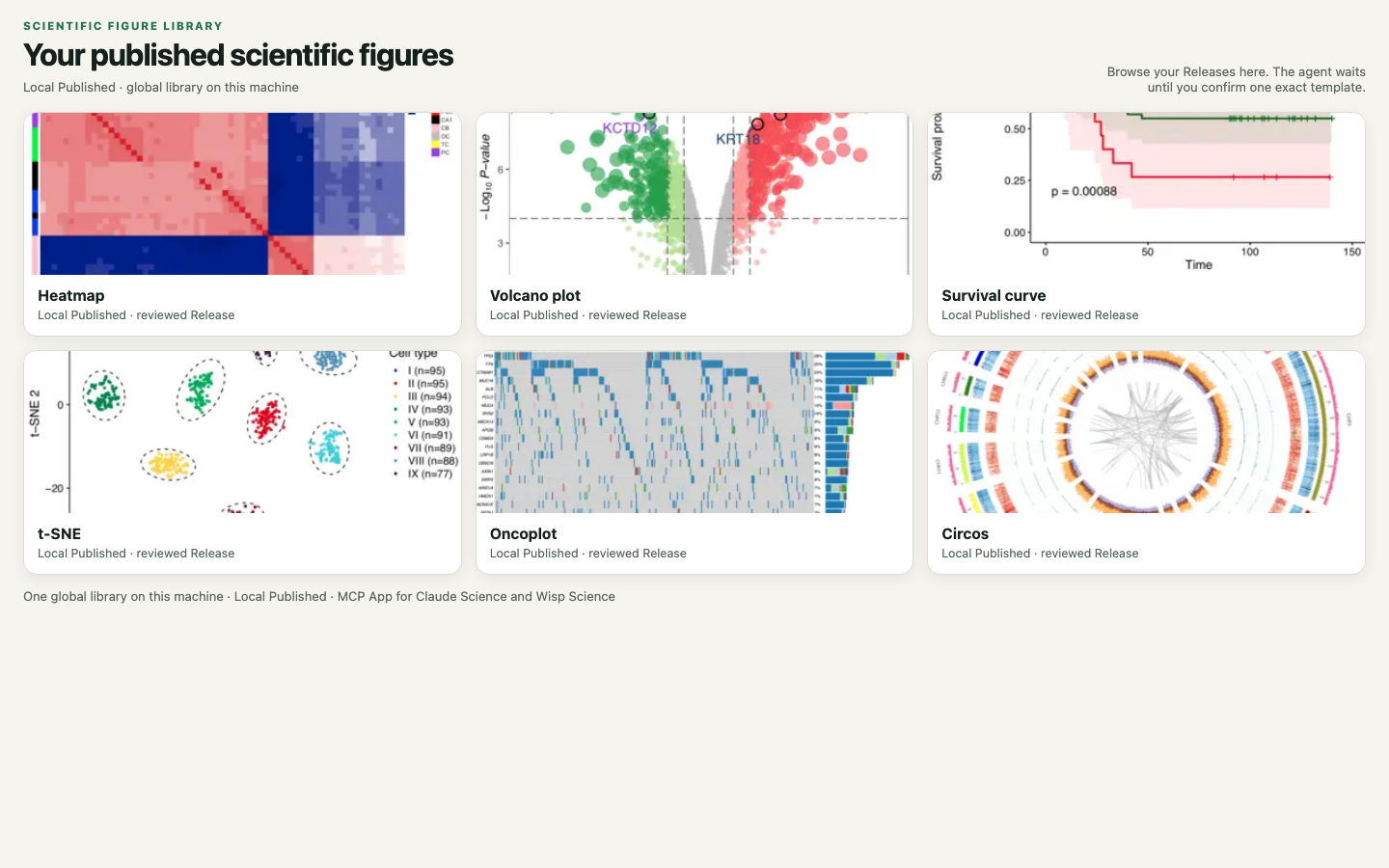
Search your local published library in the MCP App, confirm one exact template, then materialize it into a project.
Local client preview
Separate native macOS Apple Silicon and Intel DMGs, plus Windows and Linux ZIPs with bundled Node, are available through the local-client release workflow. Both bundled-Node and no-node editions (requiring installed Node.js 22+) omit gallery images and download previews on demand. See installation and preview limitations. The macOS preview is ad-hoc signed and is not notarized.
Install with a coding agent
Node.js 22+ is required. Do not execute user plotting code. After install, bind
one global Library directory on disk; if setup_required, also bind a Local
workspace before searching.
Pi
Install the published npm package. Do not pi install a GitHub URL or git
clone: the repository does not contain dist/, so MCP cannot start.
pi install npm:pi-mcp-adapter
pi install npm:scientific-figure-library
Restart Pi. The package loads the figure-library Skill and registers the
stdio MCP server through pi-mcp-adapter. If you already copied a local SFL app
MCP config into ~/.config/mcp/mcp.json or .mcp.json, skip
pi install npm:scientific-figure-library — that duplicates tools.
Paste this request:
Install Scientific Figure Library for Pi.
Run: pi install npm:pi-mcp-adapter
Then: pi install npm:scientific-figure-library
Restart Pi. Do not clone the GitHub repo and do not add a second
figure-library MCP entry. First test: figure_library_get_skill, then
figure_library_source_status. If setup_required, bind the global Library
and Local workspace. Tell me when I need to restart Pi.
DeepSeek Harness (dsh)
--profile is required. Use web unless you run another profile.
dsh plugin --profile web add scientific-figure-library
Restart the profile (dsh --profile web or dsh web). The bundle registers
the Skill and mounts @deepseek-ai/dsh-mcp-client against this package. If you
already added a dsh MCP client row for a local SFL app, do not also run
dsh plugin add scientific-figure-library.
Paste this request:
Install Scientific Figure Library for DeepSeek Harness.
Run: dsh plugin --profile web add scientific-figure-library
Restart the web profile. Do not clone the GitHub repo and do not add a
second figure-library MCP row. First test: figure_library_get_skill, then
figure_library_source_status. If setup_required, bind the global Library
and Local workspace. Tell me when I need to restart dsh.
Claude, Codex, Cursor, Wisp, or another stdio host
Give the agent this repository and the following request:
Install Scientific Figure Library from
https://github.com/xuzhougeng/ScientificFigureLibrary.

Follow docs/QUICKSTART.md. Prefer a GitHub Release ZIP when one is published.
Node.js 22+ is required. Register the stdio MCP server as figure-library
pointing at dist/index.js. For Wisp Science, use npm run package:wisp and
install the generated plugin. For Cursor, use npm run package:cursor and unzip
into ~/.cursor/plugins/local/figure-library/. Bind one global Library directory on disk.
Do not execute user plotting code. First test: open or source_status; if
setup_required, bind the global Library and Local workspace before searching.
Tell me when I need to grant folder access or start a new host session.
Manual steps: docs/QUICKSTART.md.
What is included
- Local Published library — one user-selected directory, shared across projects and hosts
- Direct image + code intake, review gates, immutable Revisions and Releases
- MCP App gallery: browse, exact preview, user confirmation
- Search, describe, preview, then materialize an exact confirmed template
- Portable backup / restore / fork of the Library
- Optional extra search providers; they do not replace local review
- Open Figure Modules — the same
io.github.jarxunlai.personal-figuresProvider. A bundled snapshot is only the offline bootstrap. After install, SFL asynchronously checks a signed GitHub feed and atomically switches the local Catalog overlay. Ordinary template updates no longer require repackaging the plugin. Complete module ZIPs are still fetched only for one exact selected materialization.
Bundled figure workflow
The host plugin ZIPs and the npm package used by Pi and dsh include one core figure-library Skill with on-demand
description, script-organization and style references. Ordinary MCP hosts can
read the same guidance with figure_library_get_skill, browse thumbnails with
figure_library_get_candidate_images or resource URIs, and paginate with
figure_library_search_page. The MCP App is optional. Approved R/Python runtimes and host execution/image tools
are still required when the user asks to draw.
Template details render safe Markdown for the requirement, biological use cases and data profile, with actual input/code/package lists visible. Technical identities and validation state are available in a collapsed area. Historical Local Published/OFM entries remain readable; this update does not rewrite their content or the bundled FigureYa catalog.
First success
Call figure_library_source_status. If writes are disabled, help me bind one
absolute global Library directory (plan then apply after I confirm the path).
Open the workbench and search my Local Published templates. Wait for me to
confirm one card. Then plan materialization into an empty folder I specify.
Do not execute R or Python. Do not redraw the figure.
If the local library is empty, import a figure/code pair, review it, and publish a Release before searching. Full contract: docs/PROTOCOL.md.
Develop from source
Requires Node.js 22+:
Pull requests run tests, type checking, build and MCP smoke across Linux, Windows
and macOS. See basic CI for the matrix and merge-check setup.
Pushing a stable vX.Y.Z tag packages local clients, host plugins, the npm
tarball and the Wisp update feed, then uploads them to the GitHub Release.
Maintainers can also configure the optional AI comment bot
for manually requested issue suggestions and PR reviews.
git clone https://github.com/xuzhougeng/ScientificFigureLibrary.git
cd ScientificFigureLibrary
npm ci
npm run check
node dist/index.js
{
  "mcpServers": {
    "figure-library": {
      "command": "node",
      "args": ["/absolute/path/to/ScientificFigureLibrary/dist/index.js"]
    }
  }
}
The Library locator is machine-local (locator.json under AppData / XDG).
FIGURE_LIBRARY_DIR is an admin override only.
Tools (short list)
| Tool | Role |
|---|---|
figure_library_plan_bind_global / apply_bind_global |
Choose the local Library directory |
figure_library_open |
Open the MCP App |
figure_library_search |
Search Local Published (and any enabled extras) |
figure_library_plan_working_revision / apply_working_revision |
Import a figure+code unit |
figure_library_plan_publish_working_revision / apply_publish_working_revision |
Publish a Release |
figure_library_plan_open_figure_module_pr / apply_open_figure_module_pr |
Optional Open Figure Modules GitHub PR |
figure_library_plan_materialize / apply_materialize |
Copy a confirmed template into a project |
The server never runs notebooks, installers, or plot scripts. See SECURITY.md.
Open Figure Modules
Personal modules use one content repository for both cleaned source modules and deterministic archives (no second archive repository):
<PERSONAL_MODULE_REPOSITORY>
├── modules/<moduleId>/       # reviewed, cleaned public module
├── archives/<moduleId>.zip  # deterministic ZIP from a pinned source commit
└── catalog/                  # archive manifest and admission records
The plugin still ships assets/personal-modules/ as a bootstrap Catalog,
preview/thumbnail snapshot, and license notice. After a successful signed-feed
refresh, search uses the remote last-known-good overlay instead of that
bootstrap. The plugin never contains complete personal ZIPs, Gallery
source/reference images, private data, credentials, or signing keys.
At runtime, complete Open Figure Modules are kept outside the plugin in the
bound global Library under source-packs/open-modules/. A verified archive
download is persisted there together with an extracted template cache. The
canonical archive identity remains the GitHub repository and pinned commit;
the bundled Catalog includes the official Gitee mirror
https://gitee.com/livenever/ScientificFigureLibrary-personal/raw/{archiveCommit}/{archivePath}
as the default transport accelerator and falls back to the canonical GitHub
archive when unavailable. An optional machine-local mirror override can take
precedence without changing canonical identity. Local Published templates continue
to be read directly from the Library store/ and never use this Source Pack.
FigureYa follows the same write-through rule in the sibling
source-packs/figureya/ directory: a verified network archive is retained as a
ZIP, indexed by figureya-source-pack.manifest.json, and extracted into the
derived templates/ cache. Preview and search remain read-only; this happens
only during the approved Materialize Apply operation.
The signed feed lives on the open-figure-feed branch of
jarxunlai/ScientificFigureLibrary-personal. SFL checks
current/source-manifest.json over HTTPS, verifies the Ed25519 detached
signature, then pins Catalog and preview ZIP URLs to a payload commit. Search
does not wait for the network. figure_library_list_provider_sources stays
offline. Explicit update still uses Plan/Apply. configure may only change
autoRefresh. Add/remove/trust-reset of this official channel are rejected.
The maintainer commands are offline and deliberately separate from GitHub operations:
npm run modules:validate -- --check --repository <PERSONAL_MODULE_REPOSITORY>
npm run modules:archive -- --write --repository <PERSONAL_MODULE_REPOSITORY>
npm run modules:catalog -- --write --repository <PERSONAL_MODULE_REPOSITORY>
npm run modules:source-pack -- --write --repository <PERSONAL_MODULE_REPOSITORY>
They do not create commits, push, create repositories, run R, install
dependencies, or modify the Gallery. SFL materialization only downloads
or reads the selected ZIP, validates its bytes and safe paths, extracts the
requested template/full file set, and writes a lock with
codeExecutedBySflClient: false.
License
MIT for this project's code. User-imported figures keep the license recorded at import. Optional bundled catalog assets, if used, keep their upstream licenses. See THIRD_PARTY_NOTICES.md.
No comments yet. Be the first to write one.