English | 简体中文
dsh-usage-stats
Token usage statistics plugin for the DeepSeek Harness web UI.
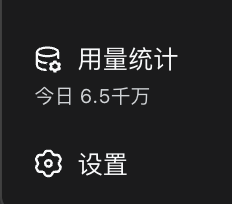
Adds a 用量统计 entry to the sidebar footer, directly above the 设置 (Settings) button:
- Today total at a glance — the trigger shows a fuzzy figure of today's token usage (in 千 / 万 / 百万 / 千万 / 亿), with the exact value on hover.
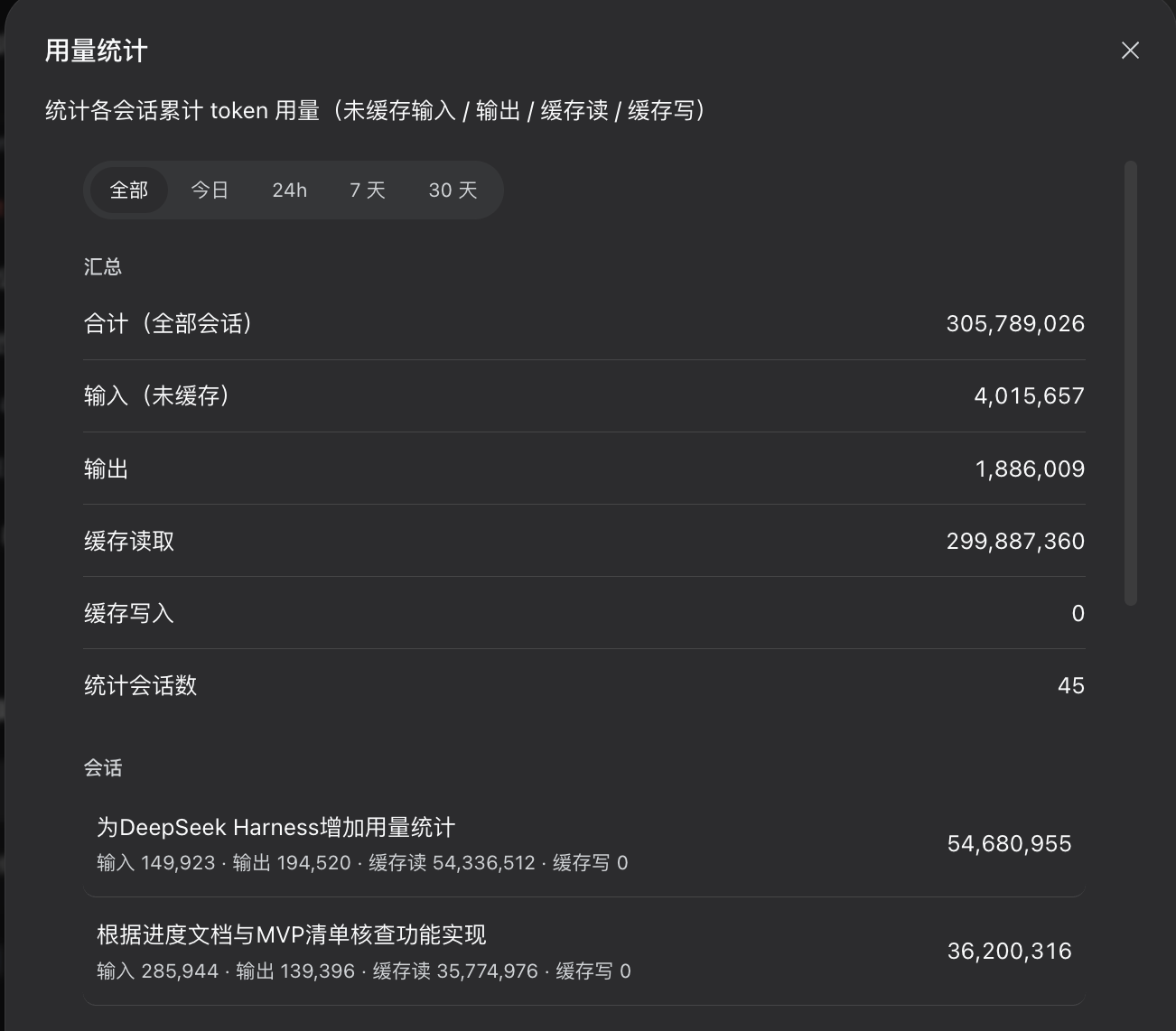
- Stats modal — a summary (uncached input / output / cache read / cache write, session count) plus a per-session breakdown list, with time filters 全部 / 今日 / 24h / 7 天 / 30 天.
- Durable ledger — the per-session
tokenUsageprojection disappears when a session is deleted; this plugin keeps its own copy inlocalStorage(dsh.usageLedger.v1) so historical totals survive session removal. Best-effort: falls back to in-memory when storage is unavailable.
Screenshots
Sidebar footer entry (above the Settings button):
Usage stats modal:
Requirements
@deepseek-ai/dshweb profile (any recent0.1.0-rc.x)- Peer packages:
react,@deepseek-ai/cordis,@deepseek-ai/dsh-client-runtime,@deepseek-ai/dsh-client-locale,@deepseek-ai/dsh-client-ui-primitives,@deepseek-ai/dsh-client-ui-slots(the dsh web profile already ships these).
Install
⚠️ Name collision warning: the npm package name
dsh-usage-statsis already taken by an unrelated project ("Lightweight usage analytics ..."). This plugin is published as@xushuojie/dsh-usage-stats— double-check the name before installing, so you don't pull in the wrong package.
Install the package where the profile can resolve it
From the npm registry (after publish):
cd "$(dsh home)/profiles/web"      # e.g. ~/.dsh/profiles/web
pnpm add @xushuojie/dsh-usage-stats
Or directly from GitHub (works right now, no registry needed):
pnpm add github:xushuojie/dsh-usage-statsFor a local checkout instead:
pnpm add file:/path/to/dsh-usage-statsRegister the loader entry in the profile's patch layer (
$DSH_HOME/profiles/web/cordis.patch.yml— the file the boot message tells you to edit, notcordis.yml):- insert: - id: usage-stats name: '@xushuojie/dsh-usage-stats'Restart
dsh web(plugin roster + boot manifest are composed at startup).
Publish (for maintainers)
Requires an npm account logged in against the official registry (this machine is configured with the npmmirror mirror, which does not accept publishes):
npm login                                    # once
npm config set registry https://registry.npmjs.org
cd dsh-usage-stats
npm publish                                  # publishes @xushuojie/dsh-usage-stats
The package is scoped to your npm username, so it can never collide with the
unrelated dsh-usage-stats package. If you want to republish under a
different scope, rename name in package.json, the loader entry, and the
client bundle id accordingly.
How it works
lib/client.jsis awindow.__ModuleLoader__.load(...)client bundle (the DSH web client-plugin format), declared viadsh.clientinpackage.json.- It registers into the
sidebar.footer.actionlist slot (rendered above the Settings button) withorder: 10, bound to its ownusageStatslocale namespace. - Data source: the standard
useSessionslist snapshot's per-sessionprojectionValues.tokenUsage, merged into the durable ledger.
License
MIT
No comments yet. Be the first to write one.