dsh-lens
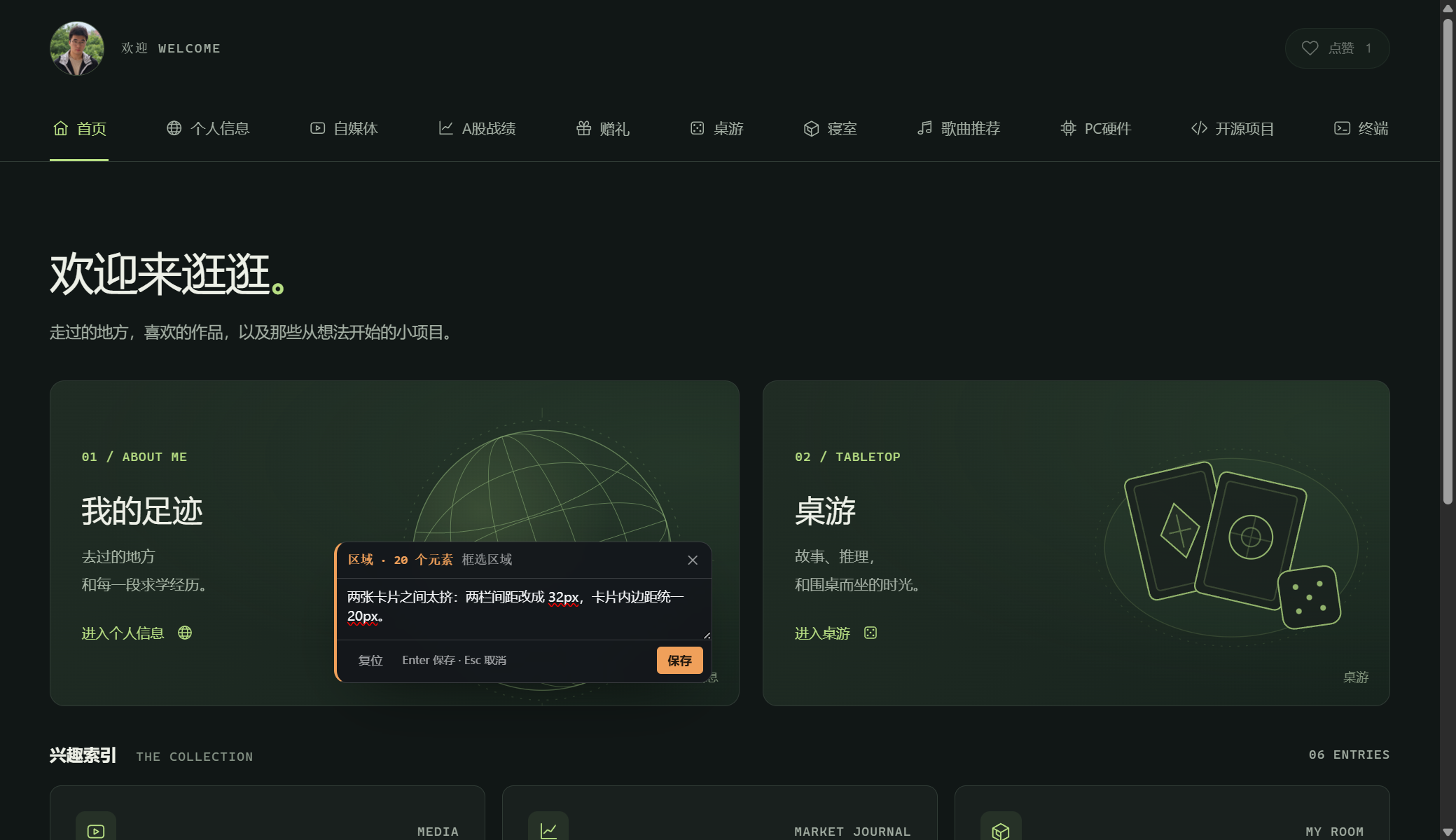
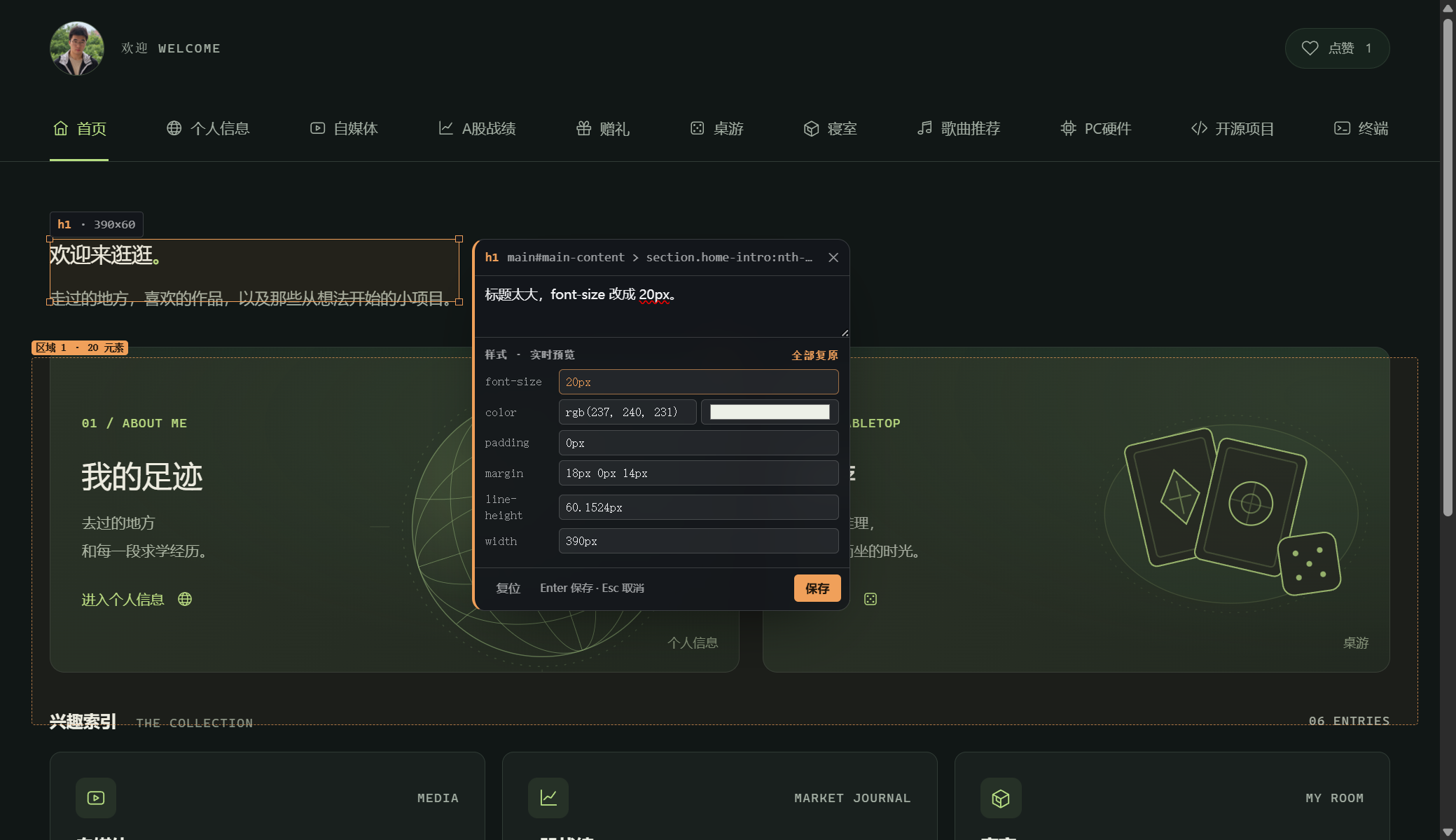
Codex 风格的界面批注插件,给 DeepSeek Harness 用。 打开当前工作区里正在跑的本地服务或静态页面,点元素、按住 Shift 框选区域、直接在页面上改样式实时预览,把修改意见一次性发进当前对话。
Codex-style element annotation for DeepSeek Harness. Open a local dev server or a static page from your workspace, click an element, Shift-drag a region, tweak styles with a live preview, and send the whole review into the current conversation in one message.


在线演示 Live demo — 三页静态站,可以直接试框选和跨页批注 · the same three pages, for trying region selection and cross-page review.
截图 / Screenshots
| 框选区域 | 样式实时预览 |
|---|---|
 |
 |
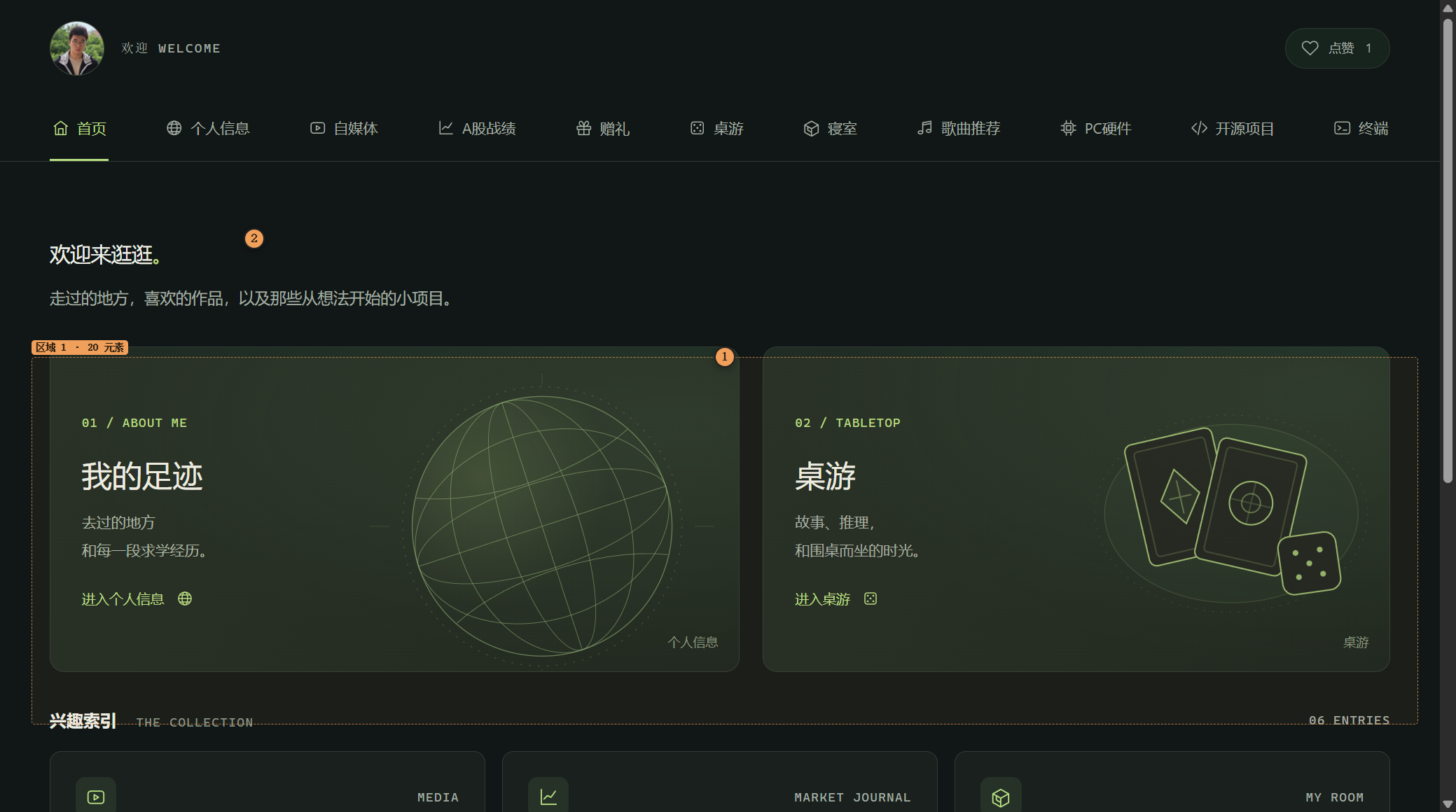
中文
它和 dsh-annotate 的区别
| dsh-annotate 0.1.14 | dsh-lens | |
|---|---|---|
| 框选区域 | 只能点单个元素 | 按住 Shift 点/拖,框内元素全收进一条区域批注(容器标 [容器],叶子带文本) |
| 样式面板 | 只能读计算样式 | 卡片里「⚙ 样式」展开,改 font-size / color / padding / margin / line-height / width,页面当场变,批注写 from → to |
| 快捷发送 | 存完再点发送 | Ctrl+点击元素 → 写(或不写)→ 回车,立即发进当前对话(只发这一条) |
| 挂载位置 | 只有右侧栏 | 右侧栏 tab + 对话区 View 标签(conversation.view)+ 输入框上方 dock |
| 跨页批注 | 按页隔离 | 一个会话里所有页面的批注一起收集、分组展示、一次发送 |
| 服务发现 | 本机所有 loopback 端口 | 只列当前工作区自己起的服务(按进程命令行/可执行文件/声明端口认领),噪音不进门 |
交互对齐 Codex 应用内浏览器文档:点元素=选元素,Shift 点/拖=框选区域,Ctrl+点=立即发送,样式收在卡片齿轮里。
安装
这是一个本地插件,通过 link: 挂进 DSH profile,不需要发布到 npm。
git clone https://github.com/xulianglong-akk/dsh-lens.git
cd dsh-lens
node scripts/install.mjs          # 写入 link 依赖 + profile bundle 行,并备份 package.json
然后在 profile 目录里装一次(只建链接,不联网):
cd "$DSH_HOME/profiles/desktop"   # Windows: %USERPROFILE%\.dsh\profiles\desktop
pnpm install
最后完全退出并重开 DSH(刷新页面不够:宿主半侧一个进程只加载一次)。
如果插件目录路径含非 ASCII 字符(例如中文目录),部分 DSH 版本在改写 profile manifest 时会把路径写坏。稳妥做法是先建一个纯 ASCII 的 junction 再安装:
mklink /J D:\dsh-lens-src "D:\你的目录\dsh-lens",然后node scripts/install.mjs --link D:/dsh-lens-src。
卸载:node scripts/rollback.mjs(还原安装前的 package.json、删掉链接),然后重开 DSH。
使用
入口:右侧栏「批注」、对话区「批注」View 标签,或 Ctrl+Shift+L。
- 面板只列当前工作区在跑的服务;认不出或服务不是从工作区起的,直接在底部输入
4173这样的端口/地址即可(打开过的会记住)。打开页面后自动进入圈选模式。 - 在页面里:
- 点元素 → 写批注 →
Enter保存,继续点下一个;Esc退出圈选。 - 按住 Shift 点/拖 → 框住一块 → 松手后列出「框内元素」→ 写批注 →
Enter。 - 按住 Ctrl 点 → 卡片变成「保存并发送」→
Enter立即发这一条。 - 卡片里 ⚙ 样式 → 改值 → 页面实时预览 → 保存时批注带
font-size 42.966px → 20px;「全部复原」撤回。
- 点元素 → 写批注 →
- 顶部「列表」按页面分组显示这个会话收集到的所有批注:定位 / 标已处理 / 删除;「发送未处理 N」一次发完。
- 点错了整页容器?卡片会提示「你点到的是整页容器」,改用 Shift 框选更准。
发出去的格式
🎯 界面标注 · 2 个页面 · 3 条

【http://127.0.0.1:5173/】
#1 h1
   选择器: main#main > header > h1(命中 1 个元素)
   位置/尺寸: 390×28 @ (47, 227) · 视口左上(17%W × 30%H)
   计算样式: display:block; width:390px; font-size:20px; color:rgb(237, 240, 231); …
   样式修改: font-size 42.966px → 20px
   文本: 欢迎来逛逛。
   批注: 标题太大,改 20px。

【http://127.0.0.1:5173/pricing】
#2 [框选区域] 1145×479 @ (143, 97)
   框内元素: 26 个(按 DOM 顺序)
     - section.grid [容器] @ 1016×319
     - article.card [容器] …
     - h2「面板 A · 大块,带嵌套」 @ 442×39
     …
   批注: 这三块卡片间距统一 24px。
每条都带:选择器 + 命中数、位置尺寸、视口方位、计算样式、可见文本、样式 from→to、批注正文。
为什么只列当前工作区的服务
本机跑着很多东西(各种客户端也占 loopback 端口)。dsh-lens 只把能证明属于当前工作区的服务列出来,证据三选一:
- 监听进程的可执行文件在工作区里;
- 命令行里出现工作区路径;
- 命令行里的相对脚本(
node scripts/dev-server.mjs)能在工作区里找到。
外加上「工作区自己声明的端口」(--port、PORT || 4173、vite port:)。一条都对不上就不列,手填地址即可。
已知限制
- 对话区 View 标签与 Chat 互斥:
conversation.view的语义是「一次只渲染一个目标视图」,切到「批注」时 Chat 会收起,底部输入框还会压住一点面板。想看对话就切回「对话」,或用右侧栏。 - 区域框线按文档坐标记录,窗口滚动跟随;内层容器滚动时可能轻微漂移(元素 pin 不漂)。
- 样式预览是写元素内联样式;退出圈选时逐条还原,重新进入时按已保存批注再贴回去。
- 只代理
127.0.0.1/localhost/[::1];HTTPS 本地服务原样转发,不忽略证书错误。 - Windows 的服务归属判定已实测;macOS/Linux 走
/proc+ps分支,未在真机验证。 - 「Ctrl+点」之后仍要按一次
Enter(可以写批注,也可以空着)——省掉的是「再去点发送」。 - 一个面板挂一个预览 iframe;两个入口(侧栏 + 对话区)可以同时挂。
- 宿主半侧改动必须完全重开 DSH;
lib/overlay.js、lib/shim.js是每次回 HTML 重新读盘,刷新预览即生效。
目录
| 文件 | 作用 |
|---|---|
lib/index.js |
宿主半侧:工作区范围的服务发现、loopback 预览代理、注入 shim/overlay、POST /__dsh-lens/api |
lib/client.js |
客户端半侧:右侧栏 tab、conversation.view、header 按钮、输入框 dock、跨页批注列表与发送 |
lib/overlay.js |
注入预览页的浮层:点选、Shift 框选、样式面板、Ctrl 点击、零残留 |
lib/shim.js |
注入预览页的 URL/WS 映射与导航上报 |
scripts/install.mjs / scripts/rollback.mjs |
一条命令安装 / 回滚 |
test/host-harness.mjs |
不启动 DSH 的宿主半侧自测台(detect / preview) |
docs/demo/ |
三页静态示例站,用来试框选和跨页批注(GitHub Pages 也发布这个目录) |
CHANGELOG.md / CONTRIBUTING.md / SECURITY.md |
变更记录、开发约定、安全边界 |
开发
node --check lib/index.js && node --check lib/client.js && node --check lib/overlay.js
node test/host-harness.mjs detect "D:/path/to/your/workspace"
node test/host-harness.mjs preview http://127.0.0.1:5173/ "D:/path/to/your/workspace"
English
Codex-style element annotation for DeepSeek Harness. Open a local dev server or a static page from the current workspace, click elements, Shift-drag a region, tweak styles with a live preview, and send the whole review into the current conversation as one structured message.
What it adds over dsh-annotate
- Region selection — hold Shift and click/drag; every element inside the box is collected into one region annotation (containers marked
[容器], leaf elements carry their text). - Live style panel — the card's ⚙ styles section edits font-size, color, padding, margin, line-height and width; the page updates immediately and the annotation records
from → tovalues. - Instant send — Ctrl+click an element, write a note (or leave it empty), press Enter: that one annotation is sent to the conversation right away.
- Three seats — the right sidebar tab, a
conversation.viewtab in the conversation area, and a dock above the composer. - Cross-page review — annotations from every page of the session are collected, grouped by page, and sent together.
- Workspace-scoped discovery — only services that provably belong to the current workspace are listed (process executable, command line, or a declared port); other loopback ports stay out of the list.
The interaction follows the Codex in-app browser documentation: click to select, Shift+click/drag for an area, Cmd/Ctrl+click to send immediately, and style controls folded into the comment card.
Install
git clone https://github.com/xulianglong-akk/dsh-lens.git
cd dsh-lens
node scripts/install.mjs            # writes a link: dependency and the bundle row, backing up package.json
cd "$DSH_HOME/profiles/desktop"     # Windows: %USERPROFILE%\.dsh\profiles\desktop
pnpm install
Then fully quit and reopen DSH (a page refresh is not enough: the host half is loaded once per process).
If the checkout path contains non-ASCII characters, some DSH builds mangle the path while rewriting the profile manifest. Create an ASCII junction first and pass it explicitly:
mklink /J D:\dsh-lens-src "D:\your dir\dsh-lens"
node scripts/install.mjs --link D:/dsh-lens-src
Uninstall with node scripts/rollback.mjs, then restart DSH.
Use
Open the sidebar tab 批注 (Annotation), the 批注 view tab in the conversation area, or press Ctrl+Shift+L.
- Pick a workspace service, or type a port such as
4173. The page opens already in annotation mode. - In the page:
- Click an element, type a note, press
Enter; keep clicking for the next one.Escleaves annotation mode. - Shift+click/drag to box an area: the card lists every element inside it.
- Ctrl+click to send that one annotation immediately (
Enter). - ⚙ styles in the card edits CSS with a live preview; values are recorded as
prop old → new.
- Click an element, type a note, press
- The list button groups the session's annotations by page: locate, mark done, delete, or send all open ones in one message.
Output format
🎯 界面标注 · 2 pages · 3 annotations

【http://127.0.0.1:5173/】
#1 h1
   selector: main#main > header > h1 (matches: 1)
   position/size: 390×28 @ (47, 227) · viewport top-left (17%W × 30%H)
   computed: display:block; width:390px; font-size:20px; …
   style change: font-size 42.966px → 20px
   text: 欢迎来逛逛。
   note: 标题太大,改 20px。
Limitations
- The
conversation.viewseat is exclusive with Chat by design (one target view renders at a time); the composer also overlaps its bottom edge. Use the right sidebar to see chat and preview side by side. - Region outlines are stored in document coordinates; inner-container scrolling can drift them slightly (element pins do not drift).
- Style previews are inline styles, restored when annotation mode ends and re-applied from saved annotations when it starts again.
- Loopback targets only (
127.0.0.1,localhost,[::1]); local HTTPS is proxied as-is without certificate bypass. - Windows discovery is tested; the macOS/Linux
/proc+psbranches are not. - Ctrl+click still needs one
Enter(a note is optional); what it removes is the separate Send click. - Host-half changes require a full DSH restart;
lib/overlay.jsandlib/shim.jsare re-read per HTML response, so a preview refresh is enough for those.
License
MIT. The loopback preview proxy, the page shim and the annotation payload plumbing are derived from dsh-annotate by qinjing, also MIT — see LICENSE.
No comments yet. Be the first to write one.