dsh-drawio-chat



The chat-first draw.io plugin for DeepSeek Harness. The model creates, inspects and edits native .drawio files, the chat renders them with the real draw.io viewer, and every diagram stays in the workspace.
- No draw.io account, no npx MCP server, no local editor install.
- Rendering happens inside a sandboxed iframe (opaque origin), so model-generated XML never touches the GUI origin.
drawio_referencefetches draw.io's official XML reference fromhttps://mcp.draw.io/mcp(no auth); the diagram itself is never uploaded, with a built-in condensed fallback.- A catalog of scenario templates ships with the plugin (a static gallery site can be published from the same manifest), and the canvas integrates as a file viewer in
dsh-better-sidebarwhen that plugin is installed. - Tools only touch
.drawiofiles under the session workspace; writes are atomic.
Links — Template gallery · npm · Marketplace entry
How to use
The card is the result, not the entrance: start a conversation and describe the diagram you want.
- Ask in plain language — e.g.
- “Draw a system login flowchart.”
- “Create a leave-request approval workflow with rejection and escalation.”
- “Use the microservices template, then rename the services to user / order / payment.”
- A draw.io card appears in the transcript — zoom, pan, layers and page navigation, with
Download .drawio,Export SVG,Export PNGandOpen in draw.ioactions. - Keep editing in the same conversation — “rename Home to 首页”, “add an edge from API to DB”, “undo that”. The tools edit the same file atomically and the card refreshes.
- Files live in the workspace —
diagrams/<title>-<hash>.drawio; click a.drawiofile (chat link, workspace tree or sidebar) to open the interactive viewer tab instead of raw XML.
Nothing needs to be configured first: install the plugin, restart the app, and talk to it.
Scenario templates
Instead of starting from a blank canvas, ask for a common scenario and the model instantiates a built-in template, then edits it for you:
- “Draw a login flow from the template.”
- “有哪些审批或工单的模板?” / “Show me the templates for data pipelines.”
- “用客服工单泳道模板画一个,把系统改成飞书。”
The drawio_template tool lists/searches the catalog and copies the chosen template into diagrams/. Templates are original, bilingual (Chinese labels) and licensed Apache-2.0; each one is checked for valid geometry, no overlapping shapes and explicit start/end paths.
| Category | Built-in templates |
|---|---|
flowchart |
system login · approval workflow · checkout flow · CI/CD pipeline · incident troubleshooting tree |
architecture |
microservices architecture · web app deployment |
data |
ETL pipeline · e-commerce ER model |
sequence |
login sequence diagram |
org |
team org chart |
swimlane |
support ticket swimlane |
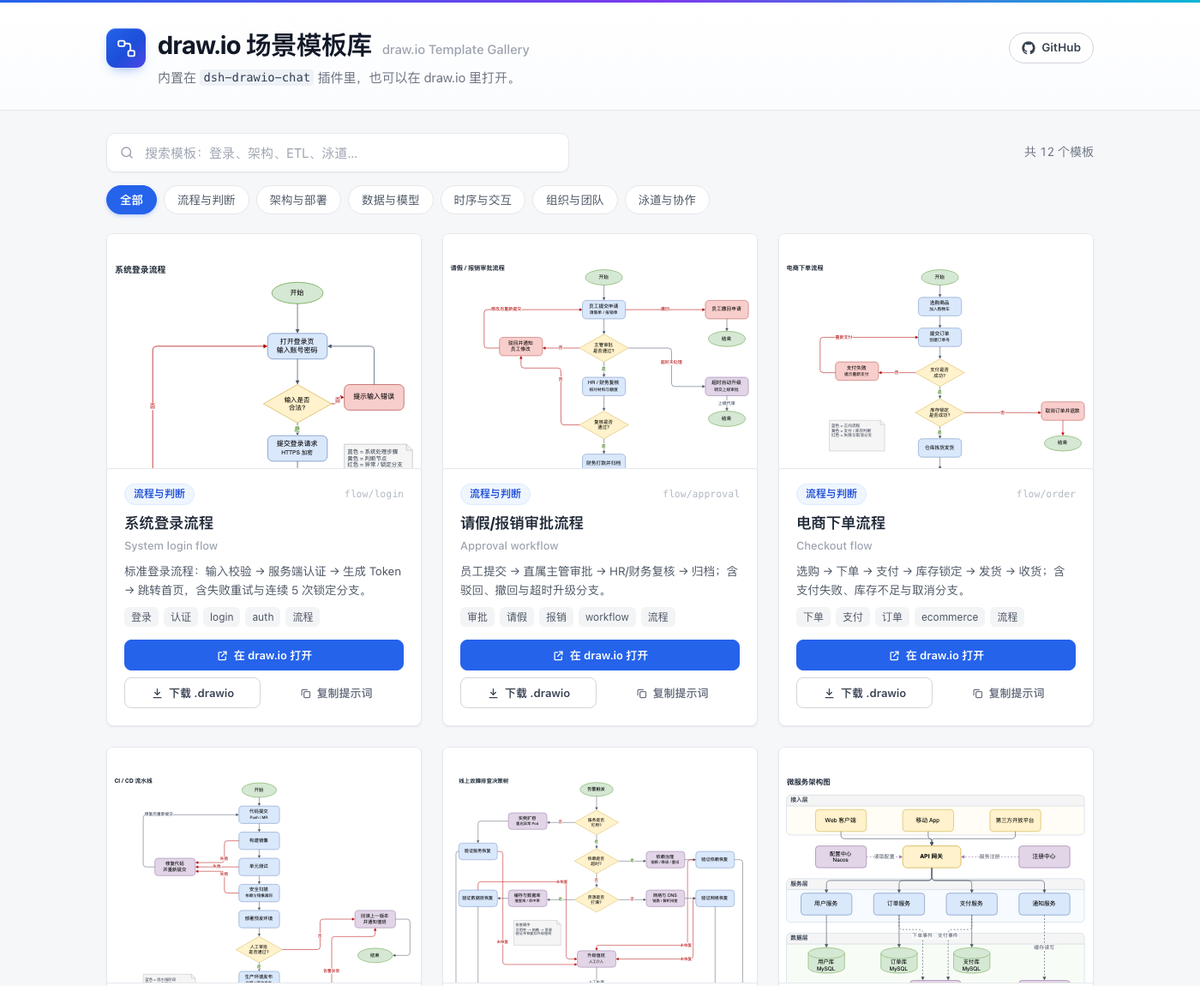
The catalog is a plain manifest (templates/catalog.json: id, bilingual title/description, category, tags, relative file) and is the single source for the plugin's tool, the test suite and the gallery site.
Gallery site. site/ is a dependency-free static gallery over the same catalog: search, category chips, lazy draw.io previews, and per-template Open in draw.io / Download .drawio / Copy prompt actions (links carry ?q= so a search is shareable). Build it with node scripts/build-site.mjs (copies site/ + templates/ into site-dist/) and deploy via the bundled GitHub Pages workflow (.github/workflows/pages.yml). Once Pages is enabled on the repository, the gallery is available at https://xuedipiaofei.github.io/dsh-drawio-chat/.
Community catalogs. drawio_template accepts an optional catalog — the public HTTPS URL of another catalog.json (for example the gallery's). Its entries are merged after the built-in ones and can be searched and instantiated the same way; catalogs are size/time capped, HTTPS-only, and loopback/private hosts are rejected. A broken remote catalog only degrades a listing (built-ins stay available, with a warning); instantiating one of its ids reports the error.
With dsh-better-sidebar. When that plugin is installed, the draw.io canvas registers as one of its file viewers (registerFileViewer, extension drawio, fsRead). It becomes the default preview for .drawio inside better-sidebar's editor — in docked panes, floating panes and the bottom workbench alike — and the viewer dropdown can switch back to the code editor. This is why the plugin uses the file-viewer extension point instead of a dedicated bottom-panel tab: one component covers every surface and better-sidebar keeps file I/O, reloading and the “Open with” flow in one place. Without dsh-better-sidebar nothing is registered and no dependency is added.
To add a built-in template: drop the .drawio file into templates/, add one catalog entry, then run python3 scripts/check-template.py templates/<file> — the same checks run in the test suite.
Feature overview
Draw — flowcharts, architecture, UML, ER, network topologies, wireframes and other draw.io shape libraries; multi-page diagrams, layers, containers and swimlanes; LaTeX typesetting in labels.
Template — a curated catalog of ready-made Chinese scenario templates (drawio_template): list/search by keyword or category, instantiate into the workspace, then edit it like any other diagram.
Edit — drawio_read returns the structure by id/geometry/style plus the current revision; drawio_apply batches semantic ops (labels, styles, add/remove nodes and edges, move, z-order) with atomic writes and a revision-conflict guard; drawio_undo restores any of the last 8 versions of a file.
View — an interactive draw.io viewer in the transcript (zoom, pan, layers, page navigation), and .drawio files open in the right sidebar tab instead of showing raw XML; with dsh-better-sidebar installed the canvas is also its default .drawio file viewer.
Export — download the .drawio, export SVG or 2× PNG, or open it in draw.io. Files are saved under diagrams/ and can be committed with the repository.
Scope — built for structural, flow, architecture and teaching diagrams. Not for 3D interactive courseware or video: those need a different plugin or pipeline.
Install
After publishing: dsh plugin --profile web add dsh-drawio-chat (or install from the desktop marketplace). For a local build (the desktop app owns the desktop profile, quit it first):
pnpm install && pnpm build
node scripts/install-into-desktop-profile.mjs --dry-run
node scripts/install-into-desktop-profile.mjs
Restart the app, then ask the model to “draw a login flow diagram”: it calls drawio_create, a draw.io viewer appears in the transcript, and the file lands under diagrams/. Follow-ups such as “rename the Home node” use drawio_read + drawio_apply; “undo that” uses drawio_undo.
Known limits
- XML input only (
mxGraphModel/mxfile); Mermaid input is not supported yet. - The inline viewer script is loaded from
https://viewer.diagrams.net(no account; first render needs network). An offline vendor pack is planned. - The built-in templates are starting points: they carry Chinese labels and generic placeholder text, so rename roles/systems for your own context (or ask the model to).
- Remote/community catalogs are only as trustworthy as their URL: templates are fetched as
.drawioXML and never executed by the plugin, but read the source before using an unknown catalog. - No 3D or video output — see Scope above.
Verification
pnpm typecheck, pnpm test (16 files / 74 tests) and pnpm build pass; the catalog test parses every bundled template, validates edge endpoints and rejects overlapping shapes; inline rendering was verified with a headless-browser screenshot (.harness/assets/viewer-sandbox-proof.png), and SVG/PNG export were verified end-to-end in headless Chrome (PNG: 2400×1600 canvas, 84,368 bytes, no canvas taint).
No comments yet. Be the first to write one.