dsh-files-fallback
English | 中文


文件引用与附件插件 for DeepSeek Harness (DSH) Web GUI
拖拽 / Ctrl+V 粘贴 / 📎 按钮上传 · @绝对路径 引用 · 桌面端兜底引用(目录、超大文件、失败不落空)· 内联缩略图 · VLM 图片识别 · 会话删除联动清理
File reference & attachment plugin for DSH web GUI: drag, paste, or upload files and images; desktop entries that cannot be uploaded (folders, oversized files, failed transfers) gracefully fall back to
@pathreferences with zero copy and no size limit.
目录
亮点
桌面端 @路径 兜底引用:在 DSH 桌面壳里,本插件可以通过 Electron webUtils 拿到拖入文件的真实操作系统路径。于是凡是「不适合走浏览器上传」的条目——文件夹、超过 50MB 的大文件、空文件、乃至上传中途失败——都不再弹失败提示,而是自动在草稿光标处插入 @绝对路径 引用 chip:
- 零拷贝:文件不读取、不上传、不落盘,直接引用原位置;
- 无大小上限:几个 GB 的数据集目录、日志文件照样引用;
- 文本模型可用:agent 收到
@路径后可自行按需读取,浏览器半与桌面半行为统一。
所有文件类型一律放行:不再设扩展名白名单,任意文件都可拖入、粘贴或通过 📎 选择上传,无需任何配置。
快速开始
dsh plugin --profile web add ./dsh-files-fallback
安装后重启 web GUI 即生效。
核心能力
| 能力 | 说明 |
|---|---|
| 🔗 桌面端兜底引用 | 桌面壳内拿到真实 OS 路径:目录 / 超 50MB / 空文件 / 上传失败,一律自动转为 @路径 引用插入草稿,零拷贝、无大小限制 |
| 📥 三种入口 | 拖入、Ctrl+V 粘贴、接管 dsh 原生 📎 附件按钮(加号右侧、modes 左侧,可多选);PC 与移动端浏览器均适用 |
| 🗂️ 统一落盘管线 | 任意类型文件与图片同走一条链路,平铺保存到 <会话工作区>/.dsh-file-attachment/<文件名>;同名冲突追加 -N 绝不覆盖;同名同大小自动去重复用;单文件上限 50MB |
🔖 @绝对路径 引用 |
落盘后在光标处插入 chip,文本模型也能「看懂」附件 |
| 🖼️ 双区预览 | 输入框内联附件条(极简文件/文件夹 chip + 名称,可移除并同步清除引用);聊天区图片渲染为可点击放大的缩略图(Lightbox) |
| 🤖 VLM 识别 | 非多模态模型下自动调用视觉模型生成中文图片描述回填草稿(仅注入模型上下文)——模型从 harness 模型目录下拉选,默认走 harness 自带模型、填了 Base URL + API Key 则走自定义 OpenAI 兼容端点;agent 可主动调用 describe_image 工具 |
| 🧹 会话清理联动 | 搭配 dsh-session-delete 等删除会话插件:删除会话时按引用计数自动清理由该会话上传的落盘附件(设置页开关,默认关闭) |
处理流程
flowchart LR
    A["📥 拖入 / 粘贴 / 📎 选择"] --> B{"文件大小 ≤50MB<br/>且非空?"}
    B -- "通过" --> C["原始字节流 → Host 落盘"]
    C --> D[(".dsh-file-attachment/文件名<br/>同名追加 -N")]
    D --> E["光标处插入 @绝对路径 chip"]
    B -- "不通过(目录/超 50MB/空文件/失败)" --> F{"桌面端拿到真实路径?"}
    F -- "是" --> G["自动插入 @路径 引用<br/>零拷贝 · 无大小限制"]
    F -- "否(纯浏览器)" --> X["跳过并 toast 提示"]
    E --> H{"模型支持多模态?"}
    G --> H
    H -- "否 · 已配 VLM" --> I["VLM 生成中文描述<br/>仅注入模型上下文"]
    H -- "是 / 未配 VLM" --> J["随消息正常发送"]
界面
演示:拖入/粘贴 → 落盘并插入 @ 引用 → 输入框内联附件条待发送状态;桌面端拖入目录或超大文件时直接插入 @路径 引用。目录在输入框与聊天区均以文件夹图标 chip 呈现。
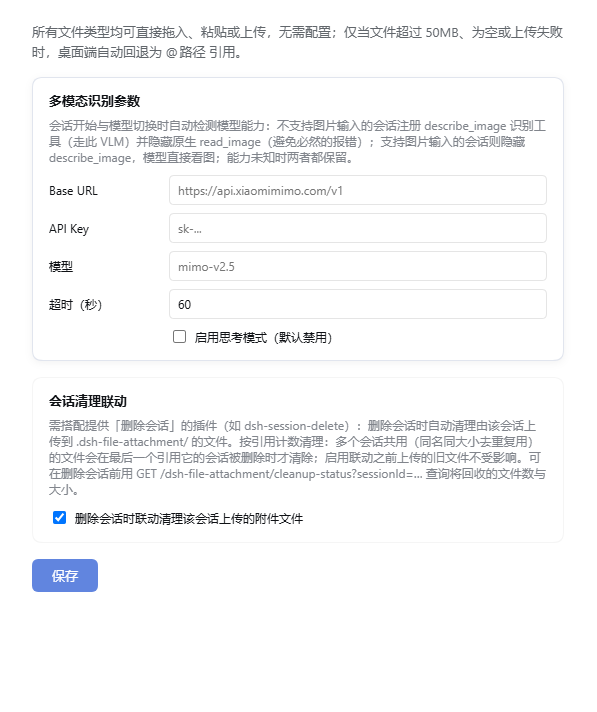
| 设置页(模型下拉 + 会话清理联动) | 输入框内联文件夹 chip |
|---|---|
 |
 |
设置页(「设置 → 文件附件」):
| 设置组 | 内容 |
|---|---|
| VLM 参数 | 模型从 harness 模型目录下拉选取(按服务商分组,无需手填;目录不可用或勾选「手填」时回退文本框,已保存值不在目录中则保留为「已保存」选项,配置不丢);Base URL / API Key 留空则走 harness 自带模型、填写则走该 OpenAI 兼容端点;思考模式开关(默认禁用)/ 超时时间(默认 60 秒);未选模型时不启用图片识别 |
| 会话清理联动 | 删除会话时连带清理该会话上传的落盘附件(默认关闭) |
行为一览
| 操作 | 行为 |
|---|---|
| 📎 按钮多选 / 拖入 / 粘贴任意类型文件 | 原始字节流 → 落盘 → 光标一次性插入全部 @ 引用;成功不提示,失败简短 toast |
| 一次多个文件 | 批量处理,一次性插入全部引用;部分失败仅提示「N 个已跳过」 |
| 拖入 / 粘贴图片 | 同一管线落盘 + 插引用;附件条缩略图预览,聊天区可点击放大 |
| 拖入目录 | 桌面端(可取真实路径):自动插入 @路径/ 引用(文件夹图标 chip);纯浏览器:toast 提示「不支持拖入目录」 |
| 单文件 > 50MB / 空文件 | 桌面端:自动 @路径 引用(零拷贝、不受限制);纯浏览器:跳过并提示 |
| 单条目上传失败 | 桌面端可取真实路径时自动转为 @路径 引用,否则提示「文件处理失败」 |
| 当前模型不支持多模态 | 自动调 VLM 生成中文描述回填草稿;agent 可用 describe_image 工具 |
| 粘贴纯文本 | 不改写,完全原生行为 |
| 重复拖入同名文件(同一天内) | 追加 -1、-2 序号,绝不覆盖 |
点附件条 × 移除 |
移除条目并清除该文件路径的全部 @ 引用 chip,其他文件不受影响 |
存储细节
- 命名:
.dsh-file-attachment/<清洗后文件名>(如.dsh-file-attachment/说明.docx),同名在扩展名前追加-N。 - 去重:上传前先查重(键 = 文件名 + 文件大小,元数据级判定),命中直接复用已有文件路径、零字节上传;
.dsh-file-attachment/.index.json为去重索引(自动维护,删除后自动重建)。 - 根目录 = 当前会话工作区(回退顺序:
session.header.cwd→sandboxPolicy.workspaceRoot→process.cwd()),每个项目各自维护自己的.dsh-file-attachment/。 - 跨平台:保存路径用
path.join自适应分隔符;文件名清洗对 Windows / POSIX 均安全;Host 半经node:fs/promises直接写字节,无 shell 依赖。
会话清理联动
上传的文件默认永久保留在工作区 .dsh-file-attachment/(不随会话删除而清理)。如果你安装了提供「删除会话」能力的插件(如 dsh-session-delete),可以在「设置 → 文件附件 → 会话清理联动」打开开关,实现删除会话 → 连带上传产物一起删干净:
- 触发:会话被删除后(插件监听
api-session/removed总线事件),自动清理该会话上传到.dsh-file-attachment/的文件; - 引用计数:同名同大小去重复用的文件,多个会话共享同一条目——只有最后一个引用它的会话被删除时才真正删除,不会误伤还在用的文件;
- 向后兼容:启用联动之前上传的旧文件没有归属记录,永远不会被自动清理,零误伤;
- 记账持久化:会话 → 文件的引用关系随去重索引写入
.index.json,重启 GUI 不丢失; - 状态查询:
GET /dsh-file-attachment/cleanup-status?sessionId=<id>返回该会话上传的文件数与总字节,可在删除前预览将回收的空间。
安装
本仓库是标准 dsh 插件包(声明了 dsh.bundle.patch)。dsh plugin add 的参数会转发给 profile 目录的 pnpm 执行:
# 本地源码安装(改完 lib/*.js 后重启 GUI 即生效)
dsh plugin --profile web add ./dsh-files-fallback
安装后自动进入 profile 的 dsh.profile.bundles,无需手改 profile package.json;升级:dsh plugin --profile web update dsh-files-fallback。
收录与检索(market listing)
本插件已按官方收录规范准备元数据,可被 awesome-dsh-plugin(插件市场与 Discover 页的数据源)与 plugin_market 工具检索:
package.json声明完整dsh.bundlemanifest(patch+client),可用dsh plugin add安装;description中英双语,keywords覆盖 dsh / deepseek-harness / multimodal / vision 等检索词;repository/homepage/bugs指回本仓库(npm 包与仓库互相认领);- 仓库 topic 含
dsh-plugin; screenshots.json声明市场详情页截图(assets/下两张)。
收录条目(PR 到 awesome-dsh-plugin 的 data/plugins/xinstart-1__dsh-files-fallback.yml):
url: https://github.com/xinstart-1/dsh-files-fallback
name: xinstart-1/dsh-files-fallback
category: vision
description:
  en: 'File attachments for DSH: drag, paste or upload files and images of any type as @absolute-path references, with a desktop fallback for folders and oversized files, and vision-model image descriptions for non-multimodal models picked from a harness model catalog dropdown.'
  zh: 'DSH 文件附件:拖拽/粘贴/上传任意类型文件,统一落盘并以 @绝对路径 引用;桌面端目录/超大文件自动回退为 @路径 引用;非多模态模型的图片由视觉模型识别生成中文描述,模型从 harness 模型目录下拉选取。'
架构
├── package.json          # dsh.client 声明 + bundle patch 指向
├── cordis.patch.yml      # bundle 补丁:插入本插件行
└── lib/
    ├── index.js          # Host 半:webServer 路由(/save /config /describe)+ describe_image 工具
    └── client.js         # Client 半:document 级 capture drop/paste 监听 + 📎 按钮接管 + @路径 兜底 + 槽组件
flowchart TB
    subgraph client["Client 半 · lib/client.js"]
        C1["capture 阶段拦截<br/>drop / paste / 📎 fileInput"]
        C2["shadow 内联附件条<br/>conversation.input.attachments"]
        C3["shadow 用户消息渲染器<br/>聊天区图片缩略图"]
        C4["shell.overlay 浮动 toast"]
    end
    subgraph host["Host 半 · lib/index.js"]
        H1["POST /save<br/>字节流 → node:fs/promises 写盘"]
        H2["GET/POST /config · GET /models<br/>VLM 参数 · harness 模型目录 · 会话清理联动"]
        H3["POST /describe"]
        H4["tools.register<br/>describe_image"]
    end
    VLM[("OpenAI 兼容 VLM")]
    C1 -- "文件字节流" --> H1
    C2 -.-> H2
    C1 -.-> C4
    H3 --> VLM
    H4 --> VLM
    C3 -- "GET /api/file?path=" --> FS[(".dsh-file-attachment/ 落盘文件")]
    H1 --> FS
- Host 半:前缀路由
/dsh-file-attachment——POST/save(流式写盘)、GET/POST/config(读写 VLM 参数与会话清理联动;vlm下含provider+model,落盘~/.dsh/file-attachment.json)、GET/models(拉取 harness 模型目录供设置页下拉选模型)、POST/describe(调 VLM 返回中文描述与思考模式配置);另经tools.register注册describe_image工具。响应信封{ ok, value | error }。 - Client 半:shadow 原生附件条(
conversation.input.attachments)实现内联附件条;shadow 用户消息渲染器(conversation.chat.nodekeyeduser)把聊天区@图片路径渲染为缩略图(经宿主/api/file?path=读取落盘图片);capture 阶段拦截原生fileInputchange 事件接管 📎 按钮,文件进入插件统一管线;window.__DSH_HOST_PATHS__.pathFor(ElectronwebUtils)可取到真实路径时启用@路径兜底引用;纯文本粘贴完全原生不改写。 - 通知与浮层:
shell.overlayframe-wide 浮动 toast(不参与文档流,4 秒自动消失);拖入任何文件时 capture 阶段拦截应用自带的图片 DropOverlay(其文案对文档是误导)。
开发说明
lib/*.js、package.json、cordis.patch.yml、README.md均为 UTF-8 无 BOM,编辑时保持原编码。- 纯 ESM 无构建,不依赖装饰器 / 远程反射。
- VLM 请求发送
thinking: { type: "enabled"|"disabled" }(部分兼容 API 忽略扁平thinkingType;默认开启深度思考的模型识别极慢,关闭后明显提速);超时后明确报错中止而非挂死会话;未配置视觉模型时识别静默跳过,不影响落盘。 - 50MB 上限两侧一致(client 跳过 + host 校验)。
- 目录引用采用
@路径/尾斜杠形式(DSH file-reference 语法),插入时以appearance: 'folder'渲染原生文件夹图标 chip。
English
dsh-files-fallback is a DeepSeek Harness (DSH) web GUI plugin for attaching files and images of any type to the chat composer via drag-and-drop, paste, or the native DSH paperclip button.
Key capabilities: unified storage pipeline under .dsh-file-attachment/; all file types accepted with no extension whitelist; @absolute-path references so text-only models can use attachments; a desktop-only path-reference fallback — folders, oversized files, empty files, and failed uploads are automatically converted into @path references (zero copy, no size limit) instead of error toasts; inline attachment chips including native folder chips (@path/ with appearance: 'folder'), plus clickable chat thumbnails with a lightbox; multi-file upload with same-name conflict handling and a 50MB guard; optional VLM descriptions for non-multimodal models, with the model picked from the harness model catalog dropdown (provider — modelName; a saved/off-catalog value stays selectable, and a free-text fallback covers catalog failures) — leave Base URL / API Key empty to use the harness's own LLM, or fill both to use a custom OpenAI-compatible endpoint; and an opt-in session-cleanup sync that reference-counts and removes a session's uploaded files when that session is deleted (pairs with session-deletion plugins); works on desktop and mobile browsers.
Install:
dsh plugin --profile web add ./dsh-files-fallback
For detailed behavior, settings, architecture, and development notes, see the Chinese documentation above.
Market listing / 收录
Metadata is prepared for the official discovery pipeline (awesome-dsh-plugin — the data source behind the in-app plugin market, the Discover tab and the plugin_market agent tool): a complete dsh.bundle manifest installable via dsh plugin add, a bilingual description, discovery-friendly keywords, repository/homepage/bugs pointing back at this repo, the dsh-plugin repo topic, and a screenshots.json declaring two marketplace screenshots under assets/.
License
MIT。详见 LICENSE。
No comments yet. Be the first to write one.