READMESource: main@bfa00713
dsh-simple-notes
可以随时记录自己的想法,可按日期与标签检索。
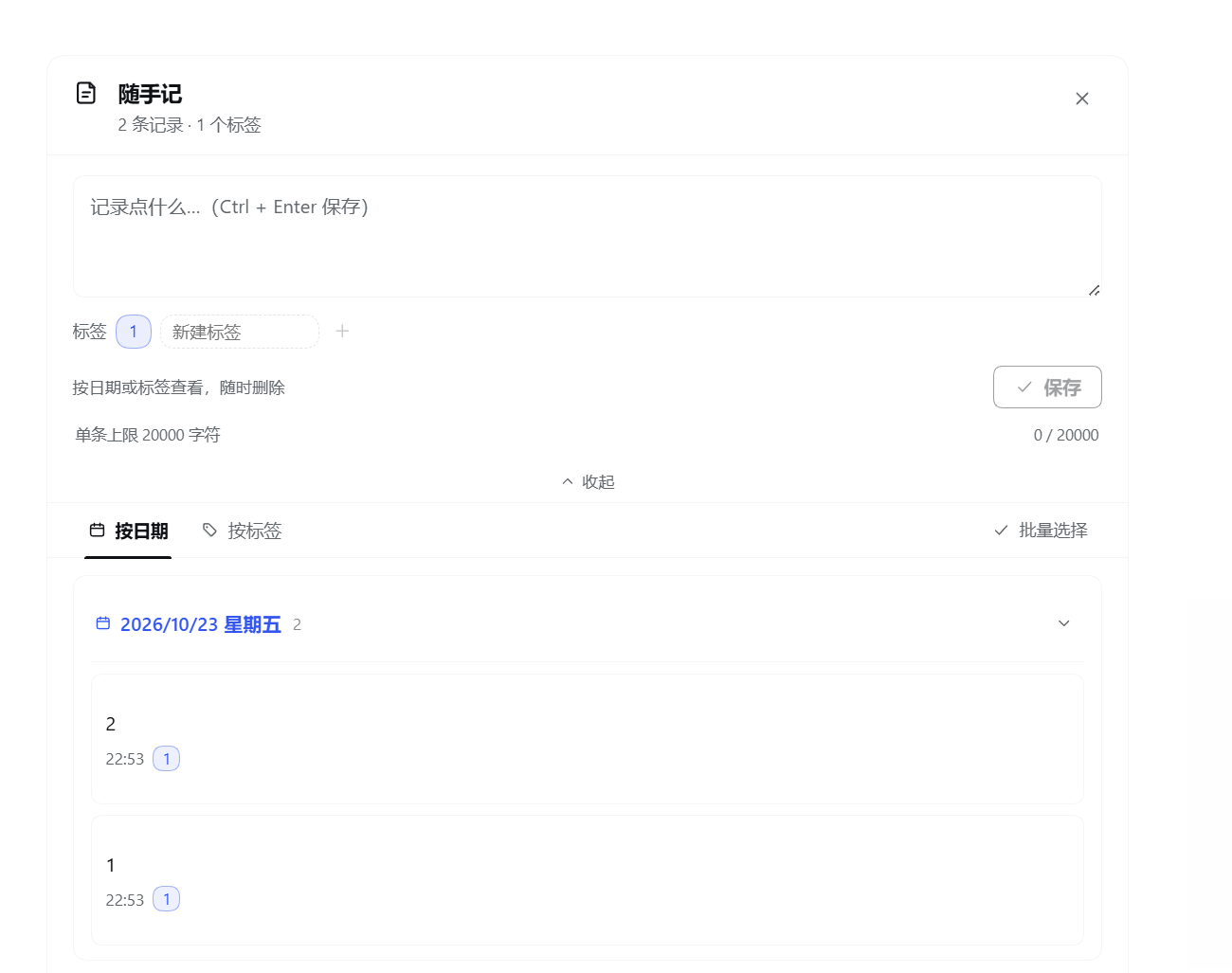
DeepSeek Harness 的侧边栏笔记本:点侧边栏图标随时打开,写完就存,既可以按日期翻看,也可以给自己建的标签翻看。
功能
- 随时记录:侧边栏常驻入口,点开即写,支持多行文本
- 右键速记:在侧边栏图标上点右键,弹出一个半宽的速记框,写完点保存即走,不用先打开整个面板
- 按日期检索:按天分组,标题显示
2026/10/23 星期五这样的实时日期 - 按标签检索:自己建标签给笔记归类;还可以查看「未打标签」的笔记
- 批量操作:进入批量选择后可勾选单条、整组或全选,然后合并、移动到指定标签、删除
- 编辑:点开任意一条进入详情,修改后保存,原始创建时间保持不变
- 收起 / 展开:每个日期或标签分组都能收起;收起后变成一条横向预览,右侧箭头可向右翻看,底部有横向滚动条
- 中文 / 英文界面:跟随 Harness 的界面语言切换
- 本地保存:笔记只存在本机,不上传任何服务器
安装
插件市场(推荐)
在 Harness 的插件市场搜索 dsh-simple-notes,一键安装。
命令行
dsh plugin --profile web add dsh-simple-notes
把 web 换成你自己的 profile 名即可。
DSH 桌面版请改用应用内的 设置 → 插件 安装:桌面版的 profile 由应用自己的插件管理器管理,命令行改动不会生效。
从源码
git clone https://github.com/ximiluoer/dsh-simple-notes.git
再用插件管理器把克隆下来的目录作为本地包安装即可,不需要构建。
安装后侧边栏会多出一个笔记本图标,点开就能用。
使用
- 点侧边栏的笔记图标打开面板
- 只想随手写一条时,在图标上点右键:弹出半宽的速记框,写完点「保存」即可收起
- 在上方输入框里写内容,可顺手选中已有标签
- 用「按日期 / 按标签」两个页签切换浏览方式
- 点任意一条记录进入详情,可编辑、可删除
- 点「批量选择」后可多选,再执行合并 / 移动至 / 删除
数据与隐私
- 笔记保存在本机 Harness 数据目录:
~/.dsh/.dsh-notes/notes.json - 同时会在浏览器
localStorage里留一份镜像,接口不可用时仍能读到内容 - 除本机 Harness 自身的
/dsh-notes/state接口外,插件不发起任何网络请求,也不会上传你的笔记 - 卸载插件不会删除已有的笔记文件
限制
- 单条笔记最多 20000 字符
- 最多 100 个标签
- 最多 5000 条笔记(宿主侧上限)
开发
无需构建步骤,改完文件后通过 profile 的插件管理重载即可生效。
| 文件 | 作用 |
|---|---|
index.js |
宿主侧插件:提供 GET/POST /dsh-notes/state 读写笔记 |
client.js |
前端界面:Cordis 客户端插件,用 React.createElement 手写渲染 |
cordis.patch.yml |
把插件注册进 Harness 组合 |
locale/zh.json、locale/en.json |
中英文文案 |
icon.svg |
侧边栏图标 |
License
MIT
English
A sidebar notebook for DeepSeek Harness. Jot down ideas any time, then browse them by date or by your own tags.
- Grouped by date (
2026/10/23 Friday) or by tag, switch with one click - Batch select a single note, a whole group, or everything — then merge, move to a tag, or delete
- Edit any note in its detail view; the original creation time is kept
- Collapse a group into a horizontal preview strip with a right-arrow pager
- Chinese and English UI, following the Harness locale
- Notes stay on your machine:
~/.dsh/.dsh-notes/notes.json, no network calls besides the local Harness endpoint
Install from the Harness plugin market, or:
dsh plugin --profile web add dsh-simple-notes
MIT licensed.
No comments yet. Be the first to write one.