DSH Plugin API Gallery · 插件接口图鉴
你想给 DSH 加个功能,但说不清它该长在页面哪个位置? 这个插件把 43 个可插入位置全部实装了一遍:每个入口都长在真实位置上、都带注册代码,点开就是“这里该怎么注册”。另有全量接口图鉴:100 个 Slot(其中 57 个不可注册,逐个写明为什么)、98 个 Host Service、76 个 Host Event、6 个 Factory。
Know what your plugin should do, but not where in the UI it belongs? 43 Slots demoed in their real positions, each with registration code — plus 100 Slots / 98 Host Services / 76 Host Events, including the 57 Slots you can't register, and why.
**装它解决三个问题:**我的功能该长在哪 → 看下表的意图索引;这个位置能不能插 → 看 43 个实测;某个接口存不存在、怎么调 → 查 Service / Event 页。
会在 43 处真实位置插入入口,建议装在测试 profile。找具体 Slot 直接 Ctrl+F 下面的 slot key 索引。
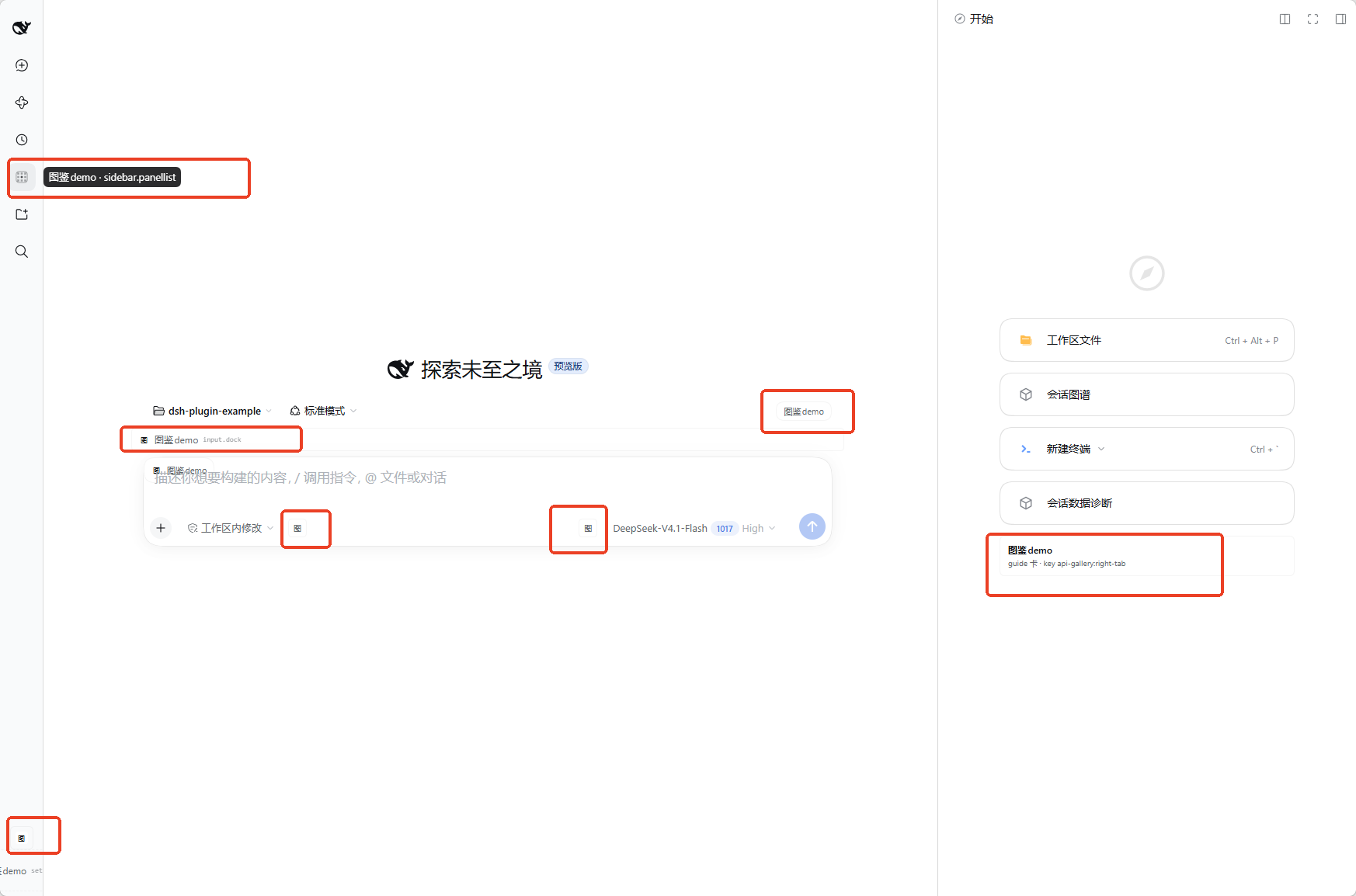
红框里就是长在真实位置上的入口(不是总览页):左侧栏 sidebar.panellist 的 tooltip、输入框上方 conversation.input.dock、composer 头部按钮、输入行左右两个「图」按钮、左下角 sidebar.footer.action,以及原生右侧栏里的图鉴 tab(key: api-gallery:right-tab)。
先定位:我的功能该长在哪
先说人话再翻源码。左边是“我想做的功能”,右边就是该注册的接口 —— 以及本插件里它的真实样子(图里带红框的就是这些入口)。
| 你想做的事 | 该注册的接口 | 本插件里的实况 |
|---|---|---|
| 在输入框旁加个按钮 | conversation.input.left / conversation.input.right |
输入行左右各一个「图」小按钮 |
| 在输入框上加常驻提示 | conversation.input.dock(卡片上方通栏)/ conversation.composer.dock(卡片下方 chip) |
两种都在图里,一眼看出区别 |
| 给会话加一整页新 tab | conversation.view |
顶部 View 标签栏多一个 图鉴demo · conversation.view |
| 在消息旁加操作 | conversation.chat.assistant-actions / conversation.chat.turnTail |
每条完成的 assistant 消息旁 / 每轮结束后一行 |
| 加设置页或设置行 | settings.section(整页)/ settings.general.item(偏好行)/ settings.plugins.tab(tab) |
Settings 左侧导航多一页、General 多一行 |
| 加右侧栏 tab(文件、终端那一列) | ctx.sidebarRightTabs.register(tab 类型)+ sidebar.right.pane.tab(body) |
不是单靠 Slot:先注册类型,再按 key 渲染 body |
| 在侧栏 Session 行加东西 | sidebar.session.row.leading / sidebar.workspaces.session.row.action / sidebar.workspaces.session.menu.item |
14px 徽标 / hover 按钮 / 「…」菜单项 |
| 加全局弹层或 Toast | shell.overlay |
所有小入口点开的详情弹层都在这里 |
| 加「+」菜单或斜杠命令 | ctx.commandUi.register(是 Service,不是 Slot) |
composer 的「指令」分组里多一项 |
| 在插件详情页加区块 | plugins.detail.section / plugins.detail.badge / plugins.detail.actions |
详情页下方说明区、标题旁标签、操作按钮 |
表里查不到,大概率就是“不该插”的位置。 57 个 Slot 属于 single / chain / fixed-key / owner-dispatch-only,硬注册会替换内置 UI 或永远不渲染 —— 每一个都在「Slot / Factory」页写明了原因;全量 100 个 Slot 的 census 和 UI 区域图见 docs/all-slots.md,分类依据见 docs/slot-classification.md。
43 个 Slot 都长在哪
这不是一个“接口总览页”。它把 43 个 Slot 注册的 demo 直接放进各自的真实位置:15 个既有代表性 Slot + A-新增 18 项 + C 子集 10 项(会话 View 标签栏、会话右上角、原生右侧栏、输入框、消息动作、Session 行、Settings、Plugins 页/详情页、main 面板、tool/command 视图,以及 onboarding/review/plan-review 等少见状态)……另外在 composer 的 + 菜单「指令」分组里加了一项 图鉴demo · commandUi.register(客户端服务,不是 Slot)。每个 Slot 入口的标题都写成:
图鉴demo · <slot-key>
例如 图鉴demo · conversation.view、图鉴demo · conversation.session.header.utilities。点击小入口会由 shell.overlay 弹出该 Slot 的完整说明、注册代码和实时效果;整页/整 tab 的 Slot 则直接把说明和代码渲染在自己的页面里。
接口快照来自 DSH 0.2.1-rc.2,扫描时间 2026-10-23。全量 98 个 Host Service、76 个 Host Event、100 个 Slot 的目录见 docs/interface-catalog.md。
安全边界:只注册 list / 自家 key 的 keyed Slot;不注册 single、chain、fixed-key、owner-dispatch-only key,也不替换任何内置 UI。B 类 57 个 + 6 个 Factory 保持不注册;A 33 + C 10 = 43 个可增量 Slot 已全部实现。分类依据见 docs/slot-classification.md。
15 个保留 Slot 在哪里
| # | Slot | 你应该看到什么 |
|---|---|---|
| 1 | conversation.view |
会话顶部 View 标签栏多一个 图鉴demo · conversation.view tab,内容显示 session、View id 和注册代码 |
| 2 | conversation.session.header.utilities |
会话右上角多一个 图鉴demo 按钮,tooltip 是完整 slot 名;点击弹详情 |
| 3 | sidebarRightTabs.register + sidebar.right.pane.tab |
原生 DSH 右侧栏(文件、终端那一列)多一个 tab;从 + 菜单或本插件的按钮打开,标题 图鉴demo · sidebarRightTabs.register |
| 4 | conversation.composer.dock |
输入框下方多一个常驻 chip 图鉴demo · composer.dock |
| 5 | conversation.input.left |
composer 工具行左侧多一个 图 小按钮 |
| 6 | conversation.input.right |
提交按钮前多一个 图 小按钮 |
| 7 | conversation.chat.assistant-actions |
每条已完成的 assistant 消息旁多一个 图鉴demo 动作 |
| 8 | conversation.chat.turnTail |
每轮完成后的 action row 之前多一行 图鉴demo · turnTail |
| 9 | sidebar.session.row.leading |
侧栏每个 idle Session 行的最前面多一个 14px 图 徽标 |
| 10 | sidebar.footer.action |
侧栏底部 Settings 旁边多一个 图鉴demo 动作;窄栏只显示图标 |
| 11 | settings.section |
Settings 左侧导航多一页 图鉴demo · settings.section |
| 12 | settings.general.item |
Settings → General 的偏好行里多一行 图鉴demo |
| 13 | settings.plugins.tab |
Settings → Plugins 的 tab 列表多一个 图鉴demo · settings.plugins.tab |
| 14 | shell.overlay |
所有小入口点击后的详情弹层 + 右下角 Toast;弹层页脚标注“渲染于 shell.overlay” |
| 15 | conversation.hero.options |
New Session 空状态的 Hero 行右侧多一个 图鉴demo 选项 |
11–13 和 15 只有对应的设置页/空状态真正挂载时才会注册;打开 Settings 或新建会话后就能看到。3 需要先有一个 Session(原生右侧栏本身就是 per-session 的)。
A-新增 18 + C 子集 10(28 个新注册)
18 个 A 项全部实现;C 的 10 项也全部补齐(5 个少见状态的 list + 1 个 guide 卡 + main/panellist 对 + 两个 keyed chat 视图)。其中 20 个 list 项共用 GENERIC_SLOTS + GalleryEntry 通用组件(mode:button / icon-button / menu-item / row / badge / link / chip / inline),其余是 bespoke。每个入口点击都打开同一个 shell.overlay 详情弹层,展示该 Slot 的 desc 和注册代码;没有 per-entry 的私有弹层。
A-新增 18
| # | Slot | 本插件 id | mode | 你应该看到什么 |
|---|---|---|---|---|
| A1 | settings.models.footer |
api-gallery-models-footer |
row | Settings → Models 里 provider 行/add 控件之后多一行「图鉴demo」 |
| A2 | settings.action |
api-gallery-settings-action |
button | 设置内容列 header(Close 旁)多一个紧凑「图鉴」按钮 |
| A3 | sidebar.workspaces.session.menu.item |
api-gallery-session-menu |
menu-item | 侧栏 Session 的 “...” 菜单里多一行「图鉴demo」 |
| A4 | sidebar.workspaces.session.row.action |
api-gallery-session-row-action |
icon-button | hover Session 行时、“...” 之后多一个 24px「图」按钮 |
| A5 | sidebar.session.row.hover |
api-gallery-session-hover |
row | Session hover 卡里多一行「图鉴demo · session.row.hover」 |
| A6 | plugins.tab |
api-gallery-plugins-page-tab |
tab | Settings → Plugins 页多一个「图鉴demo · plugins.tab」tab(页内是 SlotPage) |
| A7 | plugins.item |
api-gallery-plugin-item |
row | Plugins Official 列表里多一张「图鉴demo」plugin 行 |
| A8 | plugins.detail.actions |
api-gallery-detail-actions |
button | Plugins 详情页 header(switch/uninstall 之前)多一个「图鉴」按钮 |
| A9 | plugins.detail.badge |
api-gallery-detail-badge |
badge | Plugins 详情页标题旁多一个「图鉴demo」标签 |
| A10 | plugins.detail.section |
api-gallery-detail-section |
inline-panel | Plugins 详情页下方多一块说明区 + 可复制注册代码 |
| A11 | conversation.session.header.actions |
api-gallery-header-actions |
button | 会话标题旁多一个「图鉴」按钮(比 utilities 更靠标题) |
| A12 | sidebar.right.tab.files.actions |
api-gallery-files-actions |
icon-button | 右栏 Files tab 工具栏(reload 之后)多一个「图」按钮 |
| A13 | sidebar.right.tab.document.actions |
api-gallery-document-actions |
button | 右栏文档预览工具栏多一个「图鉴」按钮(不调用 openFile) |
| A14 | sidebar.right.tab.menu.item |
api-gallery-right-menu |
menu-item | 右栏 tab 的 “...” 菜单里多一行「图鉴demo」 |
| A15 | sidebar.right.pane.tab.title(keyed) |
key api-gallery:right-tab |
chip | 图鉴右栏 tab 的 chip 标题变成自定义样式;与 body 同 key |
| A16 | deliverables.file.actions |
api-gallery-file-actions |
link | 完成 Turn 的尾行多一个「图鉴demo」链接(只开详情,不打开文件) |
| A17 | conversation.input.overlay |
api-gallery-input-overlay |
chip | composer 卡内多一个浮动「图鉴」chip |
| A18 | conversation.input.dock |
api-gallery-input-dock |
row | composer 卡上方多一行通栏「图鉴demo」条目 |
C 子集 6(少见状态,已确认 occupant active)
| # | Slot | 本插件 id / key | mode | 你应该看到什么 |
|---|---|---|---|---|
| C3 | settings.onboarding |
api-gallery-onboarding |
inline | 只有 onboarding 流程挂载时出现;当前 profile 已完成引导,通常看不到 |
| C4 | plugins.add.actions |
api-gallery-plugins-add-actions |
row | 只有 bundle 安装完成后的状态出现 |
| C5 | sidebar.right.tab.document.unpreviewable |
api-gallery-document-unpreviewable |
row | 只有打开一个不可预览文件时出现 |
| C6 | deliverables.review.file.actions |
api-gallery-review-file-actions |
link | 只有 changed-file review tab 存在时出现 |
| C7 | conversation.plan-review.actions |
api-gallery-plan-review-actions |
button | 只有 plan 正在 review 的瞬时状态出现 |
| C8 | sidebar.right.tab.guide.entry(keyed) |
key api-gallery:right-tab |
guide-card | 图鉴右栏 tab 的 guide 卡;已确认 key 被 owner 派发(occupant active) |
任务文本里的
conversation.composer.plan-review.actions与 census / classification 的实时 keyconversation.plan-review.actions不一致,代码按 census 的真实 key 注册(见docs/all-slots.md§2.8)。C 的 keyed guide 卡使用自家 tab key,只替换本插件自己的 fallback 标准卡。
C 子集最后 4(本轮补齐)
| # | Slot | 本插件 id / key | mode | 你应该看到什么 |
|---|---|---|---|---|
| C1 | main(keyed) |
key api-gallery-panel |
page | 侧栏图鉴demo 图标打开的中央面板;页面只演示 main slot,不是接口总览 |
| C2 | sidebar.panellist |
api-gallery-panel |
icon | 侧栏全局面板图标;entry id 与 main key 都是 api-gallery-panel,点击图标打开 C1 |
| C9 | tool.call.toolview(keyed) |
key api_gallery_demo |
tool-card | Host 注册 api_gallery_demo 工具后,调用它的卡片渲染自定义视图 |
| C10 | conversation.chat.commandview(keyed) |
key api-gallery |
command-row | Host 注册 /api-gallery 命令后,命令行渲染自定义视图 |
Host 半现在注册了
api_gallery_demo工具和/api-gallery命令,专门让 C9/C10 的 key 可达;tool/command view 的 key 与 host 名称完全一致。main + panellist 是成对实现,已确认两个 occupant 都 active。
仍未实现(B 类 + Factory,不可增量 / 不可见)
| Slot / 类别 | 数量 | 跳过原因 |
|---|---|---|
| B 类:single | 43 | owner 只渲染一个节点,注册即替换内置 UI(root、sidebar、settings.trigger、conversation.composer.bar 等)。 |
| B 类:chain | 3 | shell.quota-notice、sidebar.right.tab.guide、conversation.composer 是 selector 路由替换,不是追加入口。 |
| B 类:fixed-key keyed | 4 | workspace.toast / conversation.user.text.node / conversation.chat.node / tool.view.cordis 的 key 集合由 owner 固定,无法新增。 |
| B 类:owner-dispatch-only keyed | 7 | key 由 owner 注册表派发(provider-card / bundle config / document renderer 等),注册了也永远不渲染。 |
| Factory | 6 | 由 owner 直接渲染的子界面,不是注册点。 |
43 个可增量 Slot(15 原有 + 18 A + 10 C)已全部注册;
main+sidebar.panellist、tool.call.toolview、conversation.chat.commandview也已补齐。剩余 B 类 57 + Factory 6 属于“不可增量/不可见”,注册只会替换内置 UI 或永远不渲染,因此不注册。
非 UI 接口参考页
侧栏的 图鉴demo 图标(sidebar.panellist)打开的 main 页面是“非 UI 接口参考页”,有四个 tab:
- Slot / Factory(63):57 个不可见 Slot + 6 个 Factory;数据
non-ui-slots.json,路由GET /plugin-api-gallery/non-ui;分组single 43 / chain 3 / fixed-key 4 / owner-dispatch 7 / Factory 6;顶部 UI 位置示意图(左栏 / 中央 / 右侧 + frame / overlay)可点击过滤;每行有区域标签、breadcrumb、purpose、parent、replaceRisk、keyDomain、registration 和逐项原因。 - Events(80):76 Host Events + 4 Client Events;数据
interfaces-reference.json,路由GET /plugin-api-gallery/interfaces;每行显示 mode、signature、描述和ctx.on(...)观察/waterfall 片段。 - Services(110):98 Host Services + 8 Client Services + 4 个 source-verified 但 Inspect 目录未列出的 Client Services(
sidebarRight/sidebarRightTabs/commandUi/inputTriggers);每行显示 methods、ctx.get(...)片段,并标注“图鉴已用”。 - Tools / Builtins:当前模型可见 Tools(来自
/state,当前 43 个)+ 5 个 Client Builtins;Theme tokens 收在折叠区,标注它们是 UI 令牌而不是事件/接口。
页面顶部搜索可过滤当前 tab;所有数据来自只读 JSON 路由,不注册任何额外 UI。所有条目的主描述使用中文(Slot 原因、事件分类/用途、服务分类/用途、工具/内建符号说明);原始英文 purpose/description 收在每行的「原文(English)」折叠里,方便核对来源。main + sidebar.panellist 自身的注册代码和 Host 快照在页面底部折叠区。
UI 位置示意图是概念布局,不是像素级截图;它用来回答“这个 Slot 管的是哪一栏/哪一块”,精确位置仍需对照实际界面。当前环境没有浏览器控制入口,无法生成带标注的真实截图。
它不是 43 个可交互 Slot 的总览页;43 个入口仍然分布在各自的真实位置。
额外:composer 「+」菜单里的一项(不是 Slot)
composer 左边的 + 按钮点开后会显示「添加 / 指令」两组。这里没有对应的 Slot;扩展点是客户端服务 ctx.commandUi.register:
ctx.inject(['commandUi'], (scope) => {
  scope.effect(() => scope.get('commandUi').register({
    name: 'api-gallery-demo',
    label: () => '图鉴demo · commandUi.register',
    description: () => '客户端命令菜单扩展(不是 Slot)',
    icon: GalleryMenuIcon,
    available: () => true,
    ui: {
      kind: 'action',
      run: () => openSlotDetail('commandUi.register'),
    },
  }));
});
- 自定义 contribution 会出现在 「指令」分组末尾;
/菜单里也能看到,输入/api-gallery-demo也能触发。 - 「添加」分组的内置行(File / Goal / Plan / Feedback)是
ui-commands源码里的固定名单,没有公开接口把自定义项插进去;要改只能改内置包。 - 点这一行会打开共享详情弹层,里面写明这是 client service 而不是 Slot。
原生右侧栏:不是 better-sidebar
这是本轮最关键的接口区别:
| 层 | 接口 | 作用 |
|---|---|---|
| tab 列表/类型 | ctx.sidebarRightTabs.register({ id, kind, priority, title, guide }) |
往原生右侧栏注册一个 tab 类型;guide 决定它是否出现在 + 菜单/guide 里 |
| tab 内容 | ctx.slots.register({ name: 'sidebar.right.pane.tab', key: definition.id }, Body) |
按类型 id 渲染 tab 的 body;body 通过注入的 useTabInfo() 拿 { sidebar, panel, tab } |
| 打开/导航 | ctx.sidebarRight.openTab(kind) |
展开右栏并打开该 kind;没有 Session 时会抛错 |
本插件用的是 DSH 自带 @deepseek-ai/dsh-client-ui-sidebar-right 的服务,不依赖 better-sidebar。sidebar.right.pane.tab 不是“往列表里加一项”的 Slot——它只渲染 body;加列表项必须走 sidebarRightTabs.register。代码见 client.js 的 RIGHT_TAB_ID / RIGHT_TAB_KIND 部分。
设计约定
- 只占用可增量注册的 Slot:list 用新
id(api-gallery-<slug>),keyed 只用自家 key(api-gallery:right-tab、api-gallery-panel、api_gallery_demo、api-gallery)。sidebar、rightbar.session这类 single/replace 型 Slot 不硬塞,避免替换内置 UI。当前共 43 个 Slot 注册 = 37 list + 6 keyed,其中 28 个是本轮新增。 - 数据驱动,不写 28 个 bespoke 组件:
GENERIC_SLOTS数组描述 slot / id / mode / order / desc,GalleryEntry一个组件覆盖 8 种 mode;只有plugins.tab、plugins.detail.section、sidebar.right.pane.tab.title、sidebar.right.tab.guide.entry、main/PanelIcon、tool.call.toolview、conversation.chat.commandview是 bespoke。 - 完整标题 + 紧凑控件:tab/页面/列表项显示
图鉴demo · <slot>;header/input 这类空间小的控件显示短标签(「图」/「图鉴」/「图鉴demo」),完整 slot 名放title/aria-label和详情弹层标题。 - 每个 demo 都是真实实现:View 真的能切、右侧栏 tab 真的能开、Settings 页真的在导航里、按钮真的可点;不是截图或静态说明。
- 共享详情面:小入口统一调用
openSlotDetail(slotKey),由shell.overlay里的 modal 显示 slot 元数据、完整注册代码、replaceRisk、owner props 和实时值。这样shell.overlay本身也是一个真实 demo,而不是一个隐藏的基础设施。 - 防御式渲染未知 owner props:A5/A12/A13/A16 等 Slot 的 owner props 静态未知;
GalleryEntry只读注入的entry,不读、不猜 owner props,也绝不调用openFile等副作用。 - 样式只用主题令牌:
--dsw-alias-*;明暗主题自动跟随;不 import 任何 Harness Client 包。
项目结构
.
├─ client.js                    43 个 Slot 注册(15 保留 + 24 新增 + 4 最后补齐)+ 非 UI 接口参考页
├─ index.js                     Host 半:/state + /non-ui + /interfaces 只读数据 + api_gallery_demo 工具 + /api-gallery 命令
├─ catalog.json                 全量接口快照(文档用,不参与 UI)
├─ non-ui-slots.json           57 个不可见 Slot + 6 Factory 的逐项原因(页面数据)
├─ interfaces-reference.json   76 Host Events / 4 Client Events / 106 Services / Builtins(页面数据)
├─ cordis.patch.yml             Loader 行
├─ package.json                 bundle manifest(dsh.bundle + dsh.client)
├─ LICENSE                      MIT © 2026 xiguazhiPrince
├─ locale/{en,zh}.json          插件标题/描述
├─ icon.svg                     插件图标
├─ assets/hero.png              README 首屏截图(43 处入口 + 红框标注)
├─ docs/interface-catalog.md    98 Services / 76 Events / 100 Slots 全量目录
├─ docs/slot-classification.md  task-2 分类:A 33 / B 57 / C 10(最终 C 10 全部实现)
├─ docs/all-slots.md            task-1 全量 Slot census
├─ docs/slot-demos.md           43 个 Slot 注册的契约与注册矩阵(验证用)
├─ scripts/build-catalog.cjs    从 .scan/ 生成 catalog.json
├─ scripts/build-docs.cjs       从 catalog.json 生成 interface-catalog.md
├─ scripts/build-non-ui.cjs     从 catalog.json 生成 non-ui-slots.json
├─ scripts/build-interfaces.cjs 从 catalog.json + source-verified services 生成 interfaces-reference.json
└─ .scan/                       cordis_inspect_query 原始快照
Host 半
index.js 用 ctx.webServer.register 暴露只读的 /plugin-api-gallery/state(实时 session / tool / server)、/non-ui(57+6 参考数据)、/interfaces(Events / Services / Builtins 参考数据);另外注册两个 demo 能力,让两个 keyed Slot 有真实 key 可派发:
ctx.tools.register→api_gallery_demo(tool.call.toolview的 key)ctx.commands.register→/api-gallery(conversation.chat.commandview的 key)
它不注册 prompt section。
Client 半
client.js 的 META 为每个 Slot 保存 kind、scope、说明和最小注册代码;GENERIC_SLOTS 是 20 个 list Slot(15 A + 5 C)的唯一数据源,register() / 通用注册循环统一调用 ctx.slots.inject(slot, () => ctx.slots.register(...))。GalleryEntry 覆盖 8 种 mode;plugins.tab、plugins.detail.section、sidebar.right.pane.tab.title、sidebar.right.tab.guide.entry、main/PanelIcon、tool.call.toolview、conversation.chat.commandview 是 bespoke 组件。原生右侧栏的 tab 类型用 ctx.get('sidebarRightTabs') 注册,body / title / guide 卡都用自家 key api-gallery:right-tab 注册。
通用注册模式:
ctx.slots.inject(entry.slot, () => ctx.slots.register({
  name: entry.slot,
  id: entry.id,               // api-gallery-<slug>
  order: entry.order,
  label: () => `图鉴demo · ${entry.slot}`,
}, (props) => h(GalleryEntry, { ...props, entry })));
安装、更新、卸载
要求:DSH ≥ 0.2.1-rc.2(本插件的接口快照版本)。仓库里是构建好的纯 JS(无 TypeScript、无 scripts、无 prepare),所以从 git 安装不需要任何构建授权。
从 GitHub 安装(推荐)
dsh plugin --profile web add github:xiguazhiPrince/dsh-plugin-api-gallery
要锁死版本、不让上游后续推送悄悄改变运行内容,就带上 commit:
dsh plugin --profile web add github:xiguazhiPrince/dsh-plugin-api-gallery#<commit-sha>
<commit-sha> 用 git ls-remote https://github.com/xiguazhiPrince/dsh-plugin-api-gallery main 取当前 sha 替换。
dsh plugin add会自动把包写进该 profile 的dsh.profile.bundles,不用手写 manifest;装完重启 DSH。应用内也可以装:Settings → Plugins 的插件管理器里用同一个 spec(
github:xiguazhiPrince/dsh-plugin-api-gallery)。在 Agent 里同样可以:
plugin_manager { action: "install_bundle", target: "github:xiguazhiPrince/dsh-plugin-api-gallery" }
本地源码(改代码时用)
git clone git@github.com:xiguazhiPrince/dsh-plugin-api-gallery.git
dsh plugin --profile web add ./dsh-plugin-api-gallery
本地 checkout 装的是 link: 依赖(本仓库作者的 profile web 目前就是这种状态)。目录改名或移动会断链,需要重新 add。
更新
- GitHub 装法:重新执行一次
add(同 spec,或改成新的 commit sha);钉了 sha 的不会自动跟新。 - 本地源码:改
client.js在patchReload: live下 HMR 自动替换,没生效就硬刷新(Ctrl+Shift+R);改index.js需要重启 DSH,或在插件管理器里禁用/重新启用dsh-plugin-api-gallery。
卸载
dsh plugin --profile web remove dsh-plugin-api-gallery
会同时移除依赖和对应的 bundle 层;应用内也可以在插件管理器里移除。
装完 30 秒验证
- Settings → Plugins 里出现
dsh-plugin-api-gallery,开关为开; - 新会话:输入框上方有
图鉴demo · conversation.input.dock,输入行左右各一个「图」按钮; - 侧栏底部多一个 3×3 点阵图标,点开是四 tab 的非 UI 接口参考页;
- 输入
/api-gallery能触发命令视图(api_gallery_demo工具要模型调用才可见)。
它会在 43 处真实位置插入入口。想隔离测试就先建一个独立 profile(
dsh --profile demo --from-default-profile <template>),再往里装;不要在主力 profile 上试。
验证状态
注册 + live occupant 验证(已通过)
node --check client.js/node --check index.js通过。- 43 个 Slot 注册 = 37 list + 6 keyed(
sidebar.right.pane.tabbody、sidebar.right.pane.tab.title、sidebar.right.tab.guide.entry、main、tool.call.toolview、conversation.chat.commandview)。 - 24 个新增 A/C 项 + 最后 4 项已逐一用
cordis_inspect_query抽查 occupant,全部 active:- P1/Plugins:
api-gallery-models-footer、api-gallery-settings-action、api-gallery-header-actions、api-gallery-plugins-page-tab、api-gallery-plugin-item、api-gallery-detail-actions、api-gallery-detail-badge、api-gallery-detail-section; - Session/侧栏:
api-gallery-session-menu、api-gallery-session-row-action、api-gallery-session-hover、api-gallery-file-actions; - Composer:
api-gallery-input-overlay、api-gallery-input-dock; - 右栏:
api-gallery-files-actions、api-gallery-document-actions、api-gallery-right-menu、api-gallery:right-tab(body/title/guide 三个 keyed occupant 都 active); - C 子集:
api-gallery-onboarding、api-gallery-plugins-add-actions、api-gallery-document-unpreviewable、api-gallery-review-file-actions、api-gallery-plan-review-actions; - 最后 4:
api-gallery-panel(sidebar.panellist 与 main key 都是它)、api_gallery_demo(tool.call.toolview key)、api-gallery(conversation.chat.commandview key)。
- P1/Plugins:
- Host tool
api_gallery_demo已实际调用成功(返回 echo + Host 时间),tool view 有真实 key 可派发;Host/api-gallery命令已注册,command view occupant 已 active。 GET /plugin-api-gallery/non-ui返回 200,total=63,counts =single 43 / chain 3 / fixed 4 / owner 7 / factory 6;main与sidebar.panellist的api-gallery-paneloccupant 均 active,页面数据链路可用。GET /plugin-api-gallery/interfaces返回 200:76 Host Events / 4 Client Events / 98 Host Services / 8 Client Services / 4 source-verified extras / 5 Client Builtins / 14 theme tokens;Tools tab 的实时 tools 来自/state(当前 43 个)。- 既有 15 个保留项仍 active;
main/sidebar.panellist在旧总览页阶段没有 occupant,现在分别由api-gallery-panel占用(成对实现,不是旧总览页)。 - 额外的
ctx.commandUi.registeraction 已按内置 File action 的同构写法注册;+菜单的实际渲染和点击未能截图验证。
视觉验证:当前环境没有可用的浏览器控制入口,无法截图确认像素级效果。请硬刷新页面后逐个查看;若某个入口不出现,先确认对应上下文是否挂载(Settings / Plugins 详情 / 右栏 Files 或 Document / hover / menu / onboarding / review / plan-review)。
已知问题
- sidebar.panellist 打开的是“非 UI 接口参考页”:为了覆盖 main + sidebar.panellist 这两个 Slot,侧栏多了一个 3×3 点阵图标;点开后的页面有 Slot/Factory、Events、Services、Tools/Builtins 四个 tab。它不注册这些非 UI 接口,只做只读参考;如果不需要,删掉这两个注册即可(它们是独立的一对)。
- tool/command 视图需要调用才可见:
tool.call.toolview只有模型调用api_gallery_demo时出现;conversation.chat.commandview只有输入/api-gallery时出现。两者都已在 Host 注册,但 UI 点击未截图验证。 - C 子集出现条件苛刻:
settings.onboarding、plugins.add.actions、sidebar.right.tab.document.unpreviewable、deliverables.review.file.actions、conversation.plan-review.actions只在 onboarding / 安装完成 / 不可预览 / review / plan-review 状态出现;occupant 已确认 active,但正常聊天流程中可能看不到。 - better-sidebar 仍是 pending:安装本插件时 Plugin Manager 报告
better-sidebar: pending (waiting for service: webRuntime)。这与本插件无依赖关系;重启 DSH 或升级/检查 better-sidebar 可恢复。原生 DSH 右侧栏的文件/终端 tab 不受影响。 - 原生右侧栏需要 Session:
ctx.sidebarRight.openTab在没有 Session 时会抛错,本插件会捕获并弹 Toast。 - 详情弹层会拦截页面交互:这是 modal 的预期行为;
Escape或点遮罩关闭。
加一个新的 Slot demo
优先走数据驱动(list 型、通用控件):
- 在
GENERIC_SLOTS追加{ slot, slug, mode, order, scope, desc };id 会自动变成api-gallery-<slug>,META 代码自动生成; - 确认
mode在button / icon-button / menu-item / row / badge / link / chip / inline内,否则给GalleryEntry加一个分支和.sl-gen-<mode>样式; - 注册循环会自动
ctx.slots.inject+register,无需改apply; - 只有整页 / 内联区块 / keyed 标题这类特殊形态才写 bespoke 组件,并补
listMeta/手写 META; - 更新
docs/slot-demos.md和本 README 的表,并确认没有碰 single / chain / fixed-key / owner-dispatch Slot。
License
MIT © 2026 xiguazhiPrince —— 可自由使用、修改、再发布,保留版权声明即可。
No comments yet. Be the first to write one.