
简体中文 | English







dsh-live2d-widget
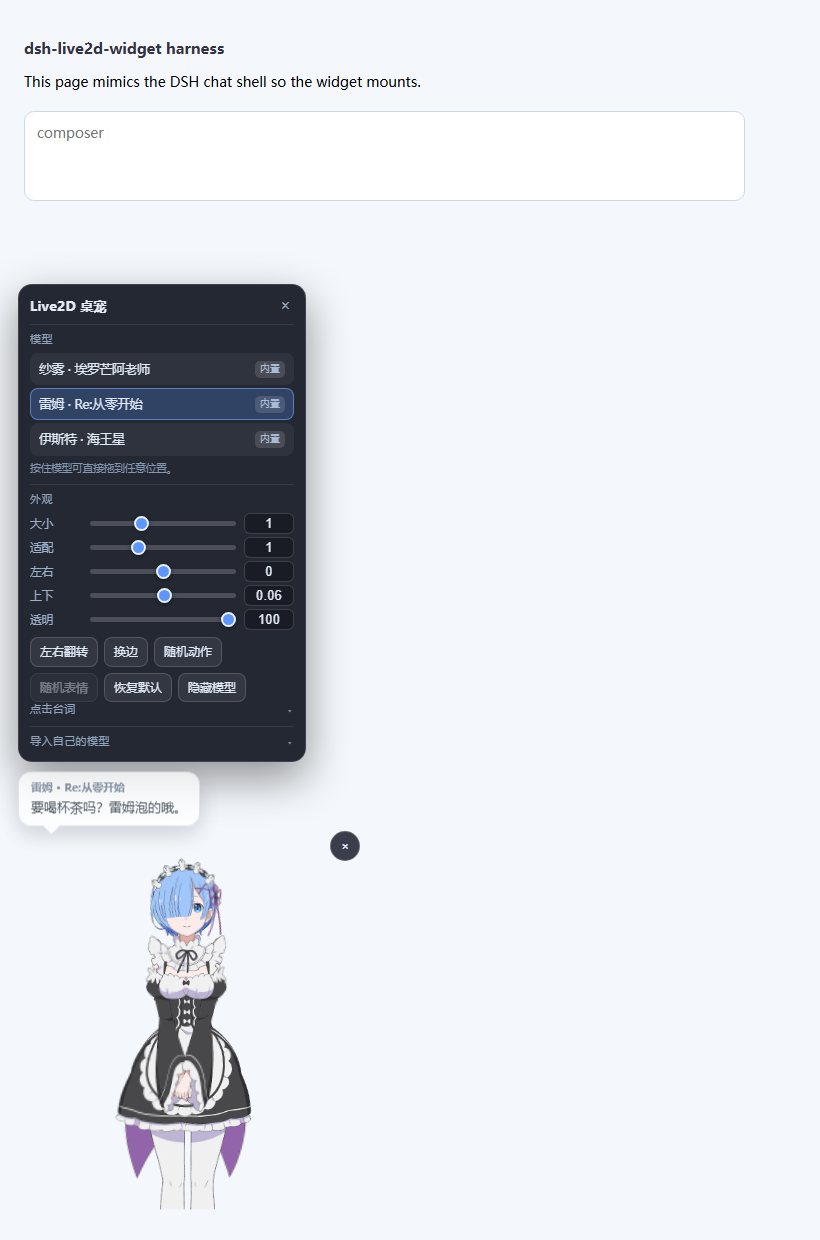
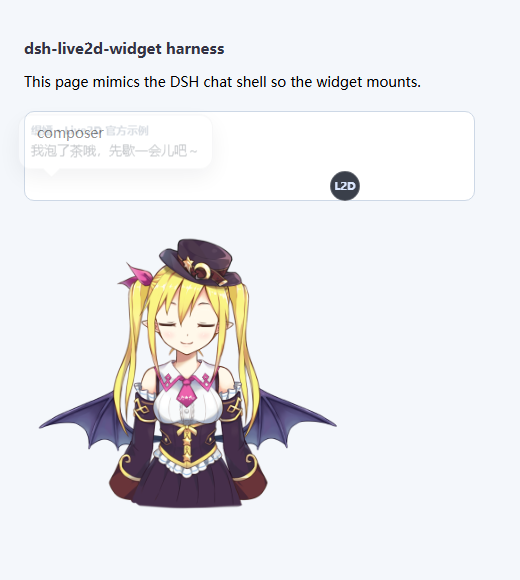
A Live2D desktop pet for the DeepSeek Harness Web UI: open DSH and a cute anime character is already standing in the corner of the chat view. Four characters ship in the box and switch with one click; click the model and she says something in character from a speech bubble (and you can rewrite every line); import your own models any time. Zero runtime dependencies, pure plugin mount — installing enables it, uninstalling leaves nothing behind.
Highlights
- Cute characters included — Sagiri, Rem, Histoire and Tia, spanning the Cubism 2 and Cubism 4 runtimes.
- Click to talk — clicking the model pops a line written for that character, with her name on the bubble. Every character's lines are editable (one per line, stored locally).
- Drag to place — hold the model and drag it anywhere on screen; it is remembered across restarts.
- Free switching — one click in the panel; each model keeps its own fit, position and lines.
- Import your own models — a
.zip, a model folder, or a path on this machine. Entry files are found by content, somodel.json,rem.jsonand arbitrary names all work. - Sane sizing — "大小" resizes the canvas, so the character grows proportionally and is never cropped; "适配" separately tunes how much of the canvas the model fills.
- Precise input — every value has both a slider and a field: drag it, type an exact number, or press and drag sideways on the number to scrub.
- Out of the way — sits in one corner by default, hides with
Ctrl+Shift+L, and lets clicks through to the chat UI. - Zero runtime dependencies — the Live2D runtime ships in the package as a single JS file (no CDN, no network), and unzipping is a dependency-free implementation too.
- Does not pollute DSH — the whole widget lives in a Shadow DOM, so neither DSH's stylesheet nor other plugins can touch it, and vice versa.
Preview
Quick start
Requires DeepSeek Harness (the dsh command) and
Node.js ^22.19 || >=24 (the same range DSH itself requires).
Pick any one of three install paths:
# 1) From GitHub (recommended: all 4 bundled characters come with it)
dsh plugin --profile web add github:xieluyang912/dsh-live2d-widget

# 3) From a local directory (development: pnpm makes a junction, so edits apply immediately)
dsh plugin --profile web add link:D:/Plugins/dsh-live2d-widget

# Uninstall
dsh plugin --profile web remove dsh-live2d-widget
dsh plugin proxies straight to pnpm (everything after --profile web is passed through), so any
specifier pnpm accepts works: github:, git+https:, a plain npm name, link:, a tarball.
The command writes the plugin into dsh.profile.bundles in
%USERPROFILE%\.dsh\profiles\web\package.json — no hand-editing of the profile patch required.
Nothing is built when installing from git or npm. The plugin is plain JavaScript with no build step and no
install/preparelifecycle script, so pnpm'sERR_PNPM_IGNORED_BUILDSnever applies and it works the moment it lands.
Changes need a reload, and the two halves reload differently.
- The browser half (
assets/live2d-widget.js,assets/vendor) is re-read from disk on every request — refresh the page.- The host half (
lib/index.js, the bundled model list and model files) is read into process memory at startup, so it needs adsh webrestart. DSH refuses to reload plugins while an agent is running (its plugin-market log saysrefused while agents are running), so either finish the current session or restart manually.To tell which half you are looking at: if the panel has "大小 / 适配 / 点击台词" but the model list is still the old one, the browser half is updated and the host half is stale — restart and it matches.
Usage
After opening DSH a character appears in the bottom-left corner. The round L2D button at her top-right opens the control panel.
| Section | What it does |
|---|---|
| Model | Click any entry to switch instantly. Entries marked 导入 are yours; × deletes them. |
| 大小 | Overall size (0.4× – 2.2×). This resizes the canvas, so the character grows with it and is never cropped. |
| 适配 | How much of the canvas the model fills (0.1 – 3.0). Mainly for imported models; the bundled ones are pre-calibrated, so 1 is right. |
| 左右 / 上下 | Fine position inside the canvas (−2 – 2). |
| 透明 | Overall opacity (15 – 100). |
| 左右翻转 / 换边 | Mirror, and swap between the bottom-left and bottom-right corners. |
| 随机动作 / 随机表情 | Poke the model on demand (greyed out when it has no motions or expressions). |
| 恢复默认 | Reset the current model's size, fit, position and appearance to the built-in defaults. |
| 隐藏模型 | Tuck it away; Ctrl+Shift+L brings it back. |
| 点击台词 | Collapsible: bubble toggle, dwell time, line editor. |
| 导入自己的模型 | Collapsible: the three import paths. |
Three ways to set a value
Every number can be set three ways, and all three stay in sync:
- Drag the slider — the obvious one.
- Type a number — into the field on the right; commit with Enter or by clicking away. Out-of-range values clamp to the limit, and unparsable text reverts to the value still in effect.
- Press and drag the number sideways — scrubbing (about 320px sweeps the whole range). If you press and release without moving, the field focuses so you can type instead.
Speech bubble
- Expand 点击台词 and tick 点击模型时说话; clicking the model then pops a random line.
- In the text box, one line per message. "保存台词" commits, "恢复默认台词" restores the character's built-in persona, "试说一句" previews immediately.
- 停留 controls how long the bubble stays up (2 – 20s).
- Lines are stored per model, so each character can have its own voice.
- Switching models also greets you with a line.
The shipped lines are written in character — Rem says 「雷姆,会一直相信你的。」, Sagiri says 「哥哥,你回来啦……」, Histoire says 「知识,就是力量哦。」.
Dragging and shortcuts
Hold the model and drag it wherever you like; it is remembered. A drag never also fires a line. Placing it near the top of the screen is fine — the panel shrinks itself so it stays on screen.
| Action | Effect |
|---|---|
| Drag the model | Move it (remembered) |
| Single click the model | Say a line |
Ctrl+Shift+L |
Show / hide the model |
| Click the L2D button | Open / close the control panel |
Importing your own models
The import section offers three paths; all of them strip the archive's or folder's single top-level directory automatically.
| Path | Best for |
|---|---|
| Choose a zip archive | The common case — model packs usually ship as zip |
| Choose a model folder | A model already unpacked on disk |
| Type a local directory | Large models: the plugin reads straight from disk instead of uploading through the browser |
The entry file is found by content: Cubism 3/4/5 is recognised by FileReferences.Moc, Cubism 2 by
a top-level model plus textures. So it can be called model.json, rem.json, chara-def.json or
anything else — no naming convention required. When a directory holds several valid entries (the same
character in several outfits, say), the bundled models name theirs explicitly, and an imported pack can
simply contain only the outfit you want.
Model assets belong to their original rights holders. Make sure you have the right to use whatever you import — many models forbid commercial use or redistribution. This plugin only provides the loading capability and ships none of your imported models.
Bundled characters
| Character | From | Cubism |
|---|---|---|
| Sagiri · Eromanga Sensei | Eromanga Sensei | 2 |
| Rem · Re:Zero | Re:ZERO -Starting Life in Another World- | 2 |
| Histoire · Neptunia | Hyperdimension Neptunia | 2 |
| Tia · Live2D official sample | Live2D official sample model | 2 |
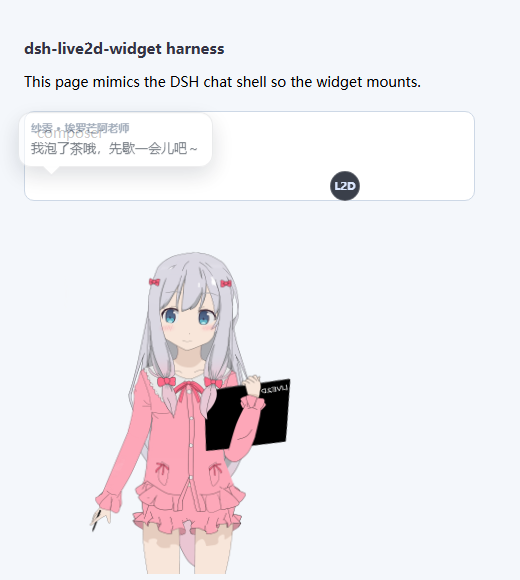
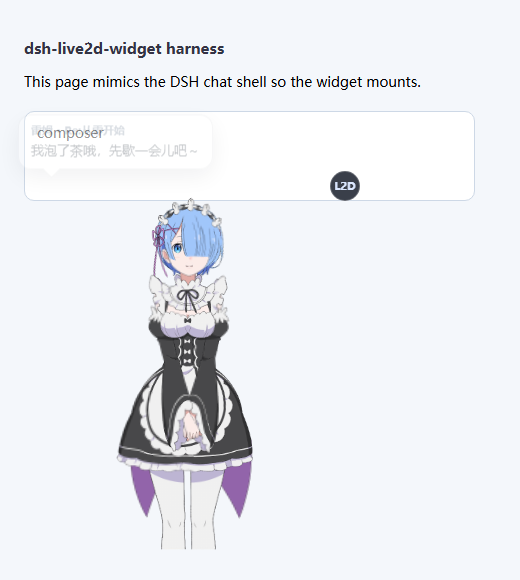
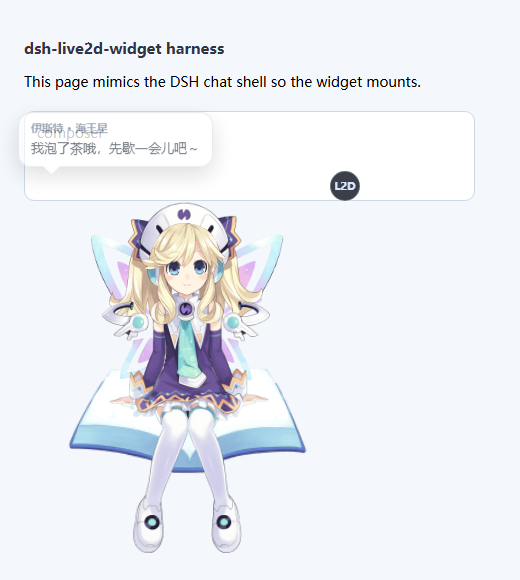
Model assets come from the public collection Eikanya/Live2d-model and remain the property of their respective rights holders; they are not covered by this plugin's MIT license (see LICENSE).
How it works
The plugin has a host half and a browser half:
DSH web app
  │  tapIndex injects <script defer src="/dsh-live2d/widget.js">
  ▼
browser half (Shadow DOM: canvas + speech bubble + control panel)
  ├─ GET  /dsh-live2d/runtime.js        Live2D runtime (vendored, self-contained)
  ├─ GET  /dsh-live2d/api/state         model list + settings + skipped models
  ├─ POST /dsh-live2d/api/settings      persist preferences
  ├─ POST /dsh-live2d/api/import-zip    raw zip upload
  ├─ POST /dsh-live2d/api/import-files  folder upload (base64)
  ├─ POST /dsh-live2d/api/import-path   read a local directory directly
  ├─ POST /dsh-live2d/api/delete        delete an imported model
  └─ GET  /dsh-live2d/model/<id>/<rel>  model files (prefix route + ETag)
  ▲
  │  every route first passes ctx.connection.requestRejection()
host half (lib/index.js, inside the DSH process)
- Host half registers routes with
ctx.webServer.registerand injects the script withctx.webServer.tapIndex. Model files are served by oneprefixroute whose paths go through..filtering plus arealpathcheck, so a symlink cannot escape the model directory either. Large textures use ETag +Cache-Control: immutable, so the browser fetches them once. A model whose entry file is 0 bytes (a truncated copy) is skipped explicitly and reported in/api/state'sskipped, rather than letting the runtime fail with an opaqueUnexpected end of JSON input. - Browser half lives entirely in a Shadow DOM, initialises only on the main chat view (below), and
uses
z-index: 90— above the chat content, below DSH's own popovers and dialogs.
Four traps worth knowing (all documented in the code)
- Initialise the runtime once; switch models with repeated
load().l2d'sdestroy()does not release the WebGL context, so callinginit()per switch leaks a context each time until the browser drops the oldest one and the model goes blank. - The widget must own the canvas's CSS size. The runtime's bootstrap helper freezes
style.width/heightonto the canvas the first time its computed size equals its attribute size; once frozen, the canvas stops following its container — which looks like "the size slider does nothing / the model is cropped". SoapplyStyles()writescanvas.style.width/heightevery time. - Size cannot come from scaling the model. The runtime first fits the model to the canvas and
scalemultiplies that fit, so anyscalepast the calibrated value only crops the character. Hence "大小" changes the canvas and "适配" changes the fill ratio. - Mount readiness must be observed, never assumed. DSH paints a "Loading plugins…" overlay into
#rootfirst, and the composer only appears once every plugin has loaded. So the widget watches with a MutationObserver (up to 5 minutes) instead of giving up after a few seconds — otherwise a slow cold start silently leaves you with no model.
Where the defaults come from
Live2D models have no canonical size: each author draws the character at an arbitrary scale inside its
own canvas, so one global default cannot make them all look right. tools/calibrate.html loads each
model in turn, reads the drawn pixels back, and iterates scale/position until the silhouette is
centred and fills the canvas height. The bundled defaults were measured that way (targeting 88% of the
height, leaving 12% of margin to absorb the silhouette wobble of the idle animation).
Files and settings
Everything lives under %USERPROFILE%\.dsh, so reinstalling the plugin keeps it:
| Path | Contents |
|---|---|
.dsh-live2d.json |
Active model, size, appearance, per-model fit and position, per-model custom lines, imported-model registry |
live2d-models/<id>/ |
The model files you imported |
Security boundary
- Every custom route first calls
ctx.connection.requestRejection(): forged Host/Origin (DNS-rebinding) and unauthenticated requests are refused, the same trust fence the official plugins use. - Model-file routes apply
..filtering plus arealpathcheck, so symlinks cannot escape either. - Import bounds file count, per-file size and total uncompressed size, to resist zip bombs.
- The plugin ships no sandbox: file, shell, sandbox and approval policy come entirely from the current DSH profile.
- The plugin makes no network calls: the runtime is vendored and models are read from local disk.
Known limitations
- All four bundled characters are Cubism 2; Cubism 3/4/5 (
*.model3.json) is supported by the runtime and reachable by importing. - Setting 适配 above 1 makes the model overflow the canvas, which crops it — that is what the control is for (enlarging a model that was authored tiny). Use 大小 to make everything bigger.
- The panel has to fit in the space above the model; when there is not enough (a large model or a short window) it automatically switches to overlaying the model instead.
- Hiding the model is visual only — the render loop keeps running. Hide it and close the page to stop it.
- Audio is muted: if an idle motion carries a sound effect, it plays at volume 0.
FAQ
The model vanished / I want it back — press Ctrl+Shift+L, or delete .dsh-live2d.json to return
to defaults.
Clicking the model says nothing — check the toggle in 点击台词. With an empty line box you get the placeholder line 「……」.
Import fails with "no Live2D model file found" — the archive has neither *.model3.json /
*.model.json nor any JSON containing model + textures (or FileReferences.Moc). Some packs ship
only textures and a .moc3 with no model description; such a pack is incomplete and no loader can use it.
Import fails with "unsupported compression" / "this zip is encrypted" — use an unencrypted plain zip. The bundled reader supports store and deflate; not encryption or multi-volume archives.
The model renders blank / it reports an empty entry file — the file was truncated to 0 bytes during
a copy. Copy the model again; the plugin lists such models under skipped with the reason.
Some panel sections are missing — 点击台词 and 导入自己的模型 start collapsed; click their headers.
Development
# Standalone dev server: mounts the plugin on a stub ctx and serves it over plain HTTP
# (no DSH auth, which makes debugging easy)
node tools/harness.mjs 8899
The harness points DSH_HOME at its own scratch directory
($env:TEMP\dsh-live2d-harness-home) so it never reads or overwrites the settings of a live DSH;
override with DSH_HARNESS_HOME if you want otherwise.
| URL | Purpose |
|---|---|
http://127.0.0.1:8899/ |
A page mimicking the chat shell, so the widget mounts |
?panel=1 |
Open the control panel automatically |
?speak=1 |
Keep a speech bubble up (handy for screenshots) |
?ce=1 |
Use a contenteditable composer (DSH's real shape) |
?boot=1 |
Show a 9s boot overlay first, then the composer (exercises the mount gate) |
?diag=1 |
Quantitative self-check: canvas size, real drawn size, drag, bubble, numeric controls |
/tools/calibrate.html |
Measure default scale / position for new models |
Editing assets/live2d-widget.js only needs a page refresh; editing lib/index.js needs a plugin reload.
Asset licensing notice: three of the four bundled characters (Sagiri, Rem, Histoire) are third-party assets extracted from commercial games, with no licence permitting redistribution; Tia is a Live2D official sample model whose redistribution terms I could not verify. Publishing them publicly carries a real risk of a DMCA notice or an npm takedown, borne by the publisher. Part 3 of LICENSE records the provenance and rights holders. To reduce the risk, delete
assets/models/<id>/and remove the matching entry fromBUILTIN_METAinlib/index.js— the plugin runs fine with no bundled models (it reports "no models available", and importing still works).
Layout
dsh-live2d-widget/
├── cordis.patch.yml          # bundle mount declaration
├── package.json              # dsh.bundle.patch points at cordis.patch.yml
├── lib/
│   ├── index.js              # host half: routes, model registry, import, settings
│   └── zip.mjs               # dependency-free zip reader (store + deflate + Zip64 + GBK names)
├── assets/
│   ├── live2d-widget.js      # browser half: render + bubble + panel + import UI
│   ├── vendor/l2d.min.js     # Live2D runtime (Cubism 2 & 6 inside, one self-contained file)
│   └── models/<id>/          # bundled models
├── docs/                     # screenshots and README assets
└── tools/                    # development only, not published
    ├── harness.mjs
    └── calibrate.html
Credits
- Live2D runtime:
l2d(MIT), a wrapper over the official Live2D Cubism SDK, vendored asassets/vendor/l2d.min.jswith its LICENSE and README kept alongside. - Widget shape and injection approach were informed by hacxy/l2d-widget and MeteorNOX/DeepSeek-Balance-Whale-Widget.
- Model assets come from Eikanya/Live2d-model and remain the property of their respective rights holders.
Use of the Cubism SDK is governed by the Live2D Proprietary Software License Agreement. Commercial use may require a separate license from Live2D Inc.
License
MIT for the plugin's own code. Bundled models and the Cubism SDK are covered in LICENSE and the Credits section above.
No comments yet. Be the first to write one.