dsh-remote-panel
中文 | English
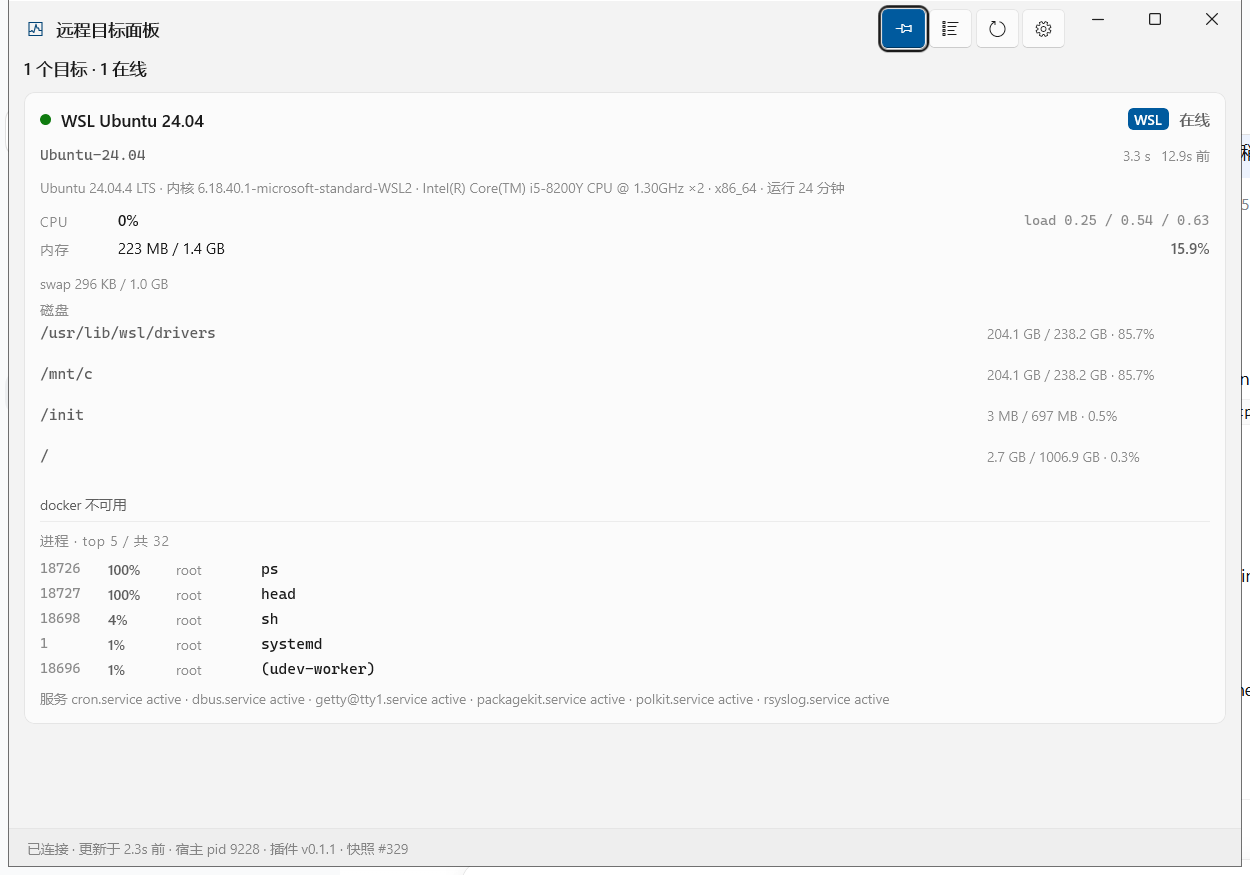
一个 DSH(DeepSeek Harness)插件:探测本地 WSL 发行版和通过 SSH 连接的远程机器——CPU、内存、磁盘、GPU、Docker、进程和 systemd 服务——把结果写成一份原子更新的 JSON 快照,并以四种方式呈现这份快照。
| 界面 | 使用者 | 形态 |
|---|---|---|
remote_* agent 工具 |
模型 | 结构化 JSON + 一行结论 |
/wsx ... 会话命令 |
人 | 对齐的纯文本表格 |
| WinUI 3 桌面面板 | 人 | 置顶的原生窗口,实时 |
| MCP stdio 服务器 | 任意 MCP 客户端 | 与工具同一份实现 |
另外还有一个 GUI 内的网页面板(DSH 侧边栏里的 "remote targets" 图标),在浏览器里渲染同一份快照。
┌─ Remote targets ───────────────── [Probe now] [Open panel] ── ─ □ ✕ ┐
│ 3 targets · 2 online · 1 offline                                     │
│                                                                      │
│ ┌──────────────────────────────────────────────────────────────────┐ │
│ │ ● WSL Ubuntu 24.04    WSL  127.0.0.1                   82ms      │ │
│ │   CPU 6.5%   MEM 16.3% · 229M/1.4G   load 1.12 .26 .09           │ │
│ │   /            2.8% · 1.0T free                                  │ │
│ │   /mnt/c      86.7% · 33.8G free                                 │ │
│ │   probed 2s ago                                                  │ │
│ └──────────────────────────────────────────────────────────────────┘ │
│ ┌──────────────────────────────────────────────────────────────────┐ │
│ │ ✕ lab-gpu-01         SSH  192.168.1.50                           │ │
│ │   connect timeout: waited 20s for 192.168.1.50                   │ │
│ │   (is sshd reachable? is key auth working?)                      │ │
│ │   probed 12s ago · 3 consecutive failures                        │ │
│ └──────────────────────────────────────────────────────────────────┘ │
└──────────────────────────────────────────────────────────────────────┘
功能概要
- 默认只读探测,写操作只需一个开关。 每个写操作(docker/service 启停、文件上传)都由
allowMutations把关;kill另有独立的confirm: true门禁,并拒绝 PID 1。 - 自身不持有任何凭据。 它调用系统的 OpenSSH 客户端,所以你现有的
~/.ssh/config、ssh-agent 和known_hosts直接可用。 - 面板侧不轮询。 快照就是一个文件,原子写入。
- 零运行时 npm 依赖 —— 只用 Node 内置模块。
- 自带预编译面板。
dist/是一份自包含的 .NET 8 publish:目标机器不需要 .NET 运行时、不需要 Windows App Runtime,也不需要 MSIX。 - 附带 Skills。 两份 agent 操作手册:使用方式,以及分层排错。
截图
原生 WinUI 3 面板,显示一个在线的 WSL 目标和一个连接失败的 SSH 目标:
窄宽度下:
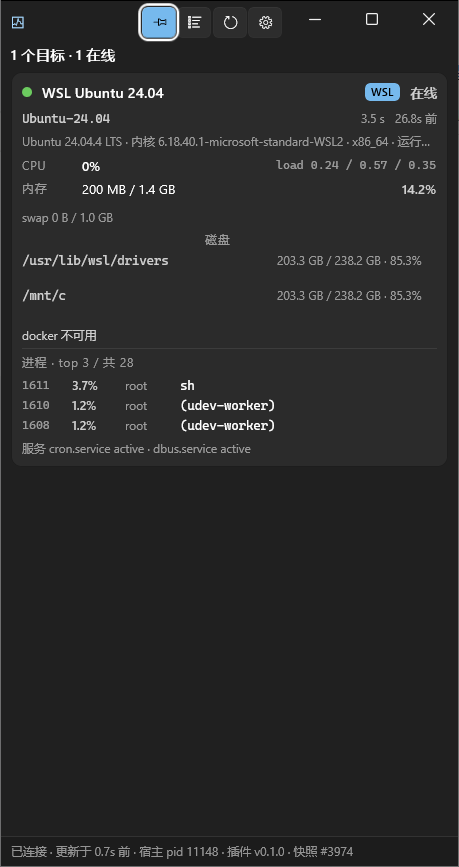
窄宽度下已知的布局问题。 这张窄截图是诚实的,不是美化的:窗口被压窄时,指标行会以别扭的方式折行,过长的错误字符串会溢出卡片而不是干净地省略,每个目标的标题也可能挤到状态徽标上。面板在这些宽度下能用,但看得出没打磨完。目前也没有紧凑的“单个数字”模式。修这些问题在待办列表上;请把这两张截图当作当前状态,而不是预期状态。
环境要求
| 要求 | |
|---|---|
| 操作系统(面板) | Windows 10 1809(build 17763)或更新 —— 这是 WinUI 3 的要求 |
| 操作系统(其余部分) | 任何能跑 Node 的平台:/wsx、工具、MCP 和 Skills 都与平台无关 |
| DSH | 带插件系统的版本(bundle 机制 + dsh.client 客户端模块) |
| 远程目标 | 任何运行 sshd 的类 Unix 主机(Linux / macOS / WSL) |
| 使用它 | 什么都不用装 —— dist/ 是自包含的;不需要 .NET 运行时,也不需要 Windows App Runtime |
| 开发它 | .NET 8 SDK(构建窗口)+ Node.js 20(跑测试);不需要 Visual Studio |
非 Windows 主机: 插件的 host 那半边能加载,命令和工具都能用,但面板是 WinUI 3 程序,所以没有浮窗。网页面板正常工作。
架构
| 部分 | 位置 | 职责 |
|---|---|---|
| Host 插件 | lib/index.js |
接线、调度、采集、写快照、注册命令/工具/路由 |
| 传输 | lib/ssh.js |
两条通道:系统 OpenSSH(复用 ~/.ssh/config 和 agent)与 wsl.exe |
| 采集 | scripts/probe.sh |
一份自包含的只读脚本,喂给目标的 POSIX shell |
| 解析 | lib/probe.js |
把分节文本转成结构化指标 |
| 调度 | lib/manager.js |
并发上限、离线退避、冷启动错峰、心跳写入 |
| 桌面面板 | app/ |
WinUI 3(C#/.NET 8)程序;读取快照并渲染 |
| 网页面板 | lib/client.js |
DSH 侧边栏图标 + 中栏实时面板 + "open desktop panel" 按钮 |
| MCP | bin/mcp-server.js |
零依赖的 MCP stdio 服务器 |
| Skills | skills/ |
两份给 agent 的操作手册 |
Host 和窗口之间通过一个状态文件通信,而不是 HTTP:
$DSH_HOME/remote-panel/state.json # %USERPROFILE%\.dsh\remote-panel\state.json by default
它用临时文件 + rename 写入,所以读取方永远不会看到半份 JSON 文档。旁边 host 还会写 config.resolved.json(归一化后的配置),独立运行的 MCP 服务器因此能看到与 DSH 完全相同的目标列表。
为什么用状态文件而不是 HTTP
DSH 的 web 服务器有一道信任栅栏:非 loopback 的 Host 头和未认证请求会被直接拒绝。插件确实可以注册路由,但一个外部的原生进程仍然得自己解决认证和端口发现问题。状态文件不需要认证、不需要端口,同一个用户就能读,而且天然支持两种启动顺序——“窗口在 host 之后启动”和“host 重启后窗口重连”。
例外是网页面板:它活在浏览器里,那本来就是同源环境,所以它使用 host 注册的
/dsh-remote-panel/*路由。这些路由会开真实的 SSH 连接并返回机器信息,所以 host 在它们前面放了一道 loopback 信任栅栏:逐段校验 Host,拒绝Sec-Fetch-Site: cross-site,只要带了Origin就必须同源,不是 POST 的一律 405,任何异常都按失败关闭(fail closed)。
安装
首次安装的分步指南见 INSTALL.md。
简版:这是一个标准的 DSH bundle 包 —— package.json 的 dsh.bundle.patch 指向 cordis.patch.yml,由它把 host 插件、skills 和 MCP 服务器插入 profile 的配置树。
# Plugin Manager: add a package, "link:" + the absolute path of this folder
link:C:\path\to\dsh-remote-panel

# or the command line
dsh plugin --profile desktop add link:C:\path\to\dsh-remote-panel   # local dev: edits apply without reinstalling
dsh plugin --profile desktop add C:\path\to\dsh-remote-panel        # copy it into the profile
bundle 变更要生效,必须重启 DSH。
配置目标
目标写在 profile 的 cordis.patch.yml 里,位于 dsh-remote-panel 那一行的 config.targets 下。改完重启 DSH。
- id: dsh-remote-panel
  name: dsh-remote-panel
  config:
    targets:
      # A local WSL distribution
      - kind: wsl
        name: WSL Ubuntu 24.04
        distro: Ubuntu-24.04
        channel: auto          # auto = try SSH first, fall back to wsl.exe
        user: root             # optional: the default user for a WSL target is "root"
        tags: [local]
        services: [ssh, docker, cron]

      # A remote machine (IP or hostname)
      - kind: ssh
        name: lab-gpu-01
        host: 192.168.1.50
        port: 22
        user: ubuntu
        identityFile: ~/.ssh/id_ed25519
        tags: [lab, gpu]

      # Or just use a Host alias from ~/.ssh/config
      - kind: ssh
        name: prod-web-1
        host: prod-web-1
        user: deploy
目标可以用 id、name、主机名,或其中任意一个的唯一片段来选中。省略 id 时,它由 kind + user + host 推导出来——例如 ssh-ubuntu-192.168.1.50。
配置项参考
| 选项 | 默认值 | 说明 |
|---|---|---|
enabled |
true |
false 会停止所有探测。插件仍然加载,命令/工具/面板仍然可用,但每个目标都停在 unknown。 |
probeIntervalMs |
15000 |
探测间隔(钳制在 3000–3600000)。 |
timeoutMs |
60000 |
全局单次探测超时(钳制在 3000–600000)。WSL 冷启动要花 18–88s —— 如果你会盯着 WSL,别调低这个值。 |
targets[].timeoutMs |
继承全局值 | 单目标覆盖(同样是 3000–600000 的钳制)。只收紧某一个目标——比如一直温热的 WSL 发行版,或纯 SSH 部署。 |
connectTimeoutMs |
10000 |
建连超时(ssh 的 ConnectTimeout)。真正能逮住“机器确实挂了”的就是它,所以全局那 60s 永远不会让你白等。 |
probeOnStart |
true |
插件启动时探测一次(错峰进行)。 |
maxConcurrentProbes |
4 |
同时探测多少个目标(钳制在 1–32)。 |
allowMutations |
true |
写操作总开关;false 即保持只读。 |
collectDocker |
true |
采集开关——关掉能减轻目标端负载。 |
collectProcesses |
true |
|
collectServices |
true |
|
collectGpu |
true |
|
historyLength |
40 |
每个目标保留多少条历史样本用于趋势线(钳制在 0–600)。一次失败仍会推入一个 latencyMs=0 的断点。 |
flushIntervalMs |
500 |
调度器 tick 周期(钳制在 100–60000)。 |
heartbeatMs |
2000 |
什么都没变时多久重写一次快照——面板靠它区分“没变化”和“host 没了”(钳制在 500–300000)。 |
autoLaunch |
true |
DSH 启动时打开面板窗口。 |
appPath |
'' |
面板 exe 的显式路径;留空表示“在包内查找”。 |
stateFile |
$DSH_HOME/remote-panel/state.json |
快照写入的位置。 |
targetsFile |
— | 从一个 JSON 文件读取额外的目标数组。 |
ssh.executable |
自动检测 | 显式指定 ssh.exe。 |
ssh.user |
'' |
kind: ssh 目标的默认用户。 |
ssh.port |
22 |
kind: ssh 目标的默认端口。 |
ssh.identityFile |
'' |
默认身份文件。 |
ssh.commonFlags |
[] |
追加到每次 ssh 调用后的额外 argv。 |
ssh.controlMaster |
true |
连接复用。热探测从 ~300ms 降到 ~80ms。 |
ssh.controlPersistSec |
60 |
复用的 master 保持存活多久(钳制在 0–3600)。 |
wsl.executable |
wsl.exe |
|
wsl.defaultUser |
'' |
目标没有 user 时使用。 |
单目标选项:kind(wsl | ssh)、id、name、distro、host、port、user、channel(auto | ssh | wsl)、identityFile、sshConfigHost、strictHostKeyChecking、timeoutMs、tags、enabled、services。kind: wsl 目标还可以设 sshPort(默认 2222)——那是通过 SSH 访问该 WSL 目标时使用的端口,这类目标的 host 侧永远是 127.0.0.1。
为什么
timeoutMs默认是 60000。 最后一个wsl.exe会话结束约一分钟后,WSL 会把整个发行版拆掉,所以冷启动的第一次探测要花 18–88s。早先 20s 的默认值让健康的 WSL 目标每隔几轮就抖成 “offline”——数据是对的,只是还没到。真正的浪费(等一台根本连不上的机器)改由connectTimeoutMs吸收,所以 60s 只作用于“连得上但很慢”的目标——而这正是 WSL 冷启动的样子。已经温热的部署可以用targets[].timeoutMs收紧单个目标。
通道,以及 WSL 的两个坑
kind: wsl 目标有两条到达路径;由 channel 决定:
channel |
行为 | 适用场景 |
|---|---|---|
auto(默认) |
先试 SSH,失败则回落到 wsl.exe |
大多数情况 |
ssh |
只用 SSH | 发行版里跑了 sshd |
wsl |
只用 wsl.exe |
没有 sshd,且当前会话拥有完整访问权限 |
坑 1:受限沙箱下 wsl.exe 会被拒绝
DSH 的 Windows 沙箱把子进程降到 Low 完整性级别,而 WSL 服务拒绝这类调用者:
| 方式 | 受限沙箱下 |
|---|---|
wsl.exe -l -v、wsl.exe -d ... -- cmd |
Wsl/E_ACCESSDENIED |
\\wsl.localhost\Ubuntu-24.04\... |
拒绝访问 |
| SSH 到 WSL 内部的 sshd | 可用,受限和完整访问下都可用 |
这就是 channel: auto 优先走 SSH 的原因。插件把这个特定的失败当成一种可诊断的状态,而不是泛泛的错误:一旦看到 Wsl/E_ACCESSDENIED,它会明说,并指向 SSH 路线。wsl-link skill 会在发行版里部署一个 sshd(监听 127.0.0.1:2222,仅 loopback,仅公钥认证)。
坑 2:WSL 冷启动要花 18–88 秒
最后一个 wsl.exe 会话结束约一分钟后,WSL 会把整个发行版拆掉——即使 SSH 正在用它。所以空闲期之后的第一次调用要付冷启动的代价,紧接着的那次不到一秒。这不是故障。
要么接受它(全局默认 timeoutMs: 60000 已经覆盖了),要么在 %USERPROFILE%\.wslconfig 的 [wsl2] 下加 vmIdleTimeout=3600000 把它消掉——代价是发行版会长期占着约 1.4 GB 内存。
当一次探测耗时 10 秒或更多,面板会把那张卡片标为冷启动,这样第一次采样慢就不会被误当成链路坏了。
认证:只能用密钥或 agent
插件总是带上 ssh -o BatchMode=yes(以及 NumberOfPasswordPrompts=0)。因此它永远不可能弹密码提示——在没有 TTY 的子进程里,密码提示只会一直挂到探测超时。如果某个目标一直 offline,先检查免密登录:
ssh -o BatchMode=yes -o ConnectTimeout=10 -o NumberOfPasswordPrompts=0 -- user@192.168.1.50 'echo OK'
用法
更深入的参考资料(与本 README 一同编写):
- docs/commands.md —— 每个
/wsx子命令及其示例输出 - docs/skills.md —— 两个 Skills 教了 agent 什么
- docs/mcp.md —— 运行和接入 MCP 服务器
/wsx ... 命令
/wsx                    status overview of local WSL and remote machines
/wsx status [target]    status overview (optionally one target)
/wsx list               list all configured targets and their channel
/wsx probe [target]     probe now (all targets when none is given)
/wsx docker [target]    list containers
/wsx services [target]  list key service states
/wsx ps [target] [n]    list processes by CPU
/wsx exec <target> <cmd> run a command on the target
/wsx panel              show / raise the desktop panel window
/wsx open               open the plugin data directory and the state file
/wsx help               the command list above
/wsx list 还会打印一行工具注册路径,说明这些工具是通过官方的 defineTool 助手注册的(附带额外的 schema 校验),还是回落到裸 JSON Schema。两者都能用。
在开发这个插件的机器上,跑的是回落(
raw)路径,原因值得记下来:@deepseek-ai/*这些包只存在于app.asar内部,没有被解包到磁盘,所以第三方插件的 ESMimport('@deepseek-ai/dsh-tools')在 Node 里解析不了(Cannot find package '@deepseek-ai/dsh-tools')。于是插件用
projectParameters()把自己的参数方言翻译成标准 JSON Schema,再走ctx.tools.register的 raw 路径注册——这条路径只用 Node 内置能力,因此永远可用。那行注册路径会如实报告正在走哪条路;看到raw不是故障。 两条路径的行为、参数校验和安全门禁完全一致。
Agent 工具
七个 remote_* 工具,与 MCP 服务器共用同一份实现和同一套门禁:
| 工具 | 用途 |
|---|---|
remote_status |
目标总览;refresh: true 立即重新探测 |
remote_exec |
在目标上执行命令,返回 stdout/stderr/退出码 |
remote_files |
list / read / upload / download |
remote_docker |
ps / logs / start / stop / restart / pause / unpause |
remote_services |
status / start / stop / restart / reload |
remote_processes |
list(按 cpu/mem)和 kill |
remote_panel |
显示 WinUI 3 面板窗口 |
MCP
cordis.patch.yml 里已经有一行,把这套相同的能力通过 MCP stdio 暴露出去:
- id: mcp-remote-panel
  name: '@deepseek-ai/dsh-mcp-client'
  config:
    serverName: remote_panel
    transport: stdio
    command: !!js process.execPath
    args: !!js "process.env.DSH_PROFILE_DIR ? [process.env.DSH_PROFILE_DIR + '/node_modules/dsh-remote-panel/bin/mcp-server.js'] : []"
这些工具会以 mcp__remote_panel__<tool name> 的形式出现。不想要 MCP 就整块删掉——不影响别的任何东西。(真实文件里还设了 cwd、failOnStartupError: false 和 toolCallTimeoutMs;上面这段摘录裁到只剩理解接线方式所需的部分。)
不用 DSH,手动验证 MCP 服务器:
$env:DSH_WSX_CONFIG = '{"config":{"targets":[{"kind":"wsl","distro":"Ubuntu-24.04","channel":"wsl","user":"root"}]}}'
'{"jsonrpc":"2.0","id":1,"method":"tools/list"}' | node .\bin\mcp-server.js
stdout 上只能有协议 JSON(按换行分隔);所有诊断信息都走 stderr。 给那个文件加日志时请写 stderr——stdout 上多一个字符就会破坏协议。
目标列表来自 host 插件写出的 config.resolved.json,所以 MCP 侧和 DSH 侧看到的目标永远一致;配置合并逻辑没有在那里重新实现一遍。
Skills
两个 skill,装好之后 agent 可以加载:
| Skill | 用途 |
|---|---|
remote-panel |
什么时候该用哪个界面、典型工具用法、WSL 的两条通道和冷启动 |
remote-panel-troubleshooting |
分层诊断:配置 → 链路 → 采集 → 状态文件 → MCP → 被拒的写操作 |
它们由 install.ps1(以及 INSTALL.md 里的手动步骤)装进 DSH 默认的 skill 扫描根目录 $DSH_HOME/skills/,而不是通过 bundle patch。cordis.patch.yml 里的长注释解释了为什么 bundle patch 在这里无法启用 skill-filesystem(web-app 层禁用了那一行,而非 insert 的 patch 只赋值它携带的键,因此永远清不掉继承来的 disabled)。对 skill 内容的修改实时生效——那个目录被监视着;代码和配置的改动需要重启。
构建面板
.\build.ps1              # Release build (for development)
.\build.ps1 -Pack        # publish into dist\ (the shipping location)
.\build.ps1 -Clean       # clear bin/obj/dist
你不需要 Visual Studio。 关键在于 csproj 里的 EnableMsixTooling=true:它决定用哪套 PRI 工具链。设成 false 会回落到 MrtCore.PriGen.targets,它依赖 Microsoft.Build.Packaging.Pri.Tasks.dll——一个只在 Visual Studio 里才有的程序集——于是在干净的 .NET SDK 上必然以 MSB4062: ... ExpandPriContent 失败。设成 true 时,改用 Windows App SDK NuGet 包内随附的独立工具链。打包本身则由 WindowsPackageType=None 关掉。
dist/ 是一份自包含发布,带着完整的 .NET 和 Windows App SDK 运行时(视剪裁情况约 163 MB / 约 324 个文件)。换来的是:目标机器不需要 .NET 运行时、不需要 Windows App Runtime,也不需要 MSIX 注册——拷过去就能跑。
build.ps1 -Pack 还会剪掉 .pdb 文件和未使用的本地化 satellite 目录,然后跑一次无头自检(test/run-checks.ps1,用面板的 --dump-status)来确认发布出来的 exe 真的能启动,而不只是躺在磁盘上。
签名(要清楚它做了什么、没做什么)
发布出来的 exe 是未签名的,所以第一次启动时 Windows 会弹一个“未知发布者——你确定要运行这个软件吗?”的安全警告。build.ps1 -Pack 会在发布之后给它签名;你也可以单独运行:
.\sign-panel.ps1              # create/reuse a code-signing certificate, trust it, sign the exe
.\sign-panel.ps1 -Uninstall   # revoke: remove the signature and the certificate
它做四件事,而且只写当前用户的 HKCU 存储——不碰机器级证书存储,也不需要管理员权限:
- 在
CurrentUser\My里创建(或复用)一张自签名的代码签名证书; - 把它的公钥加进
CurrentUser\Root和CurrentUser\TrustedPublisher; - 用它给
dist\WsxPanel.exe签名(SHA-256); - 校验签名。
诚实的局限。
- 自签名并不能可靠地去掉“未知发布者”警告。 在常见情况下,它能在本机为本用户去掉警告,但它不是真实信任链的替代品;只有商业代码签名证书才能可靠地为他人去掉这个警告,也只有它才能产生 Windows 信任的发布者名称。
- 把证书放进“受信任的根”意味着这个用户信任由该证书签名的任何东西。这是自签名固有的性质,不是脚本的疏忽。
-Uninstall会撤销它(签名字节仍留在 exe 里,但失去信任链,等同于未签名)。- 它只对本机的当前用户有效。把
dist/拷到另一台机器,警告就会回来。- 重新构建会覆盖 exe,从而使签名失效,所以签名必须是构建的最后一步——这正是
build.ps1 -Pack已经采用的顺序。
测试
node test\run-all.mjs # or: node test\run-all.mjs Ubuntu-22.04
五个套件,在一台有可用本地 WSL 发行版的 Windows 主机上测得共 139 项检查:
| 套件 | 需要 WSL | 覆盖内容 | 检查数 |
|---|---|---|---|
unit.test.mjs |
否 | 命令注入面、配置归一化、探测解析(含 CPU 公式)、调度(心跳/错峰/门禁)、目标选择、schema 方言投影、ssh/scp argv 构造、原子写入 | 69 |
client.test.mjs |
否 | 浏览器那半边的契约:模块 id、slot 配对、主题 token、路由 | 10 |
lossless.test.mjs |
否 | remote_* 的返回值必须是无损 JSON——一个 undefined 就会让 DSH 拒绝整个调用 |
10 |
smoke.test.mjs |
是 | 真实路径 buildProbeCommand → runRemote → parseProbeOutput,外加只读的目录列举/文件读取和一次目标级超时 |
26 |
mcp.test.mjs |
是 | MCP 协议:initialize / tools/list / tools/call / 错误码 / 从垃圾输入中恢复 | 24 |
三个离线套件在任何地方都能跑。另外两个会驱动一个真实的发行版:它们用内联配置跑通协议,然后对活的目标调用工具,所以需要一个可用的本地 WSL 发行版。如果没有发行版响应,run-all.mjs 会把那些套件报成 FAIL 而不是跳过,这样汇总行反映的是现实,而不是悄悄通过。
任何套件也可以单独运行:
node --test test\unit.test.mjs
node --test test\client.test.mjs
node --test test\lossless.test.mjs
node test\smoke.test.mjs Ubuntu-24.04
node test\mcp.test.mjs Ubuntu-24.04
如果你
PATH上的node不是 DSH 用的那个,就显式使用那个解释器——先跑node --version确认你在 Node 20 或更新版本上。
run-all.mjs 覆盖 Node 那半边。面板本身由两个 PowerShell 自检覆盖,两者都需要 Windows 桌面会话(它们不属于 run-all.mjs):
pwsh -File .\test\run-checks.ps1 -Exe .\dist\WsxPanel.exe   # headless: asserts --dump-status output
pwsh -File .\test\gui-smoke.ps1 -Exe .\dist\WsxPanel.exe -Shot .\docs\panel-default.png
run-checks.ps1 生成一份形状真实的状态文件,并断言窗口会显示的那行状态(它与窗口共用 reader 和 formatter,所以这不是一个仿制品)。gui-smoke.ps1 真正启动窗口,断言它活着且拥有真实的主窗口句柄,可选地截图,并打印新增的日志行。build.ps1 -Pack 在发布之后会自动运行 run-checks.ps1。
目录结构
dsh-remote-panel/
├── package.json            bundle manifest (dsh.bundle.patch → cordis.patch.yml)
├── cordis.patch.yml        the bundle patch itself (host plugin row, MCP row, rationale)
├── install.ps1             install/uninstall helper (also copies the skills)
├── build.ps1               build/publish the WinUI 3 panel
├── sign-panel.ps1          self-sign (and revoke) the panel exe
├── release.ps1             maintainer-only: privacy scan, zip + tgz, SHA256 (not shipped)
├── README.md               this file
├── INSTALL.md              first-time install guide
├── CHANGELOG.md            version history
├── LICENSE                 MIT + third-party notices for the bundled runtimes
├── .gitignore              build output, runtime state, packaging artifacts
├── lib/                    host plugin: index, config, manager, state, ssh, probe,
│                           ops, remote-ops, tools, commands, client, panel, format, util
├── bin/mcp-server.js       zero-dependency MCP stdio server
├── scripts/probe.sh        the read-only collection script sent to the target
├── app/                    WinUI 3 (C#/.NET 8) panel sources
├── dist/                   self-contained panel publish (shipping location)
├── skills/                 the two agent Skills
├── locale/                 panel title/description strings (en, zh)
├── docs/                   screenshots, the snapshot JSON Schema, reference docs
└── test/                   the five Node suites plus the PowerShell panel self-checks
预编译的发布归档为用户做了裁剪:它包含 lib/、bin/、scripts/、skills/、dist/、docs/、locale/、各个 manifest、三个 PowerShell 脚本(install.ps1、build.ps1、sign-panel.ps1)以及文档——但不含 app/ 源码、test/ 和 release.ps1。因此要跑测试需要仓库,而不是发布归档。
已知限制
- 只支持类 Unix 目标。 采集脚本是 POSIX sh,依赖
/proc、df和ps。不支持 Windows 目标(WinRM,或 SSH 到 Windows)。 - 只支持 NVIDIA GPU(通过
nvidia-smi)。 - 对同一目标的并发写没有保护。 两个调用方同时重启同一个容器,插件不会把它们串行化。
remote_exec不在allowMutations的覆盖范围内。 它接收的是任意命令,插件无法判断那条命令是否只读。责任在调用方。- scp 不可用时,文件传输回落到内联 base64,上限 8 MB。 更大的文件会被直接拒绝,而不是截断写入。在目标上装一个
sftp-server就能传输任意大小的文件。 - 有歧义的目标选择器一律拒绝,绝不猜测:当
prod匹配到两台机器时,命令和工具都会要求更具体的指定。 - 面板只做展示。 你不能从窗口里启停任何东西——那要走命令或工具。
- 桌面面板跟随系统的浅色/深色设置,而不是 DSH web UI 自己的主题。
- 窄窗口宽度下明显没打磨好(见截图)。
- 桌面面板只存在于 Windows(WinUI 3 要求 Windows 10 1809+)。
排错
从 /wsx list 开始(它会报告工具注册路径和任何配置问题),然后按 skills/remote-panel-troubleshooting/SKILL.md 走一遍——它是逐层写的,所以能把“连不上”定位到链条上具体的一环。最常见的三种情况:
| 症状 | 首先怀疑 |
|---|---|
某个目标一直是 offline |
没有配置免密登录(插件从不弹密码,所以密码认证和超时无法区分) |
| 某个 WSL 目标偶尔超时 | 冷启动(看 latencyMs:第一次大、之后小,就正是它) |
| 面板一片空白 | dist/WsxPanel.exe 从来没构建过;/wsx panel 会明确说明 |
INSTALL.md 专门列出了首次运行时的失败情况。
许可
本插件采用 MIT 许可 —— 见 LICENSE。package.json 声明 "license": "MIT",两者一致。
重新分发之前有一点值得一读:dist/ 里预编译的面板是一份自包含的 .NET 8 publish,因此它打包了上面那份 MIT 许可不覆盖的运行时组件——.NET 运行时(MIT,© .NET Foundation and Contributors)、Windows App SDK / WinUI 3(Microsoft Software License Terms),以及 Microsoft.Windows.SDK.NET.dll(MIT,© Microsoft Corporation)。LICENSE 在第三方声明(third-party notices)一节里列出了这些。如果你把 dist/ 连同自己的作品一起分发,请一并带上这些声明;从源码重新构建(build.ps1 -Pack)会复现同一套组件。
dsh-remote-panel (English)
A DSH (DeepSeek Harness) plugin that probes local WSL distributions and remote machines over SSH — CPU, memory, disk, GPU, Docker, processes and systemd services — writes the result into one atomic JSON snapshot, and surfaces that snapshot in four ways.
| Surface | Consumer | Shape |
|---|---|---|
remote_* agent tools |
the model | structured JSON + a one-line verdict |
/wsx ... session commands |
humans | aligned plain-text tables |
| WinUI 3 desktop panel | humans | always-on-top native window, live |
| MCP stdio server | any MCP client | the same implementation as the tools |
Plus an in-GUI web panel (the "remote targets" icon in the DSH sidebar) that renders the same snapshot in the browser.
┌─ Remote targets ───────────────── [Probe now] [Open panel] ── ─ □ ✕ ┐
│ 3 targets · 2 online · 1 offline                                     │
│                                                                      │
│ ┌──────────────────────────────────────────────────────────────────┐ │
│ │ ● WSL Ubuntu 24.04    WSL  127.0.0.1                   82ms      │ │
│ │   CPU 6.5%   MEM 16.3% · 229M/1.4G   load 1.12 .26 .09           │ │
│ │   /            2.8% · 1.0T free                                  │ │
│ │   /mnt/c      86.7% · 33.8G free                                 │ │
│ │   probed 2s ago                                                  │ │
│ └──────────────────────────────────────────────────────────────────┘ │
│ ┌──────────────────────────────────────────────────────────────────┐ │
│ │ ✕ lab-gpu-01         SSH  192.168.1.50                           │ │
│ │   connect timeout: waited 20s for 192.168.1.50                   │ │
│ │   (is sshd reachable? is key auth working?)                      │ │
│ │   probed 12s ago · 3 consecutive failures                        │ │
│ └──────────────────────────────────────────────────────────────────┘ │
└──────────────────────────────────────────────────────────────────────┘
Feature summary
- Read-only probing by default, mutations behind one switch. Every write operation
(docker/service start-stop, file upload) is gated by
allowMutations;killhas its own independentconfirm: truegate and refuses PID 1. - No credentials of its own. It spawns the system OpenSSH client, so your existing
~/.ssh/config, ssh-agent andknown_hostsjust work. - No polling from the panel side. The snapshot is a file, written atomically.
- Zero runtime npm dependencies — Node builtins only.
- Ships the panel prebuilt.
dist/is a self-contained .NET 8 publish: the target machine needs no .NET runtime, no Windows App Runtime and no MSIX. - Skills included. Two agent playbooks: usage and layered troubleshooting.
Screenshots
The native WinUI 3 panel, showing one online WSL target and one failed SSH target:
At a narrow width:
Known layout issues at narrow widths. The narrow screenshot is honest, not flattering: when the window is squeezed, metric rows wrap awkwardly, long error strings overflow their card instead of eliding cleanly, and the per-target header can crowd the status badge. The panel is usable at those widths but visibly unpolished. There is also no compact "single number" mode. Fixing this is on the list; treat these screenshots as the current state rather than the intended one.
Requirements
| Requirement | |
|---|---|
| OS (for the panel) | Windows 10 1809 (build 17763) or newer — a WinUI 3 requirement |
| OS (for everything else) | any platform Node runs on: /wsx, the tools, MCP and Skills are platform-independent |
| DSH | a version with the plugin system (bundle mechanism + dsh.client client modules) |
| Remote targets | any Unix-like host running sshd (Linux / macOS / WSL) |
| To use it | nothing to install — dist/ is self-contained; no .NET runtime, no Windows App Runtime |
| To develop it | .NET 8 SDK (to build the window) + Node.js 20 (to run the tests); Visual Studio is not required |
Hosts other than Windows: the host half of the plugin loads and both the commands and the tools work, but the panel is a WinUI 3 program, so there is no floating window. The web panel works normally.
Architecture
| Part | Location | Role |
|---|---|---|
| Host plugin | lib/index.js |
wiring, scheduling, collection, snapshot writes, command/tool/route registration |
| Transport | lib/ssh.js |
two channels: system OpenSSH (reusing ~/.ssh/config and the agent) and wsl.exe |
| Collection | scripts/probe.sh |
a self-contained read-only script fed to the target's POSIX shell |
| Parsing | lib/probe.js |
turns the sectioned text into structured metrics |
| Scheduling | lib/manager.js |
concurrency cap, offline backoff, cold-start staggering, heartbeat writes |
| Desktop panel | app/ |
WinUI 3 (C#/.NET 8) program; reads the snapshot and renders it |
| Web panel | lib/client.js |
DSH sidebar icon + centre-column live panel + "open desktop panel" button |
| MCP | bin/mcp-server.js |
zero-dependency MCP stdio server |
| Skills | skills/ |
two playbooks for the agent |
The host and the window talk through a state file, not HTTP:
$DSH_HOME/remote-panel/state.json # %USERPROFILE%\.dsh\remote-panel\state.json by default
It is written by temp file + rename, so a reader never sees half a JSON document.
Next to it the host also writes config.resolved.json (the normalised configuration),
which is how the standalone MCP server sees exactly the same target list as DSH.
Why a state file instead of HTTP
DSH's web server has a trust fence: non-loopback Host headers and unauthenticated requests are refused outright. A plugin can register routes, but an external native process would still have to solve authentication and port discovery on its own. A state file needs no auth, no port, is readable by the same user, and naturally supports both orderings — "the window started after the host" and "the host restarted and the window reconnects".
The exception is the web panel: it lives in the browser, which is already a same-origin environment, so it uses the host-registered
/dsh-remote-panel/*routes. Those routes open real SSH connections and return machine information, so the host puts a loopback trust fence in front of them: segment-by-segment Host validation,Sec-Fetch-Site: cross-siterefused, a presentOriginmust be same-origin, anything that is not POST gets 405, and any exception fails closed.
Install
See INSTALL.md for the step-by-step first-time guide.
The short version: this is a standard DSH bundle package — package.json's
dsh.bundle.patch points at cordis.patch.yml, which inserts the host plugin, the skills
and the MCP server into the profile's config tree.
# Plugin Manager: add a package, "link:" + the absolute path of this folder
link:C:\path\to\dsh-remote-panel

# or the command line
dsh plugin --profile desktop add link:C:\path\to\dsh-remote-panel   # local dev: edits apply without reinstalling
dsh plugin --profile desktop add C:\path\to\dsh-remote-panel        # copy it into the profile
A DSH restart is required for bundle changes to load.
Configuring targets
Targets live in the profile's cordis.patch.yml, under the dsh-remote-panel row's
config.targets. Restart DSH after editing.
- id: dsh-remote-panel
  name: dsh-remote-panel
  config:
    targets:
      # A local WSL distribution
      - kind: wsl
        name: WSL Ubuntu 24.04
        distro: Ubuntu-24.04
        channel: auto          # auto = try SSH first, fall back to wsl.exe
        user: root             # optional: the default user for a WSL target is "root"
        tags: [local]
        services: [ssh, docker, cron]

      # A remote machine (IP or hostname)
      - kind: ssh
        name: lab-gpu-01
        host: 192.168.1.50
        port: 22
        user: ubuntu
        identityFile: ~/.ssh/id_ed25519
        tags: [lab, gpu]

      # Or just use a Host alias from ~/.ssh/config
      - kind: ssh
        name: prod-web-1
        host: prod-web-1
        user: deploy
A target can be selected by id, name, hostname, or a unique fragment of any of
those. If id is omitted it is derived from kind + user + host — for example
ssh-ubuntu-192.168.1.50.
Config reference
| Option | Default | Notes |
|---|---|---|
enabled |
true |
false stops all probing. The plugin still loads and commands/tools/panel still work, but every target stays unknown. |
probeIntervalMs |
15000 |
Probe interval (clamped 3000–3600000). |
timeoutMs |
60000 |
Global per-probe timeout (clamped 3000–600000). A cold WSL start costs 18–88s — do not lower this if you watch WSL. |
targets[].timeoutMs |
inherits global | Per-target override (same 3000–600000 clamp). Tighten just one target — a permanently warm WSL distro, or a pure-SSH deployment. |
connectTimeoutMs |
10000 |
Connection-establishment timeout (ssh ConnectTimeout). This is what catches a machine that is genuinely down, so the global 60s never makes you wait for nothing. |
probeOnStart |
true |
Probe once when the plugin starts (staggered). |
maxConcurrentProbes |
4 |
How many targets are probed at the same time (clamped 1–32). |
allowMutations |
true |
Master switch for write operations; false leaves read-only. |
collectDocker |
true |
Collection toggles — turning them off reduces load on the target. |
collectProcesses |
true |
|
collectServices |
true |
|
collectGpu |
true |
|
historyLength |
40 |
History samples kept per target for the trend lines (clamped 0–600). A failure still pushes a latencyMs=0 breakpoint. |
flushIntervalMs |
500 |
Scheduler tick period (clamped 100–60000). |
heartbeatMs |
2000 |
How often the snapshot is rewritten when nothing changed — this is how the panel tells "no change" apart from "the host is gone" (clamped 500–300000). |
autoLaunch |
true |
Open the panel window when DSH starts. |
appPath |
'' |
Explicit path to the panel exe; empty means "find it inside the package". |
stateFile |
$DSH_HOME/remote-panel/state.json |
Where the snapshot is written. |
targetsFile |
— | Read an additional target array from a JSON file. |
ssh.executable |
auto-detected | Explicit ssh.exe. |
ssh.user |
'' |
Default user for kind: ssh targets. |
ssh.port |
22 |
Default port for kind: ssh targets. |
ssh.identityFile |
'' |
Default identity file. |
ssh.commonFlags |
[] |
Extra argv appended to every ssh invocation. |
ssh.controlMaster |
true |
Connection multiplexing. Hot probes drop from ~300ms to ~80ms. |
ssh.controlPersistSec |
60 |
How long the multiplexed master stays alive (clamped 0–3600). |
wsl.executable |
wsl.exe |
|
wsl.defaultUser |
'' |
Used when a target has no user. |
Per-target options: kind (wsl | ssh), id, name, distro, host, port, user,
channel (auto | ssh | wsl), identityFile, sshConfigHost,
strictHostKeyChecking, timeoutMs, tags, enabled, services. A kind: wsl target may
also set sshPort (default 2222) — that is the port used when the WSL target is reached over
SSH, and the host side of such a target is always 127.0.0.1.
Why
timeoutMsdefaults to 60000. WSL tears the whole distribution down about a minute after the lastwsl.exesession ends, so a cold first probe costs 18–88s. An earlier 20s default made healthy WSL targets flap to "offline" every few rounds — the data was correct, it just had not arrived yet. The real waste (waiting on a machine that cannot be reached) is absorbed byconnectTimeoutMsinstead, so 60s only applies to targets that connect but are slow — which is exactly the shape of a cold WSL start. A deployment that is already warm can tighten one target withtargets[].timeoutMs.
The channels, and WSL's two traps
A kind: wsl target can be reached two ways; channel decides:
channel |
Behaviour | When it fits |
|---|---|---|
auto (default) |
try SSH first, fall back to wsl.exe |
most cases |
ssh |
SSH only | the distribution runs sshd |
wsl |
wsl.exe only |
no sshd, and the current session has full access |
Trap 1: wsl.exe is refused under a restricted sandbox
DSH's Windows sandbox drops child processes to a Low integrity level, and the WSL service refuses such callers:
| Approach | Under a restricted sandbox |
|---|---|
wsl.exe -l -v, wsl.exe -d ... -- cmd |
Wsl/E_ACCESSDENIED |
\\wsl.localhost\Ubuntu-24.04\... |
Access denied |
| SSH to the sshd inside WSL | works, under both restricted and full access |
That is why channel: auto prefers SSH. The plugin treats this specific failure as a
diagnosable state rather than a generic error: when it sees Wsl/E_ACCESSDENIED it says so
and points at the SSH route. The wsl-link skill deploys an sshd inside a distribution
(listening on 127.0.0.1:2222, loopback only, public-key auth only).
Trap 2: a cold WSL start costs 18–88 seconds
WSL tears the whole distribution down roughly a minute after the last wsl.exe session
ends — even if SSH is using it. So the first call after an idle period pays the cold-start
cost, and the call right after it takes under a second. This is not a fault.
Either accept it (the global timeoutMs: 60000 default already covers it), or remove it by
adding vmIdleTimeout=3600000 under [wsl2] in %USERPROFILE%\.wslconfig — at the cost of
the distribution holding about 1.4 GB of memory permanently.
When a probe takes 10 seconds or more, the panel marks that card as a cold start, so a slow first sample is not mistaken for a broken link.
Authentication: key or agent only
The plugin always passes ssh -o BatchMode=yes (plus NumberOfPasswordPrompts=0).
It can therefore never prompt for a password — a password prompt on a TTY-less child process
would just hang until the probe times out. If a target stays offline, check passwordless
login first:
ssh -o BatchMode=yes -o ConnectTimeout=10 -o NumberOfPasswordPrompts=0 -- user@192.168.1.50 'echo OK'
Usage
Deeper references (written alongside this README):
- docs/commands.md — every
/wsxsubcommand with sample output - docs/skills.md — what the two Skills teach the agent
- docs/mcp.md — running and wiring the MCP server
/wsx ... commands
/wsx                    status overview of local WSL and remote machines
/wsx status [target]    status overview (optionally one target)
/wsx list               list all configured targets and their channel
/wsx probe [target]     probe now (all targets when none is given)
/wsx docker [target]    list containers
/wsx services [target]  list key service states
/wsx ps [target] [n]    list processes by CPU
/wsx exec <target> <cmd> run a command on the target
/wsx panel              show / raise the desktop panel window
/wsx open               open the plugin data directory and the state file
/wsx help               the command list above
/wsx list also prints a tool registration path line, showing whether the tools were
registered through the official defineTool helper (with extra schema validation) or fell
back to raw JSON Schema. Both work.
On the machine this was developed on the fallback (
raw) path is what runs, and the reason is worth recording: the@deepseek-ai/*packages exist only insideapp.asarand are not unpacked to disk, so a third-party plugin's ESMimport('@deepseek-ai/dsh-tools')cannot resolve in Node (Cannot find package '@deepseek-ai/dsh-tools').So the plugin translates its own parameter dialect into standard JSON Schema via
projectParameters()and registers throughctx.tools.register's raw path — a path that uses nothing but Node builtins and is therefore always available. The registration-path line reports honestly which path is in use; seeingrawis not a fault. Behaviour, argument validation and the safety gates are identical either way.
Agent tools
Seven remote_* tools, sharing one implementation and one set of gates with the MCP server:
| Tool | Purpose |
|---|---|
remote_status |
target overview; refresh: true re-probes immediately |
remote_exec |
run a command on the target, return stdout/stderr/exit code |
remote_files |
list / read / upload / download |
remote_docker |
ps / logs / start / stop / restart / pause / unpause |
remote_services |
status / start / stop / restart / reload |
remote_processes |
list (by cpu/mem) and kill |
remote_panel |
show the WinUI 3 panel window |
MCP
cordis.patch.yml already carries a row that exposes the same capabilities over MCP stdio:
- id: mcp-remote-panel
  name: '@deepseek-ai/dsh-mcp-client'
  config:
    serverName: remote_panel
    transport: stdio
    command: !!js process.execPath
    args: !!js "process.env.DSH_PROFILE_DIR ? [process.env.DSH_PROFILE_DIR + '/node_modules/dsh-remote-panel/bin/mcp-server.js'] : []"
The tools appear as mcp__remote_panel__<tool name>. Delete that whole block if you do not
want MCP — nothing else is affected. (The real file also sets cwd,
failOnStartupError: false and toolCallTimeoutMs; the excerpt above is trimmed to the parts
that matter for understanding how it is wired.)
To check the MCP server by hand, without DSH:
$env:DSH_WSX_CONFIG = '{"config":{"targets":[{"kind":"wsl","distro":"Ubuntu-24.04","channel":"wsl","user":"root"}]}}'
'{"jsonrpc":"2.0","id":1,"method":"tools/list"}' | node .\bin\mcp-server.js
stdout must carry protocol JSON only (newline-delimited); all diagnostics go to stderr.
When adding logging to that file, write to stderr — one extra character on stdout breaks
the protocol.
The target list comes from the config.resolved.json the host plugin writes, so the MCP side
and the DSH side always see the same targets; configuration merging is not reimplemented there.
Skills
Two skills, loadable by the agent once installed:
| Skill | Purpose |
|---|---|
remote-panel |
which surface to use when, typical tool usage, the two WSL channels and cold starts |
remote-panel-troubleshooting |
layered diagnosis: config → link → collection → state file → MCP → refused writes |
They are installed into DSH's default skill scan root, $DSH_HOME/skills/, by install.ps1
(and by the manual steps in INSTALL.md) rather than through a bundle patch.
The long comment in cordis.patch.yml explains why a bundle patch cannot enable
skill-filesystem here (the web-app layer disables that row, and a non-insert patch only
assigns the keys it carries, so it can never clear the inherited disabled). Edits to
skill content take effect live — that directory is watched; code and config changes need
a restart.
Building the panel
.\build.ps1              # Release build (for development)
.\build.ps1 -Pack        # publish into dist\ (the shipping location)
.\build.ps1 -Clean       # clear bin/obj/dist
You do not need Visual Studio. The key is EnableMsixTooling=true in the csproj: it
decides which PRI toolchain is used. Setting it to false falls back to
MrtCore.PriGen.targets, which depends on Microsoft.Build.Packaging.Pri.Tasks.dll — a
Visual Studio-only assembly — and always fails on a bare .NET SDK with
MSB4062: ... ExpandPriContent. With true, the standalone toolchain that ships inside the
Windows App SDK NuGet package is used instead. Packaging itself is disabled by
WindowsPackageType=None.
dist/ is a self-contained publish carrying the full .NET and Windows App SDK runtimes
(~163 MB / ~324 files depending on pruning). In exchange, the target machine needs no .NET
runtime, no Windows App Runtime and no MSIX registration — copy it and run.
build.ps1 -Pack also prunes .pdb files and unused localisation satellite directories, and
then runs a headless self-check (test/run-checks.ps1, using the panel's --dump-status) to
confirm the published exe actually starts instead of merely existing on disk.
Signing (be aware of what it does and does not do)
The published exe is unsigned, so Windows shows an "unknown publisher — are you sure you
want to run this software?" security warning the first time it launches.
build.ps1 -Pack signs it after publishing; you can also run it standalone:
.\sign-panel.ps1              # create/reuse a code-signing certificate, trust it, sign the exe
.\sign-panel.ps1 -Uninstall   # revoke: remove the signature and the certificate
It does four things, and it only writes to the current user's HKCU stores — it does not touch machine-wide certificate stores and needs no administrator:
- creates (or reuses) a self-signed code-signing certificate in
CurrentUser\My; - adds its public key to
CurrentUser\RootandCurrentUser\TrustedPublisher; - signs
dist\WsxPanel.exewith it (SHA-256); - verifies the signature.
Honest limitations.
- Self-signing does not reliably remove the "unknown publisher" warning. It removes it on this machine for this user in the common case, but it is not a substitute for a real chain of trust; only a commercial code-signing certificate reliably removes the warning for other people, and only that produces a publisher name Windows trusts.
- Putting the certificate into "trusted roots" means this user trusts anything signed by that certificate. That is inherent to self-signing, not an oversight in the script.
-Uninstallrevokes it (the signature bytes stay in the exe but lose their trust chain, which is equivalent to unsigned).- It is effective only for the current user on this machine. Copying
dist/to another machine brings the warning back.- Rebuilding overwrites the exe and therefore invalidates the signature, so signing has to be the last build step — which is the order
build.ps1 -Packalready uses.
Testing
node test\run-all.mjs # or: node test\run-all.mjs Ubuntu-22.04
Five suites, 139 checks as measured on a Windows host with a working local WSL distribution:
| Suite | Needs WSL | Covers | Checks |
|---|---|---|---|
unit.test.mjs |
no | command-injection surface, config normalisation, probe parsing (including the CPU formula), scheduling (heartbeat/staggering/gates), target selection, schema dialect projection, ssh/scp argv construction, atomic writes | 69 |
client.test.mjs |
no | the browser half's contract: module id, slot pairing, theme tokens, routes | 10 |
lossless.test.mjs |
no | remote_* return values must be lossless JSON — a single undefined makes DSH reject the whole call |
10 |
smoke.test.mjs |
yes | the real path buildProbeCommand → runRemote → parseProbeOutput, plus read-only directory listing / file reads and a target-level timeout |
26 |
mcp.test.mjs |
yes | MCP protocol: initialize / tools/list / tools/call / error codes / recovery from garbage input | 24 |
The three offline suites run anywhere. The other two drive a real distribution: they exercise
the protocol with an inline config but then call tools against a live target, so a working
local WSL distro is required. If no distro answers, run-all.mjs reports those suites as
FAIL rather than skipping them, so the summary line reflects reality instead of quietly
passing.
Any suite can also be run on its own:
node --test test\unit.test.mjs
node --test test\client.test.mjs
node --test test\lossless.test.mjs
node test\smoke.test.mjs Ubuntu-24.04
node test\mcp.test.mjs Ubuntu-24.04
If the
nodeon yourPATHis not the one DSH runs with, use that interpreter explicitly — runnode --versionto confirm you are on Node 20 or newer.
run-all.mjs covers the Node half. Two PowerShell self-checks cover the panel itself, and both
need a Windows desktop session (they are not part of run-all.mjs):
pwsh -File .\test\run-checks.ps1 -Exe .\dist\WsxPanel.exe   # headless: asserts --dump-status output
pwsh -File .\test\gui-smoke.ps1 -Exe .\dist\WsxPanel.exe -Shot .\docs\panel-default.png
run-checks.ps1 generates a realistically shaped state file and asserts the status line the
window would show (it shares the reader and formatter with the window, so this is not a
lookalike). gui-smoke.ps1 actually launches the window, asserts that it is alive and has a
real main window handle, optionally captures a screenshot, and prints the new log lines.
build.ps1 -Pack runs run-checks.ps1 automatically after publishing.
Directory layout
dsh-remote-panel/
├── package.json            bundle manifest (dsh.bundle.patch → cordis.patch.yml)
├── cordis.patch.yml        the bundle patch itself (host plugin row, MCP row, rationale)
├── install.ps1             install/uninstall helper (also copies the skills)
├── build.ps1               build/publish the WinUI 3 panel
├── sign-panel.ps1          self-sign (and revoke) the panel exe
├── release.ps1             maintainer-only: privacy scan, zip + tgz, SHA256 (not shipped)
├── README.md               this file
├── INSTALL.md              first-time install guide
├── CHANGELOG.md            version history
├── LICENSE                 MIT + third-party notices for the bundled runtimes
├── .gitignore              build output, runtime state, packaging artifacts
├── lib/                    host plugin: index, config, manager, state, ssh, probe,
│                           ops, remote-ops, tools, commands, client, panel, format, util
├── bin/mcp-server.js       zero-dependency MCP stdio server
├── scripts/probe.sh        the read-only collection script sent to the target
├── app/                    WinUI 3 (C#/.NET 8) panel sources
├── dist/                   self-contained panel publish (shipping location)
├── skills/                 the two agent Skills
├── locale/                 panel title/description strings (en, zh)
├── docs/                   screenshots, the snapshot JSON Schema, reference docs
└── test/                   the five Node suites plus the PowerShell panel self-checks
The prebuilt release archive is trimmed for users: it ships lib/, bin/, scripts/,
skills/, dist/, docs/, locale/, the manifests, the three PowerShell scripts
(install.ps1, build.ps1, sign-panel.ps1) and the documentation — but not app/
sources, test/, or release.ps1. Running the tests therefore requires the repository, not
the release archive.
Known limitations
- Unix-like targets only. The collection script is POSIX sh and depends on
/proc,dfandps. Windows targets (WinRM, or SSH to Windows) are not supported. - NVIDIA GPUs only (via
nvidia-smi). - No protection against concurrent writes to one target. Two callers restarting the same container at the same time are not serialised by the plugin.
remote_execis not covered byallowMutations. It receives an arbitrary command, so the plugin cannot tell whether that command is read-only. The caller is responsible.- When scp is unavailable, file transfer falls back to inline base64 with an 8 MB ceiling.
Larger files are refused outright rather than written truncated. Install an
sftp-serveron the target to transfer files of any size. - An ambiguous target selector is always refused, never guessed: when
prodmatches two machines, both the commands and the tools require something more specific. - The panel is display-only. You cannot start/stop anything from the window — that goes through the commands or the tools.
- The desktop panel follows the system light/dark setting, not the DSH web UI's own theme.
- Narrow window widths are visibly unpolished (see Screenshots).
- The desktop panel exists only on Windows (WinUI 3 requires Windows 10 1809+).
Troubleshooting
Start with /wsx list (it reports the tool registration path and any config problems), then
work through skills/remote-panel-troubleshooting/SKILL.md — it is written layer by layer,
so it can pin "cannot connect" down to a specific link in the chain. The three most common
cases:
| Symptom | Suspect first |
|---|---|
A target is always offline |
passwordless login is not set up (the plugin never prompts for a password, so password auth is indistinguishable from a timeout) |
| A WSL target occasionally times out | a cold start (look at latencyMs: large first, small afterwards means exactly that) |
| The panel is blank | dist/WsxPanel.exe was never built; /wsx panel says so explicitly |
INSTALL.md lists the first-run failures specifically.
License
This plugin is MIT licensed — see LICENSE. package.json declares
"license": "MIT", and the two agree.
One caveat worth reading before you redistribute: the prebuilt panel in dist/ is a
self-contained .NET 8 publish, so it bundles runtime components that the MIT license
above does not cover — the .NET runtime (MIT, © .NET Foundation and Contributors),
the Windows App SDK / WinUI 3 (Microsoft Software License Terms), and
Microsoft.Windows.SDK.NET.dll (MIT, © Microsoft Corporation). LICENSE lists these in a
third-party notices section. If you ship dist/ alongside your own work, carry those
notices with it; rebuilding from source (build.ps1 -Pack) reproduces the same set.
No comments yet. Be the first to write one.