dsh-power-menu
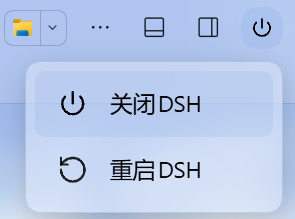
给 DeepSeek Harness 桌面版加一个右上角电源按钮:点开只有 关闭DSH 和 重启DSH 两项,省得每次改完插件/配置还要去系统托盘里翻「退出」。
Windows 专用 · 只支持 DSH Desktop · 纯本地 · 无外部依赖 · MIT
⭐ 如果这个小工具帮你省了点时间,欢迎点个 Star 支持一下,感谢~
为什么做这个
DSH Desktop 关窗口只是收进托盘,真正退出或重启要走托盘菜单;而改插件、改配置之后又经常需要重启一次。这个插件把这两步搬到会话标题栏右上角:一个电源键,两项操作,点完就走。
功能
- 右上角电源按钮:位于会话标题栏图标行最右侧,顺序为「布局 / 侧栏 / 电源」。
- 空会话也显示:欢迎页和对话内使用同一个挂载位置,透明无底色,不会破坏主题,也不会出现两个按钮。
- Windows 电源菜单风格:白色圆角卡片、悬浮阴影、左侧线性图标 + 右侧文本,只有两项,不塞多余入口。
- 关闭DSH:结束整个 DeepSeek Harness 桌面应用(Electron 主进程 + Host),不重新启动。
- 重启DSH:结束整个应用,等旧端口释放后用原可执行文件重新拉起,窗口自动回来。
- 键盘可用:
↑/↓/Home/End在两项间移动,Enter/ 空格执行,Esc关闭,点菜单外部也能关。 - 执行反馈:点击后整页盖一层半透明遮罩,显示「正在关闭DSH…」/「正在重启DSH…」。
- 纯本地:没有外部依赖、没有遥测;接口只监听本机回环地址,并做同源校验。
安装
重要:装完插件后,必须再运行一次
enable.ps1(或直接用下面的install.ps1),把dsh-power-menu补进 profile 的dsh.profile.bundles,然后重启 DSH。少了这一步,按钮会 404——这是 DSH 插件管理器只写dependencies、不写 bundles 的已知行为,不是插件本身的问题。
方式 A:一键脚本(推荐)
从仓库下载 ZIP 或 git clone 后,在目录里运行:
powershell -ExecutionPolicy Bypass -File .\install.ps1
脚本会:清理旧的 link/junction 残留(避免 pnpm 的 ERR_PNPM_EPERM,界面上表现为「没有写入权限」)→ 用 DSH 自带 CLI 安装 → 补齐 dsh.profile.bundles → 提示重启。
GitHub 直连慢或不通时,改用镜像:
powershell -ExecutionPolicy Bypass -File .\install.ps1 -Mirror
机器上没有 git 也能装:
install.ps1会先检查git;没有就自动从 GitHub Release 下载dsh-power-menu-0.1.16.tgz,再用本地文件安装,全程不调用 git(这正是ERR_PNPM_GIT_RESOLVE_FAILED的解法)。直连下不动会自动改走 gh-proxy 镜像;也可以用-TgzPath指定已经拷到本机的安装包,完全离线安装。如果你就是想保留
github:xichen-62/dsh-power-menu(或在插件管理器里粘仓库地址)这种方式,加-Github:脚本会下载一个便携版 git(约 38 MB,一次)并写进用户 PATH,之后github:spec 和仓库 URL 都能正常解析,重启 DSH 后图形界面也能用。
方式 B:通过 DSH 插件管理器
打开 DSH Desktop 的 插件 / 插件市场。
选择 添加插件,输入:
github:xichen-62/dsh-power-menu安装完成后,下载/克隆本仓库,运行
enable.ps1补一次 bundles(这一步不能省):powershell -ExecutionPolicy Bypass -File .\enable.ps1重启 DSH,并在 插件市场 → 已安装 里确认
dsh-power-menu处于「启用中」。
如果装完点按钮报
HTTP 404,说明插件只进了dependencies、没进dsh.profile.bundles,宿主半没加载。运行仓库里的enable.ps1(右键使用 PowerShell 运行),它会先备份 profile,再把dsh-power-menu补进dsh.profile.bundles;然后重启 DSH。
方式 C:命令行安装
dsh plugin --profile desktop add github:xichen-62/dsh-power-menu
powershell -ExecutionPolicy Bypass -File .\enable.ps1
dsh是 DSH 自带的 CLI;如果 PATH 里没有,请用 DSH 安装目录里的dsh/dsh.cmd。
方式 D:本地开发安装
git clone https://github.com/xichen-62/dsh-power-menu.git
把插件链接进 desktop profile:
# Windows PowerShell
$profileDir = "$env:USERPROFILE\.dsh\profiles\desktop"
New-Item -ItemType Junction `
  -Path "$profileDir\node_modules\dsh-power-menu" `
  -Target "<你 clone 下来的目录>"
然后在 $profileDir\package.json 里:
dependencies增加"dsh-power-menu": "link:<你 clone 下来的目录>"dsh.profile.bundles增加"dsh-power-menu"
重启 DSH 生效。这个插件没有构建步骤,改完 lib/ 里的文件重启即可。
注意:
link:安装会在node_modules里创建 junction。之后如果改用插件管理器(github:安装)升级同一个包,pnpm 的临时目录 rename 会撞上这个 junction,报ERR_PNPM_EPERM,界面上显示「没有写入权限」。遇到时先删链接再重装:cmd /c rmdir "$profileDir\node_modules\dsh-power-menu"(只删链接,不动 clone 的源码)。
使用
- 在会话标题栏右上角点电源图标。
- 选择 关闭DSH 或 重启DSH。
- 等待遮罩出现:关闭会退出应用;重启会在几秒后把窗口拉回来。
| 动作 | 结果 | 需要手动重开? |
|---|---|---|
| 关闭DSH | 结束整个桌面应用,不重新启动 | 是 |
| 重启DSH | 结束应用 → 等端口释放 → 重新拉起 | 否,窗口自动回来 |
注意:点击即执行,没有二次确认。两个动作都会中断正在生成的回答、运行中的工具和后台任务。请在点之前保存手头的事情。
工作原理
桌面版的进程树大致是:
Electron 主进程
└── Host 子进程(dsh-desktop-host,ELECTRON_RUN_AS_NODE=1)
    └── 本插件
插件跑在 Host 里,不能直接调用 Electron 的 app.quit() / app.relaunch()。所以 Host 只负责“交接”,真正的进程切换交给一个分离的 helper:
flowchart LR
  UI[电源菜单] -->|POST| Host[Host 插件]
  Host -->|写 handoff + spawn| Helper[detached helper]
  Helper -->|taskkill /PID main /F<br/>不带 /T| Main[Electron 主进程]
  Main -.->|IPC 断开| Host
  Host -->|application.shutdown| Disk[(会话日志落盘)]
  Helper -->|等端口释放 + 重新拉起| NewMain[新的 Electron 主进程]
具体步骤:
- Host 把交接信息写到
%USERPROFILE%\.dsh\dsh-power-menu\,用process.execPath+ELECTRON_RUN_AS_NODE=1启动lib/helper.cjs。 - helper 等 1.2 秒,让 HTTP 应答先到浏览器。
- helper 执行
taskkill /PID <主进程> /F,刻意不带/T:只结束 Electron 主进程,让 Host 子进程有机会收到 IPC 断开。 - Host 检测到断开后走自己的
application.shutdown,尽量把会话日志正常落盘。 - 重启模式下,helper 等旧监听端口释放,清掉
ELECTRON_RUN_AS_NODE/DSH_DESKTOP_NODE_EXECUTABLE,用原可执行文件重新拉起,并确认新进程存活;失败会重试,仍失败就弹窗提示手动打开。 - 关闭模式下不拉起,等 Host 自己退出。
接口
Host 半注册三个仅限本机回环的接口:
POST /api/dsh-power-menu/shutdown
POST /api/dsh-power-menu/restart
GET  /api/dsh-power-menu/health
安全
- 三个接口只接受回环地址(
127.0.0.1/::1),校验Host必须是本机,拒绝sec-fetch-site: cross-site,带Origin时必须与本机同源。 - 没有鉴权令牌的第三方网页无法跨站触发关机/重启。
- 只支持桌面版;
dsh web下接口返回 409,不会去杀别的进程。 - 不收集任何数据,不联网,不写注册表;日志只写在本地
%USERPROFILE%\.dsh\dsh-power-menu\。
兼容性
- 系统:Windows 10 / 11。插件依赖
taskkill和 Electron 桌面进程树,其他系统未实现。 - DSH:在 DSH Desktop 0.2.1-rc.2 上实测通过(2026-10-18)。其他 0.2.x 版本可能可用,但未逐一验证。
- Node:跟随 DSH 自带的 Node(22+),无需单独安装。
开发
dsh-power-menu/
├── lib/
│   ├── index.js        Host 半:三个回环接口 + 交接调度
│   ├── client.js       浏览器半:window.__ModuleLoader__ bundle
│   └── helper.cjs      分离的交接 helper
├── cordis.patch.yml    bundle 插入层
├── package.json
├── docs/screenshot.png
└── README.md
客户端 bundle 不是普通 ESM,必须用
window.__ModuleLoader__.load({ id, factory })格式;dsh.client.inject声明@deepseek-ai/dsh-client-ui-slots。没有构建步骤,也没有运行时 npm 依赖。
提交前跑一次静态检查:
npm run check本地调试日志:
%USERPROFILE%\.dsh\dsh-power-menu\power-menu.log和helper-*.log。
常见问题
按钮没出现? 确认插件处于「启用中」,并重启过一次 DSH;按钮只出现在有会话标题栏的页面。
插件卡片上没显示介绍?
本地开发(link 安装)的插件,卡片不读 package.json 的 description,需要在卡片上点「添加备注」自己填。这是 DSH 插件管理器的行为,不是插件的问题。
重启后端口变了?
正常。DSH Desktop 每次启动用随机端口(--port 0),插件只负责拉起新实例,不假设端口不变。
DSH 装在中文路径 / 用户名含中文能用吗?
可以。插件不拼 cmd 字符串:启动用 spawn(exe, [], { cwd }),路径作为单个 argv 交给 Node 的 Unicode API;交接 JSON 和日志按 UTF-8 读写;helper 自带 --pathtest,会在“中文 + 空格”的临时目录里实测 UTF-8 读写和从中文路径启动 exe。安装脚本也按 UTF-8 BOM 保存。
点了没反应?
看 %USERPROFILE%\.dsh\dsh-power-menu\ 下的日志;dsh web 环境会返回 409(仅支持桌面版)。
关闭/重启会跳过 profile 收尾吗?
会有一点:插件只结束 Electron 主进程,Host 会走 application.shutdown,但主进程的 before-quit 可能被跳过,Chromium 的 Cookie / Local Storage 不保证落盘。0.1.15 起会在 Host 退出后定向清理非 Host 孤儿进程(不再留 GPU / 渲染器 / 插件后台),但追求最干净的退出请用托盘「退出」。真正的 app.quit() 需要 DSH 提供协作退出 IPC,插件单方面做不到。
装完点按钮报 HTTP 404?
说明宿主半没加载:插件只在 dependencies 里,不在 dsh.profile.bundles 里。运行仓库里的 enable.ps1,或手动把 dsh-power-menu 加进 profile 的 dsh.profile.bundles,再重启 DSH。0.1.9 起不再依赖 postinstall——pnpm 11 默认会拦截依赖的生命周期脚本,装不上钩子。
插件安装失败,提示「没有写入权限,无法安装」?
多半是之前用 link: 装过(node_modules\dsh-power-menu 是 junction),pnpm 升级时 rename 覆盖不了它,报 ERR_PNPM_EPERM,被安装器误读成权限问题。先删链接再重装:
cmd /c rmdir "$env:USERPROFILE\.dsh\profiles\desktop\node_modules\dsh-power-menu"
或者直接运行 install.ps1,它会自动处理这一步。
GitHub 直连很慢 / 报网络错误?
用 install.ps1 -Mirror,或把安装来源换成 https://gh-proxy.com/https://github.com/xichen-62/dsh-power-menu.git。插件本身不联网,这只是下载阶段的网络问题。
装的时候报 ERR_PNPM_GIT_RESOLVE_FAILED / 这台电脑没装 git?
这不是插件的问题:github: 安装是 pnpm 的 git 依赖,pnpm 必须先调起系统里的 git 做 ls-remote,没有 git 就直接失败(界面上的 added 0 说明一个文件都没下载)。两条路:
跑
install.ps1:检测到没有 git 会自动改用 Release 里的.tgz,不碰 git。想保留
github:spec:跑install.ps1 -Github,它会下载便携版 git 并写进用户 PATH,之后github:和仓库 URL 都能装(重启 DSH 后插件管理器也生效)。或者直接装 tarball(pnpm 走 HTTP 下载后本地解包):
dsh plugin --profile desktop add https://github.com/xichen-62/dsh-power-menu/releases/latest/download/dsh-power-menu-0.1.16.tgzGitHub 慢的话,在前面加
https://gh-proxy.com/走镜像;也可以把 tgz 下载到本机后用dsh plugin --profile desktop add file:<路径>安装。
卸载
- 插件管理器里移除
dsh-power-menu,或者从 profile 的dependencies/dsh.profile.bundles里删掉,再删掉node_modules里的链接。 - 可选:删除
%USERPROFILE%\.dsh\dsh-power-menu\下的日志与交接文件。 - 重启 DSH 生效。
更新日志
见 CHANGELOG.md。
许可证
MIT © 2026 xichen-62
致谢
- 分离 helper 做进程交接、只结束主进程让 Host 优雅退出的思路,参考了 dsh-desktop-restart(MIT)。本项目的实现是独立编写的。
- 菜单样式参考 Windows 电源菜单;图标为内联 SVG,无第三方图标库。
English
A small DSH Desktop plugin that adds a power button to the top-right of the session header. It opens a Windows-style menu with exactly two actions:
- 关闭DSH — quit the whole desktop app (no relaunch).
- 重启DSH — quit and relaunch the app, so the window comes back automatically.
Windows only, DSH Desktop only. No telemetry, no external dependencies; the three HTTP routes are loopback-only and same-origin fenced.
Install from GitHub:
dsh plugin --profile desktop add github:xichen-62/dsh-power-menu
or add github:xichen-62/dsh-power-menu in the DSH plugin manager, then run enable.ps1 and restart DSH. The one-click install.ps1 handles both the install and the dsh.profile.bundles registration, and cleans up a stale link: junction that would otherwise make pnpm fail with ERR_PNPM_EPERM ("No write permission; the plugin cannot be installed").
No git on the machine? The github: spec is a pnpm git dependency, so pnpm must spawn git and fails with ERR_PNPM_GIT_RESOLVE_FAILED when it is missing. install.ps1 detects that and installs the .tgz attached to the GitHub Release instead (no git involved); the tarball URL can also be passed to dsh plugin add directly.
If this saves you some time, a ⭐ star is much appreciated. Thanks!
MIT licensed.
No comments yet. Be the first to write one.