桌面弹窗提醒(dsh-desktop-notify)
English | 简体中文
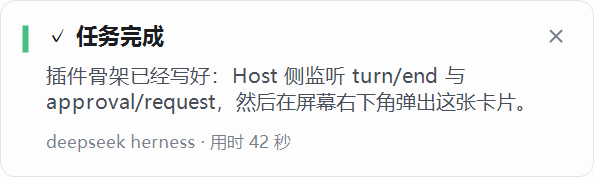
DSH 窗口被最小化、被别的窗口盖住、或者你正在别的程序里时,任务结束或需要你介入的那一刻, 屏幕右下角会浮起一张小卡片——就是聊天软件收到消息时的那种提示。
什么时候弹
| 时机 | 触发来源 | 卡片 |
|---|---|---|
| 一轮正常结束 | turn/end: completed |
绿色竖条 ·「✓ 任务完成」 |
| 一轮出错 | turn/end: error |
红色竖条 ·「!任务出错」 |
| 输出被截断 / 被阻止 / 会话中断 / 被中止 | 对应的 turn/end 原因 |
灰色竖条 |
| 工具等待你授权 | approval/request |
琥珀竖条 ·「⚠ 需要你的确认」,正文带工具名与原因 |
| Agent 向你提问 | user-questions/request |
琥珀竖条 ·「?需要你回答」,正文带问题 |
完成卡片显示这一轮最后一段回复(截断为一行),出错卡片显示错误码或错误信息, 底部显示会话标题与实际耗时。
什么时候不弹
- 前台窗口属于 DeepSeek Harness:你正看着它,不需要提醒。这项检查在渲染之前完成, 此时只是短暂启动一个 PowerShell 进程后立刻退出,屏幕上不会闪任何东西。
- 子代理(subagent)会话的回合结束,避免一次任务弹出一串提示。
- 你自己点停的那一轮(中止原因为
user)。 enabled关闭,或当前不是 Windows。
卡片行为
- 固定在主屏右下角,始终置顶,不抢焦点,不出现在 Alt+Tab 和任务栏里,不影响你正在打的字。
- 从屏幕右侧滑入(约 220ms,缓出曲线),
animate: false可变成原地出现。 - 显示后会把自己推到置顶窗口队列的最前面,并在卡片存活期间每 0.8 秒重申一次, 所以别的窗口(包括同样置顶的窗口)后激活也压不住它。真正全屏独占的程序(部分游戏)无法覆盖。
- 完成卡片默认停留 12 秒,等待你操作的卡片停留 24 秒,然后自己消失。
- 右上角的 ✕:只关闭卡片,不切换窗口;鼠标移上去会高亮并变成手型光标。
- 单击卡片其他位置:关闭卡片并把 Harness 窗口叫回前台(最小化会自动还原)。
- 新卡片会替换上一张,不会叠成一摞。
- 颜色跟随 Windows 的浅色/深色设置,用绿、琥珀、红、灰四种竖条区分结果。
- 默认播放系统提示音(完成、等待、出错各用一种),
silent: true可关。
配置
在 cordis.patch.yml 里改 desktop-notify 这一行的 config:
| 键 | 默认值 | 说明 |
|---|---|---|
enabled |
true |
总开关 |
notifyOnTurnEnd |
true |
任务完成时提醒 |
notifyOnError |
true |
任务出错时提醒 |
notifyOnApproval |
true |
需要授权时提醒 |
notifyOnQuestion |
true |
需要回答时提醒 |
notifyWhenFocused |
false |
窗口在前台也提醒;仅用于检查卡片长什么样 |
silent |
false |
不播放提示音 |
animate |
true |
从右侧滑入;设为 false 则原地出现 |
cardDurationMs |
12000 |
完成卡片停留时长(毫秒) |
waitingDurationMs |
24000 |
等待你操作的卡片停留时长(毫秒) |
summaryChars |
90 |
正文摘要最大字数 |
appProcessName |
DeepSeek Harness |
判定「窗口在前台」用的进程名 |
language |
zh |
卡片文案语言,zh 或 en |
logFile |
空 | 写入卡片诊断日志的路径,排错时用 |
为什么不是系统通知中心的通知
Windows 的 toast 接口要求调用进程有「程序包身份」,普通桌面进程调用会失败并返回
0x80073D54。所以这里用 PowerShell + WinForms 自己画一张卡片:任何 Windows 10/11 都能显示,
外观也完全可控。代价是通知不会留在通知中心,关掉就没了。
排错
每次调用都会在 %TEMP%\dsh-desktop-notify.log 留一行记录(超过 200 KB 自动重来),用它可以分清三种情况:
invoked ...—— 插件确实触发了;foreground=... name=DeepSeek Harness加skipped: harness window is foreground—— 窗口在前台,按设计不打扰;showing card ... painted—— 卡片已经画出来了;raised to top ok=True style=... topmost=True—— 卡片确实在置顶层(topmost=False说明没进置顶层,会被普通窗口压住);bounds=... above us: [...]—— 卡片位置和压在它上面的窗口,排查遮挡时看这一行。
想固定日志位置就把配置里的 logFile 指向一个路径。
已知限制
- 仅 Windows;其他平台插件保持静默。
- 卡片只出现在主屏右下角。
- 卡片由一次性 PowerShell 进程绘制,事件到出现之间约有 0.3–0.6 秒延迟,并在显示期间保留该进程。
- 回复过长时正文只显示前四行。
- 停用插件后立即不再提醒;已经显示的卡片不受影响,会在超时后消失。
English
A Windows-only DeepSeek Harness plugin: when a turn finishes, fails, or the Harness is waiting for your approval or answer while its window is not in front, a small card slides into the bottom-right corner of the primary screen — the same pattern chat apps use for incoming messages.
Install
In the Web GUI open Plugins → Add plugin, enter the Git address
github:xiaoweiqianluo/dsh-desktop-notify (or clone the repository and give its absolute path),
then enable Desktop popup alerts in the plugin list.
Or from a shell with the dsh CLI available:
dsh plugin --profile desktop add github:xiaoweiqianluo/dsh-desktop-notify
No dependencies, no build step: the bundle is plain ES module JavaScript plus one PowerShell script. It needs Windows 10/11 with Windows PowerShell 5.1 (installed by default).
When it appears
| Moment | Source | Card |
|---|---|---|
| A turn completed | turn/end: completed |
Green bar · "✓ Task finished" |
| A turn failed | turn/end: error |
Red bar · "! Task failed" |
| Output truncated / blocked / interrupted / stopped | the matching turn/end reason |
Grey bar |
| A tool waits for authorization | approval/request |
Amber bar · "⚠ Your confirmation is needed" |
| The agent asks a question | user-questions/request |
Amber bar · "? Your answer is needed" |
It stays silent when the foreground window belongs to the Harness (you are already looking at it), for subagent sessions, and for turns you stopped yourself.
Card behavior
- Always on top of the topmost band, never takes focus, never shows in Alt+Tab or the taskbar.
- Slides in from the right (~220 ms, ease-out);
animate: falseshows it in place. - The ✕ in the top-right corner closes the card without switching windows; hovering highlights it.
- Clicking anywhere else closes the card and brings the Harness window back (restoring it if minimized).
- The ✕/click split, per-kind accent colours and fonts are drawn with WinForms and follow the Windows light/dark setting. Completion cards live 12 s, waiting cards 24 s.
Configuration
Edit the desktop-notify row in cordis.patch.yml:
| Key | Default | Meaning |
|---|---|---|
enabled |
true |
Master switch |
notifyOnTurnEnd |
true |
Card when a turn completes |
notifyOnError |
true |
Card when a turn fails |
notifyOnApproval |
true |
Card when an authorization is pending |
notifyOnQuestion |
true |
Card when the agent asks a question |
notifyWhenFocused |
false |
Also alert while focused; for inspecting the card |
silent |
false |
No system sound |
animate |
true |
Slide in from the right |
cardDurationMs |
12000 |
Completion card lifetime |
waitingDurationMs |
24000 |
Waiting card lifetime |
summaryChars |
90 |
Maximum preview characters |
appProcessName |
DeepSeek Harness |
Process name treated as "window in front" |
language |
zh |
Card copy language, zh or en |
logFile |
empty | Optional diagnostics log path |
Why not a Windows toast
The toast API requires package identity; an ordinary desktop process calling it fails with
0x80073D54. This plugin draws its own card with PowerShell and WinForms instead, which works on
every Windows 10/11 installation and keeps the appearance under control. The trade-off: notifications
are not kept in the Action Center.
Known limitations
- Windows only; the plugin stays silent elsewhere.
- The card only appears on the primary screen.
- A one-shot PowerShell process draws the card: expect 0.3–0.6 s between event and appearance.
- A long reply is clamped to four lines.
- A card already on screen closes on its timeout after the plugin is disabled.
No comments yet. Be the first to write one.