dsh-composer-launcher
One "+" panel for compositions, plugins and MCP.
⚠️ DSH 1.5 only (
>=0.1.5-rc.2 <0.2.0). Newer DSH releases will be supported in follow-up updates.
English · 简体中文




The composer's + button, turned into a real menu.
Table of contents
- What this is
- What it does
- Screenshots
- The browser extension
- Settings
- HTTP routes
- Interface language
- 🔗 Integration
- Known limitations (stated plainly)
- Installation
- Compatibility
- FAQ
- Repository layout
- Self-check
- License
What this is
By default the + button left of the composer opens a file picker. Everything else you may want to point the model at — a browser tab you are looking at, an earlier conversation, a skill, an MCP server, one of the plugins installed on this machine — has to be typed by hand, or referenced with @.
dsh-composer-launcher replaces that button with a three-group menu:
| Group | What is in it |
|---|---|
| Add | files and folders, earlier chats, plan mode, goal mode |
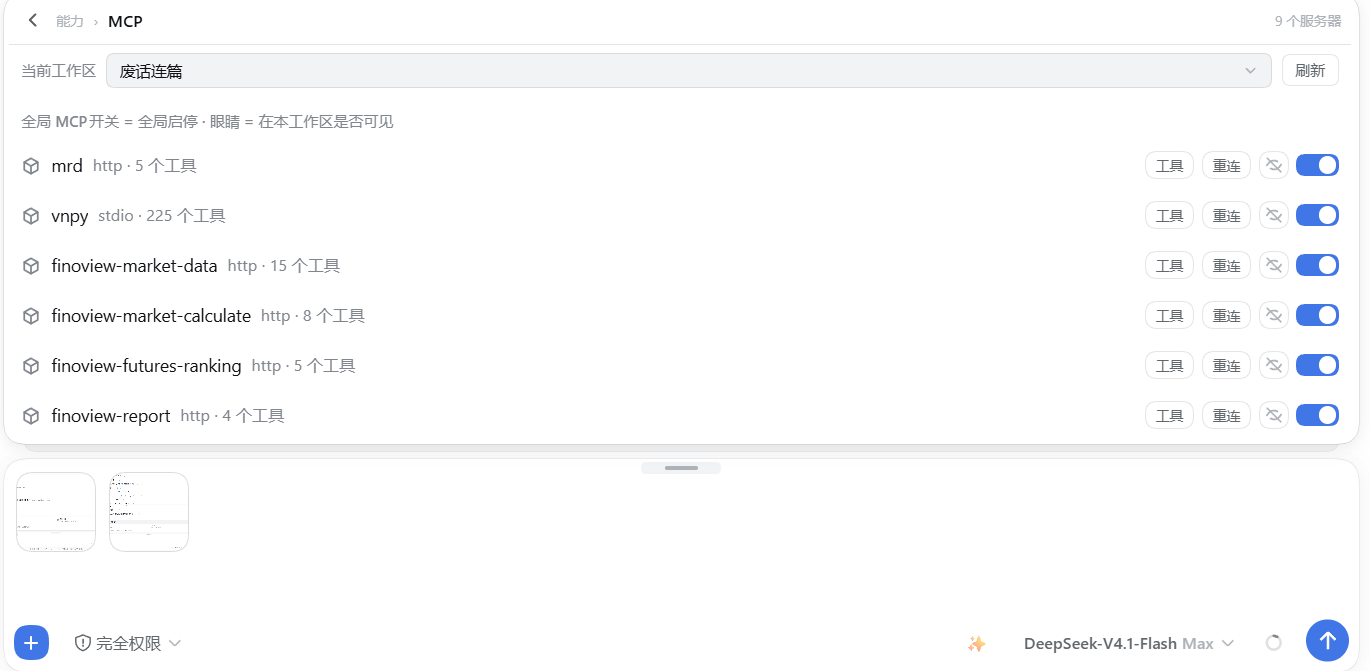
| Capabilities | slash commands, skills, MCP servers |
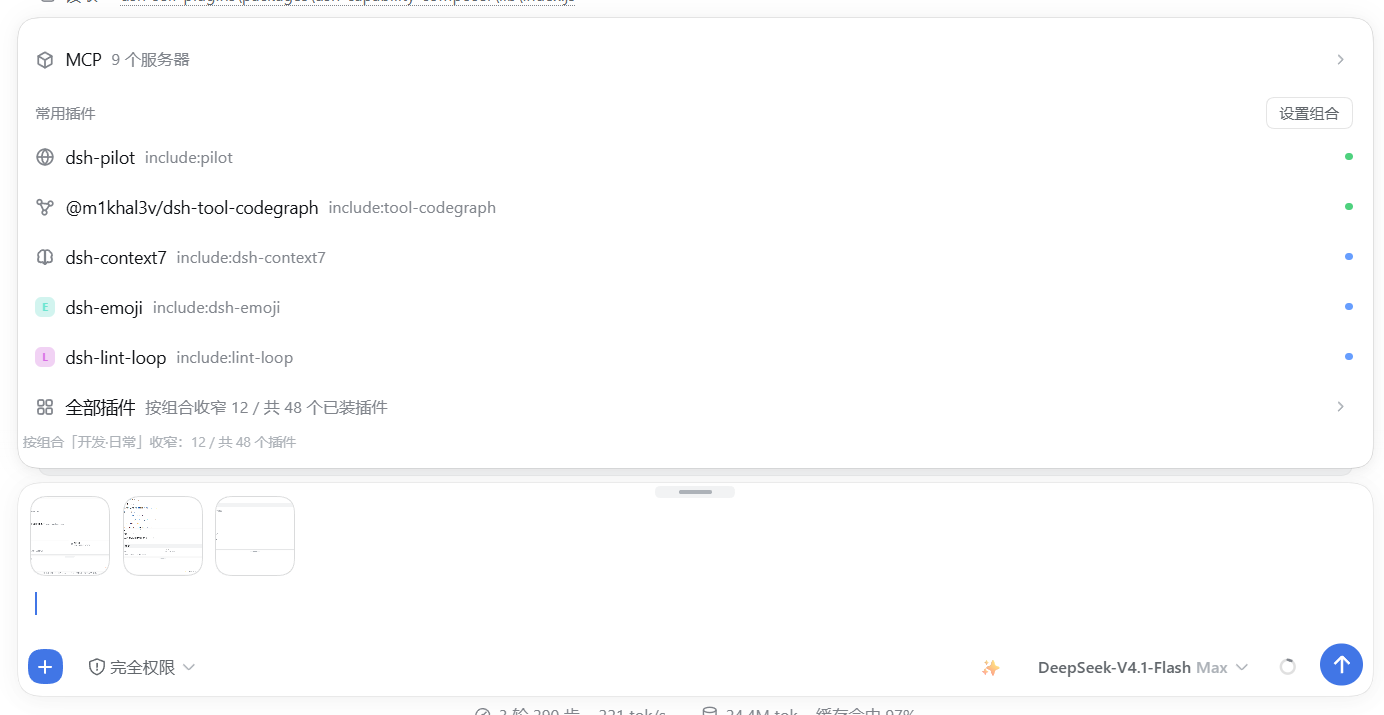
| Common plugins | one row per installed plugin, plus an "all plugins" row |
What you pick does not get pasted in as text. It becomes a reference chip on a rail above the input box — the same native chip kind the host already renders for @ references — and only turns into message text when you actually send.
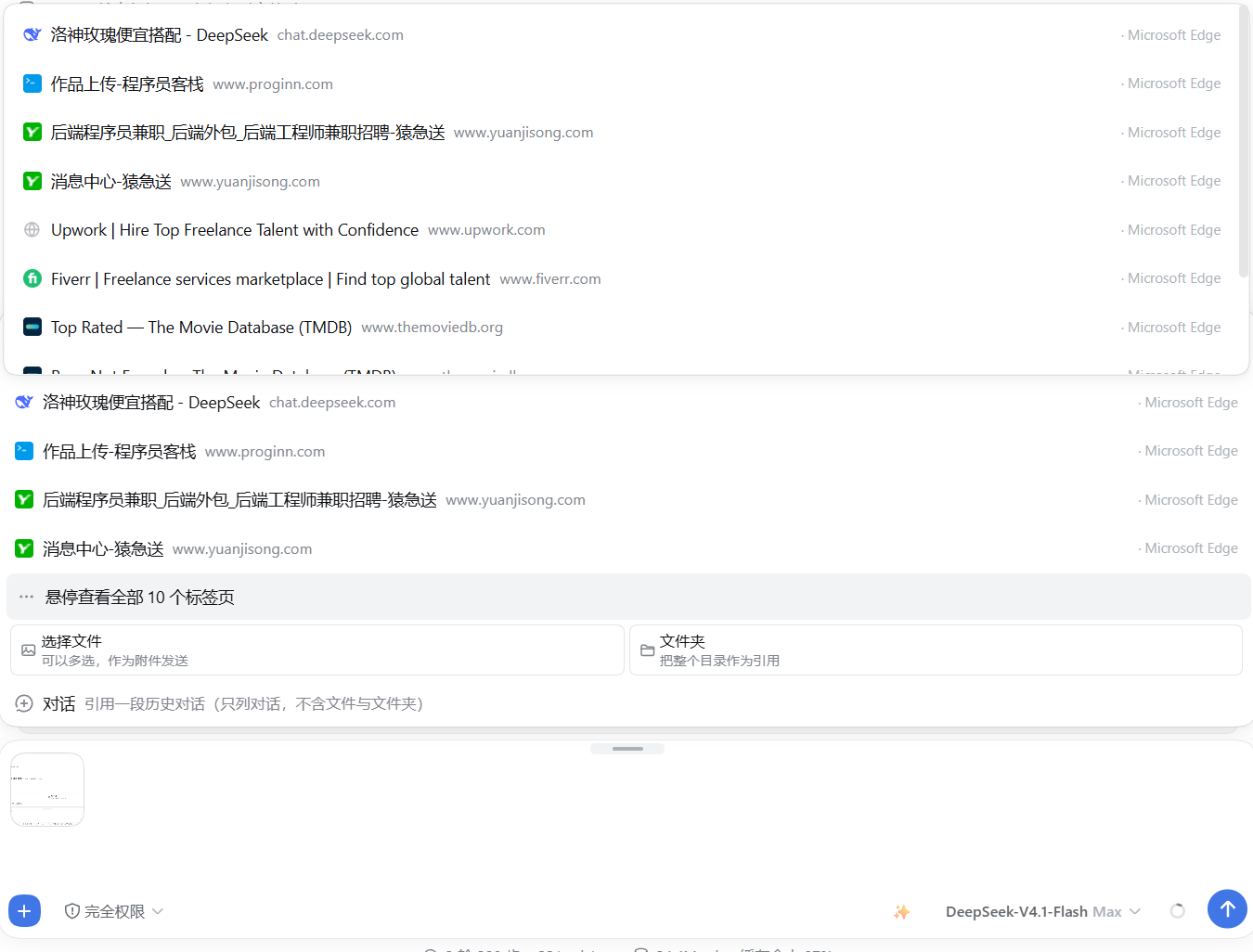
There is also an optional browser extension (DSH Tab Bridge) which pushes your real browser's tabs to the plugin over a loopback HTTP bridge, so the Tabs row lists the pages you genuinely have open rather than a throwaway debug instance.
What it does
1. The + menu (three groups)
A 360px panel, opened from the button at the conversation.input.left slot.
- Add — Files and folders (the host's own picker, multi-select, drag-and-drop; falls back to
@references when the host exposes no folder picker), Chats (viaremote.sessionReferenceResolver; chats only, no files), Plan, Goal. - Capabilities — Commands (whatever the host's slash-command service offers), Skills (read live with
ctx.remote.skills.list({ sessionId })), MCP (needs the host'sremote.mcpManager). - Common plugins — one row per plugin returned by
ctx.remote.pluginInventory.list(). That list is read from the host on every load, so installing, removing or disabling a plugin is reflected immediately and there is no cache to keep in sync. Three modes decide which rows appear:pinned,frequent,mixed(see Settings).
Every row can be switched off individually from the settings card.
2. Reference chips
Picked items land on a rail above the input box (conversation.input.dock). A chip is { label, kind, icon } plus an optional url, where kind is one of web, plugin, skill, mcp. Clicking the × removes it.
Two properties are worth naming, because both were bugs before they were features:
- A web chip keeps its address. A page title with no URL is useless to whoever reads the message — the chip carries the URL and the payload includes it.
- A session reference stays a chip. Writing a reference back through the plain-text draft API silently downgrades it to body text; the plugin renders it as a chip instead and never round-trips it through the text editor.
Chips are per session, so two chat tabs never share a rail.
On send, each chip is serialised into the message with a short marker, so the model can tell a referenced page from an attached file:
| Chip kind | Marker |
|---|---|
| web page | 【参考网页】<title> — <url> |
| plugin | 【使用插件】<name> |
| skill | 【技能】<name> |
| MCP server | 【MCP】<name> |
These markers are literal and stay in Chinese in both interface languages. They are part of the text the model reads, not interface copy — translating them would change what the model sees.
3. Settings card
Registered on the settings.plugin.item slot as a card titled Launcher — 「启动器」 in the Chinese interface. It is collapsed the first time you open it and remembers that choice. All twelve fields are listed under Settings.
4. Debug browser (fallback)
The Tabs row can also read tabs over a remote-debugging port from a Chromium process it starts itself. That is what Launch debug browser does — and when the extension is staged, the same call attaches it with --load-extension and then verifies through the debugging port that it really mounted, so this route needs no manual step at all (see The browser extension). It stays a fallback rather than the primary path because it only ever sees that one throwaway-profile instance, never the browser you already have open.
5. Loopback bridge
The host half owns a small HTTP bridge on 127.0.0.1:43130 (override: DSH_LAUNCHER_BRIDGE_PORT) so the extension can push tabs into it. It binds loopback only, yields politely if an older instance already holds the port, and is used for nothing else.
Screenshots
The + menu — Add / Capabilities / Common plugins — with the Tabs row fed by the extension
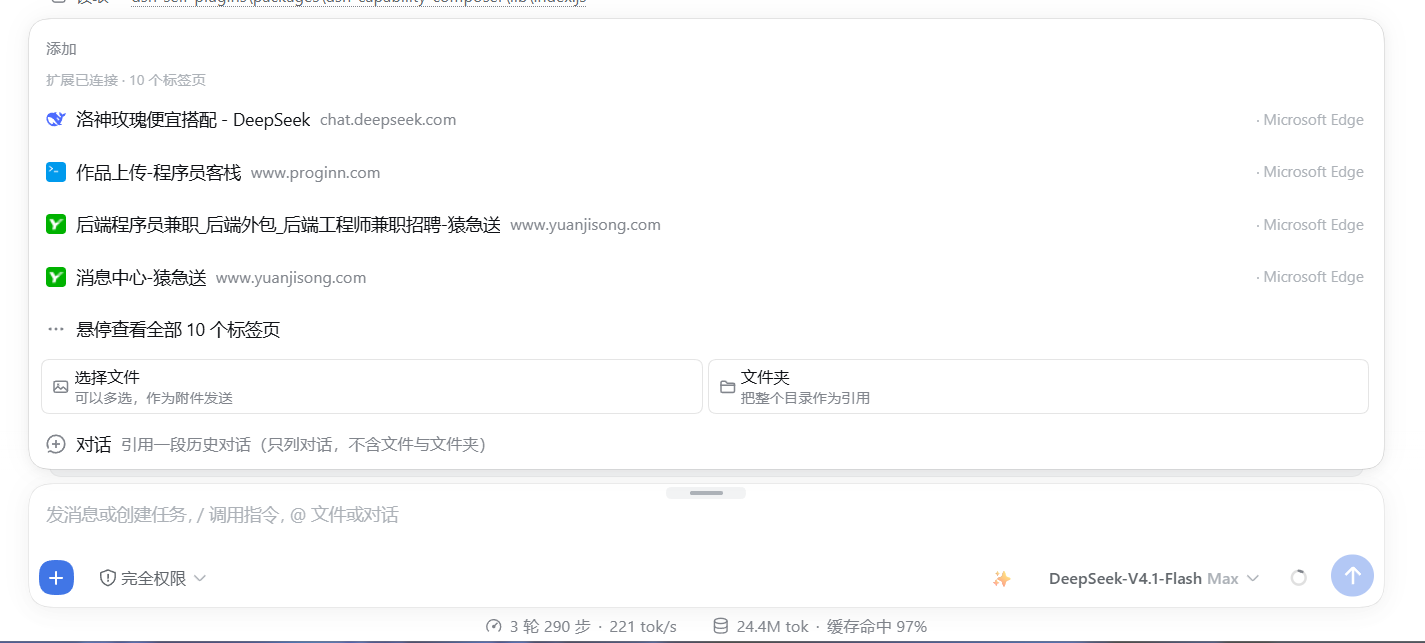
The Tabs row reading a real Microsoft Edge window over the bridge
The MCP servers the Capabilities group can reference — the row is built from the host's remote.mcpManager
The plugin inventory the Common plugins group is built from, including its "N / M" narrowing counter
The browser extension
The plugin works without it — the Tabs row simply says the extension is not installed and points at the button. With it, the row lists the tabs of your everyday browser.
Three ways to get it loaded
Chromium will not let anything silently sideload an extension into the browser you use every day. That is a browser security rule with no plugin-side workaround, so the goal is a different one: make every remaining step either automatic or one click.
| Route | What happens | Manual steps |
|---|---|---|
| A — a browser this plugin starts | The plugin spawns a separate Chromium process with --load-extension pointing at the staged copy, then verifies through the debugging port that the extension really mounted |
none |
| B — your everyday browser | The Tabs row offers Open the extensions page and Copy the extension path, so loading it once is a paste and a "Load unpacked" | one time, ~20 seconds |
| C — managed machines | Chromium enterprise policy (ExtensionSettings / ExtensionInstallForcelist) pointing at a self-hosted, signed CRX plus an HTTPS update manifest |
admin rights; not shipped here |
Route A is verified, not assumed. After launching, the plugin asks the debugging port for its raw target list and looks for this extension's own worker (chrome-extension://<id>/background.js) rather than "some extension" — every Chromium ships several of its own. Chromium reports no error when --load-extension is ignored, so a launch on its own proves nothing.
If our worker is missing, the plugin retries once on a clean profile ~/.dsh-edge-agent-ext and says so in the healed and note fields of its answer. That is not defensive padding: a profile that was ever opened without the command-line switches can stop honouring them, and the plugin's default profile ~/.dsh-edge-agent does exactly that on some machines. If both attempts fail, extensionLoaded comes back false and the Tabs row falls back to reading tabs over the debugging port — the plugin never claims a step it did not actually complete.
Firefox cannot be started this way: the launcher passes Chromium-only switches, which is why it is the one browser the plugin's table marks as manual-only.
Route B is what those two buttons and install-extension.ps1 are for (see Which browsers below) — nothing in either contains a drive letter or a user name.
Route C is a real answer for fleets, and out of scope here: it needs administrator rights, a CRX you signed yourself, and an HTTPS endpoint serving the update manifest. This repository ships none of that, and no README should pretend otherwise.
How it works
It does not poll. The extension pushes:
| Trigger | Action |
|---|---|
tabs.onCreated / onUpdated / onRemoved / onActivated / onMoved / onAttached / onDetached |
push immediately |
a 1-minute alarms heartbeat |
push |
| browser startup, install, update | push |
Each push is a POST to http://127.0.0.1:43130/composer-launcher/tabs with { tabs: [...] }. A failed push is swallowed, never thrown — the bridge is allowed to be down, and the extension must not spam console errors while it is.
The host keeps the last push for 65 seconds (PUSH_TTL_MS), deliberately longer than the 1-minute heartbeat, so one slow tick cannot make the row flicker to empty. An empty push is ignored rather than obeyed (ignored: 'empty-push-kept-previous'), because a browser that momentarily reports nothing must not wipe the list.
Pushed fields are { id, title, url, host, favIconUrl, browser }. Internal pages are filtered before sending: chrome:, edge:, brave:, opera:, vivaldi:, about:, devtools:, chrome-extension:, extension:, moz-extension:.
The popup shows the connection state, lets you edit the port, and has a Save and push now button for when you do not want to wait for the next heartbeat.
Which browsers
The extension is Manifest V3 and talks to globalThis.browser ?? globalThis.chrome, so it loads in every Chromium browser as well as Firefox.
| Browser | Extensions page | Loading |
|---|---|---|
| Microsoft Edge | edge://extensions |
Load unpacked |
| Google Chrome | chrome://extensions |
Load unpacked |
| Brave | brave://extensions |
Load unpacked |
| Vivaldi | vivaldi://extensions |
Load unpacked |
| Opera | opera://extensions |
Load unpacked |
| Arc | arc://extensions |
Load unpacked |
| 360 极速浏览器 | chrome://extensions |
Load unpacked |
| QQ 浏览器 | chrome://extensions |
Load unpacked |
| Firefox | about:debugging#/runtime/this-firefox |
Load Temporary Add-on |
Chromium browsers do not allow silent sideloading — that is a browser security rule, not something a plugin can work around (routes A and C above are the two exceptions, and C needs an administrator). So for your everyday browser the plugin's job is to point precisely: the Tabs row has an Open the extensions page button (route POST /composer-launcher/open-extensions-page, which picks the first Chromium installed here) and a Copy the extension path button, and install-extension.ps1 does the same from a terminal — it enumerates the browsers actually installed on this machine (on Windows from the StartMenuInternet registry keys, on macOS and Linux from the platforms' own locations), prints them, and opens the right extensions page for the one you choose. -Browser <id> picks one non-interactively. Nothing in that script contains a drive letter or a user name.
Firefox is offered but flagged differently in the plugin's own browser table: it is not offered to the debug-browser launcher, because that launcher passes Chromium-only flags.
Port
Default 43130, or whatever DSH_LAUNCHER_BRIDGE_PORT holds when it parses as an integer between 1024 and 65535. That override exists so two DSH instances on one machine can each keep their own bridge instead of one stealing the port from the other (this repository's own end-to-end tests use it for exactly that reason). The extension's port is editable in its popup: if you change one, change the other — a mismatch only means the Tabs row reports the extension as offline and falls back to the debug port.
43129 is recognised as the legacy port and migrated automatically on first read.
Settings
Namespace composer-launcher. Every field is a boolean or a number except the last, and all of them are optional.
| Field | Default | Meaning |
|---|---|---|
showWeb |
true |
Show the Tabs row |
webCount |
3 |
How many tabs to show before the "N more tabs" row |
port |
9222 |
Local CDP port (the debug-browser path, not the bridge) |
showFiles |
true |
Show the files-and-folders row |
showPlan |
true |
Show the plan row |
showGoal |
true |
Show the goal row |
showCmd |
true |
Show the slash-command row |
showSkill |
true |
Show the skills row |
showMcp |
true |
Show the MCP row |
pluginMode |
"mixed" |
pinned | frequent | mixed |
pluginCount |
5 |
How many plugin rows to show before the "all plugins" row |
pinned |
[] |
Plugins that always appear, regardless of mode |
pinnedis empty on purpose, and the client half keeps the same empty default. It used to list two plugin names in the host schema only, which made the two halves disagree — a user who never opened the settings would see two pinned rows they had never chosen.
HTTP routes
Everything is served under /composer-launcher on the host's existing web server. The plugin does not open a second web port (the bridge on 43130 is a separate, tiny loopback socket for the extension).
| Method | Path | Purpose |
|---|---|---|
POST |
/tabs |
The extension pushes its tab list. Returns { ok, accepted } — or { accepted: 0, ignored: 'empty-push-kept-previous', kept: N } when an empty push was refused |
GET |
/tabs?port= |
Merged tab list (extension first, CDP second). Returns { source, stale, port, sources: { extension, cdp, mixed }, extensionHint, tabs, error } |
GET |
/stage-extension |
Copy the bundled extension to a stable path and return { extensionDir, dir, browsers, note } — browsers is the list of browsers actually installed here |
GET |
/linked-plugins |
Probe partner plugins. Returns { linked: [{ id, label, ok, detail }] } |
POST |
/open-debug-browser |
Start a Chromium instance with a debugging port and the staged extension attached; the answer carries extensionLoaded (verified over the debugging port, not assumed), plus healed/note when a clean profile was needed |
POST |
/open-extensions-page |
Open the extensions page of the first Chromium installed on this machine, for the one-time manual load. Returns { ok, browser, url } |
GET |
/bundles |
The profile's mounted-plugin manifest |
GET|HEAD |
/favicon?u=<encoded> |
Same-origin favicon proxy: it sniffs the bytes, caches for 6 hours, and serves with default-src 'none'; sandbox |
GET|HEAD |
/bridge |
Bridge identity: { bridge: true, pid, port, holding, startedAt } |
POST |
/bridge-yield |
Ask an older instance to release the bridge port |
GET |
/health |
{ plugin, extensionTabs, extensionAt } |
Anything else under the prefix returns 404 { ok: false, error: 'not found' }.
Writes are guarded: a non-GET/HEAD request is rejected with 403 cross-site request rejected unless it comes from no origin at all, from a chrome-extension:// or moz-extension:// origin, or from the same host. The favicon proxy is the one route that accepts an arbitrary URL, which is exactly why it is sandboxed and byte-sniffed rather than trusted.
Interface language
Plugin-owned interface text follows the host's language, not a setting of its own.
- The client half injects the
localeservice, reads the active locale, and retranslates when it changes — live, without a reload. - Two tables ship today: zh and en, 194 keys each, flat and dot-namespaced (
'button.title','settings.title','jump.composer.missing'). - Lookup order is active language → en → the key itself.
t()can never returnundefinedand can never throw — a missing translation degrades to English, and a missing key degrades to a visible key name rather than a blank row. - If the locale service is unreachable, the language falls back to
document.documentElement.lang, thennavigator.language, thenen. - The registry is extensible:
registerLanguage(id, table)adds a table, and the plugin announces the languages it has to the host's locale service so they can appear in its language picker. - The extension cannot use the host's locale service (it is a separate browser process), so it uses the browser's own
_localesmechanism withenandzh_CN, and readsapi.i18n.getUILanguage().
🔗 Integration
With dsh-capability-composer — a real, two-way link
This is the one integration that changes what you see, so it is worth being precise about it.
What the launcher does. It declares one linked plugin:
{ id: 'capability-composer', label: '能力组合器', path: '/dsh-capability-composer/state' }
At startup it probes that path and logs connected or absent per plugin. In the client half it then uses the composer's own endpoints:
| Uses | Endpoint | If the composer is missing |
|---|---|---|
| The plugin rows' narrowing scope | /dsh-capability-composer/effective?sessionId=… |
Falls back to listing all plugins and shows why |
| The settings-jump buttons | /dsh-capability-composer/state |
Buttons do not jump; a dismissible banner names the missing plugin |
What happens when the composer is absent. Nothing breaks. The Common plugins group lists every installed plugin instead of the narrowed set, and the two Set composition(「设置组合」)buttons refuse to jump — clicking one shows, for 15 seconds:
dsh-capability-composer is not installed — install and enable it, then come back and hit Set composition.
The probe is deliberately optimistic. A rejected or non-2xx response means "not installed", but a network-level failure (the sandbox transport throwing) is treated as reachable. A false "not installed" would be worse than a false "installed": the first hides a working button, the second only means the jump lands on a settings page that is missing its tab.
What the launcher does not do. It does not compute the narrowing numbers. The "N / M plugins installed" counter is rendered here, but its two numbers come from the composer (N) and from this plugin's own plugin inventory (M). And the launcher never writes composer state.
With the MCP panel — an entry point, not a dependency
The MCP row in the Capabilities group is fed by the host's remote.mcpManager service (in practice, provided by an MCP manager plugin). This plugin's host half contains no MCP code at all; it does not read, configure or restart MCP servers.
If that service is absent, the MCP row is simply unavailable, and clicking it returns a plain reason rather than failing silently. Which servers exist, whether they are enabled, and what tools they expose is entirely the MCP panel's business.
With the rest of this family
dsh-composer-launcher has no code-level relationship with dsh-context-reclaim or dsh-aux-degrade. They solve different problems — those two work on what enters the context and what the auxiliary model calls spend; this one works on how you point the composer at things. Installing any of them alone is fine; the plugin inventory row for a missing sibling simply shows as not installed.
Known limitations (stated plainly)
- The enable/disable switch is not wired. Plugin rows show state and link to settings; they do not toggle a plugin on or off.
- Real tabs need the extension (or the debug browser). There is no third path — a plugin cannot reach into a browser it is not running inside.
- The bridge port is
43130unlessDSH_LAUNCHER_BRIDGE_PORToverrides it. The extension's side is editable in its popup. - Chromium will not let this plugin install the extension into the browser you already use. It can start its own browser with the extension attached, and it can point precisely at the manual steps; installing silently into an existing browser requires an enterprise policy and administrator rights, which this repository does not ship.
- Firefox's MV3 support means a temporary load in most builds; that is a browser constraint, not a plugin one.
- The favicon proxy accepts arbitrary URLs. It is sandboxed, byte-sniffed and size-limited, but it is still the one route worth understanding before you expose a machine.
9. The browser-extension notice: one dialog, naming the steps
The browser extension belongs to this plugin (the "+" launcher), so this dialog is this plugin's own. It appears once, the first time the interface opens after installation, and spells out:
- Why it cannot install itself: Chromium has a hard rule — nothing may silently sideload an extension into the browser you use every day. The plugin has already staged the files, but the one "Load unpacked" click has to be yours.
- Three routes: A, zero clicks — press "Open with the extension loaded" and the plugin starts a separate browser instance with the extension attached; B, into your everyday browser (one time only) — press "Open the extensions page" → Developer mode → Load unpacked → pick the folder the dialog prints; C follow
tutorial-browser-extension.md. - Detection: the extension pushes its tab list to the plugin; a received push means "installed" and the dialog stops appearing immediately. No push means "not installed". Nothing is guessed.
- Always available: the browser group has a "How to install" button that brings this same guide up on demand, even after the extension is installed.
This plugin needs no DSH patches at all — patches are announced by the plugins that need them, the extension by this one, and neither speaks for the other.
📚 Tutorials
| Document | What it covers |
|---|---|
| Browser extension tutorial (English) | How to get the extension loaded: the zero-manual route A, the everyday-browser route B, the enterprise route C; how to verify it, what to do when it fails, and a prompt for your own agent |
| 浏览器扩展教程(中文) | the same, in Chinese |
| Install & official patches (English) | How to install all four plugins and what to do about the official patches the patches themselves ship as a library: https://github.com/xiamubumu/dsh-patch-library |
| 安装与官方补丁(中文) | the same, in Chinese 补丁本体已开源成补丁库:https://github.com/xiamubumu/dsh-patch-library |
🔗 The rest of the family
Each plugin installs on its own; together they save the most. The other three:
dsh-context-reclaim— Context reclamation: bounded tool results, a folded tool surface and a stable prefixdsh-aux-degrade— Auxiliary-call degradation: summaries and titles stop burning their budget on reasoningdsh-capability-composer— Capability composer: switchable tool/skill/MCP sets instead of one bloated surface
All of them are DSH 1.5 only; newer DSH releases will be supported in follow-up updates. Plugins that need official patches announce them in the UI once you install them — nothing goes unseen.
Installation
From GitHub (recommended; measured on a fresh DSH_HOME)
dsh plugin --profile web add github:xiamubumu/dsh-composer-launcher
One command. That is the whole procedure — no script, no path to edit.
From a local tarball (air-gapped machines)
Download dsh-composer-launcher-1.1.0.tgz from Releases, then:
dsh plugin --profile web add /path/to/dsh-composer-launcher-1.1.0.tgz
From the plugin marketplace / npm (not yet possible)
The marketplace submission (an awesome-dsh-plugin PR) has not been filed and nothing is published on npm yet ⇒ neither route works today.
Once listed/published, searching for dsh-composer-launcher in the marketplace and installing is all there is to it.
⚠️ Known issue: do not feed the release asset's tarball URL to
dsh plugin add.dsh plugin --profile web add https://github.com/.../releases/download/v1.1.0/....tgzfails on the pnpm DSH bundles (10.34.5) withERR_PNPM_MISSING_TARBALL_INTEGRITY(pnpm#14351, fixed upstream only in pnpm ≥ 12.5.1). Installing a second plugin that way always fails — use thegithub:shorthand or a local tarball path instead.
From a local checkout
node install.mjs
or, on Windows PowerShell:
pwsh -ExecutionPolicy Bypass -File .\install.ps1
install.ps1 runs three steps and stops at the first failure:
- Backtick gate (
strip-backticks.mjs) — the client bundle must contain zero backticks before it is deployed. It runs first because it can rewrite the file: a bundle checked before a rewrite is not the bundle that ships. - Deploy (
install.mjs) — copies the shipped files into a new generation, writes the generation'sgeneration.jsonanddesired.json, then calls the host's ownprojectGenerations()to make it live. It finishes by importing the host half for real and checking the profile manifest, so a bundle that cannot load is caught here rather than at your next boot. - Verification — the profile's
dependencies,dsh.profile.bundlesand the generation projection are read back and asserted.
The script finds Node itself: PATH first, then the runtime DSH Desktop ships. You do not have to install Node.
Then restart DSH
The plugin's host half and its patch file are read at boot only. Restart DSH once after installing; the client half is then loaded with the app.
The extension (optional)
Nothing to do for the zero-touch route: open the composer and press Launch debug browser (or Open a browser with the extension loaded) in the Tabs row. That starts a Chromium with the staged extension attached and verified — no manual load, no everyday browser involved.
For the browser you actually use, load it once:
pwsh -ExecutionPolicy Bypass -File .\install-extension.ps1
It stages the extension to a stable path, lists the browsers it found on this machine, and opens the right extensions page. Add -Browser edge (or chrome, brave, vivaldi, opera, arc, 360, qq, firefox) to skip the question. The Tabs row's Open the extensions page and Copy the extension path buttons do the first half of that without a terminal; the full walkthrough, including what Chromium does and does not allow, is in The browser extension.
Compatibility
| DSH | 1.5 series only — engines.dsh: ">=0.1.5-rc.2 <0.2.0" |
| Desktop app | ✅ supported |
| Web UI | ✅ supported |
| Other DSH hosts | ✅ if it is DSH, it is supported — nothing here is desktop-specific |
| Operating system | Windows, macOS, Linux |
| Node | ships with DSH; the syntax used here targets Node 20+ but you never install it yourself |
| Third-party dependencies | none — peer dependencies are DeepSeek Harness packages plus React |
The upper bound is deliberate. The plugin hooks client slots and host routes whose contracts are still moving inside the 1.5 line, so it declares the line it has actually been tested against and nothing beyond it. A later release will widen it.
Web builds have no native folder dialog — so this plugin supplies one
DSH's own directory flow (@deepseek-ai/dsh-client-ui-directory-picker-native) reads exactly one browser global, window.dshDesktopDirectoryPicker.pick(). Only the desktop shell injects it; on a web build the global is absent, the flow rejects with
DSH Desktop directory picker bridge is unavailable
and DSH's workspace UI shows 「无法打开文件夹」. Both your own folder button and DSH's own picker reach that same global, so the launcher installs a stand-in only when the real bridge is missing:
- a real desktop shell ⇒ the stand-in is never installed at all, and
pick()re-checks on every call, so a bridge arriving late still wins; - a web build ⇒ the stand-in asks you to type the folder's absolute path (browsers deliberately hide absolute paths —
showDirectoryPicker()returns a handle whose only useful field is the last name segment — so typing is the one way left to hand the server a real directory). Relative paths are rejected;D:\…,\\server\shareand/…are accepted.
If you would rather not have that at all, uninstall this plugin: the stand-in exists nowhere else.
FAQ
Do I need the browser extension?No. The plugin's menu, chips, skills, commands, MCP and plugin rows all work without it. The extension only fills in the Tabs row with your real browser's open pages. Without it, that row can still read a debug instance you launch yourself.
Can the plugin install the extension by itself?Into a browser it starts itself, yes — and that route is verified rather than assumed. Into the browser you already have open, no: Chromium forbids silent sideloading, and that is a security rule rather than a missing feature. What the plugin does instead is make the manual half small — Open the extensions page and Copy the extension path in the Tabs row, or install-extension.ps1 in a terminal. A fleet can do it centrally with an ExtensionSettings / ExtensionInstallForcelist policy and its own signed CRX, which needs an administrator and is not shipped here.
Two usual reasons, both visible in the extension's popup:
- The popup says unreachable — the bridge port does not match. Both sides default to
43130; if you edited one, edit the other. - The popup says it pushed, but the row is stale — the host keeps a push for 65 seconds and the heartbeat is once a minute, so give it a moment, or hit Save and push now.
That button jumps into the settings pages owned by dsh-capability-composer. If that plugin is not installed, the launcher refuses to jump and tells you so instead. When the two are both installed, the jump is a real click through DSH's own settings navigation — the launcher does not fake a settings route.
The Add group handles files and folders (with multi-select and drag-and-drop). The Common plugins group is about naming a plugin in the message, not attaching its files.
Will my chips survive a reload?They are per session and live in the client's memory for that session. A reload of the client rebuilds the rail from the session's own state rather than losing it, but chips are not a durable store — they are an input method, and they become message text the moment you send.
Does this send anything to the network?No. The bridge is loopback only (127.0.0.1), the tab data never leaves your machine, and the favicon proxy fetches favicons through the host's own web server rather than from the page. There is no telemetry.
Because the two halves must agree on exactly one number, and one of them (the extension) can already be edited by the user. Making both configurable doubles the ways to get it wrong in exchange for a setting nobody needs to change.
Repository layout
.
├── .github/
│   └── workflows/ci.yml         Verification on Linux / macOS / Windows
├── extension/                   The browser extension (optional)
│   ├── _locales/en/messages.json
│   ├── _locales/zh_CN/messages.json
│   ├── background.js            Collect, push, heartbeat
│   ├── manifest.json
│   ├── popup.html
│   └── popup.js
├── lib/
│   ├── client.js                The menu, the chips, the settings card, i18n
│   └── index.js                 Routes, the bridge, linked-plugin probe, favicon proxy
├── screenshots/
├── cordis.patch.yml             How the plugin is inserted into the profile
├── bridge-selfcheck.mjs         Cross-process check for the bridge
├── dsh-paths.mjs                Adaptive DSH home / app-root resolution
├── install-extension.ps1        Stage the extension, find the installed browsers
├── install.mjs                  The deploy (used by install.ps1)
├── install.ps1                  Backtick gate → deploy → verify
├── register.mjs                 Registry helpers used during development
├── strip-backticks.mjs          The client-bundle gate
├── verify.mjs                   Layout / manifest / syntax / secrets check
├── vault-*.mjs                  Development helpers for the local patch vault
├── package.json
├── README.md                    English (this file)
└── README.zh-CN.md              Simplified Chinese
The vault-*.mjs and register.mjs scripts are development tools for the author's own machine. They are inert unless you run them by hand, and they are not part of what gets deployed.
Self-check
Two checks you can run on a fresh checkout, both offline and both read-only unless noted:
node verify.mjs
Layout (the manifest's dsh.bundle.patch really exists), manifest fields, node --check over every source file, a scan for secrets and leftover backup files, and a hard-coded-machine-path scan. It prints VERIFY PASSED or VERIFY FAILED and exits non-zero on failure.
node bridge-selfcheck.mjs
Spawns two real Node processes and proves the bridge behaves across processes — including that a second instance yields instead of fighting for the port. Run this after install.ps1, because it needs the deployed plugin.
License
MIT — see LICENSE.
No comments yet. Be the first to write one.