dsh-nebula
A DeepSeek Harness plugin that connects to a
NebulaGraph v5 server and executes ISO-GQL statements, in the spirit of
the ngql console.
The plugin speaks the native NebulaGraph v5 wire protocol (gRPC +
nebula.proto.graph.GraphService) with a pure-JS client — no native
modules, no external gateway. Results come back as structured JSON rows plus
an ngql-style ASCII table render.
Features
- Connect / authenticate against a graphd (
nebula_connect), execute GQL on the same server-side session (nebula_execute), and close it (nebula_disconnect). - Named instance profiles (Settings → NebulaGraph): manage any number of
connection presets in the DSH settings page — each with its own
host/port/user/passwordRef/TLS policy — addressed by a short alias. The
model then just says "connect to the
prodNebula" and callsnebula_connect(instance: "prod"); the profile supplies the parameters. An instance can be marked as the default, used when no alias is given. Per-call tool arguments still override the profile. - Decodes the columnar
VectorResultTablepayload exactly like the official nebula-go v5 client: scalars, strings, temporal values, lists, sets, maps, records, vertices, edges, paths, embedding vectors, geography,Any-typed columns, const vectors, and null bitmaps. - Schema exploration (
nebula_schema): one call runsSHOW GRAPHS, resolves the target graph (explicitgraph=argument, the session working graph fromSESSION SET graph, or the sole graph), thenDESC GRAPH TYPEand returns the graph type's node types and edge types — labels, primary/multiedge keys, and properties. Read-only: the session working graph is never changed. - Interactive graph rendering (Web Client): when a
nebula_executeresult contains nodes, edges, or paths, the result is projected into a replayable graph payload and the bundled Web Client plugin renders it as an interactive AntV G6 graph (drag / zoom / hover), alongside the normal table output. - Bundles the
gql-query-generatorskill: the plugin registers actx.skillsprovider so the agent'sskilltool can load NebulaGraph GQL-writing guidance (reference docs ship ingql-query-generator/references/and resolve against the packaged directory). - Plugin config supplies default connection parameters; every tool argument can override them per call.
- Password never travels through the model:
nebula_connecttakes apasswordRef(a credential reference / environment variable name), not the password value. The value is resolved per connection through the DSH credentials seam (ctx.credentials, falling back to the process environment) and cleared from memory right after authentication. Tool arguments, output, and the registry never carry the plaintext. - TLS by default, plaintext fallback available: connections try TLS first
(
tls: "auto", the default) and fall back to plaintext only when the server has no TLS listener — the fallback is reported to the caller as a warning. Settls: "on"to require TLS (fails if the server does not speak it) ortls: "off"to force plaintext. CA / client certificate / key / server name overrides are configurable for private CAs and mutual TLS. - Unloading the plugin closes every open session (effect-based cleanup).
Tools
| Tool | Purpose |
|---|---|
nebula_connect |
Connect to a graphd and open a session. Arguments: instance (alias of a profile configured in Settings → NebulaGraph), host, port, user, passwordRef, tls, ca, timeoutMs (all optional). Resolution order: explicit instance alias → the default instance (if set) → plugin config; per-call arguments override the profile. The password itself is never an argument — it resolves from passwordRef via the DSH credentials seam / environment. Returns a connectionId (plus instance, viaDefault, warning, and tlsFallback when relevant). |
nebula_execute |
Run one GQL statement on a connection. Arguments: connectionId (required), gql (required), timeoutMs. Returns { ok, columns, rows, numRows, latencyUs, summary?, error? }. |
nebula_schema |
Introspect a graph's schema. Arguments: connectionId (required), graph (optional — defaults to the session working graph, then the sole graph). Runs SHOW GRAPHS + DESC GRAPH TYPE, returns { graphs, graph, nodes, edges, … }. Read-only. |
nebula_disconnect |
Close a connection and release its server-side session. |
Skill
The plugin registers a bundled skill provider on ctx.skills named
dsh-nebula that serves the gql-query-generator skill from the packaged
gql-query-generator/ directory. The model can load it through the skill
tool (or a direct user invocation); its references/*.md resolve against the
packaged directory via the skill's resourceBase. The skill body is read
from disk on each load, so editing SKILL.md takes effect without a rebuild
for link-installed plugins.
Typical agent flow:
nebula_connect (host: 192.168.8.6, port: 9669, user: root, passwordRef: NEBULA_PASSWORD)
  → { connectionId: "…", tlsFallback: false }
nebula_execute (connectionId, gql: "SHOW GRAPHS")
nebula_schema  (connectionId, graph: "movie")
  → { graphs: […], graph: { name: "movie", graphType: "movie_type", … },
      nodes: [ { name: "Actor", labels: [Person], primaryKey: [id], … } ],
      edges: [ { name: "Act", source: "Actor", target: "Movie", … } ] }
nebula_execute (connectionId, gql: "SESSION SET graph movie")
nebula_execute (connectionId, gql: "MATCH (n) RETURN n LIMIT 5")
nebula_disconnect (connectionId)
Install
The plugin is an out-of-tree DSH bundle: a plain npm package whose manifest
declares a dsh.bundle patch. Any DSH installation (rc.5+; the web profile
ships ctx.skills, so the bundled skill provider works out of the box) can
install it in one command, from any of these sources (the release tarball is
the smoothest):
# recommended — the latest release's prebuilt tarball (stable URL, always current)
dsh plugin --profile web add https://github.com/xiajingchun/dsh-nebulagraph-v5/releases/latest/download/dsh-nebula.tgz

# a specific release (versioned, reproducible)
dsh plugin --profile web add https://github.com/xiajingchun/dsh-nebulagraph-v5/releases/download/v0.1.0/dsh-nebula-0.1.0.tgz

# from the npm registry (once published)
dsh plugin --profile web add dsh-nebula

# straight from the git repository (builds from source — see note below)
dsh plugin --profile web add github:xiajingchun/dsh-nebulagraph-v5#v0.1.0

# from a local tarball / checkout while developing
dsh plugin --profile web add /path/to/dsh-nebula-0.1.0.tgz
dsh plugin --profile web add link:/path/to/dsh-nebula
The release tarballs are the pnpm pack output: prebuilt lib/, so the
release and registry installs need no install-time build and no build-script
approval. This runs pnpm add in the profile directory, then appends
dsh-nebula to dsh.profile.bundles because the package declares a
dsh.bundle patch (cordis.patch.yml inserts the plugin row). Restart the
profile (dsh web) for the new bundle to mount.
Git installs build from source. pnpm fetches sources, not built artifacts: it runs the package's
preparescript (herepnpm build), which needs the dev toolchain, and pnpm ≥10 refuses to run that script until it is explicitly allowed — the firstaddfails and prints the package key. Copy that key underallowBuildsin the profile'spnpm-workspace.yamland re-run. Prefer the release tarball or registry installs to avoid this, and pin a commit (github:…/#<sha>) if you do install from git.
nodeLinker: hoisted profiles must approve the protobufjs build script (the
shipped web profile already does).
Releasing (for maintainers)
Every v* tag push triggers the GitHub Actions workflow
(.github/workflows/release.yml): it verifies
the tag matches package.json's version, installs, runs the tests, packs, and
uploads both the versioned dsh-nebula-<version>.tgz and a stable
dsh-nebula.tgz alias to the release — so
releases/latest/download/dsh-nebula.tgz always points at the newest build:
git tag v0.1.0 && git push origin v0.1.0
Manually (same result, no CI):
pnpm build && pnpm pack     # → dsh-nebula-0.1.0.tgz
# attach the tarball to a GitHub release (optionally also as dsh-nebula.tgz)
For an npm release instead:
npm login        # once
pnpm publish     # runs build + tests via prepublishOnly
The tarball (pnpm pack → dsh-nebula-0.1.0.tgz) is fully self-contained:
compiled lib/, vendored protos, the packaged gql-query-generator/ skill
(including its .feature evidence files), cordis.patch.yml, README, and
LICENSE. It was verified by installing the tarball into a fresh throwaway
profile: the bundle joins dsh.profile.bundles, the module resolves, and the
skill provider lists/loads gql-query-generator with its resource base inside
the installed package.
Config
Plugin config lives in the profile's patch layer (e.g.
~/.dsh/profiles/web/cordis.patch.yml):
- insert:
    - id: nebula
      name: dsh-nebula
      config:
        host: 127.0.0.1
        port: 9669
        user: root
        passwordRef: NEBULA_PASSWORD   # preferred: credential reference (env var name)
        tls: auto                      # auto | on | off
        timeoutMs: 30000
        maxConnections: 5
| Field | Default | Meaning |
|---|---|---|
host |
127.0.0.1 |
Default graphd host. |
port |
9669 |
Default graphd gRPC port. |
user |
root |
Default login user name. |
passwordRef |
(none) | Credential reference (environment variable name) resolving to the default password via the DSH credentials seam. Preferred over password — the value never appears in config surfaces, tool arguments, or logs. |
password |
'' |
Default login password (plaintext). Fallback used only when passwordRef is unset; keep it out of shared config files. |
tls |
'auto' |
TLS mode: auto (try TLS, fall back to plaintext when the server has no TLS listener), on (require TLS), off (plaintext only). |
ca |
(none) | CA bundle (PEM) for verifying the server certificate (private / self-signed CAs). |
cert / key |
(none) | Client certificate and private key (PEM) for mutual TLS. The key is config-only and never exposed as a tool argument. |
servername |
(none) | Override the server name used for SNI and certificate verification. |
timeoutMs |
30000 |
Default per-request deadline (ms). |
maxConnections |
5 |
Upper bound on concurrently open connections. |
To use a passwordRef, store the value in the DSH credentials document
(~/.dsh/.credentials.yaml, mode 0600) or the process environment, e.g.:
# ~/.dsh/.credentials.yaml
NEBULA_PASSWORD: s3cr3t
The password is resolved per connection at nebula_connect time and cleared
from memory immediately after authentication succeeds.
Instance profiles (Settings → NebulaGraph)
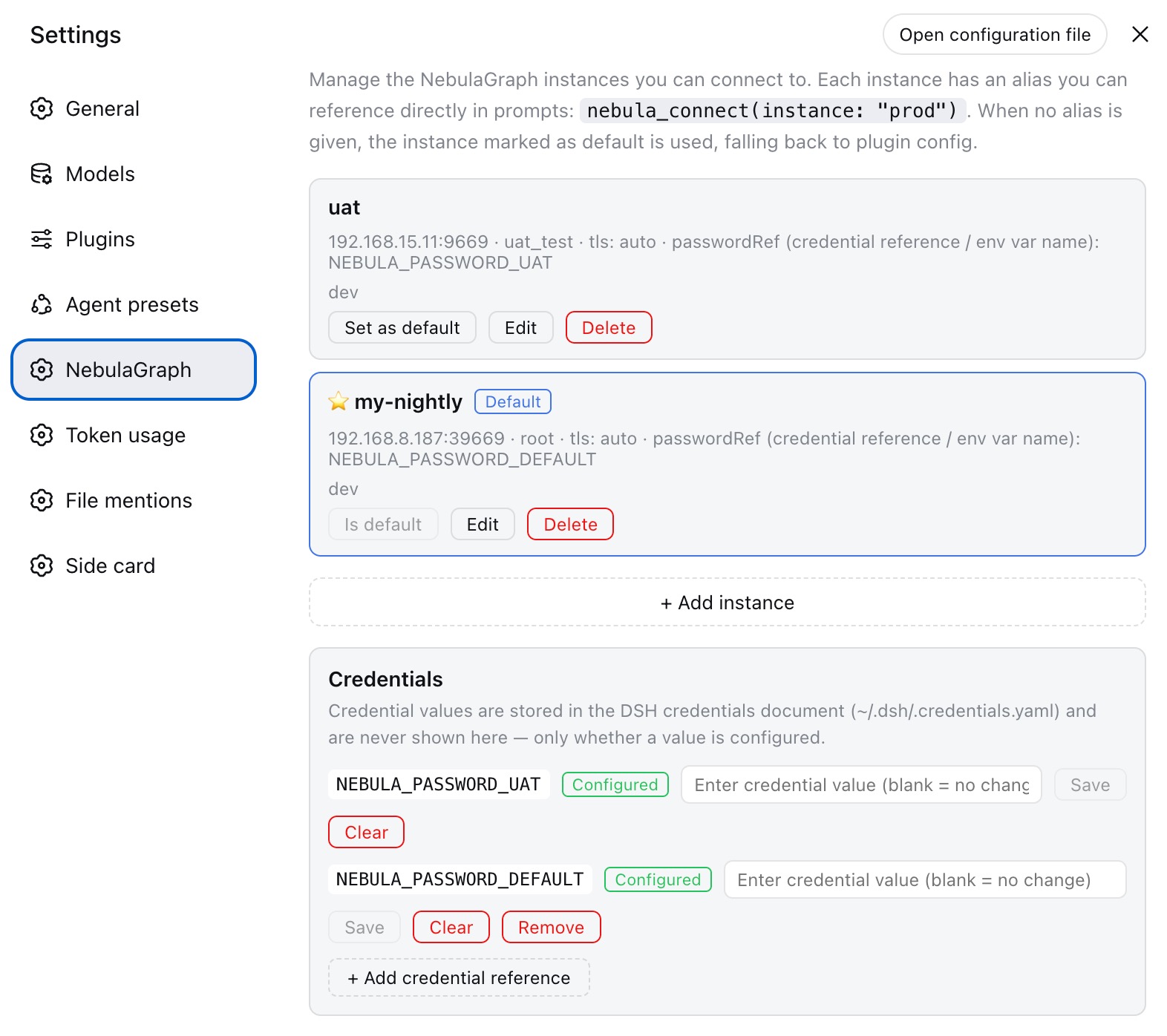 When the profile composes a settings provider (the Web GUI does), the plugin
registers a
When the profile composes a settings provider (the Web GUI does), the plugin
registers a dsh-nebula settings namespace and a Settings →
NebulaGraph page. There you can:
- Add connection presets — each with an alias (letters/digits/
_/-, ≤ 64 chars), host, port, user,passwordRef, TLS mode, per-instance CA / client cert / key / servername,timeoutMs, and a note. - Edit / delete presets and mark one as the default.
- Manage the credential values behind the
passwordRefs from the same page: every reference the instances name (plus extra references you add, e.g. the plugin-config default's) gets a write-only password field and a clear button. Values are written through the harness credentials RPC (credentials.set/credentials.unset) and persisted to the DSH credentials document (~/.dsh/.credentials.yaml). The page only ever shows whether a value is configured — never the value itself — and inputs always start blank. - Passwords never enter the settings document: only the
passwordRef(credential reference / environment variable name) is stored, and it is resolved through the DSH credentials seam at connect time like the plugin-config default.
nebula_connect resolution order:
- explicit
instance: <alias>— an unknown alias is a hard error that lists the configured aliases; - the default instance, when one is set (the connect output reports
viaDefault: true; a stale default referencing a deleted instance falls back to plugin config with awarning); - plugin config (
cordis.patch.yml).
Per-call host/port/user/passwordRef/tls/ca/timeoutMs arguments
still override the resolved profile. A non-auto TLS mode inside a profile is
an enforced transport policy exactly like plugin config: a conflicting tls
tool argument is rejected.
The page is implemented by the plugin's Web Client bundle
(client/NebulaInstancesSection.tsx), which reads and writes the namespace
through a plugin-owned Web route (/dsh-nebula/api, see
src/instances-api.ts) with the same browser-trust fence as the harness
gateway. A plugin-owned route is required because the harness's own settings
RPC (api.settings.*) serves only namespaces on its explicit exposure
allowlist — the established third-party pattern in this deployment
(dsh-better-sidebar's /sidebar/api). The host reads the same namespace at
connect time (src/instances.ts). Without a settings provider or a web
surface the route simply never mounts and the plugin keeps working on plugin
config alone.
Development
pnpm install
pnpm typecheck
pnpm build     # tsc → lib/ + copies vendored protos to lib/proto
pnpm test      # decoder unit tests + gRPC integration tests (in-process fake GraphService)
The package is plain ESM ("type": "module") with no runtime dependencies
beyond @grpc/grpc-js, @grpc/proto-loader, and schemastery.
How it works
- Protocol — the vendored protos under
src/proto/nebula/are the official NebulaGraph 5.0 definitions (graph/common/vector) from nebula-go v5.AuthRequest.auth_infoisJSON.stringify({ password })andClientInfo.langadvertisesJAVASCRIPT;Status.code == "00000"means success. The password is sent only inside the one-timeAuthenticatecall and cleared from the client/registry options immediately after success. - Transport security — the channel uses gRPC credentials per the
tlsmode:on→createSsl(with optional CA / client cert / server-name override),off→createInsecure,auto→ try TLS first, then recreate the channel with plaintext credentials only when the handshake fails at the transport level (never on an authentication failure). A plaintext fallback is surfaced astlsFallbackin the connect output and as a warning line. - Logout — the v5 gRPC service has no signout RPC; closing a session
executes the
SESSION CLOSEstatement before releasing the channel (mirroring nebula-go v5connection.Close()), so the server-side session is released immediately instead of lingering until its idle timeout. - Decoder —
src/decode/is a faithful TypeScript port of nebula-go v5'sinternal/decode(column type schemas, flat/const vector layouts, chunked strings, node/edge property vectors, path adjacency lists, composite value encoding). - Registry — open connections live in a per-plugin registry; disposing the plugin closes them all.
- Instance profiles — the
dsh-nebulasettings namespace is registered throughinstallSettingsSectionwith the plugin config as the composition base: without a settings provider the tools read an empty section and fall back to config exactly as before, while the Web GUI edits the same namespace over the plugin-owned/dsh-nebula/apiroute. Alias resolution and validation are pure functions insrc/instances.ts, shared by the tools and the settings surface contract.
License
MIT
还没有评论,来写第一条。