dsh-user-profile
Your own name and avatar, inside DeepSeek Harness.
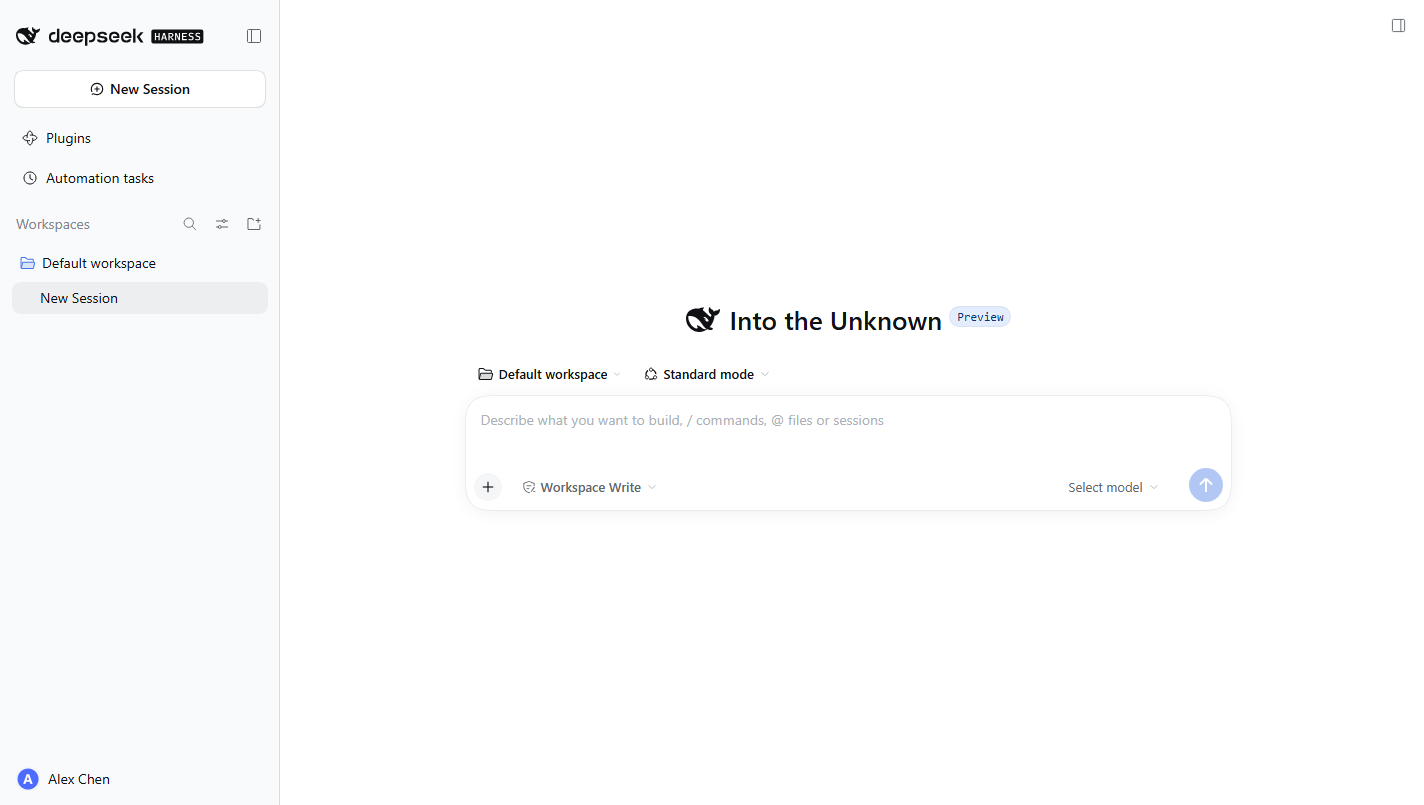
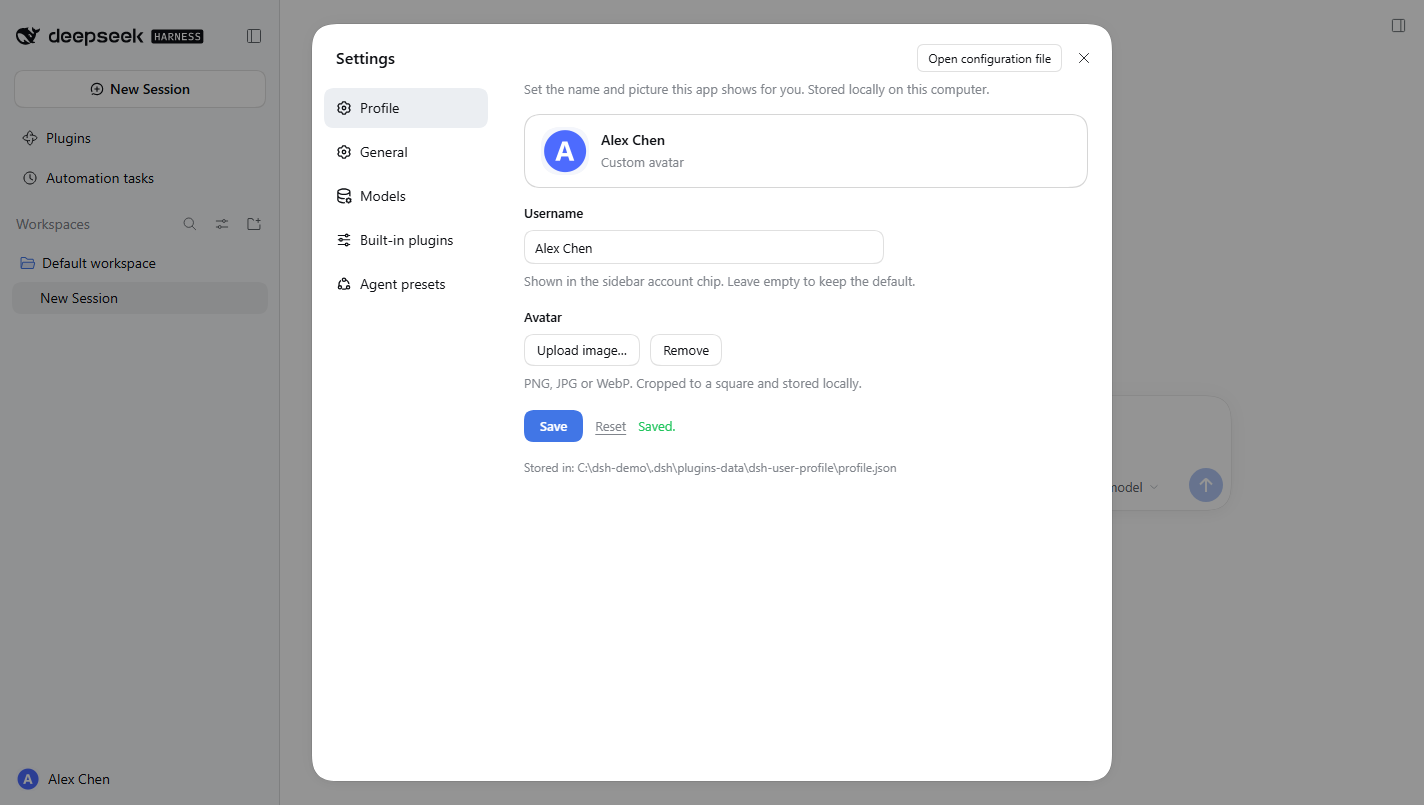
Set a username and upload an avatar in Settings → Profile; both appear immediately in the sidebar account chip.
A local display profile for DeepSeek Harness.





中文 · English
Why
The account area at the bottom-left of DSH renders the DeepSeek Platform account — read-only — and degrades to a generic "More" button when nobody is signed in. That spot never shows what you want it to show.
dsh-user-profile fills the gap: a name and avatar stored locally, overlaid on the same control. The account menu (settings / feedback / sign out) keeps working; only the face changes.
| 🪪 Username | Up to 32 characters, any script; leave it empty for the default |
| 🖼️ Avatar | PNG / JPG / WebP, center-cropped and downscaled to 192×192 |
| 👀 Live preview | See the result while editing; the sidebar updates on save |
| 🔄 Reversible | Reset clears the profile and restores the platform identity |
| 🌐 Localized | Follows the DSH language setting (中文 / English) |
| 💾 Local only | Nothing uploaded or synced; it lives under your own ~/.dsh |
Install
As a bundle (recommended)
The package declares dsh.bundle.patch, so the official CLI also mounts the plugin row:
dsh plugin --profile web add github:xbbkok/dsh-user-profile
Use desktop instead of web on the desktop app, then reopen DSH.
From a local checkout
Append an insert entry to the profile's cordis.patch.yml. The loader uses import(), so the specifier must be a file:// URL — a bare Windows path fails silently:
- insert:
    - id: dsh-user-profile
      name: 'file:///C:/path/to/dsh-user-profile/lib/index.js'
Profile patch locations:
| Build | Path |
|---|---|
| Desktop | %USERPROFILE%\.dsh\profiles\desktop\cordis.patch.yml |
| Web | %USERPROFILE%\.dsh\profiles\web\cordis.patch.yml |
The row is keyed by id, so a later bundle install overrides the same row instead of mounting a second copy.
Usage
- Sidebar account chip → Settings (
Ctrl+Alt+,). - First entry: Profile.
- Set a name, pick an image, press Save.
- Reset brings the platform identity back.
Storage
%USERPROFILE%\.dsh\plugins-data\dsh-user-profile\profile.json
{
  "version": 1,
  "name": "Ada",
  "avatar": "data:image/png;base64,…",
  "updatedAt": "2026-10-20T02:14:44.183Z"
}
heartbeat.txt in the same directory is rewritten on every host mount, so "did it load?" is a fact you can check.
The avatar is a 192×192 PNG data URL (usually 10–40 KB), cropped and compressed in the browser — the original file never touches disk.
API
The host half registers two methods on the DSH web server (same origin as the GUI):
| Method | Path | Notes |
|---|---|---|
GET |
/user-profile |
{ ok, profile, storagePath } |
POST |
/user-profile |
Body { name?, avatar? }; omitted fields keep their value, avatar: null clears it |
Validation: names are limited to 32 code points with control characters stripped; avatars accept only PNG/JPEG/WebP data: URLs (SVG is rejected — it is executable markup, not a picture) and a byte cap; writes carrying an Origin that does not match the local host get a 403, so another web page cannot rewrite the profile cross-site.
How it works
One package, two halves, like the other DSH UI plugins:
lib/index.js(host / Node) — owns/user-profile: validation, atomic write (temp file + rename), heartbeat. No third-party runtime dependencies.lib/client.js(browser) — registers the settings page throughctx.slots.register({ name: 'settings.section', id: 'profile', order: -30 }), then overlays the avatar and name on the account triggerbutton[data-signed-out].
Deliberate choices:
- No forking of someone else's component. The account button belongs to
dsh-client-ui-settings-account; editing that package would be fragile and would be overwritten by updates. The bundle decorates the DOM instead: it records each native child'sdisplay, hides it, inserts its own avatar and label, and restores everything when the profile is cleared. AMutationObserverre-applies after React re-renders, and every write is idempotent so the observer cannot feed itself (covered by a test). - Failures stay inside. A missing web server, an unwritable directory or a failing route registration produce a warning, never a broken plugin tree.
- Language follows the app. Dictionaries go through
ctx.locale.register('user-profile', { zh, en })and are read throughctx.locale.bind(), so the page honours DSH's own language setting. - No build step.
lib/*.jsis readable ESM; thewindow.__ModuleLoader__.load()factory shape is consumed directly by the client module system — no bundler, nopostinstall.
Compatibility
- DSH 0.2.x (
@deepseek-ai/dsh >= 0.1.2-rc.1), desktop and web builds. - Uses the
settings.sectionslot and thedata-signed-outattribute of the account trigger; both are stable since 0.1.x. - Display only: sign-in, billing and model calls are untouched.
Known limitations
- It changes the displayed profile, not the DeepSeek Platform account.
- The profile is per machine; it does not sync across devices.
- If a future DSH build renames
button[data-signed-out], the sidebar overlay silently stops applying (the settings page keeps working). - The sidebar overlay is DOM decoration on a component owned by another package, not an official slot.
Development
npm install   # jsdom only, for running the browser half without a GUI
npm test
19 checks: host validation, atomic persistence, the HTTP handler (GET / POST / malformed JSON / over-long name / SVG disguise / cross-origin write / wrong method), bundle loading, slot registration with a localized label, chip overlay and exact restoration, collapsed rail, observer settling.
Editing lib/client.js hot-swaps in the page; editing lib/index.js needs a DSH restart to re-import.
Uninstall
Remove the dsh-user-profile row from the profile's cordis.patch.yml (or drop it from dsh.profile.bundles), delete %USERPROFILE%\.dsh\plugins-data\dsh-user-profile\, and refresh.
License
MIT © 2026 xbbkok
No comments yet. Be the first to write one.